The 11 Best Cloud Backup Services
Finding reliable cloud backup means balancing storage capacity, data privacy, and cost. This guide covers NAS enclosures, personal cloud devices, and backup software to help you protect what matters.
 By Theresa Shelton
Updated July 23, 2026
By Theresa Shelton
Updated July 23, 2026

Your data is only as safe as its backup. Whether you’re protecting irreplaceable family photos, years of financial records, or critical work files, relying on a single drive or device is a gamble most people can’t afford to lose.
The market for cloud backup solutions has expanded well beyond simple software subscriptions: today’s options range from dedicated NAS enclosures and personal cloud devices to backup software with lifetime licenses and hybrid storage appliances that let you self-host your own private cloud.
Choosing the right approach depends heavily on how much data you have, how often it changes, and how much control you want over where it lives.
Pairing a solid backup strategy with strong password managers and reliable antivirus software gives you a genuinely comprehensive defence against data loss.
This guide cuts through the noise to help you find the cloud backup solution that actually fits your life.
ProductFind’s editorial team researched this category by analyzing manufacturer specifications, synthesizing expert review consensus across the industry, and incorporating verified buyer feedback from confirmed purchasers.
Every product in this roundup has been assigned a PF Score on our 0 to 10 scale, reflecting overall value and real-world performance relative to its price tier and use case.
Read on to see our top picks for the best cloud backup services and hardware available right now.
| Award | Product | PF Score About PF ScoreThe PF Score is our own rating from 0 to 10, based on performance, design and build, ease of use, and value. It reflects independent research and is never influenced by manufacturers, retailers, or affiliate commissions. Learn more › | Price | |
|---|---|---|---|---|
| Best Overall |
 Synology BeeStation 4TB Personal Cloud Storage
|
8.5/10 | Buy | |
| Editor's Pick |
 Nero BackItUp Lifetime License - Automated Backup Software
|
7.8/10 | Buy | |
| Best Value |
 NTI Backup Now EZ 7.5 Lifetime License
|
7.6/10 | Buy | |
| Top Rated |
 SSK 4TB Personal Cloud NAS with Remote Access
|
7.4/10 | Buy | |
 STATIONPC PocketCloud Portable NAS, Up to 8TB
|
7.3/10 | Buy | ||
 Buffalo LinkStation SoHo 220 4TB NAS
|
7.1/10 | Buy | ||
 Pentabit Labs Cloud Storage & Backup App
|
6.8/10 | Buy | ||
 AMBER X 512GB Personal Cloud Storage Device
|
6.1/10 | Buy | ||
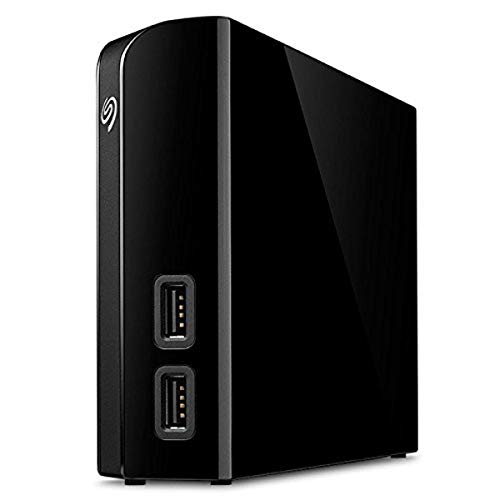 Seagate Backup Plus Hub 8TB External Drive
|
5.2/10 | Buy | ||
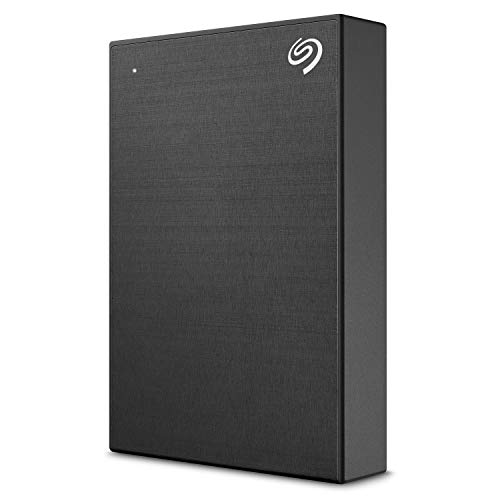 Seagate Backup Plus Portable 4TB External Drive
|
5.0/10 | Buy | ||
 Synology DS124 1-Bay NAS
|
9.8/10 | Buy |
Synology BeeStation 4TB Personal Cloud Storage
A compact personal NAS designed for simplified file consolidation and backup across devices, with QR code setup and built-in ransomware protection. Best suited for users wanting centralized storage without complex configuration.
Pros
- Quick setup via QR code with minimal technical knowledge required
- Consolidates files from computers, phones, tablets, and cloud accounts in one accessible location
- Local AI features for photo organization without cloud dependency
- Snapshot-based protection against ransomware and data loss
- Includes 3 months of BeeProtect cloud backup coverage
Cons
- No user reviews available yet, limiting real-world performance feedback
- Limited to 4TB capacity, may require upgrades for growing storage needs
- Relies on proprietary Synology ecosystem for optimal functionality
Nero BackItUp Lifetime License - Automated Backup Software
Nero BackItUp offers a one-time purchase model for continuous data protection across Windows systems, with automated backups to multiple destinations including cloud storage. Best suited for users seeking perpetual backup access without subscription fees, though the lack of verified reviews limits real-world performance insight.
Pros
- Perpetual license eliminates ongoing subscription costs after initial purchase
- Flexible backup destinations offer both local and cloud storage options
- Encryption and compression features provide security for sensitive data
- Automated scheduling reduces manual intervention for routine backups
Cons
- No verified customer reviews available to assess real-world reliability and performance
- Limited to single PC license, not suitable for multi-device households
- Data shows 4.7 rating with zero reviews, making it difficult to validate claims
NTI Backup Now EZ 7.5 Lifetime License
A four-in-1 backup solution combining scheduled, cloud, full-system image, and file-folder backup with support for major cloud services and local/external drives. One-time purchase with perpetual license, no subscription required, though there are currently no verified buyer reviews available.
Pros
- Comprehensive backup coverage addresses multiple backup scenarios in one tool
- Perpetual licensing eliminates recurring subscription costs
- Wide Windows compatibility spanning 15+ years of OS versions
- Multiple cloud service integrations for flexible backup destinations
- 256-bit encryption provides strong data security
Cons
- No verified customer reviews available to assess real-world performance or user experience
- Requires manual activation with download instructions and key upon purchase
- CD-ROM format may feel dated for modern users preferring cloud-first delivery
SSK 4TB Personal Cloud NAS with Remote Access
A 4TB network-attached storage device designed for remote file access and multi-device backup across iOS, Android, Windows, and Mac. Combines NAS and direct-attached storage modes with P2P encryption, though it lacks built-in WiFi and requires ethernet or USB connection.
Pros
- Large 4TB storage capacity comes pre-installed, no additional setup needed
- Flexible dual-mode design supports both network (10-30MB/s via 1000M ethernet) and direct USB 3.0 connection
- P2P encrypted transmission protects data during remote access
- Automatic sleep mode reduces power consumption when idle
- Works across multiple devices and platforms with dedicated client software
Cons
- No built-in WiFi connectivity, requires ethernet cable or USB connection for operation
- Network speeds via ethernet are modest at 10-30MB/s compared to modern standards
- Web interface has browser compatibility limitations, requiring IE or Safari rather than Chrome for downloads
STATIONPC PocketCloud Portable NAS, Up to 8TB
A diskless portable NAS designed for content creators and travelers, offering expandable M.2 NVMe storage up to 8TB with dual 3200mAh batteries for six-hour runtime. Bank-level encryption and five backup methods (SD card, USB, Wi-Fi 6, AP mode, Ethernet) provide flexible offline storage without cloud dependency.
Pros
- Multiple backup pathways reduce risk of data loss for photographers and vloggers
- Local encryption keeps sensitive files private without requiring cloud services
- Replaceable batteries extend device lifespan and support outdoor workflows
- LCD display and one-click operation minimize setup complexity in field conditions
- Compatible with SD cards and USB drives for seamless content capture integration
Cons
- No user reviews available yet, limiting real-world reliability assessment
- Requires separate purchase of M.2 NVMe drive to reach full 8TB capacity
- Dock accessory needed to unlock 16TB expansion and Ethernet connectivity
Buffalo LinkStation SoHo 220 4TB NAS
A straightforward 2-bay personal cloud NAS with 4TB capacity and included hard drives, designed for small offices and home backup without monthly fees. Ships in RAID 1 (2TB usable) but can be reconfigured to RAID 0 for full capacity, backed by 24/7 US support and a 3-year warranty.
Pros
- No subscription fees for cloud storage access
- Automatic RAID 1 backup enabled by default for data protection
- Compact design (8.1 x 3.4 x 5 inches) fits small spaces
- Includes NAS Navigator management and PC backup software
- Made in Japan with US-based support
Cons
- Only 2TB usable capacity in default RAID 1 mode, requires manual reconfiguration to RAID 0 for full 4TB
- Limited to macOS 15 (Sequoia) and earlier; newer macOS users directed to pricier SoHo 720 model
- No verified buyer reviews available to assess real-world reliability
Pentabit Labs Cloud Storage & Backup App
Mobile-first cloud storage app from Pentabit Labs focused on securing photos, documents, and videos with device-to-device sync and recovery features. Designed for users wanting centralized backup management and hardware failure protection without complexity.
Pros
- Straightforward one-tap upload interface for quick file transfers
- Instant sync across multiple devices signed to same account
- Device cloning feature enables recovery and data transfer to new phones
- Helps free up phone storage by moving large files remotely
- Protects files against hardware damage and device loss
Cons
- No verified user reviews available to assess real-world reliability or performance
- Rating of 4.2 lacks reviewer volume, making quality assessment limited
- Feature set is standard for cloud storage category without clear differentiation
AMBER X 512GB Personal Cloud Storage Device
A private cloud storage device with 512GB built-in SSD that lets you back up files and media across multiple devices without subscription fees. It supports Plex, Home Assistant, and works on iOS, Android, Windows, and Mac for centralized data control.
Pros
- Eliminates recurring subscription costs for cloud storage
- One-click setup for popular platforms like Plex and Home Assistant
- Works across all major devices and operating systems
- Offers genuine privacy without reliance on third-party cloud providers
- Expandable storage via USB connectivity
Cons
- No verified user reviews available yet to assess real-world reliability
- 512GB capacity may be limiting for heavy media libraries or large households
- Limited information on backup speed, redundancy options, or disaster recovery features
Seagate Backup Plus Hub 8TB External Drive
A dual-purpose external drive that combines 8TB of storage with built-in USB hub functionality for connecting cameras and mobile devices. Best suited for Mac and Windows users who need straightforward backup capacity without breaking the bank.
Pros
- Built-in USB hub eliminates need for separate hub adapter when connecting cameras or USB devices
- Two-year warranty and included Rescue Data Recovery Services provide added protection
- Works natively with both Windows and Mac (NTFS driver provided for Mac)
- Compact desktop footprint at 4.65 x 7.8 inches
Cons
- No user reviews available to verify real-world reliability or performance consistency
- Adobe Creative Cloud membership has restrictions: requires registration within one year and unavailable in some regions
- Positioning as 'hub' adds limited value compared to standalone external drive plus budget USB hub
Seagate Backup Plus Portable 4TB External Drive
A compact 4TB portable hard drive with USB 3.0 connectivity designed for both Mac and Windows users who need straightforward backup storage. Includes bundled software subscriptions and data recovery coverage, though it requires reformatting for Time Machine use.
Pros
- 4TB capacity in a slim, portable form factor weighing under 0.5 pounds
- One-click backup with scheduling options for daily, weekly, or monthly automatic backups
- Includes two-year limited warranty and data recovery services for added security
- Complimentary one-year Mylio Create subscription and two-month Adobe Creative Cloud Photography membership
- Minimalist brushed metal design suits various work environments
Cons
- Reformatting required for Time Machine compatibility on Mac systems
- No user reviews available to assess real-world durability or performance feedback
- Storage capacity and availability may vary by region or retailer
Synology DS124 1-Bay NAS
A compact, diskless NAS designed for personal backup, private file storage, and home surveillance monitoring. Combines automatic photo and document protection with AI-powered security features, all without recurring cloud subscription costs.
Pros
- Eliminates ongoing cloud subscription costs while maintaining full data control
- Handles multiple backup sources across iOS, Android, Mac, and Windows ecosystems
- Integrates backup, file sharing, and surveillance in one compact device
- Includes AI-powered security monitoring with instant alerts
- Backed by Synology's 2-year warranty and active software support
Cons
- Diskless model requires separate hard drive purchase and installation
- Single bay design limits storage expansion and redundancy options
- No verified buyer reviews available to assess real-world performance and reliability
Cloud Backup Services Buying Guide
The category of “cloud backup” is broader than it sounds. It spans pure software solutions, personal NAS enclosures, plug-and-play personal cloud devices, and portable hybrid units. Before spending a cent, it helps to understand what each type delivers and where each one falls short.
Local vs. Cloud vs. Hybrid: Understanding the 3-2-1 Rule
Security professionals consistently recommend the 3-2-1 backup rule: keep three copies of your data, on two different media types, with one copy offsite.
Personal cloud devices and NAS units like the Synology DS124 and Buffalo LinkStation handle the “local copy” component brilliantly, giving you fast LAN-speed restores without depending on an internet connection.
Pure cloud software, such as NTI Backup Now EZ or Nero BackItUp, handles the offsite component, encrypting and uploading your files to remote servers you access from anywhere.
Hybrid devices like the AMBER X and STATIONPC PocketCloud blur the line, pairing local SSD or NVMe storage with app-based remote access so you effectively own your own mini cloud.
This approach trades subscription fees for upfront hardware cost and puts you in charge of your own data sovereignty.
For most households, the ideal setup is a combination: a local NAS or personal cloud device for speed and reliability, plus backup software to push encrypted copies to a remote destination.
Think about your threat model, too. A NAS protects against drive failure and accidental deletion, but it won’t save you if your home floods or burns. Offsite cloud backup covers those catastrophic scenarios. Pairing both approaches is the gold standard.
Storage Capacity and Scalability
Raw capacity matters, but scalability matters more. A fixed-capacity device like the AMBER X ships with 512 GB of built-in SSD, which is plenty for documents and photos but tight for 4K video collections.
Enclosure-style NAS units from Synology and Buffalo are diskless or ship with drives but accept standard hard drives, so you can expand by swapping in larger disks as your library grows.
The Synology BeeStation 4TB comes with an integrated 4 TB drive and is designed for seamless expansion through Synology’s ecosystem.
For software-based cloud backup, capacity is typically dictated by your subscription tier with the cloud storage provider you connect to, not the software itself.
NTI Backup Now EZ and Nero BackItUp both support major cloud destinations including Google Drive, OneDrive, and Dropbox, so your effective ceiling is whatever storage plan you maintain there.
Consider not just how much data you have today, but how much you’ll generate in the next three to five years.
Ease of Setup and Ongoing Management
Setup complexity varies enormously across this category. Plug-and-play personal cloud devices like the SSK 4TB NAS and AMBER X are designed for non-technical users: connect to your router, download the companion app, and you’re running within minutes.
NAS enclosures from Synology, however, require a bit more patience during initial configuration, including disk formatting, RAID selection, and package installation. That extra setup time pays dividends in flexibility and raw performance.
Backup software brings its own learning curve. The difference between a good and a mediocre backup program often comes down to scheduling options, incremental versus full backup logic, and how clean the restore process is.
NTI Backup Now EZ and Nero BackItUp both offer scheduled, automated backups with minimal user intervention after initial configuration.
Nero’s interface earns particular praise in verified buyer feedback for being approachable even for first-time users, while NTI’s lifetime license model removes the recurring cost anxiety that deters some buyers.
If you value simplicity in your home office setup, pairing backup software with a well-organised ultrawide monitor workspace can make managing your backup dashboard noticeably more comfortable.
Remote Access and Mobile Integration

One of the most practical benefits of any cloud or personal cloud backup solution is being able to access your files from anywhere.
Synology’s ecosystem leads the pack here: the DS124’s DSM operating system gives you a polished web interface and a mature mobile app (DS File, DS Photo) that lets you browse, stream, and download your files on any device.
The BeeStation takes this even further with a consumer-focused BeeStation app that requires almost no server knowledge to operate.
The SSK 4TB NAS and AMBER X both offer companion iOS and Android apps for remote access, though user reviews note that their remote access speed can depend heavily on your upload bandwidth at home.
The STATIONPC PocketCloud is notably designed for truly portable use, sporting dual 3,200 mAh batteries, Wi-Fi 6 connectivity, and an LCD status display, making it a strong option for photographers and videographers who need a self-contained backup hub in the field.
Security, Encryption, and Data Privacy

With any backup solution, understanding where your data actually lives and who can access it is non-negotiable. Pure cloud backup software typically encrypts files before upload using AES-256 encryption, ensuring that even the service provider cannot read your data.
NTI Backup Now EZ and Nero BackItUp both support encrypted cloud backup to third-party storage.
If you connect these tools to a major cloud storage provider, that provider’s privacy policy governs how your data is handled, so it’s worth reading the terms of whichever service you use.
Personal cloud and NAS devices offer a different kind of privacy: your data never leaves your own hardware unless you explicitly configure remote access.
Synology devices support end-to-end encrypted Synology Drive sync as well as local encryption for sensitive shared folders.
The AMBER X uses a zero-knowledge approach for remote access tunnelling, meaning the company’s servers act as a relay but cannot read your files. For users who are especially privacy-conscious, self-hosted NAS is hard to beat.
Whatever solution you choose, strong account security is critical. Using a dedicated password manager to generate and store unique credentials for your NAS admin account and cloud backup service accounts is one of the simplest ways to close a common security gap.
Licensing Model and Total Cost of Ownership

The pricing model for backup software can be more impactful than the sticker price. Subscription-based software keeps you current with updates and cloud features but adds a recurring line item to your budget indefinitely.
Lifetime license software like NTI Backup Now EZ and Nero BackItUp costs more upfront but eliminates that ongoing expense, making them particularly attractive for users who set a fixed budget and don’t want surprises.
Expert reviewers frequently highlight lifetime licensing as a meaningful differentiator in the backup software category, especially for home and small-office users.
Hardware devices carry a different kind of total cost. NAS enclosures require hard drives (often sold separately for the diskless DS124), and adding redundancy through RAID means buying more drives than you’d otherwise need.
Portable devices like the STATIONPC PocketCloud start diskless but accept M.2 NVMe drives up to substantial capacities.
Factor in the cost of drives, any cloud storage subscriptions you’ll connect to the hardware, and potential electricity costs for always-on devices when calculating true total ownership cost.
Why You Should Trust Us
ProductFind is an independent editorial platform. We do not sell products, fulfil orders, or accept manufacturer payment to influence rankings.
Every product in this roundup was selected and scored by our research team using a consistent, repeatable methodology: we evaluate specifications against published standards, synthesize consensus across expert reviews in the industry, analyze verified buyer feedback from confirmed purchasers, and cross-reference published data and manufacturer disclosures.
Each product receives a PF Score on a 0 to 10 scale that reflects its overall merit relative to alternatives in its class and price tier.
We do not conduct our own product trials; our evaluations are grounded in research, published data, expert review consensus, and verified buyer feedback.
This research-led approach lets us cover a broader range of products more consistently than any single hands-on review could, and it means our rankings are not skewed by sample quality, reviewer subjectivity, or manufacturer-supplied units.
ProductFind may earn a commission when you purchase through links in this article. That affiliate relationship has zero influence on our scores, rankings, or recommendations.
Our editorial independence is the foundation of the trust readers place in us, and we take that seriously. Products are ranked by PF Score, not by commission rate.
Final Thoughts
The cloud backup landscape is genuinely diverse, and the right answer depends on whether you prioritise simplicity, data sovereignty, portability, or cost. After evaluating every product in this roundup, here are the standout picks and the roles they’re best suited for.
- Best Overall: Synology DS124 Personal Backup and File Hub earns the top PF Score in this roundup by combining mature, deeply featured DSM software with a compact, energy-efficient enclosure that scales to virtually any home or small-office backup strategy. Expert consensus consistently rates Synology’s platform above all consumer NAS competitors for reliability and ecosystem depth.
- Best Complete Personal Cloud: Synology BeeStation 4TB simplifies the NAS experience into a drive-included, app-managed personal cloud that requires almost no technical setup, making it the most accessible path to full data ownership at a premium-but-justified price point.
- Best Lifetime-License Backup Software: Nero BackItUp delivers automated, cloud-connected backup with a one-time payment model that resonates strongly with verified buyers who want professional-grade protection without a subscription treadmill. It holds the highest PF Score among pure software options in this guide.
- Best Budget Backup Software: NTI Backup Now EZ 7.5 offers full-system image backup, cloud connectivity, and scheduled backups under a lifetime license at the most approachable price in the software segment, making it an excellent entry point for users new to structured backup routines.
- Best for Portable and Field Use: STATIONPC PocketCloud Portable NAS stands alone in this roundup as a genuinely battery-powered, Wi-Fi 6-capable, M.2 NVMe-ready backup hub that travels with you, making it the clear pick for photographers, videographers, and remote workers who cannot afford to wait until they’re home to back up critical files.
Whichever solution you choose, the most important thing is to actually use it. The best cloud backup service is the one running reliably in the background right now, not the one you’re still planning to set up.
Start with your highest-priority data, establish a schedule, and build from there.
Frequently Asked Questions
What is the difference between cloud backup and cloud storage?
Cloud storage (like Google Drive or Dropbox) is primarily designed for file syncing and sharing: it keeps a live mirror of your files accessible across devices, but deleting a file on one device typically deletes it everywhere.
Cloud backup is specifically designed for data protection and recovery: it retains version history, deleted files, and full-system images for a defined retention window so you can recover from accidents, ransomware, or hardware failure.
Many backup tools in this roundup, including Nero BackItUp and NTI Backup Now EZ, can use cloud storage accounts as their backup destination while adding the versioning and recovery logic that native sync services lack.
Is a NAS better than cloud backup software?
They solve different problems and work best together. A NAS like the Synology DS124 or Buffalo LinkStation gives you fast local backups and restores at LAN speeds, full control over your data, and no ongoing subscription fees beyond electricity.
Cloud backup software gives you an offsite copy that survives physical disasters at your home. The ideal setup pairs both: a local NAS for speed and daily recovery scenarios, and cloud backup software for catastrophic-loss protection.
Budget permitting, combining a mid-range NAS with a lifetime-license backup tool covers both angles without recurring subscription costs.
How much storage do I actually need for cloud backup?
A reasonable starting point is to audit your current data footprint: documents and email are typically under 50 GB for most users, while photo libraries can run into hundreds of gigabytes and a 4K video archive can easily exceed several terabytes.
Plan for at least double your current footprint to accommodate growth over the next few years.
NAS enclosures with expandable drive bays, like the Buffalo LinkStation or Synology DS124, give you the most flexibility since you can swap in larger drives as needs grow.
Fixed-capacity devices like the AMBER X are better suited for users whose storage needs are relatively stable.
Can I access my backed-up files from my phone or while travelling?
Yes, with the right solution. Synology devices offer polished iOS and Android apps for remote file access, streaming, and photo browsing from anywhere with an internet connection.
The SSK NAS and AMBER X also provide companion mobile apps for remote access, though performance depends on your home upload bandwidth.
Cloud backup software solutions that connect to services like OneDrive or Google Drive inherit those platforms’ mobile apps automatically. For truly mobile, battery-independent access in the field, the STATIONPC PocketCloud is purpose-built for that scenario.
Keep in mind that remote access opens a potential security surface, so securing your NAS admin credentials with a strong, unique password is essential.
Are lifetime-license backup programs worth it compared to subscriptions?
For most home and small-office users, lifetime licenses represent better long-term value. Programs like NTI Backup Now EZ and Nero BackItUp require a one-time payment and continue functioning indefinitely, making the effective per-year cost decrease the longer you use them.
The trade-off is that lifetime license software may eventually fall behind on features compared to actively developed subscription services, and cloud destination support may need occasional manual updates.
Subscription backup services tend to evolve faster and often bundle cloud storage capacity into the plan.
If your backup needs are relatively stable and you’re connecting to your own cloud storage accounts, a lifetime license is typically the more economical choice.
Does a personal cloud device replace the need for external hard drives?
A personal cloud device or NAS can replace the role an external drive plays in your backup strategy for most everyday scenarios, and it adds capabilities a bare drive cannot match: remote access, automatic scheduled backups, RAID redundancy, and multi-device support.
However, external hard drives remain useful for archival cold storage, offline off-site copies kept at a second location, and as a fast transfer medium for large datasets.
The Seagate Backup Plus Hub and Seagate Backup Plus Portable in this roundup serve that archival and portability role well, even if their PF Scores trail the more feature-rich NAS and software options.
A layered approach that includes both a NAS and at least one portable drive stored off-site is the most robust strategy for serious data protection.
About the author
Theresa is a reviewer and writer for ProductFind who specializes in Software & Digital Security. Theresa evaluates products through independent research: specifications, expert review consensus, and verified buyer feedback, and rates each one on the PF Score. Theresa focuses on helping readers pick the right software & digital security for their needs and budget.