The 8 Best Computer Desks
From compact budget surfaces to motorized standing desks with built-in USB-C, these are the computer desks that hold up on stability, surface area, and everyday usability.
 By Tanya Wilson
Updated July 23, 2026
By Tanya Wilson
Updated July 23, 2026

A good computer desk does more than hold a monitor and keyboard.
It shapes how long you can work comfortably, how much space you actually have to think, and whether your home office feels like a productive environment or a cluttered afterthought.
With remote and hybrid work now a permanent fixture for millions of people, the desk market has exploded with options ranging from minimalist fixed-height surfaces to motorized standing setups with built-in power outlets.
Sorting through them requires looking beyond marketing copy at what actually holds up over time.
At ProductFind, our editorial team researched dozens of computer desks, cross-referencing published specifications, expert review consensus across the industry, and verified buyer feedback from thousands of confirmed purchasers.
Whether you need a spacious executive surface for dual monitors, a compact standing desk for a tight apartment, or an L-shaped corner unit that doubles as a gaming station, our picks below represent the strongest performers across every major use case.
Scroll down to see our full ranked list of top computer desks available right now.
| Award | Product | PF Score About PF ScoreThe PF Score is our own rating from 0 to 10, based on performance, design and build, ease of use, and value. It reflects independent research and is never influenced by manufacturers, retailers, or affiliate commissions. Learn more › | Price | |
|---|---|---|---|---|
| Best Overall |
 OffiGo 71-Inch Electric Standing Desk with Memory Presets
|
7.8/10 | Buy | |
| Editor's Pick |
 Veken 55-Inch Electric Standing Desk
|
7.2/10 | Buy | |
| Best Value |
 Huuger 54-Inch Rustic Brown Computer Desk
|
8.1/10 | Buy | |
| Top Rated |
 OffiGo L-Shaped Electric Standing Desk, 55 Inch
|
8.0/10 | Buy | |
 Huuger 63-Inch L-Shaped Desk with Power Outlets
|
7.6/10 | Buy | ||
 Coleshome 71-Inch Computer Desk with USB Ports
|
6.0/10 | Buy | ||
 Tribesigns 70.8-Inch Executive Desk with Metal Frame
|
7.2/10 | Buy | ||
 PRAISUN 47x20 Computer Desk with Built-in Charging
|
8.6/10 | Buy |
OffiGo 71-Inch Electric Standing Desk with Memory Presets
A spacious sit-stand desk offering smooth electric height adjustment from 29.1 to 48 inches with three memory presets for consistent ergonomic positioning. Built-in power outlets and USB ports support multi-device setups, making it practical for home offices and conference rooms.
Pros
- Generously sized 71 x 27.6-inch desktop ideal for multi-monitor setups and conference use
- Integrated charging ports eliminate need for separate power strips and adapters
- Smooth electric adjustment with memory presets simplifies switching between sit and stand positions
- Sturdy construction with reinforced frame supports stable performance at maximum height
Cons
- Desktop does not support monitor arm mounting; requires standard monitor stands only
- 154 lbs weight capacity may limit users with heavy equipment or multiple large displays
- No customer reviews available to validate real-world durability and long-term performance
Veken 55-Inch Electric Standing Desk
A spacious electric standing desk with quiet motor operation and memory presets for easy height transitions between 28.3 and 46.5 inches. Built-in cable management and sturdy steel frame make it suitable for work, gaming, or study setups.
Pros
- Quiet motor under 52 dB allows for smooth, distraction-free height adjustments
- Memory presets enable quick switching between sitting and standing positions
- Large 55-inch work surface accommodates multiple monitors and equipment
- Sturdy steel frame remains stable at full extension
- Quick assembly in 10-30 minutes with clear instructions
Cons
- Desktop composed of two separate boards, which may require careful alignment during assembly
- Stability performance can vary depending on floor type and total load weight
- No verified buyer reviews available to confirm long-term durability or real-world performance
Huuger 54-Inch Rustic Brown Computer Desk
A spacious 54-inch desk with a sturdy metal frame and particleboard surface, designed for home offices, gaming, or study spaces. Simple assembly and reinforced construction make it a practical choice for those seeking a large, affordable work surface.
Pros
- Generous desktop space (54 x 19.7 inches) accommodates multiple work essentials
- Reinforced steel frame with additional stability struts underneath
- Quick assembly process, completed in under 40 minutes with included tools
- Available in five color options to match various décor styles
- Lightweight at 21 pounds, making it relatively easy to move or rearrange
Cons
- No customer reviews available to verify real-world durability or performance
- Particleboard construction may be less durable long-term compared to solid wood alternatives
- Limited legroom specs provided beyond marketing claims, actual clearance may vary depending on frame design
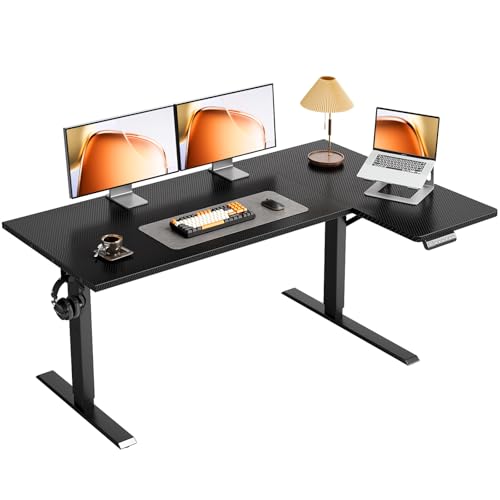
OffiGo L-Shaped Electric Standing Desk, 55 Inch
This L-shaped standing desk combines electric height adjustment with flexible corner workspace, ideal for home offices needing dual monitor setups or gaming rigs. The reversible layout and reinforced frame deliver practical organization without premium pricing.
Pros
- Memory preset buttons save time switching between sitting and standing heights throughout the day
- L-shaped layout maximizes corner space efficiency and supports multi-monitor setups
- Reversible configuration adapts to different room layouts and personal preferences
- Stable construction with crossbeam bracing reduces desk wobble during height transitions
- Includes integrated storage hook to keep desktop clutter-free
Cons
- 154 lbs weight capacity is modest, limiting setups with multiple large monitors or heavier equipment
- No reviews available yet to validate real-world durability and motor longevity
- Requires assembly, which may be time-intensive despite clear instructions
Huuger 63-Inch L-Shaped Desk with Power Outlets
A spacious reversible L-shaped desk built for productivity with integrated power outlets, USB ports, and a thick, durable desktop. Best suited for home offices and gaming setups that need multiple device charging and monitor space without extension cords.
Pros
- Integrated power and USB ports eliminate desk clutter and extension cords
- Heavy-duty construction with thick desktop and metal reinforcement handles multiple monitors and workloads
- Reversible design adapts to different room layouts and allows combining two desks for shared workspaces
- Stable base with adjustable feet prevents wobbling on uneven floors
Cons
- No customer reviews available to verify real-world durability or long-term power outlet reliability
- Reversible configuration requires disassembly to change orientation, not a quick flip
- 220 lbs weight capacity may limit very heavy equipment setups beyond standard monitors and laptops
Coleshome 71-Inch Computer Desk with USB Ports
A spacious 71-inch desk built for home offices, gaming setups, and collaborative workspaces with integrated power outlets and USB charging. Heavy-duty steel frame construction supports extended daily use, though assembly and desktop cable management require some planning.
Pros
- Extra-large work surface (70.9 x 23.6 inches) accommodates multiple monitors, printers, and equipment simultaneously
- Built-in power infrastructure with 3 outlets, 1 USB port, and 1 USB-C port eliminates need for separate power strips
- Reinforced metal frame with triangle-support structure designed for long-term stability and weight capacity
- Quick assembly process with included tools, reportedly completable within 30 minutes
- One-year warranty with responsive customer support and damage replacement guarantee
Cons
- No customer reviews available to validate real-world durability or performance claims
- Limited information about weight capacity or desktop thickness, important for heavy equipment placement
- Rustic brown finish may not suit modern minimalist office aesthetics
Tribesigns 70.8-Inch Executive Desk with Metal Frame
A spacious 70.8-inch desk built with a thickened wooden top and sturdy metal legs, designed to handle laptops, files, and office accessories without clutter. Its minimalist x-frame aesthetic works across home offices, executive spaces, or multipurpose rooms, backed by lifetime customer service.
Pros
- Substantial desktop size accommodates laptops, books, lamps, and accessories without cramping
- Solid construction with reinforced desktop and sturdy metal frame rated for long-term use
- Adjustable feet address stability issues on uneven surfaces
- Modern aesthetic blending vintage wood top with minimalist metal frame fits various decors
- Includes assembly tools and detailed instructions with lifetime support
Cons
- No customer reviews available to validate real-world durability or assembly difficulty
- Assembly required with no mention of estimated setup time
- Weight of 61.7 pounds suggests it may be difficult to reposition once placed
PRAISUN 47x20 Computer Desk with Built-in Charging
A spacious 47-inch desk with integrated power outlets and USB charging ports designed for home office, gaming, or study setups. The reinforced steel and particleboard frame provides stability, while the large work surface accommodates multiple monitors and accessories.
Pros
- Generous work surface reduces clutter and accommodates multiple monitors or projects
- Integrated charging ports eliminate need for separate power strips or extension cords
- Sturdy steel frame with reinforcement struts offers reliable stability
- Straightforward assembly process with labeled components
Cons
- No customer reviews available to verify real-world durability or assembly ease claims
- Particleboard construction may not match premium solid wood alternatives in longevity
- 4.5 rating shown despite zero verified purchases, limiting confidence in product reliability
Computer Desks Buying Guide
Choosing a computer desk is not as simple as picking a surface you like the look of. The wrong desk can contribute to poor posture, wrist strain, and a workspace that constantly feels cramped.
The right one, on the other hand, quietly supports your productivity every single day. Before you commit, it pays to think carefully about the factors below.
Pairing your desk with a quality ergonomic office chair will have an even bigger impact on how comfortable your workday feels.
Size and Surface Area

Surface area is the single most important spec to nail before buying.
A 47-inch desk works fine for a laptop and a coffee mug, but if you run a dual-monitor setup with a full-size keyboard, external speakers, and a drawing tablet, you will want at least 55 to 60 inches of horizontal run.
Depth matters too: a shallow 20-inch surface forces your monitors uncomfortably close to your face, while a 24- to 30-inch depth gives you room to push screens back to a healthy viewing distance.
For most people working from home, a 55- to 63-inch desk hits the sweet spot between generous workspace and room-friendly footprint. If you have a corner available, an L-shaped desk effectively doubles your usable surface without requiring a larger room.
Consider how much real estate you genuinely use on a daily basis rather than what you imagine you might need in theory.
Fixed Height vs. Height-Adjustable (Standing Desks)

Fixed-height desks are stable, affordable, and simple.
For users whose height falls within the typical range (roughly 5 feet 4 inches to 6 feet), a standard 29- to 30-inch desk height paired with an adjustable chair covers most ergonomic needs without any additional investment.
Fixed desks also tend to feel more rigid and solid at the same price point because the budget goes into the frame and surface rather than the motor system.
Electric standing desks, on the other hand, let you alternate between sitting and standing throughout the day.
Research consistently links prolonged sitting to a range of health concerns, and the ability to raise your desk to standing height during calls, focused sprints, or just when your back needs a break is genuinely valuable.
Look for a motor rated below 50 decibels (roughly a quiet conversation) and a height range that accommodates both sitting and standing positions for your specific height. Memory presets are a welcome convenience once you find your preferred heights.
Budget electric standing desks have improved dramatically.
Models like the Veken and OffiGo options in our list bring motorized adjustment to a much more accessible price bracket than was possible a few years ago, making the feature less of a luxury purchase than it used to be.
Desktop Thickness and Material
Desktop thickness directly affects how rigid and premium a desk feels in daily use. Thicker surfaces, typically 0.9 inches (about 23 mm) and up, resist flex under load and dampen vibration more effectively.
Desks in the budget range often use 0.6-inch particle board that can wobble noticeably if you rest your arms on the edge while typing.
When a product listing highlights a thicker-than-average top as a selling point, that usually signals the brand knows buyers care about this detail.
Most desks in the mid-range use MDF or particle board with a laminate surface in a wood-effect finish. These are entirely practical and easy to clean, though they can chip at edges if subjected to repeated impacts.
Solid wood and bamboo tops look and feel more premium but add cost.
Whatever the material, check that edges are properly finished and that the laminate is thick enough to resist moisture from spills and humidity, which is the most common cause of long-term surface degradation.
Frame Construction and Stability
A wobbly desk is the most common complaint in verified buyer reviews across every price tier.
Stability comes from a combination of frame material (steel is preferable to hollow aluminium profiles), the number of contact points with the floor, cross-bracing between legs, and the quality of the hardware connecting frame to desktop.
Powder-coated steel frames with adjustable floor levelers are a reliable baseline indicator of a stable build.
For standing desks, wobble at maximum height is a known weak point in budget models. Look for desks with a third leg stage or anti-collision sensors if you plan to use the standing feature regularly.
Executive and L-shaped desks with wide bases and corner-mounting geometry tend to be inherently more stable than straight single-span surfaces of the same build quality.
If stability is your top priority, cross-reference the weight capacity rating with verified buyer commentary rather than relying on spec sheets alone.
Built-In Power and Connectivity

Many modern computer desks now integrate power strips, USB-A ports, and even USB-C charging directly into the desktop surface or the cable management channel.
This feature removes the need for a separate power bar cluttering your desk and keeps charging cables routed cleanly.
For a primary work desk that serves as a permanent home office hub, built-in power outlets are a meaningful quality-of-life upgrade worth prioritizing.
USB-C charging on a desk is particularly useful if your laptop, tablet, or phone all use the same connector. Check the wattage of any integrated USB-C port before assuming it will charge a laptop at full speed.
Desk-mounted power should comply with relevant electrical safety standards; reputable brands list certifications in product documentation. If a desk does not include integrated power, budget for a quality cable management tray and a compact surge-protected power strip.
Assembly Complexity and Long-Term Durability

Computer desks typically arrive flat-packed and require assembly ranging from a quick 20-minute bolt-up to a multi-hour project.
Verified buyer reviews are the most reliable signal here: look for consistent comments about clear instructions, pre-drilled holes that align correctly, and hardware bags with no missing pieces. Brands that include assembly diagrams with numbered hardware pouches save significant frustration.
Solo assembly of larger desks, particularly 70-inch executive units, is challenging; budget for a second pair of hands.
Long-term durability comes down to how well the surface resists scratches and moisture over years of use, whether the frame maintains rigidity after repeated assembly or repositioning, and how the brand handles warranty claims.
A one-year warranty is the minimum acceptable; two years or more signals genuine confidence in the product. Office chairs and desks both benefit from brands with established customer service reputations, so checking post-sale support history in buyer feedback is worthwhile before committing.
Why You Should Trust Us
ProductFind is an independent editorial platform. We do not sell products, manage orders, or handle returns. Every recommendation on this site is produced by our research team, not by advertisers or brand partnerships.
Each computer desk in this guide was assessed using our structured evaluation framework. We analyze published specifications, cross-reference expert review consensus from professional reviewers across the industry, and systematically review verified buyer feedback to surface patterns that individual reviews miss.
Scores are assigned using our PF Score system on a 0 to 10 scale, applied consistently across the category so products can be compared on equal footing.
We do not conduct our own product trials; our evaluations are grounded in research, published data, expert review consensus, and verified buyer feedback.
ProductFind may earn a commission if you purchase through links on this page. That affiliate relationship has no influence on our rankings, scores, or product selection.
Products are ranked by PF Score earned through our evaluation process, not by commission rates or brand relationships. Our goal is straightforward: give you the research you need to make a confident purchase decision.
Final Thoughts
The computer desk market in 2026 offers genuinely strong options at every price level, from compact budget surfaces to feature-rich electric standing desks with integrated power hubs. After evaluating all eight models in this guide against our full scoring criteria, here are our category standouts:
- Best Overall: PRAISUN 47 X 20 Inch Computer Desk earns the top PF Score in this group with a practical footprint, integrated power outlets with USB-C, and a rustic brown finish that fits most home office setups, all at a budget-friendly price point.
- Best for Students and Growing Setups: Coleshome 71 Inch Computer Desk with USB Ports delivers a generous 71-inch surface with built-in USB connectivity, making it an excellent long-span writing and study surface that scales with your needs.
- Best Electric Standing Desk: OffiGo 71 Inch Executive Electric Standing Desk stands out for its thick three-piece desktop, integrated power outlet, and motorized height adjustment in a large-format executive footprint suited to home offices and conference rooms alike.
- Best Budget Standing Desk: Veken 55 Inch Large Electric Standing Desk brings electric height adjustment to an accessible price tier, making sit-stand capability genuinely attainable without a premium outlay.
- Best L-Shaped Desk: OffiGo Electric L Shaped Standing Desk combines a reversible corner configuration with motorized height adjustment, offering the most versatile layout option in this roundup for users who want both a large surface and the ability to stand.
Whatever your setup, the right desk makes a genuine difference to how productive and comfortable your workday feels.
If you are also building out the rest of your workspace, a quality writing desk can complement a dedicated computer surface in multi-room setups, and pairing your new desk with a well-designed filing cabinet keeps documents organized without sacrificing floor space.
Frequently Asked Questions
What size computer desk do I actually need?
For a single-monitor setup with a full keyboard and mouse, a 47- to 55-inch desk is comfortable for most users.
If you run dual monitors, have a wide ultrawide display, or keep additional peripherals on the surface, aim for at least 60 inches. Depth of 24 inches or more is preferable to give your monitors enough setback distance for healthy viewing ergonomics.
Is an electric standing desk worth it for home use?
For anyone spending more than six hours a day at a desk, the ability to alternate between sitting and standing positions has real ergonomic value.
Budget electric standing desks have dropped significantly in price, making the upgrade more accessible than ever.
The main trade-off at lower price points is stability at maximum standing height, so reading verified buyer comments specifically about wobble at full extension is a worthwhile step before purchasing.
Are L-shaped desks better than straight desks?
L-shaped desks are better in specific situations: they maximize corner space, provide distinct zones for different tasks (such as a monitor setup on one wing and paperwork on the other), and feel more expansive without requiring a larger room footprint.
For open-plan or floating desk placements, a straight desk is generally simpler to position and style.
The Huuger 63 Inch L Shaped Desk with Power Outlets in this guide is a strong example of a corner unit that adds connectivity features to the traditional L-shaped layout.
Do built-in power outlets on a desk actually matter?
For a permanent home office desk, integrated power outlets and USB ports are a meaningful convenience. They reduce cable clutter, eliminate the need for a separate power strip on or under the desk, and keep charging cables within easy reach.
USB-C ports are particularly useful for laptop users. If a desk you are considering does not include integrated power, factor in the cost and space required for a quality cable management solution.
How do I keep my computer desk organized long-term?
Cable management is the biggest factor in keeping a desk looking clean. Use cable trays under the desktop, velcro ties to bundle runs together, and cable clips along desk legs to route power and data cables out of sight.
Beyond cables, vertical storage helps enormously: monitor risers with drawers underneath, pegboard panels, and a compact filing cabinet beside the desk keep paper and accessories off the surface.
Some users also find storage ottomans nearby useful for stowing peripherals and accessories that are used occasionally rather than daily.
What should I look for when assembling a large desk alone?
Start by checking that all hardware bags are present and match the parts list before you begin. Finger-tighten all fasteners before fully torquing any of them so you can make alignment adjustments without fighting a half-assembled frame.
For desks 60 inches and wider, a second person is strongly recommended when flipping the assembled unit upright.
Floor levelers on the feet are worth adjusting carefully on any surface that is not perfectly flat, as an unlevel desk amplifies perceived wobble significantly during use.
About the author
Tanya is a reviewer and writer for ProductFind who specializes in Furniture. Tanya evaluates products through independent research: specifications, expert review consensus, and verified buyer feedback, and rates each one on the PF Score. Tanya focuses on helping readers pick the right furniture for their needs and budget.