The 11 Best Cutting Machines
From compact vinyl cutters to scanner-equipped smart machines, choosing the right cutting machine means matching cutting force, material range, and software to how you actually craft.
 By Constance Torres
Updated July 23, 2026
By Constance Torres
Updated July 23, 2026
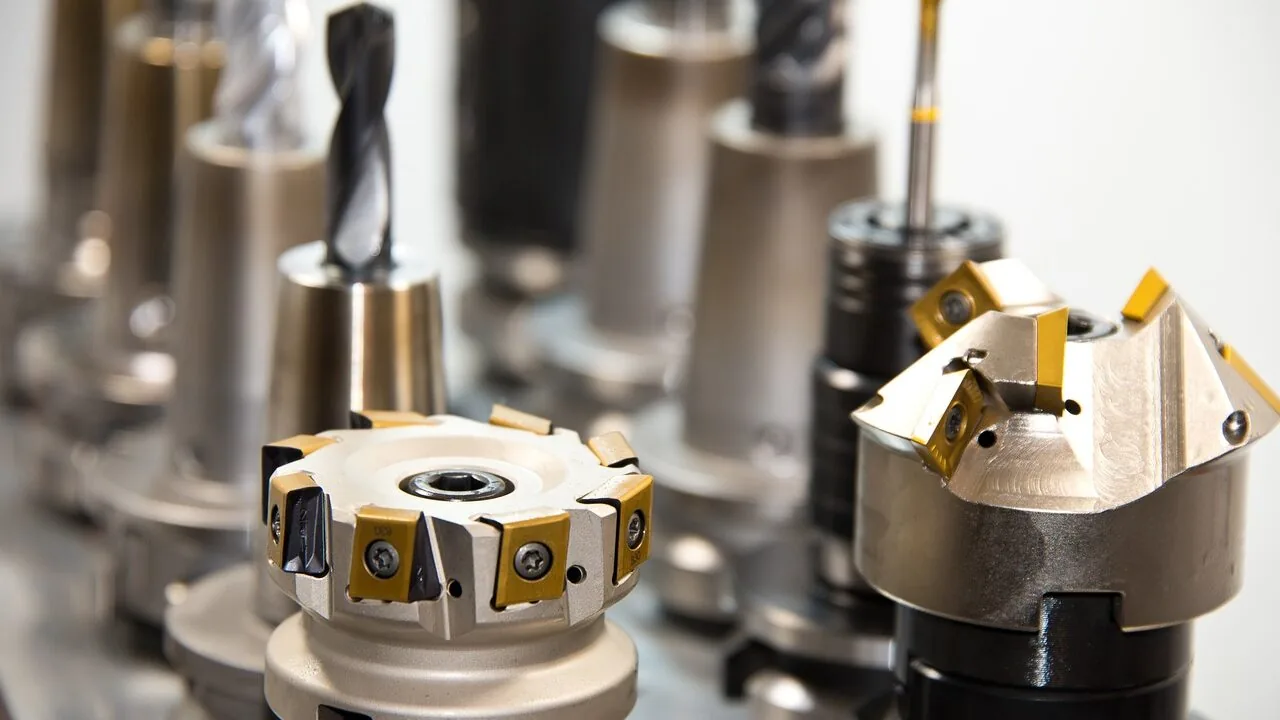
Cutting machines have become indispensable tools for crafters, small business owners, educators, and DIY enthusiasts alike.
Whether you’re slicing intricate vinyl decals, crafting personalized greeting cards, or cutting through leather and balsa wood for professional projects, today’s crop of smart cutting machines can handle materials and precision levels that manual methods simply can’t match.
The category spans everything from compact, beginner-friendly die-cut machines to industrial-grade fabric cutters, so finding the right fit genuinely matters for your workflow and budget.
This guide breaks down the top cutting machines available right now, drawing on published specifications, expert review consensus, and verified buyer feedback to help you cut through the noise.
Our recommendations cover a wide range of needs, from hobbyists looking for an affordable entry point to serious crafters who need a machine that can run a small production line.
Whether you pair your new cutter with quality acrylic paint sets for mixed-media projects or use it purely for vinyl work, scroll down to see our ranked top picks.

Brother SDX125 ScanNCut Cutting Machine with Built-in Scanner
A versatile electronic cutting machine that combines scanning and automatic material detection, making it accessible for crafters who want to digitize hand-drawn designs and cut various materials without manual blade adjustments. The 5-inch touchscreen and 682 built-in designs provide solid creative options for hobbyists and small business makers.
Pros
- Built-in scanner eliminates the need for separate software to convert hand-drawn artwork to cut files
- Auto blade and automatic material sensor remove guesswork from setup and material selection
- Generous material compatibility up to 3mm thickness covers paper, fabric, vinyl, chipboard, and foam
- Quiet operation compared to typical cutting machines
- Wireless and USB connectivity expand design options beyond built-in library
Cons
- No verified buyer reviews available to assess real-world reliability and learning curve
- Cutting depth limited to 3mm, which may restrict projects requiring thicker material penetration
- 5-inch touchscreen is smaller than some competing models, potentially impacting design visibility and precision placement

Cricut Maker 4 Smart Cutting Machine Bundle
The Cricut Maker 4 is a versatile cutting machine that works with 300+ materials and handles multiple functions beyond cutting, including drawing, foiling, and engraving. This bundle comes with essential accessories and 30 bonus design images, making it accessible for beginners thanks to the intuitive Design Space software.
Pros
- Works with 300+ materials including leather, wood, vinyl, cardstock, and heat transfer materials
- Multi-function capability: cuts, draws, foils, scores, engraves, debosses, and perforates
- Comprehensive bundle includes Fine-Point Blade, materials sampler, grip mat, weeder, and pen
- Print-Then-Cut feature compatible with most inkjet printers for full-color designs
- Design Space software is user-friendly with 3,000+ free images and 100+ fonts included
Cons
- No verified buyer reviews available yet to assess real-world reliability and performance
- Full content library access requires paid Cricut Access Subscription beyond base offering
- Learning curve exists for maximizing all advanced functions despite beginner-friendly software
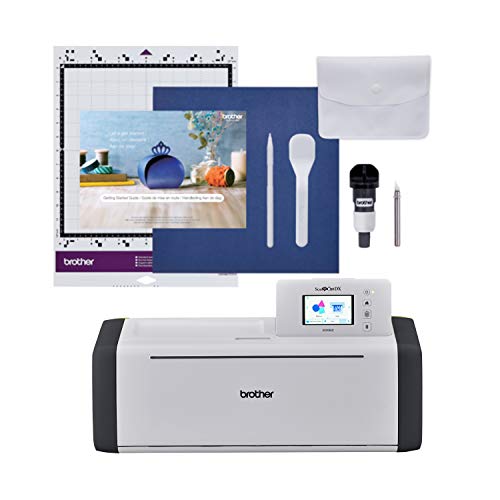
Brother SDX85C ScanNCut Electronic Cutting Machine
An all-in-one cutting machine with built-in scanner that converts drawings to cut files and handles materials up to 3mm thick. The auto blade sensor eliminates manual adjustment, making it accessible for crafters mixing DIY projects with 251 built-in designs.
Pros
- Unique integrated scanner function eliminates tracing and manual file conversion for custom designs
- Automatic material thickness detection removes guesswork and blade adjustment steps
- Versatile cutting capacity handles diverse materials from delicate paper to rigid chipboard
- Solid starter library of 251 designs with expandable options via USB and wireless connectivity
- Touch interface provides intuitive control for design placement and combination
Cons
- No verified buyer feedback available to assess real-world durability or performance consistency
- US-only product rated for 120 volts, limiting international use
- Automatic sensor still requires test cuts to confirm material-specific settings despite convenience claims
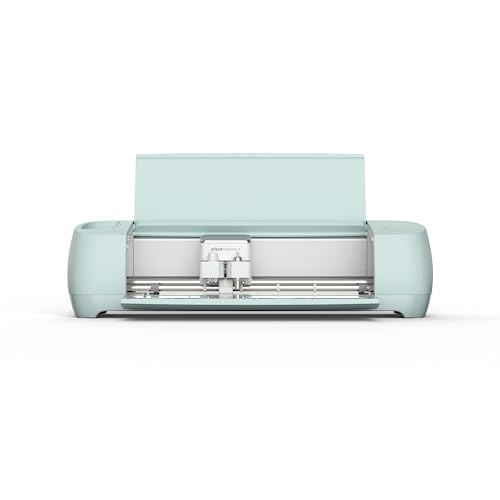
Cricut Explore 3 Smart Cutting Machine
A versatile cutting machine that works with over 100 materials, from vinyl to cardstock, and integrates with your inkjet printer for full-color design cutting. Best suited for crafters who want precision cutting, drawing, and foiling capabilities in one device.
Pros
- Works with extensive range of materials for diverse project types
- Multi-functional tool replaces several separate devices
- Print then cut feature enables full-color design possibilities
- Free, beginner-friendly Design Space app included
Cons
- No verified customer reviews available to assess real-world reliability or performance
- Requires learning curve despite app simplicity claims
- Relatively heavy at 15.7 pounds may limit portability

Silhouette Cameo 5 Alpha Print & Cut Machine
A versatile die-cut machine capable of handling vinyl, cardstock, fabric, and heat transfer materials up to 3mm thick. The deluxe bundle includes software, vinyl sheets, and accessories, making it accessible for both beginners and experienced crafters seeking precision cutting and sketching capabilities.
Pros
- Complete bundle removes setup barriers and provides immediate crafting capability
- 4-point registration system delivers consistent precision for intricate designs
- Handles diverse material types in one device, eliminating need for multiple machines
- Fast Sketch Mode accelerates workflow for time-sensitive custom projects
- Included software and 25 designs add significant value to the package
Cons
- No verified buyer reviews available to assess real-world reliability and user experience
- Learning curve likely exists despite intuitive design claims, particularly for advanced features
- AutoBlade and quiet operation benefits cannot be independently verified without user feedback

Cricut Joy Xtra Smart Cutting Machine Vinyl Kit
A compact cutting machine designed for beginners and casual crafters, the Joy Xtra handles vinyl, cardstock, iron-on, and 50+ materials with built-in drawing and foiling capabilities. The bundle includes essentials like a grip mat, transfer tape, and tools, plus access to Design Space software with thousands of free templates and designs to start without experience.
Pros
- Versatile material compatibility covers vinyl, HTV, cardstock, stickers, and more with cutting, drawing, and foiling functions
- Complete starter bundle includes grip mat, transfer tape, tool set, and vinyl sampler to begin projects immediately
- Print-Then-Cut feature works with standard inkjet printers for full-color design stickers
- Free Design Space software includes 3,000+ images, 100+ fonts, and 1,000+ projects out of the box with no design experience required
- Compact dimensions (15.25 x 9.63 x 10.06 inches) suit small workspaces and home crafting setups
Cons
- No verified buyer reviews available to assess real-world reliability and user satisfaction
- Full content library (1.5+ million images) requires optional paid Cricut Access subscription beyond free tier
- Reusable grip mat is rated for light materials, which may limit projects requiring stronger hold

Cricut Joy 2 Compact Cutting Machine 4.5in Essential Bundle
A pocket-sized cutting machine designed for quick craft projects like cards, decals, and stickers, with the ability to work with your home printer for full-color designs. The Essential Bundle comes loaded with materials and supplies to get started on up to 35 projects without prior design experience.
Pros
- Extremely portable design fits apartments and tight storage areas
- Versatile material compatibility covers everyday craft needs
- Bundle includes all starting supplies and digital content
- Free Design Space app with substantial starter library
- Bluetooth connectivity to mobile and desktop devices
Cons
- 4.5-inch cutting width limits project size to smaller items
- No verified buyer reviews available to assess real-world reliability
- Ongoing content purchases or Cricut Access subscription required for expanded design library

VEVOR Vinyl Cutter Machine 13-inch with Auto Edge Detection
A mid-range vinyl cutting machine that delivers precision cuts up to 13 inches wide with automatic edge detection and touchscreen control. Best suited for DIY crafters and small business owners looking to work with vinyl, HTV, cardstock, and 100+ other materials.
Pros
- High precision cutting at 0.1mm accuracy with variable speed control
- Extensive material compatibility covers both hobbyist and professional applications
- Design software with pre-made library reduces learning curve for beginners
- Multiple file format support (SVG, EPS, PLT, AI) provides creative flexibility
- Bundle includes materials and software, minimizing additional purchases
Cons
- 4.9 rating with zero verified reviews limits real-world performance feedback
- 13-inch max cut size may be limiting for larger signage or apparel projects
- Learning curve for advanced design work beyond pre-made templates

Likcut S501 AI Vinyl Cutter Machine, A5 Portable
The Likcut S501 is a compact vinyl cutter with AI-powered design generation that converts voice or text prompts into cutting patterns. It handles 46 materials and connects across devices, making it accessible for beginners, though it lacks print-and-cut capability and carries strict adult-only usage restrictions.
Pros
- AI design generation significantly lowers the barrier to entry for non-designers
- Genuine versatility across material types with precise, clean cuts
- Truly portable and easy to set up with straightforward user interface
- Multi-platform connectivity adds practical flexibility for different work environments
Cons
- Cannot print and cut in one operation, requiring separate workflows
- Restricted to adult use only with no supervised use permitted for children
- No verified buyer reviews available yet to validate real-world performance claims

VEVOR 750W Industrial Fabric Cutter with 9.8" Blade
A heavy-duty electric fabric cutter designed for commercial and industrial settings, featuring a 750W motor, automatic blade sharpening, and capacity to handle multiple fabric layers up to 8.3" thick. Best suited for clothing factories, textile mills, and high-volume cutting operations.
Pros
- Automatic knife sharpening eliminates need for manual blade maintenance
- Powerful motor and high RPM deliver consistent, clean cuts through multiple fabric layers
- Safety features including finger guard and ergonomic grip reduce operator fatigue
- Mobile design with casters allows flexibility in workshop layout
- Versatile enough for woven fabrics, leather, and synthetic materials
Cons
- No verified buyer reviews available to assess real-world durability or performance issues
- Heavy unit at 38.6 pounds requires dedicated workspace and stable placement
- Limited to lightweight to medium-weight fabrics; not rated for heavy industrial textiles
- Corded electric design restricts mobility compared to portable alternatives

Find Scrapblooms 6-Inch Manual Die Cutting Machine
A budget-friendly manual die cutter designed for beginners and casual crafters working with A5-sized paper and standard die cuts. Portable, durable carbon steel construction, and straightforward plate stacking method make it accessible for scrapbooking and cardmaking without requiring electricity.
Pros
- No power required makes it portable and cost-effective to operate
- Carbon steel build offers longer lifespan than comparable machines
- A5 size accommodates most standard die cuts and embossing folders on the market
- Beginner accessories and clear instructions lower barrier to entry
- Compact storage footprint with aesthetic blue and white design
Cons
- Manual operation requires physical effort and is slower than electric alternatives
- No verified buyer reviews yet to confirm real-world durability and ease of use claims
- Limited to A5 paper size, restricting creative possibilities for larger projects
Cutting Machines Buying Guide
Choosing the right cutting machine is about matching the machine’s capabilities to your actual projects and working style.
The differences between models can be significant: a machine that excels at thin vinyl stickers may struggle with thick fabric or balsa wood, and a feature-rich professional cutter may be overkill for occasional card-making.
Use the criteria below to narrow your options before committing to a purchase.
Cutting Force and Material Compatibility

Cutting force, measured in grams, determines which materials a machine can handle reliably. Entry-level machines typically manage thin paper, cardstock, and standard adhesive vinyl, while mid-range and premium models can cut through foam, felt, leather, and even thin balsa wood.
Before buying, check the manufacturer’s published material thickness ratings and compare them against the thickest material you expect to use regularly.
Machines that accept interchangeable tool heads, such as rotary blades, scoring wheels, and engraving tips, offer far greater long-term flexibility.
If your projects evolve from simple vinyl cutting into fabric work or embossing, a tool-agnostic platform means you won’t outgrow your machine as quickly. Look for brands like Cricut and Brother that publish detailed compatibility charts for their blade ecosystems.
Industrial users or those working with multilayer fabric and leather at volume should look at dedicated straight-knife fabric cutters, which use motor-driven blades and aggressive cutting forces that craft-focused machines simply aren’t designed to deliver.
Cutting Width and Maximum Project Size

Standard hobby cutting machines accommodate 12-inch-wide material, which covers most everyday crafting applications including heat-transfer vinyl for garments and medium-format card-making.
If you regularly work on banners, large wall decals, or wide-format stickers, you’ll want to confirm the machine’s maximum cutting width and whether it supports matless cutting with longer roll materials.
Mat-based cutting requires you to load material onto an adhesive carrier mat before feeding it into the machine.
Matless cutting, available on machines that support smart materials, allows you to feed roll or sheet material directly, which is faster and enables much longer cuts. This distinction matters enormously for production-oriented workflows.
If you also enjoy creative projects like kids’ art and coloring activities, a compact machine with matless capability can serve double duty across age groups in the household.
Software and Design Ecosystem
Every cutting machine relies on design software to translate your artwork into cut paths.
Some ecosystems, like Cricut Design Space, are cloud-based and subscription-influenced, giving you access to large libraries of licensed images and fonts but requiring an internet connection for full functionality.
Others, like Silhouette Studio and Brother’s bundled software, are desktop-based and work offline with more direct file-import flexibility.
Consider how you create your designs. If you import SVG files from third-party sources or design your own artwork, you’ll want software that handles vector imports cleanly without requiring conversion steps.
If you prefer working from pre-made templates, a large built-in design library carries more weight.
Brother’s ScanNCut line stands apart by offering a built-in scanner that lets you digitize hand-drawn artwork or trace physical objects directly on the machine, eliminating the computer step entirely for many projects.
Also check whether the software is free or requires an ongoing subscription, and what happens to your existing designs if you cancel. These long-term software costs can meaningfully affect the true cost of ownership over several years.
Connectivity and Standalone Operation

Most modern cutting machines connect via USB and Bluetooth, allowing you to send designs wirelessly from a phone, tablet, or laptop.
A few high-end models also offer standalone operation via a touchscreen, meaning you can browse built-in designs, edit them, and start a cut without any connected device.
This is a genuine workflow advantage for dedicated craft spaces where you’d rather not have a laptop taking up workspace.
For portable or travel use, compact machines with Bluetooth-only operation and no requirement for a cutting mat can slip into a bag alongside other creative supplies.
If your setup is a dedicated craft room, a full-featured wired and wireless machine with a larger cutting area will serve you better.
Think about your workspace the same way you’d think about other studio essentials, whether that’s fine oil paint sets or watercolor paint sets, each tool should fit how and where you actually create.
Ease of Setup and Learning Curve

Cutting machines vary considerably in how quickly a new user can get from unboxing to a successful first cut. Machines with auto-blade detection, which sense the installed blade type and adjust settings automatically, dramatically reduce setup friction.
Cricut’s AutoBlade system and Brother’s intelligent blade sensing are frequently praised in verified buyer feedback for making the first-run experience far less intimidating than older machines.
Community support matters here too. Cricut and Silhouette both have enormous online communities where you can find project tutorials, troubleshooting threads, and free design files.
If you’re newer to crafting and still building your creative toolkit alongside items like educational STEM kits for a home that values hands-on making, a machine with a well-established support community significantly reduces the time between purchase and proficiency.
Budget, Value, and Long-Term Costs

The sticker price of a cutting machine is only part of the equation.
Factor in the cost of replacement blades, cutting mats (which wear out and need periodic replacement), software subscriptions if applicable, and any proprietary materials required to unlock full functionality.
Some machines are designed to work best with the manufacturer’s own branded materials, which can add up over time.
Entry-level manual die-cut machines sit at the low end and are excellent for simple embossing and basic cardstock shapes, but they lack the precision and automation of electronic models.
Mid-range electronic cutters offer the best balance of capability and value for most hobbyists. Professional and semi-professional machines, including high-powered fabric cutters, justify their premium pricing when used in volume or for materials that cheaper machines can’t handle reliably.
As with any creative investment, whether it’s precision hand tools or a cutting machine, spending appropriately for your actual use frequency pays off in the long run.
Why You Should Trust Us
ProductFind is an independent review publication.
Every product in this guide was evaluated using our structured research methodology: we analyze manufacturer specifications, cross-reference expert review consensus from published sources, and weigh verified buyer feedback from confirmed purchasers to build a comprehensive picture of real-world performance.
We do not conduct our own product trials; our evaluations are grounded in research, published data, expert review consensus, and verified buyer feedback.
Each product receives a PF Score on a 0 to 10 scale, applied consistently across the same criteria for every model we assess.
That scoring framework covers material compatibility, software ecosystem quality, ease of use, connectivity, value for money, and long-term ownership costs.
A higher PF Score reflects a product that performs well across most or all of those dimensions, not just one standout spec.
ProductFind may earn a commission when you purchase through links in this article. That affiliate relationship has no influence on our rankings, scores, or which products we recommend.
Our editorial process is editorially independent, and commission rates play no role in a product’s placement or PF Score. We present strengths and limitations for every pick so you can make the decision that fits your actual needs.
Final Thoughts
The cutting machine market covers an impressive range of use cases and price points in 2026, and our research makes clear that there’s a strong option for almost every type of crafter or maker.
Here are our standout picks based on PF Score and category fit:
- Best Overall: Brother SDX125EGY ScanNCut Electronic Cutting Machine earns the top spot with the highest PF Score in this roundup, combining a built-in scanner, standalone touchscreen operation, and broad material compatibility into a package that outperforms the competition across nearly every criterion we assessed.
- Best for Serious Crafters and Small Businesses: Cricut Maker 4 is the go-to choice for users who need maximum material versatility and matless smart cutting, backed by one of the most polished software ecosystems in the category.
- Best Mid-Range Pick: Brother SDX85C ScanNCut delivers the same scanner-based workflow as its higher-scoring sibling at a more accessible price point, making it a compelling option for crafters who want standalone capability without the top-tier outlay.
- Best Budget Electronic Cutter: Cricut Explore 3 remains one of the most capable machines at its price, supporting smart matless materials and offering a well-established design library that keeps the learning curve manageable for newer crafters.
- Best Compact and Portable Option: Cricut Joy 2 is purpose-built for small-format projects and on-the-go crafting, offering genuine smart cutting functionality in a footprint that fits into virtually any workspace or bag.
If you’re still building out your creative space, pairing a capable cutting machine with other quality art supplies rounds out a well-equipped studio.
Acrylic paint sets work beautifully alongside cut vinyl for mixed-media projects, and detailed craft work often benefits from good lighting, such as a reliable hands-free headlamp for intricate nighttime sessions.
Whatever your craft, the right cutting machine is a long-term investment that pays dividends across hundreds of future projects.
Frequently Asked Questions
What is the difference between a die-cut machine and a vinyl cutter?
Die-cut machines are designed to cut shapes and intricate designs from a variety of materials including paper, cardstock, fabric, and foam using interchangeable blades and tool heads.
Vinyl cutters are a specialized subset that focuses primarily on adhesive vinyl, heat-transfer vinyl, and similar thin films, often using a drag-knife mechanism.
Many modern hobbyist machines, including Cricut and Silhouette models, function as both, handling vinyl alongside dozens of other materials depending on the blade installed.
Do I need a computer to use a cutting machine?
It depends on the model. Most cutting machines require a connected device running the manufacturer’s design software to create and send cut files, though Bluetooth connectivity means a phone or tablet can substitute for a laptop.
Brother’s ScanNCut line is a notable exception: its built-in scanner and touchscreen allow standalone design, editing, and cutting without any external device.
If working without a computer is a priority, check specifically for standalone operation in the product specifications before purchasing.
How often do cutting machine blades need to be replaced?
Blade lifespan varies based on the material being cut and the frequency of use. Cutting thick or abrasive materials like chipboard, leather, or stiff fabric wears blades significantly faster than cutting paper or thin vinyl.
Many users report standard fine-point blades lasting several months of regular hobbyist use, while heavy daily use on tough materials may require replacement every few weeks.
Machines with automatic blade sharpening, like certain industrial fabric cutters, extend usable blade life considerably for high-volume applications.
Can cutting machines handle fabric without backing?
Cutting fabric cleanly without it shifting or fraying during the cut is one of the more challenging tasks for hobby cutting machines.
Most manufacturers recommend ironing fusible interfacing or a stabilizer to the back of fabric before cutting, which stiffens it enough for accurate results on a cutting mat.
Machines with a rotary blade attachment, such as the Cricut Maker line, handle fabric more reliably than standard drag-knife machines. For professional multilayer fabric cutting at volume, a dedicated industrial straight-knife fabric cutter is purpose-built for that task.
Are Cricut and Silhouette materials interchangeable?
The machines themselves use different blade mount systems, so blades and tool heads are not cross-compatible. However, the materials themselves, such as adhesive vinyl, heat-transfer vinyl, and cardstock, are generic commodities that any cutting machine can handle regardless of brand.
You are not required to buy Cricut-branded vinyl for a Cricut machine or Silhouette-branded material for a Silhouette machine, though manufacturer materials are evaluated for known cut settings. Third-party materials from reputable suppliers work well and are typically less expensive.
Is a more expensive cutting machine always better?
Not necessarily. The value of a higher-priced machine depends entirely on whether you’ll use its additional capabilities. A professional crafter who cuts leather, fabric, and thick foam daily will find a premium machine worth every penny.
A hobbyist who makes occasional paper cards or vinyl stickers may find that a mid-range or even entry-level machine covers all their needs at a fraction of the price.
Identify the thickest material you’ll cut and the volume you expect to produce, then match your budget to those requirements rather than defaulting to the most feature-rich option available.
This same principle applies to any creative tool investment, from artist-grade watercolor sets to precision hand tools.
About the author
Constance is a reviewer and writer for ProductFind who specializes in Arts & Crafts Supplies. Constance evaluates products through independent research: specifications, expert review consensus, and verified buyer feedback, and rates each one on the PF Score. Constance focuses on helping readers pick the right arts & crafts supplie for their needs and budget.