The 10 Best Head Up Displays
Keeping your eyes on the road matters. These head-up displays range from basic GPS speedometers to OBD-II units with live engine data, covering every vehicle and price point.
 By Aubree Howell
Updated July 23, 2026
By Aubree Howell
Updated July 23, 2026

A head-up display is one of those upgrades that genuinely changes how you interact with your car.
Instead of glancing down at the dashboard or at your phone for speed and navigation cues, the data floats right in your line of sight on the windshield, keeping your eyes where they belong: on the road ahead.
That safety benefit is no longer exclusive to luxury vehicles.
Aftermarket HUD technology has matured to a point where solid, legible units are available at every budget, from basic GPS speedometers to OBD-II connected displays that read live engine data and fault codes in real time.
This guide covers ten of the most-purchased and highest-rated head-up displays available today, spanning entry-level plug-and-play units from brands like KUOWEIHUD and CNSPEED all the way to premium model-specific installs from Tesstudio and wiiyii.
Our team at ProductFind researched each option by analyzing manufacturer specifications, synthesizing expert review consensus, and combing through verified buyer feedback so you can shop with confidence.
The picks below are ranked and scored to help you zero in on the right HUD for your vehicle and budget.
| Award | Product | PF Score About PF ScoreThe PF Score is our own rating from 0 to 10, based on performance, design and build, ease of use, and value. It reflects independent research and is never influenced by manufacturers, retailers, or affiliate commissions. Learn more › | Price | |
|---|---|---|---|---|
| Best Overall |
 Tesstudio 10.88-inch Tesla Model 3/Y Head-Up Display
|
9.1/10 | Buy | |
| Editor's Pick |
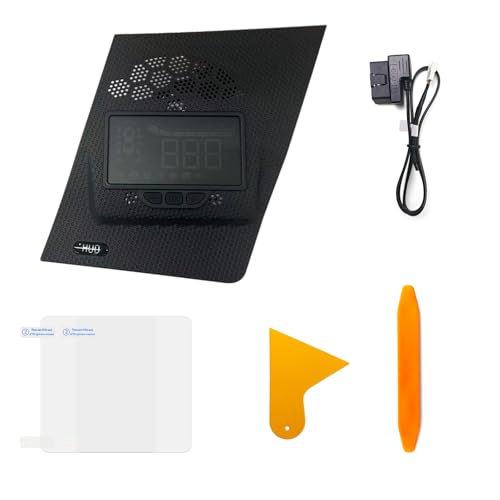 Generic RAV4 HUD Head-Up Display 2019-2025
|
8.6/10 | Buy | |
| Best Value |
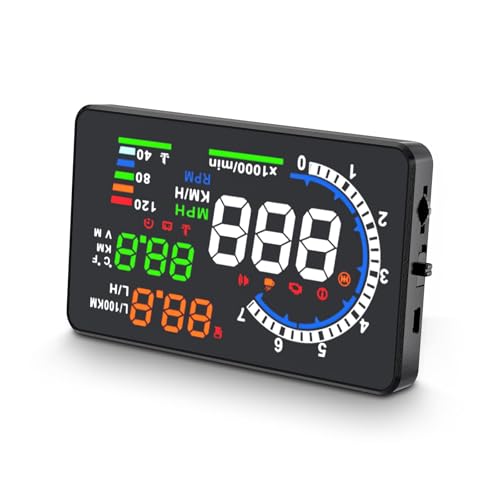 Wiiyii A8 5.5-Inch OBD2 HUD Speedometer
|
7.4/10 | Buy | |
| Top Rated |
 Wiiyii P6 OBD2 GPS Dual-Mode Head-Up Display
|
7.2/10 | Buy | |
 Riloer G12 GPS Head-Up Display 5.5-inch
|
6.8/10 | Buy | ||
 Liiiyuan G12 5.5-Inch GPS Head-Up Display
|
6.5/10 | Buy | ||
 KUOWEIHUD GPS Car HUD Display with Dual-Mode Positioning
|
5.8/10 | Buy | ||
 CNSPEED W2 HUD Windshield Speedometer Display
|
5.5/10 | Buy | ||
 KUOWEIHUD GPS Head-Up Display for Cars
|
5.3/10 | Buy | ||
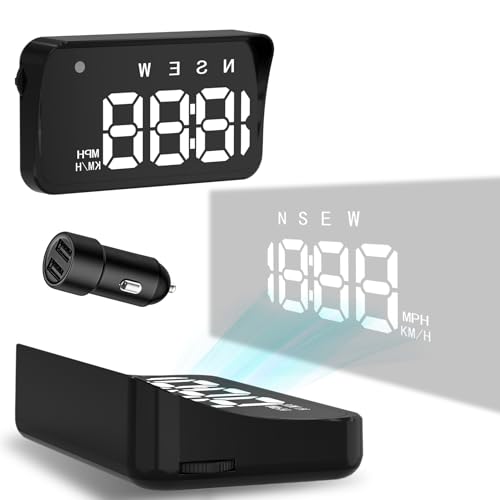 KUOWEIHUD GPS Car HUD Display
|
5.1/10 | Buy |
Tesstudio 10.88-inch Tesla Model 3/Y Head-Up Display
A large touchscreen replacement for Tesla Model 3 (2017-2023) and Model Y (2020-2024) that syncs real-time vehicle data like speed, tire pressure, and blind spot alerts. Combines steering wheel controls with a 1920×535 display and customizable 3D car models, though it carries the typical aftermarket integration risks.
Pros
- Large, high-resolution display with responsive touch controls and strong brightness for daytime visibility
- Comprehensive real-time data sync covers safety features like tire pressure warnings and blind spot alerts
- Multiple control methods (touchscreen and steering wheel) offer flexible navigation options
- Personalizable 3D car models and UI themes let users customize their dashboard appearance
- Includes dual-color blind spot system and FSD hand-off reminders for enhanced driving safety
Cons
- Zero verified buyer reviews on file, making real-world reliability and installation experience unclear
- Aftermarket integration may have compatibility issues or gaps versus Tesla's native interface despite claims of synchronization
- No information on warranty, customer support responsiveness, or long-term durability of the touchscreen module
Generic RAV4 HUD Head-Up Display 2019-2025
A head-up display projecting speed and vehicle data onto your windshield, designed for Toyota RAV4 models 2019 through 2025. The plug-and-play setup aims to reduce driver distraction by keeping critical information visible without looking down.
Pros
- Projects essential driving metrics without obstructing windshield view
- Straightforward plug-and-play installation process
- Supports multiple vehicle functions including turn signal indicators
- Wide model year compatibility covers recent RAV4 generations
Cons
- No verified customer reviews available to confirm real-world performance and durability
- Compatibility requires manual verification against specific vehicle trim and year
- Limited information on projection quality consistency across varying lighting conditions
Wiiyii A8 5.5-Inch OBD2 HUD Speedometer
A heads-up display that projects vehicle data including speed, water temperature, and voltage directly onto your windshield via OBD2 connection. Works with most vehicles from 2003 onward (OBDII/EOBD compatible) and includes diagnostic functions like fault detection and clearing.
Pros
- Large screen makes readings easy to view while driving
- Multi-function capability goes beyond basic speedometer with diagnostic features
- Wide vehicle compatibility for OBDII/EOBD equipped cars
- Includes speeding and voltage alarms for safety awareness
- CE, FCC, and RoHS certified
Cons
- Does not work with OBD I or JOBD systems, limiting compatibility for older vehicles
- No verified customer reviews available to assess real-world reliability and setup ease
- Display mounting and windshield reflection quality depend on installation and vehicle setup
Wiiyii P6 OBD2 GPS Dual-Mode Head-Up Display
This heads-up display combines OBD2 and GPS data to show speed, RPM, water temperature, and overspeed alerts directly in your line of sight. The dual-mode setup reads over 100 vehicle parameters and adjusts display color from blue to red when speeding, though it relies on OBD2 protocol compatibility.
Pros
- Displays critical driving data at a glance without looking down
- OBD2 plus GPS combination provides more data than single-mode gauges
- Flexible mounting with adjustable bracket for various vehicle setups
- Color-coded alerts change display from blue to red during speeding
- Multiple interface themes allow personalization
Cons
- No verified customer reviews available to confirm real-world reliability
- Functionality limited to GPS-only mode if vehicle lacks OBD2 protocol support
- Data accuracy depends on proper OBD2 connection and vehicle compatibility
Riloer G12 GPS Head-Up Display 5.5-inch
A plug-and-play GPS-based HUD that displays speed, compass direction, mileage, and time on a 5.5-inch LED screen with automatic brightness adjustment. Works universally across most vehicles via USB power, making it a practical dashboard companion for drivers who want real-time navigation data without smartphone dependency.
Pros
- GPS-based system avoids the OBD2 compatibility headaches common with other HUDs
- Comprehensive data display including compass and satellite positioning helps with navigation awareness
- Adaptive brightness sensor ensures readability in both bright sunlight and dim conditions
- Universal fit and simple USB-powered setup work across vehicle types without complex installation
Cons
- No verified buyer reviews available to confirm real-world reliability and durability
- 5.5-inch screen size may feel cramped compared to larger aftermarket HUD options
- Depends on GPS signal strength, which could affect accuracy in tunnels or dense urban areas
Liiiyuan G12 5.5-Inch GPS Head-Up Display
A plug-and-play head-up display that projects speed, mileage, time, and driving alerts onto your windshield via GPS and Beidou dual-mode satellite support. Best suited for drivers wanting real-time navigation data without mounting a traditional dashboard device.
Pros
- Multiple display layouts adapt to individual driving preferences
- Fast satellite connectivity via dual-mode chip support
- Minimal installation hassle with USB power and rotation bracket
- Comprehensive data output including fatigue driving reminders and speed alerts
- Compact 5.5-inch screen designed to align with natural eye level
Cons
- No user reviews available to verify real-world reliability or accuracy claims
- GPS/Beidou accuracy and signal consistency not independently verified
- Limited detail on software updates or long-term performance expectations
KUOWEIHUD GPS Car HUD Display with Dual-Mode Positioning
A windshield-mounted HUD that displays real-time GPS speed data with automatic brightness adjustment for varying lighting conditions. Designed for universal installation via USB port across all vehicle types, though performance depends on clear GPS signal and may be affected by metallic window coatings.
Pros
- Receives up to 32 satellite signals for stable connection in urban and rural areas
- Intelligent light sensor automatically adjusts visibility without manual adjustment
- Easy plug-and-play USB installation requires no professional setup
- Metal shading technology minimizes windshield reflections for clear readability
Cons
- GPS signal accuracy limited by environment, with 0.6-1.8 mph margin of error consistent with industry standards
- Performance degraded by metallic explosion-proof window films, requiring careful vehicle compatibility assessment
- Signal loss occurs in tunnels, underground garages, and poor weather conditions like rain or fog
CNSPEED W2 HUD Windshield Speedometer Display
A plug-and-play heads-up display that projects speed and safety alerts onto your windshield without requiring wiring or installation skills. Uses GPS and BDS positioning with adjustable overspeed alarms, auto-brightness adjustment, and built-in sun visor for daytime and nighttime visibility.
Pros
- Simple plug-and-play installation with no technical skills required
- Dual positioning system (GPS + BDS) provides stable signal in urban and rural areas
- Adjustable overspeed alert thresholds let you customize safety reminders
- Integrated sun visor reduces glare and improves display clarity in all lighting conditions
- Military-grade dual-core processor ensures consistent performance
Cons
- No verified buyer reviews available to assess real-world reliability and user satisfaction
- Requires USB power connection, limiting placement flexibility depending on vehicle layout
- Compatibility depends on vehicle having accessible USB port, not universal across all older models
KUOWEIHUD GPS Head-Up Display for Cars
A windshield-mounted HUD that projects real-time speed data into your line of sight using dual-mode GPS and BDS satellite tracking. Best suited for drivers who want speed monitoring without dashboard glances, though GPS signal reliability depends on clear sky conditions.
Pros
- True heads-up display design keeps eyes on the road longer
- GPS-based accuracy eliminates vehicle speedometer calibration issues
- Auto brightness sensor adapts to lighting without manual adjustment
- Simple USB power setup works across cars, trucks, and motorcycles
- Large font and anti-reflective coating enhance readability
Cons
- GPS signal drops in tunnels, underground parking, heavy rain, and vehicles with metallic windshield film
- Minor speed variance of 0.6-1.8 MPH is normal and inherent to GPS technology
- No customer reviews available yet to verify real-world performance and durability
KUOWEIHUD GPS Car HUD Display
A plug-and-play windshield-mounted heads-up display using dual-mode GPS and BDS technology to show real-time speed with a large, easy-to-read format. Best suited for drivers wanting an affordable speedometer alternative without dashboard obstruction, though GPS performance drops in tunnels and vehicles with metallic windshield film.
Pros
- Fast, stable GPS connection with up to 32 satellite support
- Simple USB power setup requires minimal installation effort
- Adjustable brightness and switchable speed units accommodate regional preferences
- Overspeed alert customization adds a safety feature
- Large font and anti-reflective design improves readability for all driver ages
Cons
- GPS signal unreliable in tunnels, underground parking, heavy rain, fog, and vehicles with metallic windshield film
- No verified buyer reviews available to confirm real-world performance and durability
- Limited to 115 MPH maximum display speed, reducing usefulness for highway-focused drivers
Head Up Displays Buying Guide
Choosing a head-up display is not as simple as picking the cheapest option or the one with the most features listed on the box.
Display legibility in direct sunlight, data source reliability, windshield compatibility, and ease of installation all vary dramatically between models.
The guide below walks through the criteria that matter most, so you can match a HUD to your actual driving situation rather than a spec sheet.
Data Source: OBD-II vs. GPS vs. Standalone

The single most important distinction between HUD models is how they get their data.
OBD-II units plug directly into your car’s diagnostic port, pulling live sensor data: speed in your car’s native calibration, RPM, coolant temperature, voltage, and even fault codes.
Because the speed reading comes from the vehicle’s own ECU, OBD-II HUDs are consistently more accurate than GPS alternatives and do not suffer from signal lag in tunnels or dense urban areas.
If your vehicle has an accessible OBD-II port (any car sold in the US after 1996 does), this is the most informative option.
GPS-based HUDs derive speed from satellite positioning, which makes them universally compatible and very easy to install since they require no port connection at all.
The tradeoff is a slight lag in speed readings and reduced accuracy at low speeds or in areas with poor satellite reception.
Hybrid models that combine OBD-II and GPS give you the best of both: accurate sensor data from the car paired with navigation-aware speed context.
Standalone units that do neither are the simplest and cheapest but offer the fewest metrics beyond basic speed display.
Pairing your HUD with a quality dash cam is a smart move for a complete road safety setup, since the two devices complement each other without interfering.
For most drivers, an OBD-II model or a GPS hybrid delivers the most practical value. Pure GPS units and standalone displays make sense for motorcycle riders, older vehicles, or anyone who wants a fast plug-and-play solution without worrying about port access.
Display Size, Brightness, and Windshield Compatibility

Display legibility in bright daylight is where many budget HUDs fall short. A unit that looks crisp indoors can wash out completely under direct afternoon sun.
Look for models that advertise peak brightness levels above 300 nits and feature automatic brightness adjustment that scales from night mode (dim enough not to blind you) to full sun mode (bright enough to read at a glance).
Larger screens, typically 5 inches or above, help enormously with at-a-glance readability since you do not need to refocus your eyes to parse the numbers.
Windshield reflectivity is a related issue that varies by vehicle. Flat windshields project a clear single image, while steeply raked or curved windshields can produce a ghost image where you see the HUD display twice at slightly different angles.
Many HUDs include a reflective film strip you apply to the glass to compensate, which works well on curved screens.
If your car has a tinted or UV-coated windshield, check compatibility before buying since some films do not adhere cleanly to treated glass.
Drivers who wear polarized sunglasses should pay particular attention to display type. Some LCD-based HUDs become invisible through polarized lenses at certain viewing angles, which completely defeats the purpose.
LED-based displays and units with adjustable display rotation tend to handle polarized lenses far better. This detail is rarely mentioned in product listings but comes up frequently in verified buyer reviews, making it worth researching before committing.
Vehicle Compatibility and Installation

Most aftermarket HUDs are designed to be universal, meaning they work with any car that has an OBD-II port or a standard USB power outlet.
Universal installation typically takes under ten minutes: plug the data cable into the OBD-II port under the dashboard, route the power cable to a USB outlet or the 12V socket, position the unit on the dash, and apply the reflective film.
This simplicity is one of the biggest selling points of the category.
Model-specific HUDs are a different story.
Units designed for particular vehicles like the Tesla Model 3 or a specific Toyota RAV4 generation integrate more cleanly into the cabin, matching trim lines and sometimes connecting directly to the vehicle’s CAN bus for richer data.
Installation is more involved and typically requires removal of trim panels, but the finished result looks factory-fitted rather than an add-on accessory.
If your vehicle has a compatible model-specific option, the premium in price is often justified by the cleaner look and deeper data integration.
Check that the OBD-II cable reaches your port without pulling tight across the footwell, where it could interfere with pedal operation. Cable management clips and longer extension cables are inexpensive accessories worth adding to your order if the unit does not include them.
Data Parameters and Alert Features

Basic HUDs display speed and not much else. Mid-range OBD-II models add RPM, coolant temperature, fuel consumption, voltage, and trip mileage, giving you a live window into your engine’s health without needing a separate gauge cluster.
Higher-end models can display boost pressure, exhaust gas temperature, and read or clear fault codes directly from the unit.
How many parameters actually matter to you depends on how you drive: a daily commuter may only care about speed and overspeed alerts, while an enthusiast who tracks driving efficiency or monitors an aging engine will appreciate the full data set.
Overspeed alarms are a standard feature on virtually every HUD at every price point, but the quality of the alert varies.
A simple beep is effective, but units that flash the display or use a graduated alarm (warning, then urgent) give you more reaction time.
Look for models where the speed threshold is user-adjustable so you can set it for school zones, highway cruising, or whatever limit is relevant to your typical route.
Some units also include fatigue driving alerts that trigger after a set duration, which is a useful passive safety feature on long road trips.
Build Quality and Long-Term Reliability
A dashboard-mounted HUD is exposed to significant temperature swings, vibration, and UV exposure every time the car sits in the sun.
Entry-level units made from lightweight ABS plastic with minimal internal shielding can develop screen flicker, cable connection failures, or adhesive mount failures within months in hot climates.
Mid-range models from established brands typically use better plastics, more robust connector pins on the OBD-II cable, and suction or adhesive mounts that hold in heat without sliding.
Verified buyer feedback is particularly valuable for assessing long-term reliability since short-term reviews often miss issues that emerge after several months of daily use.
Common failure points include the OBD-II connector losing its tight fit over time, display brightness degrading, and the reflective film peeling at the edges.
Brands that offer replacement accessories and responsive customer support rate meaningfully higher in satisfaction surveys than those that do not.
Basic installation tools like a compact screwdriver set can also make cable management and trim removal much easier when fitting the unit neatly into your dash.
Budget Tiers and Value Expectations

The head-up display market spans a wide price range, and the jump in capability between tiers is real. Entry-level units in the budget tier are GPS-only or very basic OBD-II speedometers with small screens and limited brightness.
They work, but daylight readability and data depth are limited. These are reasonable choices for a secondary vehicle or a driver who simply wants a visible speed reminder without investing in a more capable unit.
Mid-range models unlock noticeably better displays, larger screen sizes, hybrid data connectivity, and more reliable build quality. This tier delivers the best balance of capability and price for most drivers.
At the premium end, model-specific units and large-format displays offer near-factory integration, rich data overlays, and screen sizes that rival factory infotainment systems.
These make sense for enthusiasts or owners of specific vehicles who want a permanent, polished installation rather than a removable accessory.
Whatever your budget, prioritize display brightness and OBD-II connectivity over raw feature count. A dim screen with ten parameters is less useful on a bright day than a vivid screen showing only speed and RPM.
If you are upgrading your car’s tech ecosystem more broadly, a capable car stereo with navigation integration pairs naturally with a HUD for a more complete driver information setup.
Similarly, a reliable backup camera rounds out the safety tech picture alongside your new display.
Why You Should Trust Us
ProductFind is an independent review publication. Our editorial team has no commercial relationship with any of the brands featured in this guide, and our rankings are determined entirely by research quality, not by advertising spend or affiliate commission rates.
Every product in this guide is evaluated against a consistent set of criteria relevant to the head-up display category: data source type and accuracy, display brightness and legibility, vehicle compatibility, installation complexity, data parameter range, alert features, build quality, and long-term reliability signals drawn from verified buyer feedback.
Each product is then assigned a PF Score on a 0 to 10 scale, reflecting its overall performance across those criteria relative to the competitive field.
Products are ranked by PF Score so the strongest overall performer appears at the top of the list.
We do not conduct our own product trials; our evaluations are grounded in research, published data, expert review consensus, and verified buyer feedback.
This methodology lets us cover a broader range of products more consistently than any single person’s driving experience could, and it means our scores reflect the aggregate experience of many users across different vehicles and conditions rather than a single use case.
ProductFind may earn a commission when you purchase through links in this article. That affiliate relationship has no influence on which products are included, how they are ranked, or what scores they receive.
Our only goal is to give you the clearest, most honest picture of each product so you can make the right choice for your situation.
Final Thoughts
After researching the full field of aftermarket head-up displays, a few standout picks emerged for different types of buyers. Here is how we would categorize the top performers from this list:
- Best Overall: Tesstudio 10.88 Inch Head Up Display for Tesla Model 3 and Model Y earns the top PF Score in this roundup thanks to its large-format display, deep vehicle integration, and premium build quality designed specifically for Tesla owners who want a factory-grade information overlay.
- Best Model-Specific Pick for Toyota Owners: UltraEra HUD for RAV4 Toyota delivers the second-highest PF Score in the group by combining vehicle-specific fitment with a clean voltmeter and speedometer data set, making it one of the most polished plug-and-use options for RAV4 drivers across multiple model years.
- Best Mid-Range OBD-II Display: wiiyii A8 Heads Up Display with OBD Function stands out in the mid-range tier with its large 5.5-inch screen, OBD-II connectivity, and broad vehicle compatibility, making it a well-rounded choice for drivers who want real engine data without a model-specific install.
- Best Hybrid OBD-II and GPS Unit: wiiyii P6 OBD+GPS Smart Gauge HUD is the pick for drivers who want dual-source data reliability, combining OBD-II sensor accuracy with GPS backup alongside a useful overspeed alarm and RPM and water temperature readouts.
- Best Budget Pick: CNSPEED W2 Heads Up Display offers the most practical feature set at the lowest viable price point in this roundup, with automatic brightness adjustment, a built-in sun visor, and a triple overspeed alarm in a compact USB-powered form factor that fits virtually any vehicle.
Whatever your vehicle and budget, there is a head-up display in this list worth considering. Start by deciding whether OBD-II connectivity matters to you, then prioritize display brightness for your typical driving conditions. Those two decisions will narrow the field quickly to the right pick.
Frequently Asked Questions
Do head-up displays work with all cars?
GPS-based and standalone HUDs work with virtually any vehicle since they only need a power source, typically a USB outlet or 12V socket.
OBD-II models require an accessible OBD-II diagnostic port, which is standard on any car sold in the United States after 1996. Model-specific HUDs are designed for particular vehicles and trim years, so compatibility must be verified before purchasing.
Always check the product listing for a compatibility list if you are buying a vehicle-specific unit.
Will a HUD work if I wear polarized sunglasses?
This is one of the most commonly overlooked compatibility questions in the category. Some LCD-based HUDs can become very difficult or impossible to read through polarized lenses at certain viewing angles.
LED-based displays and units with a display rotation adjustment handle polarized lenses significantly better.
If you regularly drive with polarized sunglasses, look specifically for models that mention polarized compatibility in their specifications, or check verified buyer reviews from other sunglass wearers for that model.
Is a HUD distracting to drive with?
Research consistently shows that properly positioned head-up displays reduce the time drivers spend looking away from the road compared to checking a dashboard gauge or phone mount.
The key is correct positioning: the display should sit low enough on the windshield that you can read it with only a minimal refocus from the road ahead.
Most drivers adapt within a few drives and find the display becomes background awareness rather than an active distraction.
Units with overly bright displays or poorly placed information layouts can be more distracting, which is why brightness control and clean information hierarchy matter when choosing a model.
Can a HUD read and clear check engine light codes?
Only OBD-II connected HUDs have access to fault code data. Among those, not all models include the ability to display or clear diagnostic trouble codes. Mid-range and higher-end OBD-II units are more likely to include this feature than basic models.
If fault code access is important to you, verify that it is explicitly listed as a feature rather than assuming all OBD-II HUDs include it.
Basic OBD-II units often read speed, RPM, and temperature but do not access the fault code registry.
Does installing a HUD void my car warranty?
In most cases, no. Plug-in OBD-II devices and USB-powered accessories are designed to be removable and do not modify the vehicle’s systems.
Under the Magnuson-Moss Warranty Act in the United States, a dealer cannot void your warranty simply because you used an aftermarket accessory, unless they can demonstrate that the accessory caused the specific problem being claimed.
Model-specific installs that involve trim removal carry slightly more risk if not done carefully, but they typically do not affect powertrain or electronics warranties. When in doubt, consult your dealer before installing a semi-permanent unit.
What is the difference between a reflective film HUD and a combiner plate HUD?
A reflective film HUD projects its image directly onto a strip of semi-transparent film you apply to the lower portion of the windshield.
A combiner plate HUD uses a small flip-up transparent panel that sits above the dashboard in front of the driver, projecting the image onto that panel rather than the glass.
Reflective film setups look cleaner and more integrated, but they require careful application and are affected by windshield curvature and tint.
Combiner plates are easier to position precisely and sidestep windshield compatibility issues entirely, but they add a physical element to the dashboard that folds away when not in use.
Both approaches work well when the unit is properly calibrated for your viewing angle.
About the author
Aubree is a reviewer and writer for ProductFind who specializes in Car Electronics. Aubree evaluates products through independent research: specifications, expert review consensus, and verified buyer feedback, and rates each one on the PF Score. Aubree focuses on helping readers pick the right car electronic for their needs and budget.