The 12 Best Monitor Stands
Neck strain and cluttered desks are two problems one good monitor stand can solve. Our research covers risers, VESA arms, and dual-screen mounts across every budget.
 By Ruby Perry
Updated July 23, 2026
By Ruby Perry
Updated July 23, 2026

A cluttered desk is more than an eyesore. Poor monitor positioning contributes to neck strain, eye fatigue, and the kind of low-grade discomfort that compounds over a long workday.
Whether you work from home, game for hours at a stretch, or simply want a tidier workspace, a quality monitor stand or arm can make a measurable difference in how you feel at the end of the day.
The market ranges from simple risers that cost less than a lunch out to fully articulating dual-arm mounts that let you position two screens precisely where your eyes naturally land.
At ProductFind, we researched more than a dozen models across three categories: fixed-height risers, adjustable desktop stands, and VESA-compatible monitor arms. Our process draws on verified buyer feedback, published ergonomics data, and expert review consensus from professional workspace reviewers.
Pairing the right monitor stand with a well-designed standing desk can transform a static setup into a genuinely ergonomic workstation. Scroll down for our top picks, ranked by PF Score.

HUANUO FlowLift Dual Monitor Arm for 13-32 Inch Screens
A dual monitor stand that elevates two screens up to 15.75 inches with full motion control, freeing up desk space while maintaining stability through dual C-clamps. Best suited for professionals and gamers working with compatible wooden desks and VESA-mount monitors weighing under 20 lbs each.
Pros
- Smooth one-handed adjustment for all movement types, including portrait mode rotation
- Significantly increases usable desk space by lifting both monitors off the surface
- Dual C-clamp design provides robust stability without wobbling during typing or gaming
- Supports a wide range of monitor sizes and VESA standards with reasonable weight limits
- Cable management guides integrated into arms maintain a clean aesthetic
Cons
- Requires wooden desks specifically, limiting compatibility with glass or plastic surfaces
- Monitors must have VESA mounting holes and weigh between 4.4-19.8 lbs, excluding heavier or non-VESA displays
- No verified buyer reviews available yet to assess real-world durability and user satisfaction

HUANUO Monitor Stand 13-34 Inch, 44lbs Capacity
A freestanding monitor riser supporting 13 to 34 inch displays with five adjustable height settings and 360-degree rotation. Best for desk setups needing ergonomic viewing without wall mounting or drilling.
Pros
- Sturdy steel column and tempered glass base provide excellent monitor stability
- Multiple height and rotation options accommodate various workspace layouts and ergonomic preferences
- Installation-friendly with no drilling required and included cable routing clips
- Supports larger monitors up to 34 inches, accommodating heavier displays than many competitors
Cons
- Off-center VESA patterns may limit portrait mode orientation effectiveness
- No user reviews available yet to validate real-world performance and durability
- Requires manual selection among five discrete height positions rather than continuous adjustment

HUANUO FlowLift Single Monitor Arm 13-32in
A single monitor mount for 13 to 32 inch displays with full-range adjustability, tilt, swivel, and rotation for ergonomic positioning. Features dual mounting options (clamp or grommet) and automotive-grade construction backed by durability testing.
Pros
- Wide size and weight range covers most standard office monitors
- Multiple adjustment axes provide genuine ergonomic positioning flexibility
- Durable construction with documented testing suggests long-term reliability
- Two mounting methods offer flexibility for different desk configurations
- Simple setup requires minimal assembly time and tools
Cons
- No verified customer reviews available to assess real-world performance and user satisfaction
- Grommet mounting has strict table thickness requirements (0.59-3.54 inches), limiting compatibility
- Limited to VESA 75x75 and 100x100 patterns, excluding monitors with other VESA configurations

BoYata Adjustable Metal Monitor Stand
A budget-friendly monitor riser with twist-knob height adjustment and 33-pound weight capacity, designed to improve viewing ergonomics and provide under-stand storage for keyboards and accessories. Best for office workers seeking simple height customization without breaking the bank.
Pros
- Height adjustability allows customization for different users and desk setups without needing a separate monitor arm
- Solid metal build with good weight capacity makes it stable for most standard monitors
- Open design preserves usable desk surface area underneath for storage and cable management
- Simple two-plate assembly requires minimal tools and effort
Cons
- No verified customer reviews available to confirm real-world durability and adjustment smoothness
- Limited information on adjustment range and final height specifications beyond dimensions
- Fixed base design lacks tilt or rotation features for fine-tuning viewing angles

VIVO Dual Monitor Stand for 13-30 inch Screens
This dual monitor arm accommodates screens up to 30 inches and 22 lbs each with full articulation including tilt, swivel, and rotation. Heavy-duty steel construction mounts via C-clamp or grommet, making it suitable for most desk setups seeking flexible multi-monitor configurations.
Pros
- Supports large screens up to 30 inches with robust 22 lb weight capacity per arm
- Full range of motion: +90 to -90 degree tilt, 180 degree swivel, 360 degree rotation, and height adjustment
- Flexible mounting options with both C-clamp (up to 3.25 inch desk thickness) and grommet compatibility
- Includes cable management clips along arms and center pole for organized setup
- 3-year manufacturer warranty with dedicated tech support
Cons
- No user reviews available yet to validate real-world performance and durability claims
- Requires VESA 75x75mm or 100x100mm mounting holes, limiting compatibility with some older or non-standard monitors
- Assembly and installation required with multiple adjustment points that may need fine-tuning

VIVO V002F Dual Monitor Stand for 13-27 Inch Screens
A freestanding dual monitor mount designed for screens up to 27 inches with full articulation and a sturdy base. Best suited for users seeking flexible viewing angles without drilling into desks, though stability depends on proper setup and available desk space.
Pros
- No-drill freestanding design simplifies setup for renters or office users
- Wide range of adjustment options creates ergonomic viewing positions
- Large base footprint and padding offer good stability with protective desk features
- Handles monitors up to 27 inches, covering most mainstream screen sizes
- Detachable cable management clips reduce workspace clutter
Cons
- Stability compromised if monitors extend too far forward or backward without bolting down
- Requires substantial desk space due to 13x10.5 inch base footprint
- Limited weight capacity at 22 lbs per monitor rules out heavier professional displays
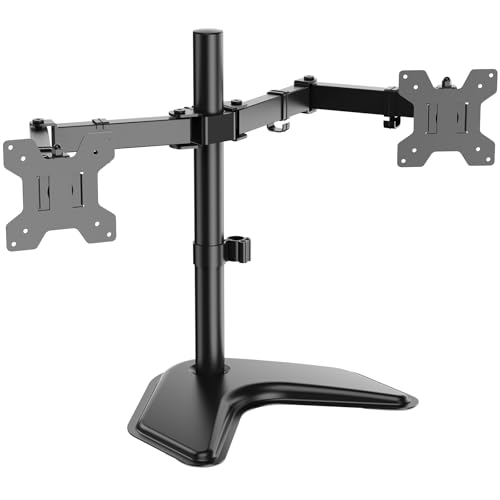
WALI MF002 Dual Monitor Stand for 27-inch Displays
A free-standing dual monitor mount supporting screens up to 27 inches and 22 lbs each, with full height, tilt, and rotation adjustability. Designed for ergonomic workspace setup without requiring desk clamps or wall mounting.
Pros
- Stable free-standing base eliminates need for desk mounting hardware
- Comprehensive adjustability (height, tilt, swivel, rotation) reduces neck and eye strain
- Compact footprint (17.05 x 10.75 x 3.46 inches) maximizes usable desk space
- Compatible with standard 75x75mm and 100x100mm VESA patterns
Cons
- No verified customer reviews available to assess real-world durability and assembly difficulty
- V-base design takes up floor space, limiting placement flexibility compared to clamp mounts
- 22 lbs per-arm weight limit may not accommodate larger or heavier monitors

Hemudu HT05B-001 Single Monitor Stand, 13-32 inch
A budget-friendly monitor riser that handles screens up to 32 inches with adjustable height, tilt, swivel, and rotation. Best suited for desk organization and ergonomic positioning, though it lacks advanced features like arm articulation.
Pros
- Supports a wide range of monitor sizes with VESA 50x50mm, 75x75mm, or 100x100mm compatibility
- Four-level height adjustment plus swivel and rotation offer flexible viewing angles
- Sturdy tempered glass base with 77-pound capacity provides stability for heavier displays
- Includes organized cable management to reduce desktop clutter
- Open-top VESA plate design makes installation straightforward without specialized tools
Cons
- No user reviews available yet to confirm real-world durability and ease of use
- Limited to single monitor setup, not suitable for multi-monitor configurations
- Adjustments are mechanical rather than articulated arm-based, restricting fine positioning compared to premium alternatives

Hemudu 2-Pack Monitor Riser, Height Adjustable 3.4-4.9 in
A tempered glass monitor stand with adjustable height and tilt that helps position screens at proper ergonomic angles. Designed for dual-monitor setups or pairing with laptop storage underneath, though assembly is required and weight capacity is moderate.
Pros
- Adjustable height range (3.4 to 4.9 inches) accommodates different desk heights and viewing preferences
- Forward tilt adjustment up to 15 degrees reduces neck and back strain from extended screen time
- Space-efficient design allows laptop storage underneath the raised monitor
- Tempered glass construction with stainless steel legs rated for up to 88 lbs maximum weight
- Two-pack format provides flexibility for multiple monitors or devices
Cons
- Requires manual assembly using screws and stainless steel components
- 88 lb weight capacity limits use with heavier dual-monitor setups or large displays
- No verified buyer reviews available to confirm real-world durability or usability experiences
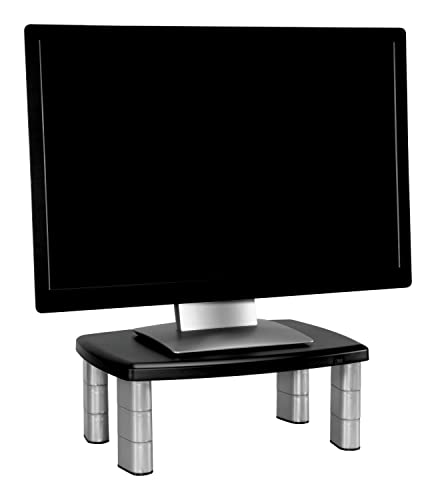
3M MS80B Monitor Stand, Adjustable 1-5.88 inches
This 3M stand lifts monitors and laptops up to 80 lbs with tool-free height adjustment in fixed increments, ideal for improving desk ergonomics without breaking the budget. The open design underneath provides 11 inches of storage space for keyboards, documents, or small office equipment.
Pros
- Straightforward height adjustment with stacking column design requires no tools or assembly
- Substantial weight capacity handles larger monitors, dual displays, or office equipment
- Smart underdesk storage maximizes limited desk real estate
- Non-skid base adds stability on smooth surfaces
Cons
- Height adjusts only in fixed 1.625-inch increments rather than continuous adjustment, limiting fine-tuning for perfect ergonomic positioning
- No customer reviews available to validate real-world durability and long-term performance
- Limited weight distribution documentation for stability with off-center loads
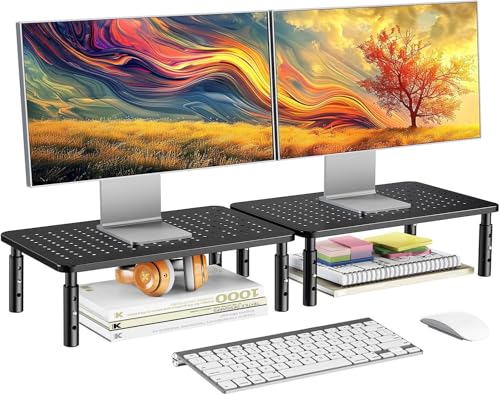
HUANUO Monitor Stand, 2-Pack, Height Adjustable
A budget-friendly monitor riser with three height settings and a perforated steel platform designed to improve airflow around your displays or laptops. Simple assembly and stable construction make it practical for office setups wanting to reclaim desk space.
Pros
- Quick, no-tool assembly that takes minimal time to set up
- Ventilated design with perforated platform helps keep electronics cool
- Sturdy construction with anti-slip feet provides reliable stability
- Affordable solution for raising monitors and creating under-desk storage
- Comes as 2-pack, suitable for dual-monitor workstations
Cons
- Limited height range (4.1 to 5.7 inches) may not suit all ergonomic preferences or taller users
- No verified buyer reviews available to assess real-world durability and long-term performance
- Fixed platform size limits compatibility with very large monitors or wide equipment

gianotter Dual Monitor Stand with Drawer
A no-assembly monitor riser that combines height adjustment for ergonomic viewing with integrated storage via a drawer and magnetic pen holders. Best suited for desk organization on a budget, though it has no verified buyer feedback yet to confirm real-world durability.
Pros
- Zero assembly saves setup time and frustration
- Dual storage features (drawer plus pen holders) help declutter smaller desks
- Ergonomic height adjustment supports better posture and reduces strain
- Maximizes under-monitor space for keyboard, mouse, or office supplies
- Metal build suggests solid construction for monitor weight support
Cons
- No verified customer reviews to confirm long-term durability or real-world weight capacity
- Limited color option (black only) may not match all desk aesthetics
- Specifications do not specify maximum monitor weight or compatibility details
Monitor Stands Buying Guide
Choosing the right monitor stand means matching the product to your specific screen, desk, and daily workflow. A riser that works perfectly for a compact home office corner can be completely wrong for a dual-monitor gaming station.
The sections below walk through the criteria that matter most, in roughly the order you should consider them.
Stand Type: Riser vs. Arm
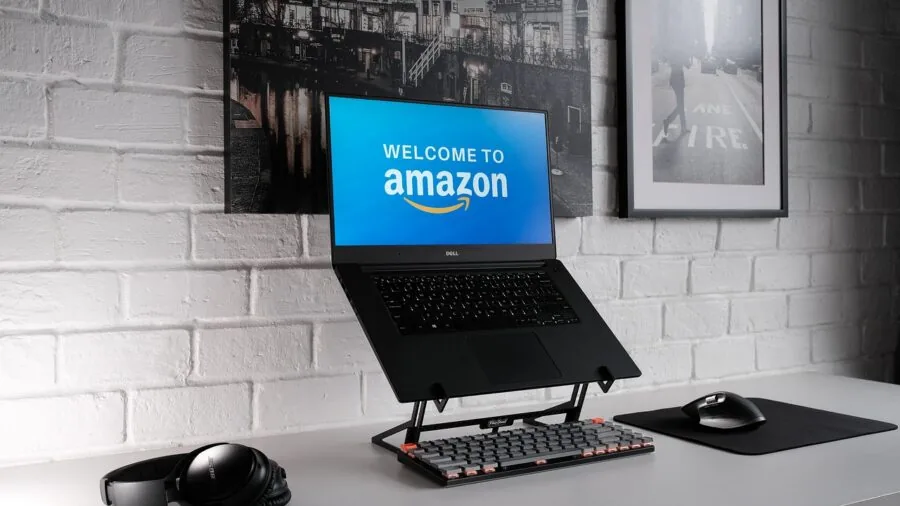
The first and most consequential decision is choosing between a passive riser and an articulating monitor arm. Risers, sometimes called desktop stands or shelves, sit directly on your desk surface and lift the monitor to a fixed or limited-range height.
They are straightforward to set up, require no drilling or desk modification, and often include bonus storage space underneath for a keyboard or documents.
The tradeoff is inflexibility: once the stand is on your desk, your viewing angle is essentially fixed.
Monitor arms, by contrast, clamp to the desk edge or thread through a grommet hole, freeing your desk surface entirely and allowing full tilt, swivel, and height adjustment on demand.
This matters enormously if you switch between sitting and standing, share a workstation with someone of different height, or need to rotate a screen to portrait mode for coding or reading.
The VESA mounting standard (most commonly 75×75 mm or 100×100 mm) is the universal interface between your monitor and any arm, so always verify your screen is VESA-compatible before buying an arm.
For users who simply need their monitor a few inches higher and value desk storage beneath, a well-built riser is perfectly sufficient. For anyone who wants precise daily adjustability or runs a dual-monitor setup, a clamp arm is the more powerful solution.
Weight Capacity and Screen Size Compatibility

Every stand has a rated weight limit and a screen size range, and both figures deserve honest attention.
An arm rated for up to 19.8 lbs may comfortably handle most 27-inch consumer monitors, but older or larger commercial displays can weigh considerably more.
Exceeding the rated load causes the arm to drift downward over time as the friction joints loosen under sustained stress.
Screen size compatibility matters for arms because larger panels create more leverage on the mounting point. A 32-inch screen at arm’s reach applies more torque than a 24-inch screen even if the two monitors weigh the same.
Always cross-reference both the weight spec and the size range listed by the manufacturer. For risers supporting large screens, also check the platform width and column spacing, since a narrow base on a wide, heavy monitor creates tip risk.
Height Range and Ergonomic Positioning
Ergonomics guidelines from occupational health researchers consistently recommend that the top edge of the monitor sit at or just below eye level, with the screen roughly arm’s length from your face.
Most people who use a laptop or a factory-stand monitor are looking slightly downward all day, which loads the cervical spine. A monitor stand corrects this by raising the display to a more neutral position.
Fixed risers typically offer a single lift height or a small number of preset levels. Fully adjustable arms can span several inches or more of vertical travel, which is essential for sit-stand workflows.
If you are pairing your setup with a height-adjustable desk, an arm with wide vertical travel will let you match the screen to your eye level whether you are seated or standing.
Users who remain seated all day can often get by with a fixed riser as long as the height matches their chair and desk combination.
Tilt adjustment is equally important. Being able to angle the monitor slightly back reduces glare from overhead lighting and lets you maintain a neutral neck posture.
Most arms allow at least plus or minus 15 degrees of tilt; premium models offer 90 degrees of rotation for portrait mode as well.
Mounting Method: Clamp, Grommet, or Freestanding

Clamp-style arms grip the desk edge using a screw mechanism and a rubber pad. They are the most popular option because they install in minutes without permanent modification and work with nearly any desk thickness.
Most clamps accommodate desks up to about 3 to 4 inches thick, so measure yours if you have a heavy butcher-block or solid-wood top.
Clamps also require the desk edge to be accessible, which rules them out for desks pushed flush against a wall on three sides.
Grommet mounts thread through a pre-drilled hole in the desk surface, typically one that was intended for cable routing. They distribute load more evenly across the desk and eliminate any lateral movement under the clamp.
The downside is that you need an existing grommet hole in approximately the right location, or you need to drill one yourself.
Freestanding arms sit on the desk surface with a weighted base and require no attachment at all, making them ideal for glass desks, rental spaces, or anyone who wants zero installation commitment.
The tradeoff is that they consume desk real estate with the base.
Single vs. Dual Monitor Configurations

Dual-monitor setups have become standard in many professional workflows, from software development to video editing to financial analysis.
A dual monitor arm replaces two separate factory stands, reclaims considerable desk space, and lets you position both screens at matched heights and angles with independent adjustment.
This is far more practical than two separate risers, which cannot be fine-tuned independently and tend to drift to different heights over time.
When evaluating dual arms, pay close attention to the reach of each arm segment. Some models keep both screens close together, which suits wide-screen workflows but limits the ability to push the secondary screen to a steep angle.
Others allow nearly perpendicular positioning, which is preferred by many power users who keep reference material on the secondary display and main work on the primary.
Brands like HUANUO and VIVO offer well-regarded dual-arm options across a range of price points in the budget-to-mid-range segment.
Build Quality, Cable Management, and Desk Compatibility

The frame and joint materials determine how well a stand holds position over years of use.
Steel construction is the gold standard for monitor arms; it resists flex under load and maintains friction joint settings far better than zinc alloy or reinforced plastic alternatives.
For risers, a metal frame with non-slip rubber feet is preferable to all-plastic designs, which can crack under the sustained weight of a large display.
Cable management channels are a small but meaningful quality-of-life feature. Arms that route cables through hollow channels keep the desk tidy and prevent cables from swinging around every time you reposition the screen.
Some risers, like the gianotter Dual Monitor Stand Riser, go further by integrating drawers and pen holders that address desk organization as a whole, making them a compelling choice for small workspaces where every square inch counts.
Similarly, if you are building a complete workstation, a thoughtfully chosen table lamp positioned at the right height alongside your monitor stand will reduce eye strain significantly.
Also confirm that the arm or stand fits your desk edge thickness and depth. Very thin or very thick desks can fall outside the clamping range of standard models.
Users with glass desks should look specifically for freestanding or grommet designs, as clamps can crack glass if overtightened.
Why You Should Trust Us
ProductFind is an independent review publication. We earn no revenue from manufacturers and accept no review units or sponsored placements.
Every product in this roundup was assessed using our structured PF Score methodology, which rates each item on a consistent 0 to 10 scale across criteria including build quality, adjustment range, mounting versatility, user-reported durability, and value relative to category competition.
We do not conduct our own product trials; our evaluations are grounded in research, published data, expert review consensus, and verified buyer feedback.
Sources include manufacturer-published specifications, aggregated verified purchaser reviews from major retail platforms, and ergonomics guidance from occupational health bodies.
When expert reviewers in the workspace and productivity space reach a consistent consensus about a product’s strengths or weaknesses, that consensus is weighted heavily in our scoring.
ProductFind may earn an affiliate commission if you purchase through a link on this page. That relationship has no bearing on rankings, PF Scores, or editorial selections. Products are ordered by research-derived merit, not by commission rate.
Final Thoughts
The monitor stands and arms in this roundup cover a wide range of needs, from simple desktop organization to professional-grade dual-screen ergonomics. Here are our top picks by category, each linked to the full product detail for easy comparison.
- Best Overall: gianotter Dual Monitor Stand Riser earns the top PF Score in this roundup by combining practical desk organization, a built-in drawer, and a sturdy elevated shelf into one affordable package that genuinely improves workspace function beyond simple screen lifting.
- Best Dual Monitor Arm: HUANUO FlowLift Dual Monitor Stand delivers full-motion adjustability for two screens up to 32 inches, with independent arm positioning that expert reviewers consistently praise for smooth operation and long-term joint stability.
- Best Freestanding VESA Mount: HUANUO Monitor Stand Freestanding VESA Mount offers five height options, 360-degree rotation, and support for screens up to 34 inches at a budget-friendly price, making it an outstanding value for users who want VESA flexibility without clamp installation.
- Best Single Monitor Arm: HUANUO FlowLift Single Monitor Mount provides clamp and grommet installation options, smooth cable routing, and reliable tilt and swivel for one screen, ranking as the highest-scoring single arm in the group.
- Best Adjustable Riser: BoYata Monitor Stand earns strong marks for its metal construction, clean aesthetic, and compatibility with large displays including iMac and wide-format screens, with verified buyers consistently highlighting its stability under heavy loads.
Whatever your setup, the right monitor stand is one of the highest-return upgrades you can make to a desk workspace.
If you are also rethinking your full office layout, exploring height-adjustable standing desks alongside a quality monitor arm will give you the most complete ergonomic solution.
And if your audio setup is part of the workstation, properly positioned speaker stands can complement your monitor arrangement for a cleaner, better-sounding desk.
Frequently Asked Questions
What Is the Difference Between a Monitor Stand and a Monitor Arm?
A monitor stand (also called a riser) is a platform that sits on your desk and elevates the screen to a fixed or limited-range height.
A monitor arm clamps to the desk edge or mounts through a grommet hole and allows full adjustment of height, tilt, swivel, and often rotation.
Arms free up the entire desk surface beneath the screen; risers typically leave the area under the platform accessible for storage.
For most users who want a simple ergonomic lift and some desk organization, a riser is sufficient and easier to set up.
Users who need daily height adjustment, portrait mode rotation, or multi-monitor precision positioning will find a monitor arm worth the slightly more involved installation.
Does My Monitor Need to Be VESA-Compatible to Use an Arm?
Yes. Monitor arms attach to the back of your screen via a VESA mount pattern, most commonly 75×75 mm or 100×100 mm.
Most monitors made in the past decade include VESA mounting holes, but some curved monitors, all-in-one PCs, and ultrawide displays use proprietary stands without VESA compatibility. Check your monitor’s manual or specifications page before purchasing an arm.
If your monitor lacks VESA holes, you can sometimes purchase a VESA adapter plate specific to your model, though these add cost and complexity. Risers and freestanding shelves, by contrast, require no VESA compatibility since they support the monitor’s existing stand from below.
Can a Monitor Arm or Stand Damage My Desk?
Clamp-style arms apply pressure to the desk edge and can leave indentations in soft wood or veneer surfaces if overtightened or used without the protective rubber pads that most models include.
Glass desks are generally not suitable for clamp mounts; use a freestanding arm or a grommet mount on a reinforced glass desk. Thick butcher-block or solid hardwood tops handle clamps well, provided you stay within the arm’s rated clamping range.
Grommet mounts distribute force more evenly and are gentler on desk surfaces, but they require an existing hole. Freestanding models carry no risk of desk damage at all, making them the safest choice for fragile or rental surfaces.
How High Should My Monitor Be for Proper Ergonomics?
Standard ergonomics guidance recommends positioning the top edge of the monitor at approximately eye level when seated upright, with the screen roughly an arm’s length away from your face.
This keeps your neck in a neutral position and reduces the muscle fatigue that builds up from looking downward for hours.
Most people find that their monitor’s factory stand leaves the screen too low, which is the primary reason a stand or arm delivers such a noticeable comfort improvement.
If you use a sit-stand workflow, an arm with at least four to five inches of vertical travel will let you reset the screen height whenever you transition between sitting and standing.
A fixed riser is calibrated for one position only, so it works best for users who remain seated throughout the day at a consistent chair height.
Are Budget Monitor Arms Reliable Enough for Everyday Use?
Budget monitor arms from established brands like HUANUO, VIVO, and WALI have built strong track records among verified buyers, with many users reporting years of stable, drift-free performance at price points well below premium office brands.
The key is staying within the arm’s rated weight and size limits and ensuring the friction joints are properly tightened during setup.
Where budget arms tend to fall short is in the smoothness of gas-spring-assisted positioning (most budget models use friction joints rather than gas springs) and in the quality of cable management channels.
For a home office or secondary workstation, a budget arm from a reputable brand is a sensible choice.
For a professional environment where the arm is adjusted dozens of times per day, a mid-range or premium model with a gas spring mechanism will hold up better over time.
Can I Use a Monitor Stand or Arm with a Laptop?
Many risers are marketed as compatible with both monitors and laptops, and a basic shelf-style riser will happily hold a closed laptop acting as a second screen.
However, most VESA-based monitor arms are designed exclusively for displays with VESA mounting holes and cannot directly hold a laptop.
Some arms include an optional laptop tray accessory that clamps to the arm structure, allowing a laptop to sit alongside a mounted monitor in a hybrid configuration.
If your workspace mixes a laptop with an external monitor, a dual riser such as the HUANUO 2 Pack Monitor Stand offers a practical low-cost solution: one riser elevates the external display, and the second provides a consistent surface for the laptop beside it, keeping both screens at a matched height without any VESA mounting required.
About the author
Ruby is a reviewer and writer for ProductFind who specializes in Office Furniture. Ruby evaluates products through independent research: specifications, expert review consensus, and verified buyer feedback, and rates each one on the PF Score. Ruby focuses on helping readers pick the right office furniture for their needs and budget.