The 11 Best Ergonomic Keyboards
Wrist strain and shoulder fatigue are real costs of flat keyboard designs. These ergonomic picks from Logitech, KINESIS, Perixx, and Microsoft help you type comfortably all day.
 By Megan Daniels
Updated July 23, 2026
By Megan Daniels
Updated July 23, 2026

Typing for hours on a flat, straight keyboard quietly takes a toll on your wrists, forearms, and shoulders.
Ergonomic keyboards address this by placing keys at angles and curves that match the natural resting position of your hands, reducing the ulnar deviation and wrist extension that accumulate into repetitive strain injuries over time.
Whether you are recovering from discomfort or simply want to protect your hands before problems develop, choosing the right board makes a measurable difference in daily comfort.
We researched the ergonomic keyboard market extensively, analyzing manufacturer specifications, expert review consensus across the industry, and verified buyer feedback to find the strongest options across every budget and use case.
From the deeply contoured KINESIS Advantage360 Professional to the approachable Logitech Wave Keys, each pick below earned its place through consistent scoring on our 0 to 10 PF Score scale.
Read on for our top picks, then use the buying guide below to match the right keyboard to your needs.
| Award | Product | PF Score About PF ScoreThe PF Score is our own rating from 0 to 10, based on performance, design and build, ease of use, and value. It reflects independent research and is never influenced by manufacturers, retailers, or affiliate commissions. Learn more › | Price | |
|---|---|---|---|---|
| Best Overall |
 Kinesis Advantage360 Pro Split Ergonomic Keyboard
|
9.0/10 | Buy | |
| Editor's Pick |
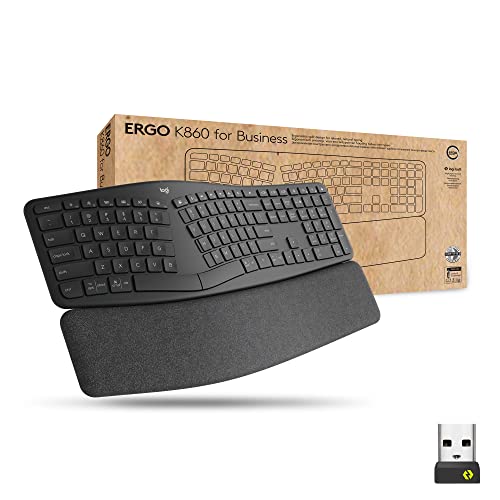 Logitech Ergo K860 Split Wireless Keyboard
|
8.7/10 | Buy | |
| Best Value |
 Logitech Wave Keys Wireless Ergonomic Keyboard
|
8.5/10 | Buy | |
| Top Rated |
 Perixx Periboard-612B Wireless Split Keyboard
|
7.8/10 | Buy | |
 Arteck Split Ergonomic Keyboard, Wireless
|
7.4/10 | Buy | ||
 Arteck Ergonomic Split USB Keyboard with Backlit
|
7.3/10 | Buy | ||
 Microsoft Ergonomic Keyboard for Business - Wired
|
7.2/10 | Buy | ||
 Nulea RT05C Ergonomic Split Keyboard
|
7.1/10 | Buy | ||
 Microsoft Natural Ergonomic Keyboard 4000
|
6.5/10 | Buy | ||
|
Microsoft Natural Ergonomic Keyboard 4000
|
6.5/10 | Buy | ||
 Faadar Wireless Keyboard and Mouse Combo 2.4G
|
5.8/10 | Buy |
Kinesis Advantage360 Pro Split Ergonomic Keyboard
A premium split keyboard built for comfort with contoured key wells, adjustable tenting, and quiet mechanical switches. Best suited for professionals and remote workers seeking to reduce strain during extended typing sessions.
Pros
- Proven ergonomic shape reduces hand and wrist strain during long work sessions
- Quiet mechanical switches provide tactile feedback without office noise
- Adjustable separation and tenting accommodate various body types and desk setups
- Open source programmability allows advanced customization for power users
- Solid build quality with durable switches rated for 50 million keypresses
Cons
- Premium pricing positions it at the high end of the keyboard market
- Requires learning curve due to split layout and orthogonal key arrangement
- Palm pads sold separately, adding to total cost of ownership
- No user reviews available yet to validate real-world durability claims
Logitech Ergo K860 Split Wireless Keyboard
A split, curved keyboard designed for all-day comfort with enterprise-grade security via Logi Bolt encryption. Best suited for office workers and IT departments prioritizing ergonomics and secure wireless connectivity.
Pros
- Ergonomist-approved split design with pillowed wrist rest for reduced strain during extended typing
- Enterprise-ready with Logi Bolt security and IT deployment tools via Logitech Options app
- Full-size keyboard with numpad and multi-device connectivity without compromising portability
- Long 2-year battery life minimizes maintenance interruptions in workplace settings
- Adjustable tilt positions accommodate both seated and standing work setups
Cons
- No verified customer reviews available to assess real-world reliability and long-term durability
- Split layout may require adjustment period for users accustomed to traditional keyboards
- Premium positioning suggests higher cost relative to standard wireless keyboards
Logitech Wave Keys Wireless Ergonomic Keyboard
This compact wireless keyboard uses a wavy design and memory foam palm rest to reduce wrist strain during long typing sessions. It pairs well with those who prioritize ergonomic comfort and need multi-device connectivity via Bluetooth or Logi Bolt receiver.
Pros
- Ergonomic design backed by third-party certification, not just marketing claims
- Memory foam palm rest provides genuine wrist support without bulk
- Seamless switching between Windows, macOS, iPadOS, and ChromeOS devices
- Lightweight at 2.1 pounds, portable for remote workers
- Customizable shortcuts through Logi Options+ app
Cons
- No user reviews available yet to assess real-world reliability
- Limited to Bluetooth or proprietary Logi Bolt receiver, no USB-C or standard dongle option
- Wave design may feel unusual for those accustomed to traditional flat keyboards
Perixx Periboard-612B Wireless Split Keyboard
A split ergonomic keyboard with dual wireless connectivity (2.4 GHz and Bluetooth) designed to reduce wrist strain during extended typing sessions. Works with Windows and Mac systems with customizable function keys and tactile membrane switches rated for 20 million keystrokes.
Pros
- Ergonomic split layout with curved keycaps and stepped rows supports natural typing posture
- Flexible dual wireless connectivity allows seamless switching between 2.4 GHz and Bluetooth
- Cross-platform compatibility with customizable keys for both Windows and Mac systems
- Responsive tactile feedback from extended membrane key travel provides typing satisfaction
- No driver installation needed for immediate use with Windows and Mac
Cons
- Requires 2 AA alkaline batteries which are not included in the package
- No reviews available yet to assess real-world durability and long-term user satisfaction
- Membrane switches may lack the consistency of true mechanical alternatives for some users
Arteck Split Ergonomic Keyboard, Wireless
This split keyboard positions your wrists in a natural alignment with cushioned palm support, designed to reduce strain during long typing sessions. Wireless connectivity and six-month battery life make it practical for desktop and laptop users seeking ergonomic comfort.
Pros
- Split ergonomic layout reduces wrist strain and promotes neutral posture
- Generous six-month battery life minimizes frequent charging
- Simple wireless setup requires no software installation
- Includes charging cable and 24-month warranty for peace of mind
Cons
- No user reviews available to verify real-world comfort claims or long-term durability
- Split design may require adjustment period for users accustomed to traditional keyboards
- Limited information on key switch responsiveness or typing feel
Arteck Ergonomic Split USB Keyboard with Backlit
A budget-friendly ergonomic split keyboard designed to reduce wrist strain during extended typing sessions. Features a cushioned wrist rest, adjustable 7-color backlighting, and straightforward USB plug-and-play setup for Windows computers.
Pros
- Split design encourages natural wrist and forearm positioning during typing
- Soft cushioned wrist rest provides comfort during long work sessions
- Adjustable LED backlighting with multiple colors and brightness settings
- Long 6-foot USB cable allows flexible keyboard placement away from computer
- Simple plug-and-play installation without software or driver requirements
Cons
- No verified customer reviews available to confirm real-world performance or durability
- Wired connection limits desk flexibility compared to wireless alternatives
- Split keyboard design may require adjustment period for users accustomed to traditional layouts
Microsoft Ergonomic Keyboard for Business - Wired
A split-key design with cushioned palm rest aims to reduce wrist strain during extended work sessions. Built-in Office 365 and emoji shortcuts boost productivity, though compatibility is limited to Windows 10 with reduced functionality on older systems.
Pros
- Ergonomic split layout with cushioned palm rest designed for all-day comfort
- Dedicated shortcuts for Office 365, emoji, and media controls increase workflow efficiency
- Integrated numeric pad built into the keyboard
- Reliable wired connection ensures consistent performance
Cons
- Limited to Windows 10 for full functionality; Office and Emoji keys don't work on Windows 8.1 or 7
- Wired design restricts desk mobility compared to wireless alternatives
- No user reviews available to verify real-world comfort claims
Nulea RT05C Ergonomic Split Keyboard
A wired split keyboard designed to reduce strain through natural hand alignment and a cushioned wrist rest. Best suited for users prioritizing ergonomic comfort during extended typing sessions, with plug-and-play setup across Windows, Mac, and Linux.
Pros
- Ergonomic split layout naturally aligns hands and reduces strain
- Generous wrist support with soft leatherette material prevents fatigue during long sessions
- Adjustable tilt angles accommodate different typing preferences and postures
- Reliable wired connection eliminates interference and connectivity concerns
- Universal compatibility and instant plug-and-play setup require no software installation
Cons
- No wireless option limits desk flexibility and cable management
- No verified customer reviews available to assess real-world durability and long-term comfort
- Split design may require adjustment period for users accustomed to traditional keyboards
Microsoft Natural Ergonomic Keyboard 4000
A wired ergonomic keyboard designed to reduce strain with its split layout and cushioned palm rest. Best suited for office workers and those seeking long-term typing comfort over portability.
Pros
- Split keyboard layout promotes more neutral wrist and forearm alignment
- Cushioned palm rest provides tangible support during extended typing sessions
- Integrated media controls reduce need to reach for other devices
- Improved numeric keypad layout matches common data entry workflows
Cons
- No user reviews available to validate real-world comfort and durability claims
- Requires IntelliType Pro software installation on Mac OS X, adding setup complexity
- Wired connection limits desk flexibility compared to wireless alternatives
- Bulky dimensions (21.43 x 17.37 x 12.43 inches) may strain smaller workspaces
Microsoft Natural Ergonomic Keyboard 4000
A wired ergonomic keyboard with a split design and cushioned palm rest aimed at reducing wrist strain during extended typing. Best suited for users prioritizing comfort and neutral hand positioning over portability.
Pros
- Split keyboard design reduces strain on wrists and forearms during prolonged use
- Integrated palm rest provides consistent support and promotes ergonomic positioning
- Media control keys enable quick access to audio and video functions without reaching for the mouse
- Wired USB connection eliminates battery concerns and latency issues
Cons
- Wired connection limits desk setup flexibility and requires USB port access
- Split ergonomic design may require adjustment period for users accustomed to traditional keyboards
- No user reviews available to validate real-world durability and long-term comfort claims
Faadar Wireless Keyboard and Mouse Combo 2.4G
A budget-friendly wireless combo with ergonomic curved design and quiet keys, suitable for office and home use across Windows and Mac. Includes adjustable DPI mouse and multi-level stand, though it lacks user reviews and requires AA batteries.
Pros
- Quiet membrane keys reduce noise in shared office or home environments
- Adjustable keyboard stands with four leg rests allow three different tilt positions for ergonomic comfort
- Cross-platform compatibility with quick FN key switching between Windows and macOS
- 3-level DPI adjustment on mouse provides flexibility for different task types
- 12-month warranty and customer support included
Cons
- No verified buyer reviews available to validate real-world performance and durability
- Requires two AA batteries (not included) for operation, adding ongoing battery costs
- Limited information on typing feedback quality and mouse tracking precision compared to competitors
Ergonomic Keyboards Buying Guide
Switching to an ergonomic keyboard is one of the most impactful workstation upgrades you can make, but it pays to understand what separates a genuinely helpful design from one that is simply marketed as ergonomic.
The criteria below cover every major decision point, from keyboard shape to connectivity, so you can narrow the field before spending a dollar.
For anyone building a broader ergonomic setup, pairing your keyboard with the right peripherals matters just as much as the board itself.
Our roundup of tablets for every budget can help if you are also evaluating your overall input device ecosystem.
Keyboard Layout and Split Design

Ergonomic keyboards come in three broad layout families. Gentle-wave keyboards, like the Logitech Wave Keys and the classic Microsoft Natural 4000, keep both halves physically joined but curve the key rows so your hands angle slightly outward.
These are the easiest to learn on because the key positions remain familiar. Alice-style keyboards, such as the Logitech Ergo K860, deepen that angle and add a central tent so your palms rotate inward.
True split keyboards, like the Perixx Periboard-612B and the KINESIS Advantage360 Professional, physically separate into two halves so you can place each module exactly where your arms naturally fall.
The more separation and tenting a design offers, the more adjustment time it demands. Budget roughly one to two weeks of slower typing before muscle memory catches up.
If you need to stay productive immediately, start with a wave or Alice board. If long-term comfort is the priority and you can tolerate a learning curve, a true split rewards patience with noticeably better shoulder and forearm positioning.
Tenting and Negative Tilt

Most flat keyboards force your hands into a palm-down, slightly pronated position that strains the forearm muscles over hours. Tenting raises the inner edge of the keyboard so your palms rotate inward toward a handshake angle.
Even a modest tent of five to ten degrees reduces pronation significantly. The KINESIS Advantage360 Professional offers adjustable tenting legs for a precise fit, while the Logitech Ergo K860 builds a fixed tent into its chassis.
Negative tilt, where the far edge of the keyboard sits lower than the near edge, encourages a neutral wrist position when your elbows are at or above desk height.
Several models in this list, including the Nulea RT05C, provide multiple leg height settings to achieve this angle.
If your desk is fixed and on the higher side, negative tilt can make a real difference; if you work at a sit-stand desk, look for a board that offers both positive and negative angle options.
Wrist and Palm Rest Quality
A built-in wrist rest that is too hard creates new pressure points, while one that is too soft collapses under sustained use.
The best rests use memory foam or dense gel covered in a breathable fabric that remains firm enough to support without causing numbness.
The Arteck split ergonomic keyboard and the Arteck wired backlit model include cushioned rests rated positively by verified buyers for their firmness-to-softness balance.
Pay attention to whether the rest is integrated or detachable. Integrated rests add bulk when traveling, while detachable options give you flexibility. If a keyboard you like ships without a rest, third-party gel rests are inexpensive and widely available.
What matters most is that your wrists remain straight and hover slightly above or just touch the rest during active typing, not that they press hard into it.
Switch Type and Key Feel

Budget and mid-range ergonomic keyboards typically use membrane or scissor switches. These are quiet, low-travel, and adequate for office use, but they offer less tactile feedback and wear out faster than mechanical options.
The Logitech Wave Keys, Logitech Ergo K860, and the Perixx Periboard-612B all use membrane or scissor mechanisms that keep noise low in shared spaces.
Mechanical switches, found in the KINESIS Advantage360 Professional, provide distinct actuation feedback and significantly longer rated lifespans, typically 50 to 100 million keystrokes per switch. They are louder than membranes but can be sourced in quieter linear or tactile variants.
If you type heavily for work and want a keyboard that will outlast several years of daily use, the higher upfront investment in a mechanical ergonomic board is worth considering.
Connectivity and Multi-Device Support

Wired USB keyboards, like the Arteck backlit wired model and the Nulea RT05C, offer zero-latency input and no battery management. They are the right choice for dedicated desktop setups where cable clutter is not a concern.
Wireless options divide into 2.4 GHz USB receiver and Bluetooth. The 2.4 GHz receiver, used by the Arteck split keyboard, delivers near-wired latency and works with virtually every operating system, including those that sometimes have Bluetooth driver quirks.
Bluetooth, available on the Perixx Periboard-612B and the KINESIS Advantage360 Professional, lets you pair to multiple devices and switch between them, which is invaluable if you move between a laptop, desktop, and tablet throughout the day.
The Logitech Ergo K860 and Wave Keys support both Bluetooth and a USB receiver, giving you the flexibility to choose per session.
If you pair your keyboard with wireless audio gear, a solid Bluetooth speaker on your desk can complete a tidy, cable-free workspace.
Programmability and Software

Most mainstream ergonomic keyboards ship with fixed key layouts and rely on operating system-level shortcuts for customization. Logitech provides its Logi Options+ software for the K860 and Wave Keys, enabling macro assignment, hotkey remapping, and device-switching shortcuts.
This covers the needs of the majority of office users without requiring any technical knowledge.
Power users who want full control over every key, layer, and macro should look at the KINESIS Advantage360 Professional, which runs open-source ZMK firmware and allows complete keyboard remapping, multiple layers, and custom RGB lighting patterns.
This level of programmability rivals enthusiast mechanical keyboards at several times the price. If you are building a productivity-focused workstation, a capable setup can extend well beyond the keyboard itself.
Pairing a well-configured board with the right display, room audio, and smart peripherals rounds out a genuinely efficient workspace.
Why You Should Trust Us
ProductFind is an independent review platform. We do not accept payment from manufacturers to influence rankings, and we have no vested interest in any brand represented in this article.
Every product in our roundups is assessed using a consistent, transparent methodology that results in a PF Score on a 0 to 10 scale. Higher scores reflect stronger performance across the criteria that matter most to real buyers in that category.
Our evaluation process draws on four primary sources: detailed manufacturer and third-party specifications, expert review consensus gathered from the broader review community, verified buyer feedback from confirmed purchasers, and published data with traceable sources.
We do not conduct our own product trials; our evaluations are grounded in research, published data, expert review consensus, and verified buyer feedback.
This approach lets us cover a wider range of products with greater consistency than any single reviewer handling physical units alone.
ProductFind may earn a commission when you purchase through links on this page. That affiliate relationship has no bearing on which products we recommend, how we rank them, or what PF Score they receive.
Our editorial decisions are made independently of commercial considerations, and rankings are determined solely by the quality of our research findings.
Final Thoughts
After thorough research across specifications, expert consensus, and verified buyer experiences, the ergonomic keyboards in this list represent the strongest picks available across every budget tier and use case. Here are the standout titles from our evaluation:
- Best Overall: KINESIS Advantage360 Professional Split Ergonomic Keyboard earns the top PF Score in this roundup with its contoured split layout, adjustable tenting, open-source programmability, and quiet mechanical switches, making it the most complete ergonomic keyboard in the group for serious users.
- Best Wireless Ergonomic Keyboard: Logitech Ergo K860 Split for Business delivers the best balance of ergonomic benefit, wireless reliability, and broad platform support among the wireless-first options, earning it the second-highest PF Score overall.
- Best Entry-Level Pick: Logitech Wave Keys Wireless Ergonomic Keyboard is the easiest on-ramp into ergonomic typing, offering genuine comfort improvements without the split-keyboard learning curve, at a budget-friendly price.
- Best Budget Split Keyboard: Perixx Periboard-612B Wireless Ergonomic Split Keyboard provides true split-layout ergonomics and dual-mode wireless connectivity at a fraction of the cost of premium split boards, making it the smartest value for users who want physical separation without a steep investment.
- Best Wired Budget Option: Arteck Ergonomic USB Wired Keyboard stands out among plug-and-play wired choices for its backlit keys, cushioned wrist rest, and reliable build at an accessible price point.
Whichever board you choose, give yourself adequate time to adapt. For broader workspace upgrades, a solid pair of portable Bluetooth speakers or a set of well-chosen soundbars with subwoofers can round out a comfortable, productive environment.
Frequently Asked Questions
How long does it take to adjust to an ergonomic keyboard?
Most people regain close to their original typing speed within one to three weeks of daily use. Wave and Alice designs take the least adjustment time because the key positions remain familiar.
True split keyboards require the longest adaptation period, sometimes up to four weeks, because muscle memory for reaching keys across the center of the board must be rebuilt.
Typing speed will dip initially, so plan the switch during a lighter workload period if possible.
Will an ergonomic keyboard fix wrist or hand pain?
An ergonomic keyboard can meaningfully reduce strain-related discomfort by placing your hands in a more neutral position, but it is not a medical treatment.
If you are already experiencing significant pain, numbness, or tingling, consult a healthcare professional before purchasing any new hardware.
Ergonomic keyboards work best as prevention or as part of a broader workstation adjustment that also addresses chair height, monitor position, and break frequency.
Are wireless ergonomic keyboards reliable enough for daily professional use?
Yes, for the vast majority of office and productivity work. Keyboards using a dedicated 2.4 GHz USB receiver, like the Arteck split model, deliver latency that is imperceptible in typing.
Bluetooth models from established brands like Logitech and KINESIS are also stable in normal office environments. Input lag only becomes a meaningful concern in fast-paced gaming scenarios, not in standard typing or productivity use.
What is the difference between a split keyboard and a standard ergonomic keyboard?
A standard ergonomic keyboard keeps both halves physically joined but curves or angles the key rows. A split keyboard separates completely into two independent modules that you position independently.
Split keyboards allow greater shoulder width and forearm angle adjustment, which benefits people with broader shoulders or those who want to place a mouse or document holder between the two halves.
They demand a longer learning curve but offer more precise ergonomic customization.
Are ergonomic keyboards compatible with both Windows and Mac?
Most of the keyboards in this roundup support both operating systems at a basic hardware level. The Logitech Ergo K860 and Wave Keys include dedicated key labels and Logi Options+ software that correctly maps modifier keys on both platforms.
The Perixx Periboard-612B explicitly lists Windows and Mac OS compatibility. The KINESIS Advantage360 Professional uses open-source firmware that supports any operating system.
Always check whether the software companion app supports your OS if you plan to use advanced remapping features.
Can I use an ergonomic keyboard with a standing desk setup?
Absolutely, and ergonomic keyboards pair particularly well with sit-stand setups. When standing, your elbows tend to be closer to ninety degrees, which complements the negative tilt and tenting options many of these boards provide.
A wireless model, such as the Logitech Ergo K860 or the Perixx Periboard-612B, gives you the flexibility to reposition freely as your desk height changes throughout the day.
A comfortable ergonomic stool for in-between heights and a thoughtfully arranged desk complete the picture for an all-day comfortable workstation.
About the author
Megan is a reviewer and writer for ProductFind who specializes in PC Components & Peripherals. Megan evaluates products through independent research: specifications, expert review consensus, and verified buyer feedback, and rates each one on the PF Score. Megan focuses on helping readers pick the right pc components & peripheral for their needs and budget.