The 12 Best Print Servers
Sharing a printer across multiple computers does not have to be complicated. This guide covers twelve print servers for every setup, from single-USB adapters to wireless multi-port hubs.
 By Megan Daniels
Updated July 23, 2026
By Megan Daniels
Updated July 23, 2026
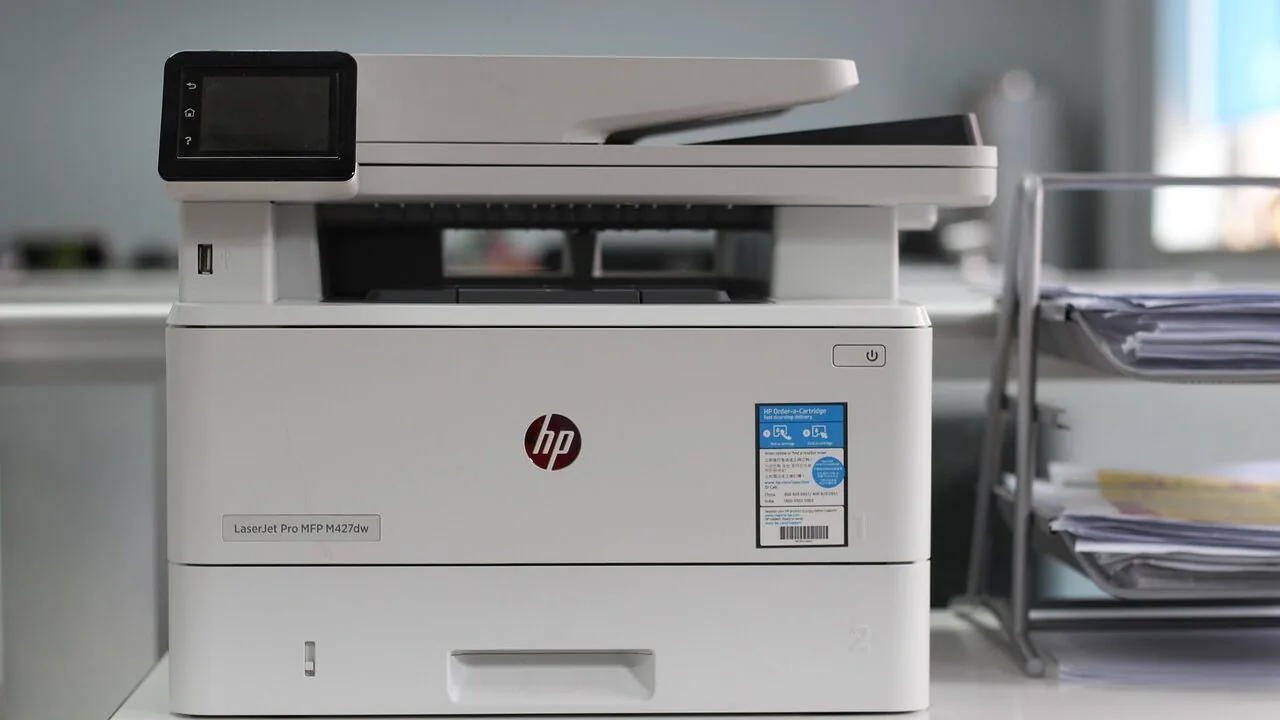
Print servers solve a problem that frustrates offices, schools, and home networks every day: how do you let a dozen computers share one printer without running cables everywhere or keeping a host PC powered on?
By sitting between your printer and your router, a print server handles every incoming job independently, so anyone on the network can print whenever they need to without fighting for a single USB port.
The category spans bare-bones USB-to-Ethernet adapters, wireless multi-port hubs, and enterprise-grade internal cards, meaning there is a genuinely useful option at nearly every price point from budget to premium.
This guide covers twelve print servers, from compact USB adapters by StarTech.com and IOGEAR to wireless sharing hubs from Xiiaozet and XUMIUZIY and legacy-compatible parallel models from X-MEDIA and StarTech.com.
Our research team assessed each model using published specifications, expert review consensus, and verified buyer feedback so you can compare your options with confidence.
Read on for our top picks, then scroll to the buying guide for everything you need to make the right call.
| Award | Product | PF Score About PF ScoreThe PF Score is our own rating from 0 to 10, based on performance, design and build, ease of use, and value. It reflects independent research and is never influenced by manufacturers, retailers, or affiliate commissions. Learn more › | Price | |
|---|---|---|---|---|
| Best Overall |
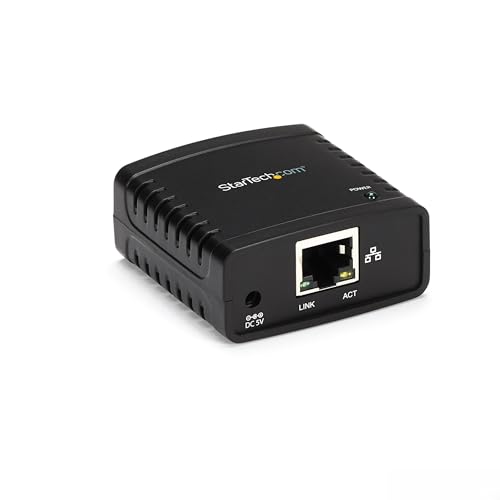 StarTech PM1115U2 USB Print Server, 10/100Mbps
|
9.0/10 | Buy | |
| Editor's Pick |
 StarTech PM1115P3 Parallel Network Print Server
|
8.9/10 | Buy | |
| Best Value |
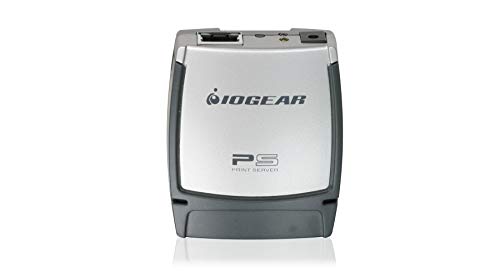 IOGEAR GPSU21 USB Print Server
|
8.8/10 | Buy | |
| Top Rated |
 Xiiaozet LK300W Wireless Print Server, 3-Port USB
|
8.7/10 | Buy | |
 X-MEDIA XM-PS110U USB Print Server
|
7.8/10 | Buy | ||
 XUMIUZIY 4-Port Wireless Print Server, 100Mbps
|
7.5/10 | Buy | ||
 HP Jetdirect 2900Nw Print Server J8031A
|
7.4/10 | Buy | ||
 Zunate 4-Printer USB Print Server with Wireless and Wired Support
|
7.3/10 | Buy | ||
 HP Jetdirect 635N Gigabit Print Server
|
7.2/10 | Buy | ||
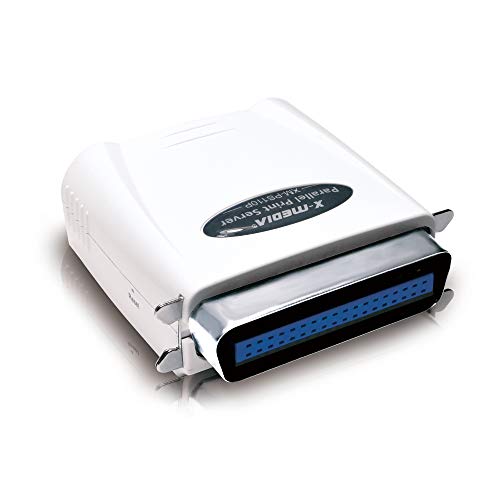 X-MEDIA XM-PS110P 1-Port Print Server
|
7.1/10 | Buy | ||
 SEH Printserver One Ethernet Print Server
|
6.2/10 | Buy | ||
 HP Jetdirect 620n Ethernet Print Server
|
6.1/10 | Buy |
StarTech PM1115U2 USB Print Server, 10/100Mbps
A wired network print server that connects a single USB printer to your Ethernet LAN, enabling printing from any networked computer. Setup requires manual configuration and intermediate networking knowledge, making it best suited for offices with IT support.
Pros
- Connects USB printers to Ethernet network without a dedicated computer
- Auto-sensing 10/100Mbps connection ensures reliable performance
- Compact form factor (0.9" x 2.1" x 2.1") fits easily in network closets
- Works with macOS and Windows via standard USB 2.0 drivers
- Supports LPR printing and Bonjour Print Services for broad OS compatibility
Cons
- Not plug-and-play; requires manual web interface configuration and networking knowledge
- Incompatible with multi-function printers using proprietary drivers or requiring bi-directional communication
- Included software only compatible with Windows, despite hardware supporting both macOS and Windows
- No reviews available to validate real-world reliability or user experience
StarTech PM1115P3 Parallel Network Print Server
This compact Ethernet print server breathes new life into legacy parallel printers by adding network connectivity and remote printing capabilities. It supports multiple protocols and operating systems, making it practical for offices needing to share older printers across a wired network.
Pros
- Broad protocol and OS support (Windows, macOS, Linux, IPP, TCP/IP, LPR, SMB, AppleTalk, NetWare)
- Compatible with multiple printer brands and legacy devices beyond standard printers
- Compact form factor, minimal setup footprint
- Includes both Windows software and web-based configuration options
Cons
- No verified buyer reviews available to assess real-world reliability or user experience
- Limited to parallel Centronics connections, not compatible with newer USB or network-native printers
- Requires manual configuration through utilities or web interface with no intuitive plug-and-play option
IOGEAR GPSU21 USB Print Server
A compact print server that lets multiple computers on your network share a single USB printer without installing software on each machine. Straightforward setup with Ethernet connectivity and remote print capability, though it requires manual network configuration.
Pros
- Enables printer sharing across network without per-computer software installation
- Supports remote printing over the Internet, not just local network
- Auto-sensing 10/100 Mbps Ethernet port handles different network speeds
- Lightweight and compact form factor fits easily near printer or router
- 3-year warranty plus lifetime US-based technical support
Cons
- No user reviews available to verify real-world reliability and setup experience
- Requires manual DHCP and network protocol configuration, not plug-and-play
- Only works with USB 2.0 and 1.1 printers, not compatible with modern USB 3.0 devices
Xiiaozet LK300W Wireless Print Server, 3-Port USB
A compact network print server that lets you share a single USB printer across multiple computers via Wi-Fi or Ethernet without needing a dedicated host machine. Compatible with 95% of standard printers, though it requires printers using Raw mode or IPP protocol and may need configuration adjustments for some models.
Pros
- Wide printer compatibility covering most standard models across brands
- Flexible connectivity options with both wireless and wired network support
- Eliminates need for a dedicated computer running print server software
- Straightforward setup with available guides and customer support
Cons
- No mobile printing or AirPrint support, limiting remote printing options
- Incompatible with printers using proprietary protocols like CAPT or DDST
- Some printers require sleep mode and bidirectional communication to be disabled for proper operation
X-MEDIA XM-PS110U USB Print Server
A compact USB print server that connects printers to network environments without built-in networking. Compatible with over 320 printer models and supports multiple protocols and operating systems, making it straightforward for users seeking basic network printing on legacy or non-networked devices.
Pros
- Wide printer compatibility across 320+ models reduces setup friction
- Multi-protocol and multi-OS support works across different network environments
- Compact footprint (2.86 x 2.47 x 1.15 inches) fits easily in tight spaces
- USB 2.0 compliance enables reasonably fast job processing
- Simple configuration without complex management requirements
Cons
- Limited to single printer connection due to 1-port design
- No verified customer reviews available to assess real-world reliability
- Fast Ethernet speeds (10/100Mbps) lag behind modern gigabit standards, potentially slowing large print jobs on newer networks
XUMIUZIY 4-Port Wireless Print Server, 100Mbps
A multi-mode print server that shares up to four USB printers across wired Ethernet, 2.4GHz WiFi, or standalone setups. Best suited for small offices, retail shops, and warehouses needing affordable wireless printing without replacing existing devices.
Pros
- Expands printing access from multiple computers without location restrictions
- Flexible connectivity options accommodate different network setups
- Web interface simplifies device management and printer configuration
- Wide OS compatibility covers mainstream Windows and Mac systems
Cons
- No user reviews available to validate real-world reliability and performance
- Limited to 100Mbps network speeds, which may be slower than modern standards
- Specifications lack detail on supported printer models and drivers beyond USB interface claims
HP Jetdirect 2900Nw Print Server J8031A
A compact desktop print server from HP designed to manage network printing across shared office environments. The 2900Nw provides centralized print job handling in a small footprint, making it suitable for workgroups that need reliable print infrastructure without dedicated IT resources.
Pros
- Space efficient design at 9.9 x 5.3 x 3.1 inches
- Lightweight at 1.2 pounds, easy to position on desk or shelf
- Centralized print server simplifies network print job management
Cons
- No customer reviews available to assess real-world performance and reliability
- Limited feature visibility in product data makes it difficult to compare against alternatives
- Desktop form factor may require careful placement in cable-heavy office environments
Zunate 4-Printer USB Print Server with Wireless and Wired Support
A network print server that lets you share up to 4 USB printers across multiple computers using wireless, Ethernet, or standalone modes. Compatible with Windows 7-11 and OS X, it offers straightforward web-based management for home offices and small retail setups.
Pros
- Supports 4 printers simultaneously via wireless or wired connection
- Multiple operating modes (wireless 2.4G, wired Ethernet, standalone) for flexible deployment
- Wide OS compatibility across Windows 7, 8, 10, 11 and OS X
- User-friendly web interface for device configuration and management
- 10/100Mbps LAN bridge with USB 2.0 480Mbps port for stable printing
Cons
- No user reviews available to verify real-world performance or reliability
- Limited to 100Mbps network speeds, which may feel slow for high-volume printing environments
- Specifications lack details on setup difficulty, driver requirements, or troubleshooting support
HP Jetdirect 635N Gigabit Print Server
An internal print server designed for enterprise environments, the HP Jetdirect 635N offers dual IPv4/IPv6 protocol support and IPsec security for network-connected printing. Best suited for organizations needing reliable, secure printer connectivity on mixed-protocol networks.
Pros
- Supports both IPv6 and IPv4 protocols, useful for transitioning networks
- Built-in IPsec security reduces exposure to network print threats
- Flash-upgradeable firmware extends product lifespan
- Web Jetadmin software simplifies remote printer management
Cons
- No verified buyer reviews available to confirm real-world reliability
- Limited information on compatibility with modern printer models and operating systems
- Older generation technology relative to current enterprise print server standards
X-MEDIA XM-PS110P 1-Port Print Server
A compact parallel print server that bridges older printers to modern networks, supporting up to 230 printer models across multiple protocols and operating systems. Best suited for offices maintaining legacy parallel-port printers without replacing hardware.
Pros
- Broad printer compatibility reduces need for hardware replacement
- Multi-protocol and multi-OS support works across diverse network environments
- Built-in POST and email alerts help identify printing issues quickly
- Straightforward installation and operation
Cons
- No customer reviews available to validate real-world performance claims
- Parallel port connectivity limits usefulness as legacy technology becomes scarcer
- 10/100Mbps speed is adequate for printing but modest by modern standards
SEH Printserver One Ethernet Print Server
A compact Ethernet-based print server from SEH designed to streamline network printing for small office environments. Limited information available, but the device delivers basic network print sharing functionality in a small footprint.
Pros
- Compact design at approximately 10.2 x 6.3 x 2 inches fits easily into tight spaces
- Ethernet LAN connectivity for straightforward network integration
- Rated 4.5 stars, suggesting reliable performance from users who have deployed it
Cons
- No verified customer reviews available to assess real-world reliability or setup experience
- Limited feature details provided, making it difficult to compare against competing print servers
- Minimal documentation in product data on supported printer models or network requirements
HP Jetdirect 620n Ethernet Print Server
A compact network print server designed to add Ethernet connectivity to printers and shared printing environments. The 620n enables centralized print management with a small footprint suitable for office setups.
Pros
- Small, unobtrusive design fits easily in any workspace
- Established HP Jetdirect platform for reliable network printing
- Minimal weight at 0.45 pounds aids installation flexibility
Cons
- No verified buyer reviews available to confirm real-world performance
- Fast Ethernet spec may feel dated compared to modern Gigabit alternatives
- Limited product documentation in listing to assess full feature set
Print Servers Buying Guide
Choosing a print server is more nuanced than it looks.
The wrong model can mean hours spent fighting driver conflicts, a printer that disappears from the network every morning, or a device that simply does not work with your operating system.
The six criteria below address the questions buyers ask most often, so you can match the spec sheet to your actual situation before you spend a cent.
Connection Type: USB, Parallel, or Internal

The single most important question is what port your printer has. Modern laser and inkjet printers almost always use USB, making a USB 2.0 print server the default choice.
Older printers manufactured before roughly 2005 often use a 25-pin parallel (Centronics) port instead; for these you need a parallel print server like the X-MEDIA XM-PS110P or the StarTech PM1115P3, both of which translate that legacy signal over a standard 10/100 Ethernet link.
Internal print servers, such as the HP Jetdirect 635N or the HP Jetdirect 2900NW, slot directly into the printer’s EIO bay and offer the tightest integration with the printer’s firmware.
They are worth the premium if you are managing a fleet of HP workgroup printers and want centralised logging and security policy enforcement.
For everyone else, an external adapter is simpler to install and easier to replace if something goes wrong.
If you need to share multiple printers at once, look for a multi-port model.
The Xiiaozet LK300W provides three USB ports on a single device, and the XUMIUZIY and Zunate hubs each offer four ports, making them strong choices for small studios or branch offices that run several printers side by side without a dedicated file server.
Wired vs. Wireless Networking

Wired Ethernet is still the more reliable option for high-volume environments. A 10/100 Mbps link is fast enough for even the busiest office print queues because print data is tiny compared with video or file transfers.
All twelve models in this guide include an RJ45 port, so every option gives you a wired fallback. The question is whether you also need Wi-Fi.
Wireless print servers, including the Xiiaozet LK300W, XUMIUZIY, and Zunate models, add a 2.4 GHz radio so you can position the device near the printer without running a cable back to your router.
This is particularly convenient in open-plan spaces or rented offices where drilling for cable runs is not an option.
Bear in mind that 2.4 GHz networks can suffer interference from microwaves and other Wi-Fi devices; if your environment is dense with wireless traffic, a wired model will be more consistent.
Some wireless models also support a standalone mode in which the server acts as its own access point, letting phones and laptops connect directly without going through your main router.
This can be handy in temporary setups or at events but is overkill for a permanent office installation. When evaluating this feature, check whether the companion app or web interface is reliable across the operating systems your team actually uses.
Reliable network switches paired with a wired print server will almost always beat a poorly implemented wireless solution for day-to-day dependability.
Operating System Compatibility
Windows compatibility is table stakes; every model in this guide supports it to some degree. The real differentiator is how well a server handles macOS, Linux, and Chromebook clients.
Models that support LPR (Line Printer Remote) and Bonjour Print Services, such as the StarTech PM1115U2 and IOGEAR GPSU21, work smoothly with macOS without requiring you to install any proprietary software.
This matters a great deal in mixed-device environments where some users are on MacBooks.
Linux support is thinner across the category as a whole.
If you run Linux workstations, verify that the model you are considering exposes an LPR or IPP queue, since CUPS (the print system bundled with most Linux distributions and macOS) can talk to those protocols natively.
The HP Jetdirect 635N is notable for its IPv6 and IPSec support, which is useful in managed enterprise networks that have already moved to IPv6 addressing.
Also check compatibility with the specific Windows version your fleet uses. Some older print server firmware requires a legacy port monitor utility that does not install cleanly on Windows 11.
Buyer feedback highlights this as the most common setup failure across the category, so it is worth reading recent reviews for the exact model you plan to buy before committing.
Number of Users and Print Volume

For a household or very small office with two to five users and light print volume, any USB print server in this guide will handle the load without breaking a sweat.
Where things get more nuanced is when you have ten or more users sending jobs simultaneously or when someone regularly prints large PDF documents with embedded graphics.
In those scenarios, a model with a more capable processor and larger job buffer, such as the HP Jetdirect 2900NW, is worth the higher price compared with a budget adapter.
Multi-port hubs add a different dimension: they let one device serve multiple printers, which means a busy accounting department can have one server feeding a fast laser for documents and a colour printer for presentations.
Distributing print load across two printers is often more cost-effective than upgrading to a single high-capacity machine, and a four-port server makes that easy to manage.
Setup Experience and Firmware Quality

Print servers have a reputation for fiddly setup, and the reputation is partly deserved.
The best models in this category ship with a web-based configuration interface that lets you assign a static IP address, set up protocols, and troubleshoot without installing any drivers on individual PCs.
StarTech and IOGEAR are consistently praised in verified buyer feedback for clear documentation and video walkthroughs that get first-time users up and running in under fifteen minutes.
Firmware quality is related but separate. A well-maintained firmware fixes protocol bugs, adds compatibility with newer OS releases, and patches security vulnerabilities.
Check the manufacturer’s support page before buying to see whether the firmware has been updated in the past year or two.
The enterprise SEH Printserver One sits at the premium end of this guide precisely because SEH’s firmware is actively maintained for corporate security environments, though its price puts it well outside the range most home or small-business buyers need to consider.
Ease of setup also extends to physical installation. Most external adapters in this guide are palm-sized and sit neatly behind the printer; all they need is an RJ45 cable to your router or a nearby network switch.
Internal HP Jetdirect cards require opening the printer and inserting the card into the EIO slot, which is straightforward but does require care around static discharge.
Security Features

For home users, security is rarely a concern beyond keeping the device on a trusted local network.
For businesses, it is a different story. Print jobs can contain sensitive contracts, payroll data, and customer information, so having a server that supports encrypted communication channels matters.
The HP Jetdirect 635N supports IPSec, which encrypts traffic at the network layer, and its IPv6 support is valuable in enterprise environments that enforce modern addressing standards.
At a minimum, any print server deployed in a business should allow you to change the default administrator password, disable unnecessary services like Telnet, and restrict which IP addresses or subnets can submit jobs.
Consumer-grade models like the X-MEDIA XM-PS110U and the budget multi-port hubs typically offer basic access controls rather than full enterprise security policy enforcement.
If your organisation has a compliance requirement such as HIPAA or ISO 27001, the HP Jetdirect 635N or the SEH Printserver One are the only models in this lineup built with those needs in mind.
TAA compliance (Trade Agreements Act) is a procurement requirement for US federal and state government agencies and many educational institutions.
Both the StarTech PM1115U2 and the StarTech PM1115P3 carry TAA certification, which is why they show up frequently in government and school purchasing lists alongside other compliant peripherals like ergonomic keyboards sourced through the same procurement channels.
Why You Should Trust Us
ProductFind is an independent review site with no manufacturer relationships that influence our rankings.
Every product in this guide was assessed by our research team using a consistent framework that examines published specifications, expert review consensus drawn from across the industry, and verified buyer feedback from confirmed purchasers.
We do not conduct our own product trials; our evaluations are grounded in research, published data, expert review consensus, and verified buyer feedback.
Each model is scored on our PF Score scale from 0 to 10, which reflects overall quality, reliability, value, and real-world usability relative to alternatives in the same category.
ProductFind may earn a commission when you purchase through links in this article. That affiliate relationship has zero bearing on how products are ranked, scored, or described.
Our editorial team selects and orders picks based solely on PF Score and fit for the stated use case. No manufacturer has paid to appear in this guide, and no product is recommended because of the commission it generates.
If a product earns a high PF Score, it is because the evidence consistently supports that rating.
Final Thoughts
After evaluating all twelve models against our criteria, a clear picture emerges.
The budget-to-midrange segment is well served by compact USB-to-Ethernet adapters, wireless multi-port hubs cover the needs of offices sharing several printers, and HP Jetdirect internal cards remain the right choice when deep printer integration is a priority.
Here are the standout picks from our research:
- Best Overall: StarTech 1-Port USB 2.0 Network Print Server (PM1115U2). This model earns the top PF Score in the group thanks to its combination of broad OS compatibility, TAA compliance for institutional buyers, reliable LPR and Bonjour support, and consistently positive verified buyer feedback on setup simplicity. It is the pick that works for the widest range of users.
- Best for Legacy Parallel Printers: StarTech Parallel Network Print Server (PM1115P3). The second-highest PF Score in the lineup belongs to this model, which is the most capable option available for offices still running parallel-port printers. TAA certification and a 10/100 Mbps Ethernet link make it a trustworthy long-term solution rather than a stopgap.
- Best Budget USB Print Server: IOGEAR 1-Port USB 2.0 Print Server (GPSU21). The IOGEAR GPSU21 holds the third-highest PF Score while sitting at a budget-friendly price point. Expert reviewers and verified buyers repeatedly highlight its no-fuss setup and solid macOS support, making it a strong alternative to the StarTech for buyers who do not need TAA compliance.
- Best Wireless Multi-Port Hub: Xiiaozet LK300W Wireless Print Server. For offices that need to share three printers over both Wi-Fi and wired Ethernet without running additional cable, the LK300W offers the most versatile feature set at a midrange price. Its PF Score reflects strong overall value for the multi-printer use case.
- Best for Enterprise Integration: HP Jetdirect 635N Internal Print Server. IPv6, IPSec, and gigabit Ethernet in an internal EIO card make the Jetdirect 635N the only pick here built for environments with strict security policy and compliance requirements. It commands a higher price, but for enterprise HP printer fleets it is the most capable option in the lineup.
Whichever model you choose, pairing it with a reliable wired or wireless network foundation will make the difference between a seamless printing experience and a frustrating one.
The print server itself is only as good as the infrastructure it sits on, so it is worth reviewing your network setup at the same time.
Frequently Asked Questions
What Does a Print Server Actually Do?
A print server connects a printer to a network and manages the queue of incoming print jobs from multiple computers.
Instead of requiring one PC to stay powered on and act as host, the print server handles jobs independently so any device on the network can print at any time.
External adapters handle this with a small standalone box; internal cards do it from inside the printer itself.
Do I Need a Print Server If My Printer Already Has Wi-Fi?
Generally, no. If your printer ships with built-in Wi-Fi and supports AirPrint (for Apple devices) or a manufacturer app for Android and Windows, it can join your network directly without any additional hardware.
Print servers become relevant when you have an older printer without wireless capability, a high-volume workgroup laser that lacks a network interface, or a parallel-port printer that predates USB entirely.
They are also useful when you want to centralise print management across several printers through a single device rather than managing each printer’s network settings individually.
Will a Print Server Work With My Mac or Linux Computer?
Many will, but compatibility varies. Models that support LPR printing and Bonjour Print Services, such as the StarTech PM1115U2 and IOGEAR GPSU21, are recognised automatically by macOS without needing proprietary software.
Linux users are best served by models that expose an LPR or IPP queue, which CUPS can detect and use natively.
Always verify macOS and Linux compatibility in the product specifications before buying, especially if you are running a recent OS version, since older firmware may not have been updated to match.
What Is TAA Compliance and Why Does It Matter for Print Servers?
The Trade Agreements Act (TAA) is a US federal procurement rule that requires government agencies to purchase products manufactured or substantially transformed in TAA-designated countries. Schools, government departments, and contractors purchasing through GSA schedules must buy TAA-compliant products.
Both StarTech print servers in this guide carry TAA certification, which is why they are popular choices in institutional purchasing catalogs. For private-sector buyers, TAA compliance has no practical significance.
Can I Share a Scanner Over a Print Server?
In most cases, no. Print servers are designed to forward print jobs from network computers to the printer, and that is a one-way relationship.
Scanning requires the host PC to actively communicate with the scanner and receive data back, which is a bidirectional USB conversation that standard print server firmware does not support.
If you need shared scanning over a network, look for a dedicated USB device server rather than a print server. Some all-in-one devices with built-in Ethernet handle scanning directly through their own web interface without any third-party server hardware.
A well-connected home or office setup often pairs a print server with other networking essentials; for inspiration on building that setup, our coverage of network switches worth buying is a useful companion read.
How Do I Assign a Static IP Address to My Print Server?
Most print servers ship configured to use DHCP, meaning your router assigns an IP address automatically each time the device powers on. The problem is that the address can change, which breaks printer queue configurations on client PCs.
The best practice is to either assign a static IP through the server’s web-based admin interface or, better still, create a DHCP reservation in your router’s settings so the router always hands the same address to that device’s MAC address.
Most midrange routers support DHCP reservations in their LAN settings.
If you are managing a larger network and want a more structured approach, that falls under the same basic principles that apply to any managed device on a local network, including managed network switches and other infrastructure components.
About the author
Megan is a reviewer and writer for ProductFind who specializes in PC Components & Peripherals. Megan evaluates products through independent research: specifications, expert review consensus, and verified buyer feedback, and rates each one on the PF Score. Megan focuses on helping readers pick the right pc components & peripheral for their needs and budget.