The 10 Best Portable Gaming Monitors
Refresh rate, resolution, battery, connectivity: portable gaming monitors now rival desktop panels in nearly every spec. Here are the options worth buying in 2026.
 By Joann Wagner
Updated July 23, 2026
By Joann Wagner
Updated July 23, 2026
Portable gaming monitors have come a long way from dim, laggy panels that couldn’t keep up with even casual play.
Today’s options pack serious refresh rates, vibrant color accuracy, and versatile connectivity into packages thin enough to slip into a laptop bag.
Whether you’re gaming in a hotel room, competing at a LAN event, or simply extending your desktop setup, the right portable display can make a genuine difference in how your games look and feel.
This guide draws on specifications analysis, expert review consensus across the monitor industry, and verified buyer feedback to help you navigate a crowded market.
From budget-friendly 1080p panels to high-end QHD displays with ultra-fast refresh rates, we’ve evaluated every option below to match real gaming needs.
If you’re also looking to complete your gaming setup, pairing your monitor with controllers suited to every platform and a solid gaming desk makes the whole experience click into place. Read on for our top picks ranked by PF Score.
| Award | Product | PF Score About PF ScoreThe PF Score is our own rating from 0 to 10, based on performance, design and build, ease of use, and value. It reflects independent research and is never influenced by manufacturers, retailers, or affiliate commissions. Learn more › | Price | |
|---|---|---|---|---|
| Best Overall |
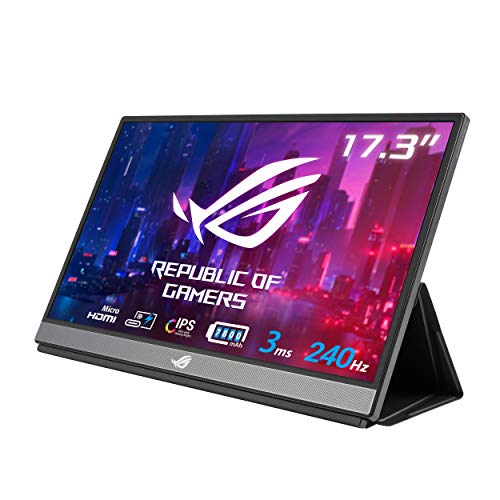 ASUS ROG Strix XG17AHPE 17.3" 240Hz Portable Gaming Monitor
|
9.2/10 | Buy | |
| Editor's Pick |
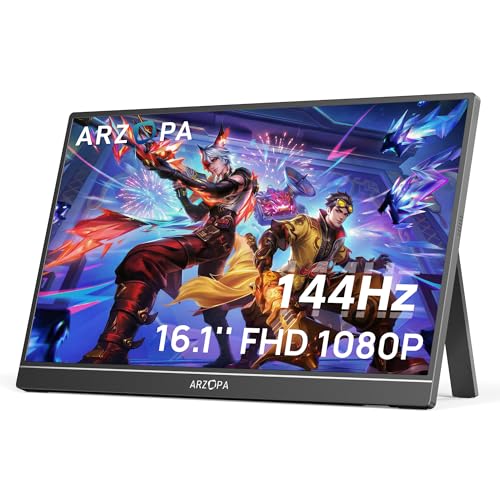 ARZOPA Z1FC 16.1" 144Hz Portable Gaming Monitor
|
8.6/10 | Buy | |
| Best Value |
 UPERFECT 24.5" 2K 240Hz Portable Gaming Monitor
|
8.4/10 | Buy | |
| Top Rated |
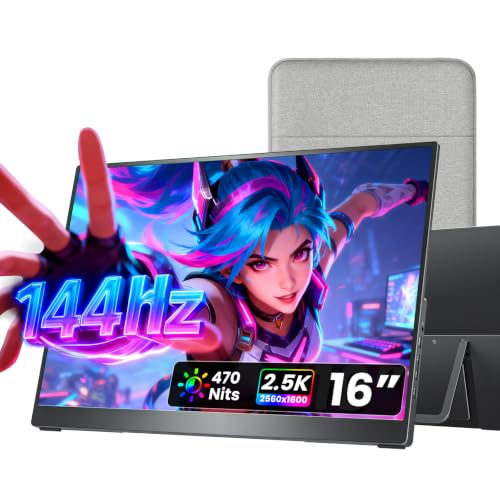 Cocopar 16-Inch 2.5K Portable Monitor 144Hz
|
7.9/10 | Buy | |
 ViewSonic VX1754 17-Inch 144Hz Portable Monitor
|
7.8/10 | Buy | ||
 VisionOwl 16-Inch 2.5K 144Hz Portable Monitor
|
7.8/10 | Buy | ||
 InnoView 18.5" 280Hz Portable Gaming Monitor
|
7.5/10 | Buy | ||
 InnoView 16" 240Hz 2K Portable Monitor
|
7.4/10 | Buy | ||
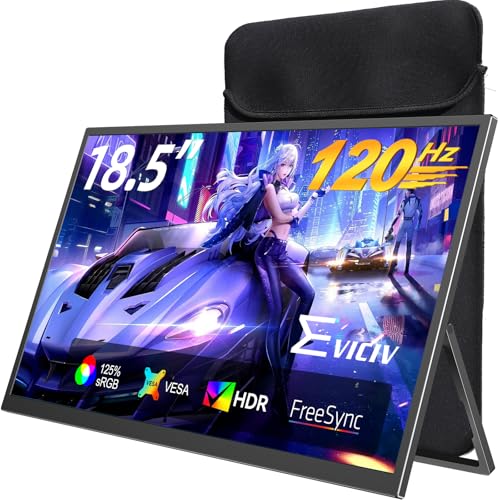 EVICIV 18.5" Portable Gaming Monitor 120Hz
|
7.2/10 | Buy | ||
 MNN 15.6" 1080P Portable Monitor with USB-C
|
6.1/10 | Buy |
ASUS ROG Strix XG17AHPE 17.3" 240Hz Portable Gaming Monitor
A 17.3-inch portable gaming monitor with 240Hz refresh rate and IPS panel, designed for gamers who need smooth visuals on the go. Built-in 3-hour battery and dual connectivity via USB-C and micro-HDMI make it versatile for laptops, consoles, and smartphones.
Pros
- High 240Hz refresh rate supports fast-paced competitive gaming
- Built-in battery eliminates need for external power on short trips
- USB-C and micro-HDMI provide broad device compatibility
- IPS panel delivers consistent color and wide viewing angles
- Compact and lightweight design with included case
Cons
- No user reviews available to assess real-world durability or performance consistency
- 3-hour battery life limits extended gaming sessions without recharging
- Renewed condition means it may show cosmetic wear or have limited warranty
ARZOPA Z1FC 16.1" 144Hz Portable Gaming Monitor
A lightweight 16.1-inch portable monitor with 144Hz refresh rate and 1080p resolution, designed for gamers and remote workers needing a secondary display. Plug-and-play connectivity via USB-C and Mini HDMI makes setup straightforward across laptops, consoles, and PCs.
Pros
- High 144Hz refresh rate eliminates adaptive sync limitations for competitive gaming
- Two USB-C ports provide flexible connection options and power delivery
- Compact 16.1-inch size with integrated stand improves portability and desk space
- 106% sRGB gamut delivers vibrant color reproduction for work and media
- No drivers or software required for immediate use
Cons
- No adaptive sync (FreeSync or G-Sync) support limits benefits of high refresh rate
- Mini HDMI port less common than full-size HDMI, may require adapter
- 1080p resolution typical for 16-inch class, not a standout upgrade for larger displays
UPERFECT 24.5" 2K 240Hz Portable Gaming Monitor
A 24.5-inch portable display built for competitive gaming with 240Hz refresh rate, 2K QHD resolution, and HDR support. Well-suited for gamers and remote workers seeking a larger second screen with minimal travel footprint.
Pros
- High 240Hz refresh rate eliminates motion blur for fast-paced gaming
- Larger 24.5-inch display provides more screen real estate than typical 15-17" portable monitors
- HDR with 500 nits brightness supports outdoor visibility and vivid color reproduction
- Dual HDMI 2.1 and DP 1.4 connectivity ensures compatibility across gaming consoles and PCs
- Adjustable stand and VESA mounting offer flexible positioning for various setups
Cons
- No verified buyer reviews available to assess real-world reliability and long-term durability
- Heavier than smaller portable monitors at 3 pounds, reducing portability advantage
- No information on color accuracy or calibration, which matters for content creators
Cocopar 16-Inch 2.5K Portable Monitor 144Hz
A lightweight 16-inch portable display with 2.5K resolution and 144Hz refresh rate, designed for remote workers, students, and gamers needing a secondary screen. Connects via USB-C with plug-and-play setup and includes a built-in kickstand, though real-world performance depends on your device's USB-C capabilities.
Pros
- Sharp 2560x1600 display with 110% sRGB and 470 nits brightness for outdoor visibility
- Genuinely portable at 1.5 lbs with premium fabric sleeve included
- No drivers needed for compatible USB-C devices, minimal setup friction
- Metal chassis and adjustable stand provide durability and professional feel
- 144Hz refresh rate delivers noticeably smoother playback than standard 60Hz portables
Cons
- Requires devices with Thunderbolt 3/4/5 or USB-C DP Alt Mode support, limiting compatibility with older or non-compliant devices
- No customer reviews available to verify real-world reliability and long-term performance
- 1.5W built-in speakers are functional but unlikely to match dedicated external speakers for audio quality
ViewSonic VX1754 17-Inch 144Hz Portable Monitor
A lightweight 17.3-inch IPS monitor built for mobile professionals and casual gamers who need a second screen without the bulk. The 144Hz refresh rate and FreeSync support deliver smooth visuals, while USB-C connectivity with 60W charging simplifies cable management for laptops and gaming devices.
Pros
- Extremely portable at 2 lbs with 0.7-inch thickness, fits easily in backpacks
- Single USB-C cable handles video, audio, data, and 60W device charging
- 144Hz refresh rate with FreeSync for responsive gameplay and smooth scrolling
- Built-in adjustable stand supports both portrait and landscape orientation
- Includes screen protector and stand cover for protection during travel
- 3-year warranty backed by US-based customer support
Cons
- No verified buyer reviews available to assess real-world reliability and user experience
- Mini-HDMI input may require adapters for some devices, adding to cable needs
- 17-inch size limits screen real estate compared to traditional desktop monitors
VisionOwl 16-Inch 2.5K 144Hz Portable Monitor
A 16-inch portable display with 2.5K resolution, 144Hz refresh rate, and 10-bit IPS panel designed for laptop users and gamers. Connects via USB-C or HDMI with built-in kickstand and includes a complete accessory kit.
Pros
- 2.5K QHD resolution at 144Hz delivers sharp visuals with smooth motion for gaming and productivity
- 10-bit IPS panel with 110% sRGB gamut and 470 nits brightness suits photo editing and outdoor use
- Dual USB-C and full-size HDMI ports provide flexible connectivity across laptops, consoles, and PCs
- Lightweight metal design at 1.48 lbs with built-in kickstand and VESA mount holes for versatile setup
- Includes sleeve case, power adapter, and cables—ready to use immediately without drivers
Cons
- Single-cable operation requires Thunderbolt 3/4 or DisplayPort Alt Mode support, limiting compatibility with some devices
- No verified user reviews available to confirm real-world performance and build durability
- 16:10 aspect ratio matches MacBooks but may show black bars on standard 16:9 content
InnoView 18.5" 280Hz Portable Gaming Monitor
An 18.5-inch portable display built for gamers and professionals who need extra screen real estate on the go. The 280Hz refresh rate, 2K resolution, and 100% sRGB coverage deliver smooth gaming and accurate colors, though you'll need external power to avoid flickering.
Pros
- Fast 280Hz refresh rate eliminates lag and ghosting for competitive gaming
- Larger 18.5-inch screen with 16:10 ratio reduces scrolling for productivity tasks
- Three flexible mounting methods accommodate different setups and orientations
- Plug-and-play connectivity with dual USB-C and HDMI, no driver installation needed
- Wide color gamut and HDR support deliver vivid visuals for creative work
Cons
- Requires external power supply to avoid flickering, limiting true portability
- Achieving full 280Hz refresh rate depends on your device's output capability
- No verified buyer reviews available to assess real-world durability or performance
InnoView 16" 240Hz 2K Portable Monitor
A 16-inch portable display with 2560x1600 resolution and 240Hz refresh rate, designed for content creators and competitive gamers who need high color accuracy and smooth performance on the go. Offers plug-and-play connectivity via Type-C and HDMI across laptops, phones, and gaming consoles.
Pros
- Sharp 2K visuals with 100% sRGB color accuracy ideal for designers and photographers
- High 240Hz refresh rate minimizes latency and tearing during fast-paced gaming
- Lightweight and portable 16-inch form factor works in offices, homes, or while traveling
- Plug-and-play setup with multiple connectivity options eliminates driver installation
- Wide device compatibility spans Windows/Mac laptops, phones, and major gaming consoles
Cons
- Requires source device to natively support 240Hz and HDMI 2.1 to achieve full performance specifications
- No verified buyer reviews available to assess real-world durability or user experience
- Built-in speakers noted in title but no audio quality details provided in specifications
EVICIV 18.5" Portable Gaming Monitor 120Hz
A compact 18.5-inch portable display built for productivity and gaming with 120Hz refresh rate, 1ms response time, and dual connectivity via USB-C and Mini HDMI. Includes a protective travel case and flexible VESA mounting for adaptable workspace setup.
Pros
- High refresh rate (120Hz) and fast response time (1ms) cater to competitive gaming
- Bundled travel case with shock absorption foam simplifies portability
- Flexible mounting options with VESA standard and adjustable stand for various workspaces
- Dual ports (USB-C and Mini HDMI) provide connectivity versatility across devices
- 350 nits brightness and 125% sRGB deliver adequate color performance for content work
Cons
- No verified reviews yet, limiting real-world performance validation from users
- 18.5-inch size is compact, which may feel cramped for extended work sessions
- Mini HDMI is less common than full HDMI, requiring adapters on some devices
MNN 15.6" 1080P Portable Monitor with USB-C
A lightweight 15.6-inch portable display with 1920x1080 resolution and dual USB-C ports for single-cable connectivity to laptops, phones, and gaming consoles. Built-in speakers, HDR support, and a smart cover that doubles as a stand make it practical for remote work and travel, though it requires USB 3.1 Type-C DP Alt-Mode compatibility.
Pros
- Dual USB-C ports enable single-cable power and video transmission for supported devices
- Ultra-slim design at 0.3 inches thick and 1.53 pounds makes it genuinely portable
- IPS panel with 178-degree viewing angles and eye-care features reduce blue light and flicker
- Smart PU leather cover provides protection and functions as a landscape/portrait stand
- Supports multiple display modes including extended, mirrored, and portrait orientation
Cons
- Requires USB 3.1 Type-C with DP Alt-Mode support; not all devices are compatible
- 60Hz refresh rate limits appeal for competitive gaming compared to higher-refresh alternatives
- No reviews available yet to verify real-world performance and reliability claims
Portable Gaming Monitors Buying Guide
Choosing the right portable gaming monitor isn’t just about picking the biggest screen or the highest number on the spec sheet. The best match depends on how you game, where you game, and what devices you’re connecting to.
The sections below walk through the criteria that matter most, so you can prioritize confidently rather than getting lost in marketing language.
Panel Type and Display Quality

Nearly all portable gaming monitors in this range use IPS (In-Plane Switching) panels, and for good reason.
IPS technology delivers wide viewing angles and accurate color reproduction, which matters whether you’re gaming solo or sharing the screen with someone beside you.
Look for panels covering at least 100% sRGB for consistent color, while 106% to 110% sRGB coverage gives noticeably richer saturation in open-world and cinematic titles.
HDR support is increasingly common at this form factor, but its real-world impact varies. True HDR performance requires high peak brightness, typically above 400 nits, combined with good local dimming.
Many portable monitors list HDR as a feature while delivering only a modest brightness boost, so treat HDR on a portable as a bonus rather than a headline spec unless the display also quotes a peak brightness figure that backs it up.
Brightness matters more on a portable than a desktop monitor because you’re often using it in varied lighting environments, from dim hotel rooms to brighter co-working spaces.
A minimum of 300 nits is workable, while 350 nits and above keeps the image readable in most conditions without needing to crank the backlight to its maximum.
Refresh Rate and Response Time

Refresh rate is arguably the single most debated spec in gaming displays, portable or otherwise. For casual and single-player gaming, 60 Hz to 144 Hz covers all practical needs.
For competitive first-person shooters or fighting games where reaction speed is a real advantage, stepping up to 240 Hz or even 280 Hz becomes meaningful because motion blur and ghosting are reduced enough that fast movements stay sharp.
Response time, quoted in milliseconds, tells you how quickly a pixel can change color. A 1 ms to 3 ms response time is ideal for gaming. Higher figures, such as 5 ms or 8 ms, can produce visible trailing behind fast-moving objects.
Most quality IPS portable monitors now achieve 3 ms or better, but it’s worth confirming whether the manufacturer quotes the grey-to-grey (GtG) figure or a more favorable MPRT measurement, as these are not directly comparable.
Adaptive sync technology, including FreeSync and G-Sync Compatible certifications, eliminates screen tearing by synchronizing the display’s refresh rate to your GPU’s output.
If you’re gaming on a PC or a console that supports variable refresh rate output (the PlayStation 5 and Xbox Series consoles both do), adaptive sync support is a genuinely valuable addition rather than a paper feature.
Many portable monitors in this guide include it, making gameplay noticeably smoother even when frame rates fluctuate.
Resolution and Screen Size
Full HD (1920×1080) remains the most widely used resolution in portable gaming monitors for a practical reason: it’s easier to drive at high refresh rates, which means integrated graphics, handheld gaming PCs, and mid-range laptops can all push smooth frame rates without needing a powerful dedicated GPU.
For a 15 to 17-inch screen viewed at arm’s length, 1080p still looks clean and detailed.
QHD formats, including 2560×1440 and 2.5K (2560×1600 at a 16:10 aspect ratio), offer a meaningful step up in pixel density and are increasingly available in portable displays around the 16-inch mark.
The wider 16:10 aspect ratio is especially useful for productivity tasks alongside gaming, giving you more vertical screen real estate. If your device can comfortably output a QHD signal, the extra sharpness in detailed game environments is worth paying for.
Screen size on portables typically runs from 15.6 inches up to 18.5 inches, with a sweet spot around 16 to 17 inches that balances usability and portability.
Larger panels like the UPERFECT 24.5-inch model offer a genuinely desktop-like experience but are heavier and bulkier to carry.
Consider your typical transport scenario: a monitor you’re happy to slide into a backpack most days will get more use than a larger display that stays in the hotel bag.
Connectivity and Power Delivery

USB-C is the connective backbone of modern portable monitors, and for good reason. A single USB-C cable can carry video signal, audio, and power simultaneously, which dramatically simplifies desk setups and hotel-room gaming sessions.
Look for monitors that support at least 60W USB-C power delivery if you plan to charge your laptop through the monitor at the same time, as many mid-range options max out at lower wattage and won’t keep a gaming laptop’s battery topped up under load.
Mini HDMI is the secondary input standard on most portable monitors and is essential for connecting to gaming consoles, Raspberry Pi units, or older laptops without USB-C video output.
Some monitors, including the cocopar 16-inch model in this list, offer both USB-C at 144 Hz and full-size HDMI running at 120 Hz, giving you the flexibility to run at high refresh rates regardless of your source device.
Always check whether the HDMI port tops out at 60 Hz or supports higher rates, as this is a common area where budget models cut corners.
Built-in speakers are a convenience feature most portable monitors now include, though audio quality is expectedly modest given the slim chassis.
If sound quality matters to your gaming sessions, plan to pair the monitor with a compact pair of earbuds rather than relying on the onboard speakers for anything immersive.
Stand Design and Portability

A monitor that arrives without a workable stand is a significant inconvenience in portable use. Most models now include a built-in kickstand or a smart cover that doubles as a stand, but the quality varies considerably.
Look for stands that offer a range of tilt angles, ideally from around 20 degrees to 90 degrees, so you can adjust for different surface heights and lighting conditions.
Flat kickstands that offer only one or two preset angles become frustrating quickly in real travel use.
Weight and thickness are the other half of portability. Most 15 to 17-inch portable monitors land between 1.5 and 2.5 pounds, which is genuinely bag-friendly. Larger 18-inch and above models tend to push past 3 pounds.
VESA mounting compatibility (typically 75x75mm) is a useful addition if you want to mount the display on an arm at your desk when you’re not traveling, effectively letting one device serve both roles.
Several picks in this guide, including the cocopar and VisionOwl models, include VESA support.
Battery life is a premium feature found only at the higher end of the portable monitor market.
The ASUS ROG Strix XG17AHPE stands out by including a built-in battery that delivers around three hours of gaming without a power source, a feature that’s genuinely rare and valuable for travel scenarios where outlets aren’t always available.
Most other portable monitors require a USB-C power source or power bank to operate, so factor that into your kit if you’re planning to game away from power outlets.
Gaming-Specific Features
Beyond raw specs, several software and hardware features improve the day-to-day gaming experience. GamePlus or similar OSD overlays, as found on the InnoView 18.5-inch model, provide in-game crosshairs, frame counters, and timers without needing third-party software.
These are most useful for competitive play where every small edge matters.
Eye care features, including flicker-free backlights and blue light reduction modes, matter more for portable monitors than desktop displays because you’re more likely to use them in dim environments or for extended sessions without a secondary screen to rest your eyes on.
Most monitors reviewed here include some form of flicker-free certification, but the effectiveness of blue light modes varies, so treat them as a supplementary comfort feature rather than a substitute for taking breaks.
A comfortable gaming chair with proper lumbar support contributes at least as much to long-session comfort as display eye-care settings.
Input lag, which measures the delay between a signal reaching the display and that signal appearing on screen, is distinct from response time.
Most quality gaming monitors at 144 Hz and above measure input lag well under 10 ms, which is imperceptible in practice.
If a manufacturer doesn’t publish an input lag figure, expert review consensus from the display community generally fills that gap with measured data, and we factor this into our PF Score evaluations.
Why You Should Trust Us
ProductFind is an independent review platform. We do not sell products, accept review units from manufacturers, or allow commercial relationships to influence our rankings.
Every monitor in this guide is assessed using our PF Score system, a 0 to 10 scale applied consistently across all products in a category using the same criteria: display specifications, verified buyer feedback aggregated from confirmed purchasers, and expert review consensus drawn from the broader display and gaming monitor community.
We weight these data sources according to their reliability and relevance to the buying decision at hand.
We do not conduct our own product trials; our evaluations are grounded in research, published data, expert review consensus, and verified buyer feedback.
This approach lets us cover a wider range of products more consistently than single-reviewer assessments, and it keeps our scoring free from the variability that comes with individual unit samples and reviewer preference.
ProductFind may earn a commission if you purchase through links in this article. That affiliate relationship has no bearing on which products are included, how they are ranked, or what PF Score they receive.
Our recommendations are determined entirely by our evaluation criteria, not by commission rates or commercial arrangements with any retailer or brand.
Final Thoughts
The portable gaming monitor market in 2026 spans a genuine range of performance tiers, and the picks in this guide reflect that breadth. Here are the standout awards from our research:
- Best Overall: ASUS ROG Strix XG17AHPE earns the top PF Score in this group for good reason. Its 240Hz refresh rate, 3 ms response time, adaptive sync support, and built-in battery cover nearly every portable gaming scenario, from competitive esports sessions to console gaming in places without convenient power access. It’s the rare portable monitor that genuinely doesn’t ask you to compromise.
- Best Value for Most Gamers: ARZOPA 16.1-inch 144Hz hits an exceptional price-to-performance ratio. Its 106% sRGB coverage, HDR support, and ultra-slim profile make it a compelling everyday carry for gamers who want smooth gameplay without a premium outlay.
- Best Large-Screen Portable: UPERFECT 24.5-inch 2K 240Hz is the pick for gamers who prioritize screen real estate above all else. Its QHD resolution at 240Hz is a combination rarely found at this form factor, delivering a near-desktop experience in a portable chassis.
- Best for Detail-Oriented Gaming: cocopar 16-inch 2.5K 144Hz pairs 2.5K QHD resolution with both USB-C and HDMI high-refresh connectivity, making it a versatile choice for gamers who switch between PC and console sources and want sharp visuals in both scenarios.
- Best Budget Pick: MNN 15.6-inch 1080P is the most accessible entry point in this group. For casual gaming, productivity on the road, or a first portable monitor purchase, its plug-and-play simplicity and included smart cover keep the experience friction-free at a budget-friendly price.
Whatever your priority, the monitors in this list have been vetted to ensure they deliver on their core gaming promises rather than relying on spec-sheet marketing.
Pair your choice with a reliable controller and a comfortable place to sit, and you’ll have a travel gaming setup that punches well above what portable hardware could manage just a few years ago.
Frequently Asked Questions
Do portable gaming monitors work with gaming consoles like PS5 and Xbox Series X?
Yes. Most portable gaming monitors include a Mini HDMI input that connects directly to standard HDMI output from current-generation consoles.
Some higher-end models also support variable refresh rate (VRR) over HDMI, which pairs well with the PS5’s and Xbox Series X’s VRR output for smoother frame pacing.
Always check that the monitor’s HDMI port supports at least 120Hz if you plan to use high frame rate modes on console.
Can a portable monitor run without being plugged into a wall outlet?
Most portable monitors draw power through USB-C from your laptop, a USB-C power bank, or a wall adapter. Only a small number of models, most notably the ASUS ROG Strix XG17AHPE, include a built-in battery for fully untethered use.
If outlet-free gaming is a priority, either choose a monitor with a built-in battery or pair your preferred monitor with a high-capacity USB-C power bank that supports the monitor’s power draw.
Is 144Hz enough for competitive gaming on a portable monitor, or do I need 240Hz?
For most players, 144Hz delivers a smooth, responsive experience that’s a significant improvement over 60Hz.
The jump from 144Hz to 240Hz is real but more incremental, and its benefits are most apparent in fast-paced competitive titles like first-person shooters where tracking moving targets at high sensitivity matters.
If you play primarily single-player games, RPGs, or strategy titles, 144Hz is more than sufficient. Dedicated esports players will appreciate the extra headroom that 240Hz provides.
What resolution should I choose for a 16-inch portable gaming monitor?
At 16 inches, both 1080p and QHD (2K or 2.5K) are viable choices.
Full HD is easier to drive at high refresh rates and works well with integrated graphics or mid-range GPUs, making it the practical choice if your device isn’t particularly powerful.
QHD at 16 inches gives a noticeably sharper image with more on-screen detail, which benefits open-world games and productivity use.
If your laptop or PC has a dedicated GPU that can comfortably output a QHD signal, the resolution upgrade is worth it.
How important is VESA mounting on a portable monitor?
VESA compatibility (typically 75x75mm on portable monitors) is most useful if you want to use the same display both as a travel monitor and as a desk-mounted secondary screen at home or in the office.
Mounting frees up desk space and allows for more flexible positioning. If you only plan to use the monitor on flat surfaces with its built-in stand, VESA support is a nice extra rather than an essential criterion.
Models like the cocopar and VisionOwl picks in this guide include VESA mounting, making them particularly versatile dual-purpose displays.
Are portable gaming monitors suitable for use with handheld gaming PCs like the Steam Deck?
Yes, and this is one of the most popular use cases for portable monitors. The Steam Deck and similar handheld PCs output video over USB-C, which connects directly to any USB-C capable portable monitor without an adapter.
The main consideration is output resolution and refresh rate: the Steam Deck’s GPU is capable at 1080p but will struggle to maintain high frame rates at QHD resolutions in demanding titles.
A 1080p 144Hz portable monitor is typically the sweet spot for handheld gaming PC use, offering smooth gameplay without taxing the device’s graphics hardware.
About the author
Joann is a reviewer and writer for ProductFind who specializes in Video Games & Gaming Gear. Joann evaluates products through independent research: specifications, expert review consensus, and verified buyer feedback, and rates each one on the PF Score. Joann focuses on helping readers pick the right video games & gaming gear for their needs and budget.