The 9 Best Capture Cards
Capture cards vary wildly in real-world quality. We researched specs, expert consensus, and verified buyer feedback to find the best options for every setup and budget.
 By Joann Wagner
Updated July 23, 2026
By Joann Wagner
Updated July 23, 2026

Capture cards have become essential tools for streamers, content creators, and gamers who want to record or broadcast gameplay from consoles like the PS5, Xbox Series X/S, and Nintendo Switch.
Whether you’re building a dedicated streaming setup or just want to archive your gaming sessions in high quality, the right capture card can make the difference between a choppy, pixelated stream and a polished, professional-looking broadcast.
The market now spans a wide range of form factors, resolutions, and price points, from plug-and-play USB dongles to full internal PCIe cards capable of 4K HDR capture.
Choosing the right one isn’t always straightforward. Specs like “4K passthrough” and “1080p60 capture” are frequently misrepresented by budget brands, and the gap in real-world performance between a reputable card and a no-name alternative can be significant.
Our team at ProductFind researched the current market thoroughly, analyzing manufacturer specifications, synthesizing consensus from expert reviewers, and reviewing verified buyer feedback to identify the most reliable capture cards across every budget.
The picks below represent the strongest options available right now, from powerhouse internal cards to affordable grab-and-go solutions.
If you’re also building out your streaming space, pairing a capture card with a quality gaming desk and a comfortable gaming chair will make long sessions far more manageable.
| Award | Product | PF Score About PF ScoreThe PF Score is our own rating from 0 to 10, based on performance, design and build, ease of use, and value. It reflects independent research and is never influenced by manufacturers, retailers, or affiliate commissions. Learn more › | Price | |
|---|---|---|---|---|
| Best Overall |
 Elgato HD60 S+ Capture Card, 4K60 HDR10
|
8.4/10 | Buy | |
| Editor's Pick |
 AVerMedia GC573 4K60 HDR10 Internal Capture Card
|
8.2/10 | Buy | |
| Best Value |
 Elgato Cam Link 4K Capture Card
|
7.8/10 | Buy | |
| Top Rated |
 Acer USB 3.0 Video Capture Card, 4K Input/1080P 60Hz
|
5.1/10 | Buy | |
 Guermok USB 3.0 HDMI Capture Card 1080P 60FPS
|
4.3/10 | Buy | ||
 Dcyfol 4K HDMI Capture Card USB 3.0
|
4.2/10 | Buy | ||
 Rybozen 1080P HDMI Capture Card with USB 3.0
|
4.1/10 | Buy | ||
 Guermok 4K HDMI to USB-C Capture Card
|
3.8/10 | Buy | ||
 VIXLW 4K USB-C HDMI Capture Card
|
2.9/10 | Buy |
Elgato HD60 S+ Capture Card, 4K60 HDR10
External capture card designed for console streamers and content creators, supporting 4K60 HDR10 passthrough on PS5, Xbox Series X/S, and earlier generations. Combines high-fidelity gameplay recording with ultra-low-latency monitoring for live streaming workflows.
Pros
- Supports both 4K60 passthrough and 1080p60 HDR10 capture simultaneously
- Zero-lag passthrough lets you play at full console fidelity while streaming
- Flashback Recording feature captures unexpected highlights without manual recording
- Compatible across PS4/PS5 and Xbox One/Series X|S ecosystems
- Works with major streaming software and operating systems
Cons
- No verified user reviews available, making real-world reliability unclear
- Premium pricing compared to budget capture alternatives
- Requires USB 3.0 connection and adequate storage for continuous recording
AVerMedia GC573 4K60 HDR10 Internal Capture Card
The GC573 is an internal PCIe capture card built for next-gen consoles, handling 4K60 HDR10 recording and streaming with zero-lag passthrough. It supports up to 240fps capture and integrates with major streaming platforms, making it suited for serious content creators and competitive gamers.
Pros
- Captures 4K HDR content at 60fps with truly zero latency passthrough for gameplay
- Exceptional high-frame-rate support up to 240fps for smooth slow-motion recording
- Direct compatibility with current and last-gen gaming consoles without adapters
- Customizable capture settings through dedicated utility software
- Compact form factor (5.9 x 4.9 x 0.8 inches) fits standard PC builds
Cons
- Requires PCIe x4 slot, limiting compatibility to desktop systems only
- No verified buyer reviews available to assess real-world reliability and user experience
- Setup and driver installation may require technical knowledge for optimal performance
Elgato Cam Link 4K Capture Card
This capture card transforms DSLRs, mirrorless cameras, and action cams into professional-quality webcams with 4K60 streaming capability. Ultra-low latency and multi-device compatibility make it a solid choice for content creators seeking broadcast-grade video without the complexity of traditional setups.
Pros
- Supports 4K60 and 1080p60 streaming for sharp, detailed output
- Ultra-low latency ensures video and audio stay in sync
- Works with diverse camera types: DSLRs, mirrorless, camcorders, action cams, and iPhone
- iPad preview functionality via USB-C for real-time shot monitoring
- Compact, lightweight design ideal for portable streaming setups
Cons
- Requires compatible camera and latest hardware for full 4K60 performance
- No user reviews available to validate real-world reliability or edge-case issues
- Compatibility dependent on specific camera model and operating system support
Acer USB 3.0 Video Capture Card, 4K Input/1080P 60Hz
This Acer capture card handles 4K input and outputs smooth 1080P@60Hz video, making it suitable for streamers and content creators using consoles, cameras, or PCs. Setup is straightforward with plug-and-play operation and a built-in 3.5mm mic input, though it lacks reviews to validate real-world performance claims.
Pros
- 4K input with 1080P@60Hz output and YUY2 color technology
- Built-in 3.5mm mic input eliminates need for separate audio adapters
- Plug-and-play operation requires no drivers or external power
- Wide device compatibility including PS5/PS4, Switch, Xbox, DSLR cameras, and both Windows/macOS
- Compact and portable design
Cons
- No verified customer reviews available to confirm claimed performance or reliability
- Mic input limited to 3.5mm devices only
- Output capped at 1080P@60Hz despite 4K input capability
Guermok USB 3.0 HDMI Capture Card 1080P 60FPS
A plug-and-play capture card designed for streamers and content creators, supporting 1080P at 60fps and 2K at 30fps with 4K pass-through to an external monitor. Works directly with OBS, Streamlabs, and other software without requiring drivers, making it accessible for gaming, streaming, and live production setups.
Pros
- Supports simultaneous recording and 4K pass-through display, ideal for competitive gaming with minimal latency
- Broad software compatibility including OBS, Streamlabs, VLC, XSplit, and video conferencing platforms requires no driver installation
- Flexible audio connectivity with dedicated microphone input and headphone monitoring for professional streaming workflows
- Works across Windows, macOS, and multiple gaming platforms including current-gen consoles
Cons
- Actual capture limited to 1080P 60FPS or 2K 30FPS, despite supporting 4K input, so recorded video will not be 4K quality
- Microphone input only supports standard 3.5mm TRS connectors, excluding TRRS headset mics and USB microphones
- No user reviews available to validate real-world performance or build quality reliability
Dcyfol 4K HDMI Capture Card USB 3.0
This USB 3.0 capture card handles 4K input with 1080p 60fps output, designed for streamers and content creators using PS5, Xbox, Switch, and other HDMI devices. Plug-and-play setup works with OBS and similar software, making it accessible for beginners while the HDMI loop-out enables low-latency passthrough during live sessions.
Pros
- Universal HDMI compatibility across multiple gaming consoles and devices
- Zero-driver setup accelerates workflow for streamers new to capture hardware
- HDMI loop-out with passthrough eliminates the need for display splitting
- Lightweight design suits content creators who stream from different locations
Cons
- No verified buyer reviews available to confirm real-world performance or reliability
- 4K input limited to 1080p 60fps output, not true 4K streaming capability
- Software compatibility limited to specific platforms, may require workarounds on niche streaming tools
Rybozen 1080P HDMI Capture Card with USB 3.0
A plug-and-play capture card designed for streaming gameplay and video from HDMI sources up to 1080p. Works with Windows and Mac without drivers, includes mic input for commentary, and features HDMI loop-out for low-latency gaming.
Pros
- True plug-and-play setup with no drivers or external power required
- Captures 1080p video and supports multiple platforms including PS4, PS5, Xbox, and cameras
- HDMI loop-out with low latency for live gameplay streaming
- Built-in 3.5mm microphone input for adding commentary during streams
- Compatible with OBS, Twitch, YouTube, and other streaming software
Cons
- Cannot capture 4K at 120Hz or 144Hz despite supporting 4K input at lower frame rates
- Output limited to 2K at 30Hz, lower than current streaming standards
- Requires specific 3.5mm TRS microphone format, limiting mic compatibility options
Guermok 4K HDMI to USB-C Capture Card
This plug-and-play capture card handles 1080p at 60fps or 2K at 30fps without requiring external power or drivers, making it portable for live streaming and content recording. Compatibility spans Windows, Mac, Linux, and popular platforms like OBS Studio, though performance depends on having a USB 3.0 port available.
Pros
- Plug-and-play functionality with no driver installation required
- Lightweight and portable for travel or event streaming
- Broad device compatibility across operating systems and input sources
- Aluminum construction designed for heat management during extended use
Cons
- One-way transmission only, HDMI to USB-C conversion may cause signal loss
- Requires USB 3.0 port for optimal performance; USB 2.0 fallback reduces capabilities
- No reviews available to assess real-world reliability and user experience
VIXLW 4K USB-C HDMI Capture Card
USB 3.0 capture card supporting 4K input and up to 1080P 60fps recording, designed for streamers and content creators. Plug-and-play setup with no drivers needed, works across Windows, macOS, and compatible with major platforms like OBS and Zoom.
Pros
- No external power needed, truly plug-and-play operation
- Broad device compatibility covers gaming consoles, cameras, and computers
- Supports multiple streaming platforms and capture software without friction
- Aluminum construction provides durability and heat management
- Lightweight and portable for remote streaming or field recording
Cons
- No verified customer reviews available to assess real-world reliability
- Android/tablet use requires OTG support and may have limited compatibility
- Records at 2K maximum, not full 4K, despite 4K input capability
Capture Cards Buying Guide
With so many options on the market ranging from ultra-budget USB sticks to high-end internal cards, knowing which specifications actually matter will save you money and frustration.
The sections below break down every key decision point so you can match the right capture card to your exact setup and goals.
Internal vs. External: Which Form Factor Fits Your Setup?

Internal capture cards slot directly into your PC’s PCIe slot and generally offer superior performance, lower CPU overhead, and more stable data throughput than their external counterparts.
Cards like the AVerMedia GC573 Live Gamer 4K fall into this category and are ideal for dedicated streaming PCs where you’re capturing from a separate console.
If you’re running a single-PC setup or don’t want to open your case, an internal card requires some planning but rewards you with rock-solid reliability.
External capture cards, by contrast, connect via USB and are far more flexible. You can move them between machines, use them with laptops, and get started without any installation.
The Elgato HD60 S+ is the gold standard in this category, offering HDR10 support and ultra-low latency passthrough while remaining compatible with both PC and Mac.
For camera-based workflows, a device like the Elgato Cam Link 4K bridges the gap between professional cameras and your streaming software, turning any HDMI-out camera into a high-quality webcam source.
Your choice ultimately comes down to portability versus permanence. A content creator who streams from a fixed desk setup and wants maximum throughput should lean internal.
A streamer who travels or shares equipment between a laptop and a desktop will find external cards far more practical.
Consider your long-term setup before committing, since swapping form factors later can mean replacing cables, software configurations, and sometimes drivers entirely.
Resolution and Frame Rate: Understanding What You Actually Need

Capture card marketing frequently conflates “passthrough” resolution with actual capture resolution, and this is one of the most common sources of buyer confusion.
A card might pass a 4K HDR signal to your TV without dropping a frame while simultaneously capturing at 1080p60 for your stream. These are two separate capabilities, and both matter depending on your workflow.
For most streamers targeting Twitch or YouTube at 1080p60, a card that captures at 1080p60 is entirely sufficient.
The extra overhead of capturing at 4K only makes sense if you’re archiving footage for later editing and plan to downscale in post, or if you’re producing content for a 4K TV audience.
Budget cards claiming “4K” capture almost universally achieve this only at 30fps or with heavy compression, which degrades quality noticeably compared to true 4K60 capture from a premium card.
Frame rate matters as much as resolution for gaming content. Capture at 60fps versus 30fps is immediately visible to viewers, especially during fast-paced action games.
If your console outputs at 60fps or higher, make sure your capture card can actually record at that frame rate at your target resolution, not just pass it through.
Always cross-reference the card’s actual capture specifications in the product manual rather than relying on headline marketing figures alone.
HDR Support and Color Accuracy
HDR10 support has become a meaningful differentiator between mid-range and premium capture cards. When a card supports HDR10 passthrough and capture, your stream or recorded footage retains the expanded color range and contrast that modern consoles output.
Without HDR support, content from PS5 or Xbox Series X/S may appear washed out or tone-mapped incorrectly when captured.
It’s worth noting that HDR streaming is still limited by platform encoding constraints on services like Twitch and YouTube, so the immediate benefit of HDR capture is most visible in locally stored recordings rather than live streams.
However, having HDR support future-proofs your setup as platform capabilities continue to evolve.
Cards from established brands like Elgato and AVerMedia implement HDR more reliably than generic alternatives, which often claim HDR support but deliver inconsistent results in practice according to verified buyer reports.
Software Compatibility and Latency

A capture card is only as useful as the software ecosystem that supports it. OBS Studio is the dominant free streaming application, and virtually every card on this list works with it natively.
However, some brands bundle proprietary software that adds features like scene switching, audio mixing, or direct encoding. Elgato’s 4K Capture Utility and AVerMedia’s RECentral are solid first-party options, though many experienced streamers prefer OBS for its flexibility and plugin ecosystem.
Latency on the capture feed is a separate concern from passthrough latency. Capture latency refers to the delay you see in your streaming software’s preview, which is typically 100ms to several seconds depending on the card and settings.
This matters less for console streamers who play through the TV passthrough, but it’s critical for single-monitor PC workflows where you’re monitoring your own stream in OBS.
Cards with hardware encoding (like those using H.264 or H.265 onboard chips) often reduce this latency significantly compared to software-only capture.
Before purchasing, verify the card is compatible with your specific operating system, including whether Mac support is offered. Budget cards from lesser-known brands sometimes ship with Windows-only drivers, which can be a dealbreaker for Mac-based creators.
Also check whether the card appears as a standard UVC device, which enables broader software compatibility beyond the bundled application.
Connectivity and USB Standards
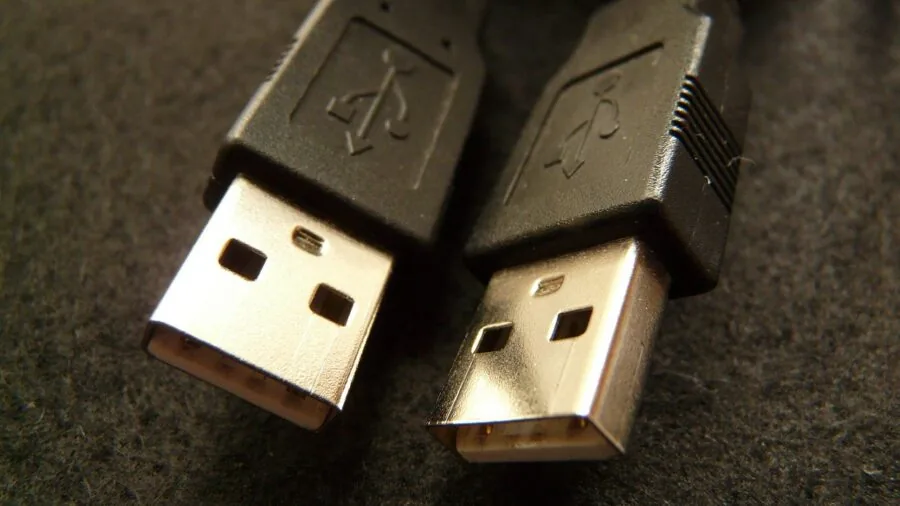
The USB standard used by an external capture card has a direct impact on the maximum bandwidth available for data transfer.
USB 3.0 (now officially called USB 3.2 Gen 1) delivers up to 5 Gbps of throughput, which is sufficient for 1080p60 capture with headroom. USB-C connectors on newer cards offer the same or better speeds with a more reversible, future-friendly connection.
However, the connector type alone doesn’t determine speed; what matters is whether the underlying controller supports USB 3.0 or higher data rates.
Budget cards sometimes use USB 2.0 speeds despite advertising USB-C ports, which limits them to approximately 480 Mbps and makes true 1080p60 capture practically impossible without heavy compression artifacts.
Always verify the actual USB generation in the product specifications, not just the connector shape. This is one area where brand reputation and verified buyer reviews are especially useful for cutting through misleading marketing claims.
Pair your capture card with a reliable USB hub or connect it directly to a motherboard port for best results; connecting through a passive hub can introduce bandwidth issues even on otherwise capable cards.
Budget Cards: What to Expect at the Lower End
The capture card market has seen a surge of ultra-affordable options from lesser-known brands, many priced below what a good gaming controller costs.
Cards from brands like Guermok, Rybozen, Dcyfol, and similar manufacturers can serve as entry points for casual recording, but it’s important to calibrate expectations.
At the budget end, verified buyer feedback consistently points to limitations like lower actual capture quality than advertised, inconsistent driver support, and shorter product lifespans.
That said, for users who simply want to capture occasional clips from a console without investing in a professional setup, a budget card can be a reasonable starting point.
The key is to focus on cards with a substantial volume of verified reviews rather than very new listings with inflated ratings.
If your goals grow over time and you find yourself streaming regularly or editing footage professionally, graduating to a reputable mid-range or premium card from Elgato or AVerMedia will deliver a noticeably better experience.
Keep your gaming setup organized with a solid controller and a well-configured streaming PC for best results.
Why You Should Trust Us
At ProductFind, every capture card in this article was evaluated using a consistent, multi-source research methodology. We analyze published manufacturer specifications, synthesize consensus from expert reviewers across the industry, and weigh verified buyer feedback from confirmed purchasers.
Each product receives a PF Score on a 0 to 10 scale that reflects performance, reliability, value, and real-world user satisfaction across these data sources.
We do not conduct our own product trials; our evaluations are grounded in research, published data, expert review consensus, and verified buyer feedback.
ProductFind is an independent review publication. We do not sell any of the products we cover, and we have no role in order fulfillment, returns, or manufacturer warranties.
Our rankings and scores are determined solely by the quality of each product relative to the criteria above.
ProductFind may earn a commission if you purchase through links in this article, but affiliate relationships have no influence on which products are included, how they are ranked, or what PF Score they receive.
Transparency in our process is fundamental to how we operate.
Final Thoughts
The capture card landscape in 2026 has something for everyone, from no-frills budget dongles to professional-grade internal cards that handle 4K HDR with ease. After thorough research and scoring across every option in this roundup, here are our top picks by category:
- Best Overall: Elgato HD60 S+ earns the top position in our rankings with the highest PF Score in this roundup. It delivers 1080p60 HDR10 capture and 4K60 HDR10 passthrough with ultra-low latency, broad platform compatibility including PS5, Xbox Series X/S, and both PC and Mac, and rock-solid software integration with OBS and more. It is the card we would recommend to most streamers without hesitation.
- Best Internal Capture Card: AVerMedia GC573 Live Gamer 4K is the strongest internal card in this group. Streaming and recording at 4K60 HDR10 directly through a PCIe slot gives it bandwidth advantages that external USB cards cannot match, making it the right choice for dedicated streaming rigs targeting maximum capture quality on current-gen consoles.
- Best for Camera Capture: Elgato Cam Link 4K is purpose-built for creators who want to use a DSLR, camcorder, or action camera as a high-quality video source. Its compact, plug-and-play design and strong compatibility with streaming and video conferencing software make it a uniquely useful tool outside of traditional game capture workflows.
- Best Budget Pick with Brand Backing: Acer USB 3.0 Video Capture Card stands out among the more affordable options in this list. It includes 4K loop-out, USB-A and USB-C connectivity, and comes from an established technology brand, which provides a degree of driver and support reliability that generic alternatives typically cannot offer at a comparable price point.
For anyone building a full streaming or gaming setup beyond the capture card itself, a capable display matters just as much as the card recording your content.
A high-quality portable projector or a well-mounted screen using a reliable full motion TV mount can transform how you monitor your stream or review recorded footage.
Whatever your setup looks like, choosing a capture card that matches your real resolution, frame rate, and software requirements will always deliver better results than chasing headline specs alone.
Frequently Asked Questions
Do I need a capture card to stream from a PS5 or Xbox Series X/S?
Both the PS5 and Xbox Series X/S have built-in streaming and clip-recording features that work without a capture card.
However, if you want to stream to PC-based software like OBS, record at higher bitrates, add overlays, manage multiple audio sources, or have full control over your broadcast, a dedicated capture card is necessary.
It also allows you to archive uncompressed or high-bitrate footage locally, which the consoles’ internal recording tools cannot match in quality.
What is the difference between capture resolution and passthrough resolution?
Passthrough resolution is what the card sends to your TV or monitor for you to play on, while capture resolution is what actually gets recorded or streamed to your computer.
A card can pass a 4K HDR signal to your screen in full quality while simultaneously capturing at 1080p60 for your stream. The two are independent, and marketing materials sometimes blur this distinction. Always check both specifications separately before buying.
Are cheap capture cards worth buying?
Budget capture cards from lesser-known brands can serve casual users who want to record occasional clips without a significant investment.
The tradeoffs include less consistent driver support, lower actual capture quality than advertised specs suggest, and limited long-term reliability based on verified buyer feedback patterns.
If you plan to stream regularly or produce content professionally, investing in a card from an established brand like Elgato or AVerMedia will deliver measurably better results and far fewer compatibility headaches.
Budget options work best as temporary or experimental solutions rather than permanent streaming infrastructure.
Can I use a capture card with a Nintendo Switch?
Yes. The Nintendo Switch outputs video via HDMI when docked, making it fully compatible with any HDMI-in capture card on this list.
The Switch outputs at up to 1080p in docked mode, so a card capable of 1080p60 capture is the ideal match. Note that the Switch in handheld mode does not output HDMI, so a docked connection is required for capture.
This workflow is well-established and widely supported across all the cards in this roundup.
Do capture cards work on Mac?
Many external capture cards support macOS, but compatibility varies by brand and model. Premium cards from Elgato explicitly support both PC and Mac. Budget cards from lesser-known brands are more likely to be Windows-only or offer limited Mac driver support.
If you use a Mac as your streaming or recording machine, verify macOS compatibility in the product specifications and check recent verified buyer reviews before purchasing, since driver support can change with OS updates.
Cards that appear as standard UVC devices tend to offer the broadest cross-platform compatibility without needing proprietary drivers.
What else should I add to my streaming setup after getting a capture card?
Once your capture card is set up, the next priorities are typically audio quality, a stable internet connection, and an ergonomic workspace. A proper ergonomic gaming chair and a well-organized gaming desk make extended streaming sessions sustainable.
If you’re gaming on a large screen, a sturdy TV wall mount can improve your viewing angle and reduce fatigue.
And if you want to monitor your stream on a secondary screen without a full extra monitor, a compact portable projector is a surprisingly flexible option for preview feeds and chat monitoring.
About the author
Joann is a reviewer and writer for ProductFind who specializes in Video Games & Gaming Gear. Joann evaluates products through independent research: specifications, expert review consensus, and verified buyer feedback, and rates each one on the PF Score. Joann focuses on helping readers pick the right video games & gaming gear for their needs and budget.