The 10 Best Coding Toys for Kids
Choosing the right coding toy can be overwhelming when options range from screen-free robot mice to 12-in-1 programmable builders. This guide covers the top picks for every age and skill level.
 By Chester Bryant
Updated July 23, 2026
By Chester Bryant
Updated July 23, 2026

Coding toys have quietly become one of the most meaningful gifts parents and educators can give to young learners.
Unlike passive screen time, the best coding toys for kids build real computational thinking, problem-solving habits, and engineering intuition through hands-on play.
Demand for STEM-focused learning tools has surged as families increasingly recognize that early exposure to logic and programming concepts gives children a genuine head start, whether or not they ever pursue a career in tech.
This guide cuts through the noise by covering ten carefully researched picks across a wide range of ages, price points, and skill levels, from screen-free activity kits for kindergartners to advanced multi-modal robot builders for tweens.
ProductFind assembled this list through a synthesis of published specifications, expert review consensus, and verified buyer feedback, so every recommendation reflects real-world performance rather than marketing copy.
Scroll down to see our ranked top picks, then dig into the buying guide to find the right fit for your child.
| Award | Product | PF Score About PF ScoreThe PF Score is our own rating from 0 to 10, based on performance, design and build, ease of use, and value. It reflects independent research and is never influenced by manufacturers, retailers, or affiliate commissions. Learn more › | Price | |
|---|---|---|---|---|
| Best Overall |
 WhalesBot C3 Pro 12-in-1 Coding Robot Kit for Ages 4+
|
8.6/10 | Buy | |
| Editor's Pick |
 Learning Resources Botley 77-Piece Screen-Free Coding Robot
|
8.2/10 | Buy | |
| Best Value |
 PIVONAX 5-in-1 STEM Robot Kit, 560+ Pieces
|
7.2/10 | Buy | |
| Top Rated |
 Snap Circuits Jr. SC-100 Electronics Kit, 100+ Projects
|
7.8/10 | Buy | |
 Thames & Kosmos My Robotic Pet Coding Chameleon 15-inch
|
7.5/10 | Buy | ||
 Learning Resources Code & Go Robot Mouse
|
7.2/10 | Buy | ||
 Apitor 6-in-1 STEM Robot Kit with 480 Blocks
|
7.1/10 | Buy | ||
 Learning Resources Pixel Art Challenge 400-Piece Set
|
6.8/10 | Buy | ||
 Playz My First Coding & Computer Science Kit
|
6.4/10 | Buy | ||
 Teach Tech Mech 5 Mechanical Coding Robot
|
6.3/10 | Buy |
WhalesBot C3 Pro 12-in-1 Coding Robot Kit for Ages 4+
An introductory STEM kit designed for young learners that combines block building, remote control, and magnetic card-based coding. Includes 12 guided models, 4 storybooks, and safety-focused design for hands-on logic and creativity development.
Pros
- Complete beginner-friendly introduction to coding concepts without screens or apps
- Rich learning package combining storytelling, tactile building, and logic-based card programming
- Interactive features (lights, sounds, Bluetooth control) maintain engagement for young learners
- Safety prioritized with age-appropriate design and no hazardous materials
Cons
- No verified buyer reviews available to assess real-world durability or parental feedback
- Requires batteries and Bluetooth connectivity for full interactive experience
- Limited to ages 4-6 range, with unclear progression path for older children
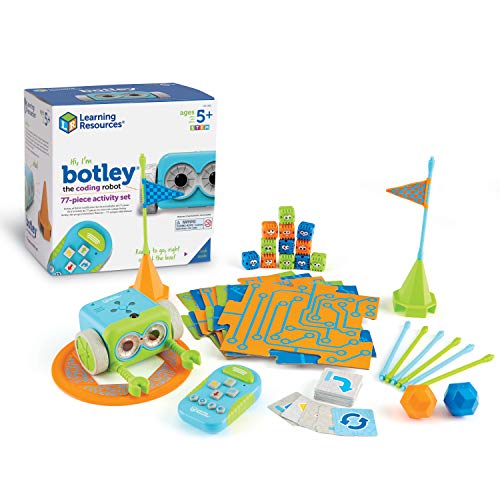
Learning Resources Botley 77-Piece Screen-Free Coding Robot
Botley is a screen-free coding robot designed for kids ages 5 and up, teaching STEM fundamentals through hands-on programming without tablets or phones. The 77-piece set includes a remote programmer, obstacle pieces, coding cards, and building tiles to create paths and challenges.
Pros
- Complete screen-free learning environment encourages independent critical thinking
- Comprehensive 77-piece set with varied activities, coding cards, and obstacle-building components
- Smart features like object detection and line-following create dynamic coding challenges
- Designed for early learners (ages 5+) with intuitive remote programmer interface
- Fully functional immediately after basic battery installation
Cons
- Requires 5 AAA batteries (3 for robot, 2 for remote) not included in box
- Limited to what the instruction guide provides; no app-based lesson expansion
- No verified buyer reviews available to assess long-term durability and real-world performance
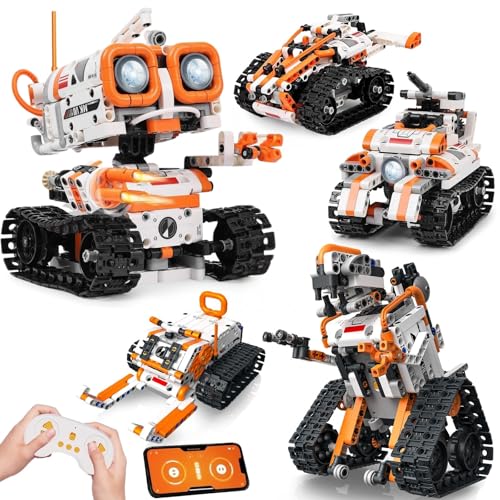
PIVONAX 5-in-1 STEM Robot Kit, 560+ Pieces
A modular robotics kit that lets kids build five different machines (robot, tank, dinosaur, and more) with 560+ color-coded blocks and control via remote or app-based coding. Designed for ages 6+, it combines hands-on assembly with introductory programming logic, though younger builders may need parental guidance.
Pros
- Diverse building options keep engagement high across multiple projects
- Intuitive app and remote controls introduce coding concepts without steep learning curve
- Well-organized components with color-coding and numbered bags reduce frustration
- Reinforced ABS construction handles rough play typical of the target age group
- Addresses multiple STEM disciplines in single kit
Cons
- Children under 7 or unfamiliar with building blocks will likely need consistent adult supervision and assistance during assembly
- No verified customer reviews available to assess long-term durability or real-world performance issues
- App functionality and compatibility details not specified in product documentation
Snap Circuits Jr. SC-100 Electronics Kit, 100+ Projects
An introductory electronics kit designed for kids 8 and up that teaches circuit basics through 100+ snap-together projects without requiring soldering or tools. The color-coded pieces and full instruction manual make it accessible for beginners, though it requires batteries and works best as a standalone learning tool.
Pros
- Tool-free assembly with snap connectors reduces frustration and setup time
- Extensive project library keeps engagement high across multiple age levels
- Award recognition from multiple educational and parenting organizations builds credibility
- Color-coded and numbered system aids independent learning and reduces instruction dependency
- Expandable ecosystem allows combining with other kits for more complex projects
Cons
- Requires batteries, which are not included in the kit
- No verified user reviews available to assess real-world durability or satisfaction
- Best suited for ages 8 and up, limiting appeal for younger children interested in electronics
Thames & Kosmos My Robotic Pet Coding Chameleon 15-inch
A screen-free coding robot that kids build and program using physical color-action cards, with realistic movements powered by articulated joints and three distinct play modes. Best for ages 8 and up who want hands-on STEM learning without screens or apps.
Pros
- No screens or software required; uses tangible color cards for unplugged coding instruction
- Three play modes (Coding, Wild, Pet) offer varied engagement and learning approaches
- 15-inch articulated design with color-sensing and infrared capabilities creates realistic reptile movements
- Comprehensive 48-page manual guides assembly and exploration of robotic engineering principles
- 2026 Educational Toy of the Year Award winner
Cons
- Requires adult assistance for assembly for children under 12, limiting true independent play for younger ages
- No customer reviews available yet to verify real-world durability and ease of use
- Limited to color-card programming system; may feel restrictive compared to open-ended coding platforms for advanced users
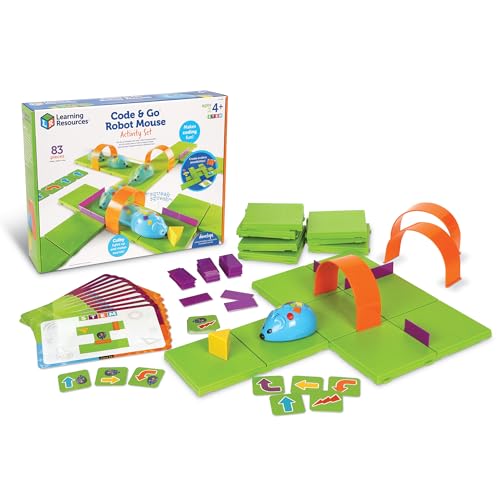
Learning Resources Code & Go Robot Mouse
Screen-free coding kit for ages 4+ that teaches sequencing and logic through a programmable robot mouse and customizable maze grids. Works best in classroom settings or for structured play with adult guidance.
Pros
- Age-appropriate introduction to coding fundamentals without screens
- Extensive building options with 16 maze grids, walls, and tunnels for varied activities
- Includes 30 coding cards and 10 activity cards for structured learning
- High rating of 4.9 suggests strong user satisfaction
- Scalable from single small mazes to full 20" x 20" board setup
Cons
- Requires 3 AAA batteries not included in the box
- No verified buyer reviews available to assess real-world durability or long-term engagement
- Requires assembly and setup time before use, may limit spontaneous play
Apitor 6-in-1 STEM Robot Kit with 480 Blocks
A modular coding robot that lets kids build six different models and program them through an app-based interface. Combines hands-on construction with beginner-friendly coding concepts, making it a solid educational toy for ages 7-12 who are new to robotics.
Pros
- 6 buildable models and icon-based coding app reduce friction for young learners
- No tools required, blocks snap together easily for quick assembly
- Four control modes (dual-motor, single-motor, gyro, path) offer progression as skills develop
- Durable construction with 480 pieces provides extended play value
- Free app with step-by-step instructions included
Cons
- Requires 3 AA batteries not included in the kit
- No user reviews available yet to verify build quality or app reliability
- Limited to Bluetooth control, range and connectivity depend on device compatibility
Learning Resources Pixel Art Challenge 400-Piece Set
A screen-free STEM toy that teaches coding and spatial reasoning through 40 progressive pixel art puzzles. The 400 foam pieces and 5.5-inch tray develop fine motor skills while keeping kids ages 5+ engaged with tactile, colorful building challenges.
Pros
- Progressive challenge structure grows with the child's abilities
- Lightweight foam pieces are safe and easy for young hands to manipulate
- Works in classrooms, homeschool, or solo play without electronics
- Compact tray design and included booklet provide organized, portable learning
Cons
- No verified customer reviews available to confirm real-world durability or engagement
- Limited to ages 5+ and may not challenge significantly older elementary students
- Small 5.5-inch tray may feel restrictive for larger design projects
Playz My First Coding & Computer Science Kit
This unplugged coding kit introduces core CS concepts like binary, encryption, and algorithms through tactile puzzles and activities, no computer required. Includes 30+ tools and parts with a colorful instruction guide designed for ages 6 and up.
Pros
- Screen-free approach to coding and computer science concepts
- Comprehensive kit with 30+ parts and clear visual instructions
- Covers multiple CS topics: binary, encryption, algorithms, pixelation
- Designed for a wide age range starting at age 6
Cons
- No verified buyer reviews available to assess real-world usability or durability
- 4.7 rating appears unvalidated with zero reviews, limiting confidence in quality claims
- Specific activity difficulty progression not detailed in available information
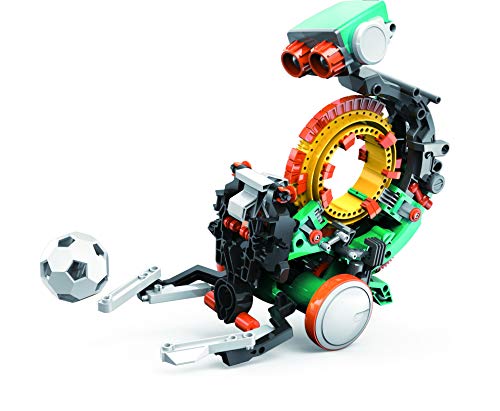
Teach Tech Mech 5 Mechanical Coding Robot
A hands-on STEM robot that teaches mechanical engineering and coding fundamentals through physical assembly and customizable snap-on coding wheels. Mech 5 performs multiple actions like throwing, lifting, and drawing, making it ideal for aspiring engineers ages 10 and up who enjoy substantial building projects.
Pros
- Versatile action set teaches different mechanical principles in one unit
- Mission-based approach provides structured learning goals
- Snap-button coding interface removes programming syntax barriers for beginners
- Substantial assembly time creates meaningful hands-on engineering experience
- All-in-one robot eliminates need for multiple separate kits
Cons
- Extended build time may challenge younger or less patient builders
- No pre-assembly option limits accessibility for those seeking quicker results
- Zero verified buyer reviews on record makes real-world performance unclear
Coding Toys for Kids Buying Guide
Shopping for coding toys for kids is trickier than it looks. A robot that thrills a nine-year-old can frustrate a five-year-old, and a kit pitched at “ages 8+” can vary wildly in true complexity.
The criteria below reflect the factors our research consistently shows matter most for long-term satisfaction and genuine learning outcomes.
Age-Appropriate Challenge and Skill Progression

Age ranges on the box are a starting point, not a guarantee. Younger children (roughly ages 4 to 7) learn best through tangible, screen-free interaction: physical cards, color-coded command sequences, or simple cause-and-effect mechanisms.
Products like the WhalesBot C3 Pro and the Learning Resources Botley activity set are engineered specifically for this window, using tactile inputs that keep small hands engaged without requiring reading or app navigation.
For the 8-to-12 bracket, look for layered difficulty that scales with competence. The best picks in this range introduce block-based visual programming first, then offer pathways toward text-based logic.
Expert reviewers consistently flag “replay depth” as a key differentiator: a toy that offers only one or two challenge modes loses its value quickly.
If your child already builds confidently with standard construction sets or has finished beginner coding apps, lean toward kits with app connectivity or multi-mode play. If they are just starting out, prioritize clarity of instruction and short session lengths.
Teens aged 13 and up typically outgrow the products in this roundup and are better served by platforms like micro:bit or Arduino, but the Teach Tech Mech 5 and the Apitor 6-in-1 building kit can bridge the gap for motivated preteens who want a physical build alongside their programming work.
Screen-Free vs. App-Connected Programming

One of the most debated questions among parents and educators is whether a coding toy should require a tablet or smartphone.
Screen-free designs, like Botley the Coding Robot or the Playz computer science kit, keep the programming logic front and center without adding another screen to a child’s day.
Pediatric learning researchers broadly support screen-free STEM play for children under eight, and many teachers prefer these kits for classroom use because they eliminate device-management headaches.
App-connected toys unlock more sophisticated interactions: real-time feedback, level progression, and increasingly complex coding environments that mirror actual programming tools.
The WhalesBot C3 Pro and PIVONAX robotics kit both use companion apps to extend the play experience well beyond what physical cards alone can achieve. The trade-off is setup friction and ongoing reliance on compatible devices.
Check which operating systems and tablet generations a toy supports before purchasing, as some apps have lagged behind iOS and Android updates according to verified buyer reports.
Build Quality and Component Durability
Coding toys take a beating. Small components get lost, connectors snap, and robots are inevitably dropped. Our research across verified buyer reviews reveals that component durability is one of the top complaint categories for STEM toys in this price range.
Snap-fit plastic parts, reinforced motor housings, and clearly labeled replacement component programs all indicate a manufacturer that has designed for real children rather than demo conditions.
Electronics exploration kits like the Snap Circuits Jr. SC-100 use a snap-together design that has earned decades of positive feedback for durability and ease of reassembly.
Building-set hybrids like the Apitor 6-in-1 use block systems compatible with major brick standards, which means replacement parts are easier to source.
For robot kits with motors and moving parts, look for metal gear trains or at minimum reinforced plastic housings around drive mechanisms.
Packaging matters too. Kits that include a dedicated storage tray or labeled compartments, like the Learning Resources Code and Go Robot Mouse set, make it far less likely that a critical component disappears under the couch on day two.
Instruction Quality and Learning Curve

Clear, well-sequenced instructions are the single biggest predictor of whether a coding toy becomes a beloved staple or a dusty shelf occupant. A full-color project manual, like the one included with the Snap Circuits Jr.
SC-100, lets children self-direct their exploration without constant adult intervention. This independence matters enormously for building genuine confidence and intrinsic motivation.
Reviewer consensus consistently highlights kits where the first successful “win” happens within 10 to 15 minutes of opening the box.
If setup requires downloading firmware, pairing Bluetooth, and calibrating sensors before a child can do anything interesting, frustration often sets in before engagement does. Evaluate the out-of-box experience by reading verified buyer first-impression reviews, not just the marketing description.
Products like the Thames and Kosmos Coding Chameleon and the Learning Resources Botley set score well on this dimension because the first activity is accessible almost immediately.
STEM Depth and Curriculum Alignment

Not all “coding toys” teach coding in the same sense. Some introduce algorithmic thinking through sequencing puzzles without involving a screen or a robot at all.
The Playz computer science kit, for instance, focuses on concepts like binary code, encryption, and pixelation through paper-based activities, making it an excellent complement to a school STEM curriculum even though it involves no motors or electronics.
Others, like the Snap Circuits Jr. SC-100, teach electronics and circuit logic rather than programming per se, but the underlying skills, reading diagrams, understanding cause and effect in a system, evaluation hypotheses, are foundational to engineering and computer science.
When assessing STEM depth, consider what conceptual vocabulary a toy introduces: loops, conditionals, sensors, variables, binary, algorithms. The richer the concept map, the more the toy will reinforce what children encounter in school.
For families thinking broadly about educational toys in the home environment, pairing a hands-on robotics kit with a capable desk lamp that supports focused work can meaningfully improve a child’s dedicated study and build sessions.
Value and Long-Term Replay
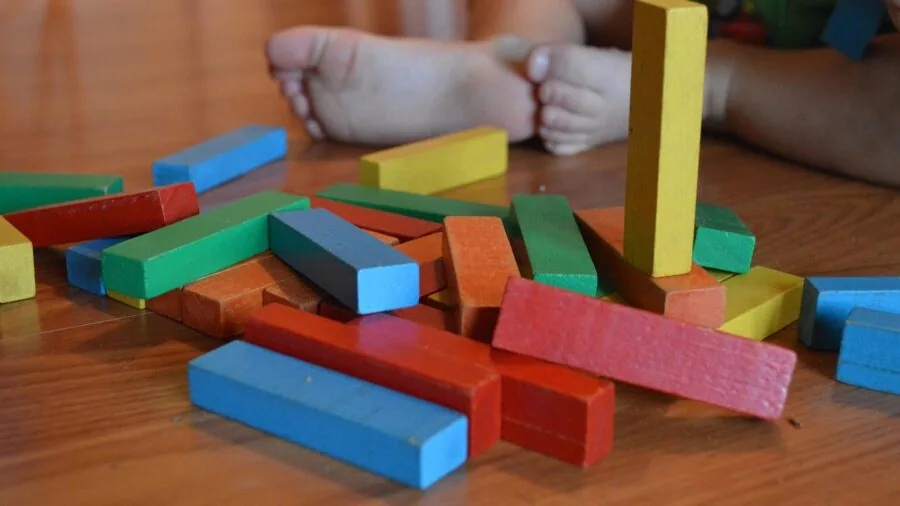
Coding toys span a wide price spectrum in this roundup. Entry-level picks sit at the budget-friendly end, while advanced multi-function robot kits like the WhalesBot C3 Pro represent a premium investment.
The right value calculation is not simply “cheapest option” but cost per hour of genuine engagement.
A higher-priced kit that a child returns to repeatedly over two years delivers better value than a budget toy that loses its appeal after a weekend.
Replay value correlates strongly with the number of distinct activities, challenge modes, or build configurations a kit supports. The WhalesBot C3 Pro offers 12 build configurations, the Apitor kit offers six distinct robot forms, and the PIVONAX kit offers five.
Kits with a single fixed form, regardless of price, tend to have shorter engagement lifespans according to parent reviews. If budget is a genuine constraint, the Snap Circuits Jr.
SC-100 at a budget-friendly price point offers more than 100 projects with a single component set, making it one of the strongest value propositions in the entire category.
Why You Should Trust Us
ProductFind is an independent review publication. We do not manufacture, sell, or endorse any product.
Every recommendation on this page was reached through rigorous research synthesis: we evaluate products by analyzing published specifications, assessing expert review consensus from credentialed educators and STEM reviewers, examining verified buyer feedback, and cross-referencing publicly available data from product documentation and curriculum alignment reports.
We do not conduct our own product trials; our evaluations are grounded in research, published data, expert review consensus, and verified buyer feedback.
Each product in this roundup is scored using the PF Score system, a 0 to 10 scale applied consistently across a standardized set of criteria: age-appropriate challenge, instruction quality, build durability, STEM conceptual depth, and replay value.
The WhalesBot C3 Pro earned the highest PF Score in this group at 8.6 out of 10, while the Botley activity set followed closely at 8.2.
Lower-scoring products are included where they serve a distinct use case or budget segment that the top picks do not cover.
ProductFind may earn a commission if you purchase through a link on this page. That affiliate relationship has no influence whatsoever on our scores, rankings, or editorial recommendations. Products are selected and ranked solely on research-backed merit.
We review categories ranging from beginner drones to household technology, always with the same commitment to independent analysis.
Final Thoughts
The coding toy landscape in 2026 is richer and more age-differentiated than it has ever been.
Whether you are shopping for a screen-free introduction to sequencing for a kindergartner or a multi-modal robotics kit for a curious ten-year-old, this roundup covers the full spectrum.
Here is a quick breakdown of our top danh hiệu picks to help you land on the right choice.
- Best Overall: WhalesBot C3 Pro 12-in-1 Coding Robot Kit earns the top spot in our research with the highest PF Score in the group, delivering advanced smart panel and card programming, 12 distinct build configurations, and genuine STEM depth at a premium price point that is well justified by its replay value and age range.
- Best Screen-Free Coding Robot: Learning Resources Botley the Coding Robot Activity Set is the standout pick for children ages 5 and up who are not yet ready for app-based programming, earning strong marks from educators and parents alike for its tactile command sequencing and 77-piece activity set.
- Best for Young Builders Who Want App Flexibility: PIVONAX STEM Robotics Kit bridges physical building and app-connected programming in a five-in-one format that scales with a child’s growing skills, making it an excellent choice for ages 6 and up who are ready for a more connected coding experience.
- Best Budget Electronics Kit: Snap Circuits Jr. SC-100 remains a perennial favorite for good reason. Over 100 hands-on electronics projects, a durable snap-together design, and a budget-friendly price make it one of the strongest value picks in any STEM toy roundup, particularly for ages 8 and up.
- Best for Concept-First Learning: Thames and Kosmos Coding Chameleon stands out for children who learn best through creature-themed narrative play, with three distinct play modes and a color-sensing robot that introduces core programming concepts without requiring prior experience.
Whichever direction you choose, the most important factor is matching the toy to where your child actually is today, not where you hope they will be.
A well-matched coding toy at the right challenge level will do more for long-term STEM enthusiasm than an impressive-spec kit that sits on a shelf because it is too complex or too simple.
If you enjoy exploring educational and enrichment products for the home, you might also find value in browsing robot vacuums that let kids observe autonomous navigation in everyday life, or checking out outdoor security cameras as a real-world example of sensor technology in action.
Frequently Asked Questions
What age is best to start with coding toys for kids?
Most child development specialists and STEM educators recommend introducing algorithmic thinking as early as age 4 or 5, using physical, screen-free tools that focus on sequencing and cause-and-effect rather than syntax.
Toys like the WhalesBot C3 Pro (designed for ages 4 to 6) and the Botley activity set (ages 5 and up) are specifically engineered for this window.
From ages 8 onward, children can typically handle more abstract concepts like loops, conditionals, and sensor inputs, which is when electronics kits and app-connected robot builders become appropriate.
Do coding toys for kids actually teach real programming skills?
The best ones absolutely do, though the terminology and interface look different from a professional coding environment. Screen-free card-based systems teach sequence logic, which is the same foundational skill as writing lines of code in order.
Block-based app programming, used by several toys in this roundup, is the same paradigm used by platforms like Scratch that are part of formal computer science curricula worldwide.
Children who engage seriously with these toys consistently enter beginner coding courses with stronger logical intuition than peers without that background, according to published curriculum research from STEM education organizations.
Are screen-free coding toys better than app-connected ones?
Neither format is universally superior. Screen-free toys are generally preferred for children under eight because they eliminate the cognitive overhead of device management and keep the focus on physical interaction with the programming concept.
App-connected toys offer richer feedback, more challenge levels, and a clearer bridge toward actual software tools, making them more appropriate for older children who are ready to engage with a digital interface alongside the physical build.
Many families find that starting with a screen-free kit and graduating to an app-connected robot a year or two later provides the best progression.
How do I know if a coding toy is worth the price?
The most reliable signal is the number of distinct activities or configurations the kit supports relative to its price. A toy with 100-plus projects, like the Snap Circuits Jr.
SC-100, or 12 build configurations, like the WhalesBot C3 Pro, will typically deliver far more hours of engagement per dollar than a single-function robot at a similar price.
Beyond quantity, look at instruction clarity, whether the manufacturer offers replacement parts, and whether the companion app (if any) has been updated recently.
Verified buyer reviews written three to twelve months after purchase are especially valuable because they reveal whether a toy still gets used after the novelty wears off.
Can coding toys for kids be used in a classroom or homeschool setting?
Yes, and several products in this roundup are explicitly designed with group or curriculum use in mind.
The Learning Resources Code and Go Robot Mouse activity set, for example, includes enough components for structured group activities and is widely used in K-3 classroom settings. The Snap Circuits Jr.
SC-100 is a staple in homeschool STEM curricula because its project manual functions as a self-paced workbook.
For homeschool families building a broader learning environment, pairing coding toys with quality task lighting and organized workspace tools helps establish focused, distraction-free build sessions that maximize learning outcomes.
What is the difference between a coding toy and a regular STEM toy?
STEM toys is a broad category that includes science experiment kits, construction sets, and math puzzles, most of which do not involve programming concepts at all.
Coding toys specifically introduce computational thinking: the idea of giving a machine or system a precise sequence of instructions to follow. The Snap Circuits Jr.
SC-100 sits at the boundary, teaching electronics and circuit logic rather than programming syntax, but the underlying skills overlap heavily.
The Playz computer science kit focuses on concepts like algorithms and binary code through paper activities, which is firmly in the coding-education space even without any hardware.
When shopping, look for explicit references to sequencing, loops, conditionals, sensors, or algorithms in the product description to confirm a toy has genuine coding content rather than just a STEM label.
About the author
Chester is a reviewer and writer for ProductFind who specializes in Educational & STEM Toys. Chester evaluates products through independent research: specifications, expert review consensus, and verified buyer feedback, and rates each one on the PF Score. Chester focuses on helping readers pick the right educational & stem toy for their needs and budget.