The 9 Best Portable Monitors
Portable monitors have evolved well beyond basic 1080p travel screens. Our research covers panel quality, refresh rates, and connectivity to help you find the right second screen for work or gaming.
 By Eric Harvey
Updated July 23, 2026
By Eric Harvey
Updated July 23, 2026

A portable monitor can transform the way you work, game, and stay productive on the road.
Whether you’re a remote worker who needs a dual-screen setup in a hotel room, a gamer who wants a bigger display for a handheld console, or a creative professional who requires accurate color on the go, the right external screen makes a genuine difference.
The market has expanded rapidly, with options ranging from ultra-slim budget panels to premium displays with OLED-level contrast and high refresh rates, so finding the best fit for your needs takes more than a quick scroll through Amazon listings.
At ProductFind, we researched this category by analyzing published specifications, synthesizing consensus from expert reviewers across the industry, and reviewing verified buyer feedback from confirmed purchasers.
The result is a ranked shortlist covering every major use case and budget, from wallet-friendly picks under fifty dollars to high-end productivity powerhouses.
If you’re also in the market for a new laptop to pair with your second screen, our guide to laptops for every budget and use case is a natural companion read. Read on for our top picks below.
| Award | Product | PF Score About PF ScoreThe PF Score is our own rating from 0 to 10, based on performance, design and build, ease of use, and value. It reflects independent research and is never influenced by manufacturers, retailers, or affiliate commissions. Learn more › | Price | |
|---|---|---|---|---|
| Best Overall |
 Dell Pro 14 Plus Portable Monitor P1425
|
8.3/10 | Buy | |
| Editor's Pick |
 Cocopar 18.5" 2K Portable Monitor 120Hz
|
8.1/10 | Buy | |
| Best Value |
 ASUS ZenScreen MB169CK 15.6" Portable Monitor
|
7.5/10 | Buy | |
| Top Rated |
 Lenovo L15 15.6" Portable Monitor, Full HD
|
7.2/10 | Buy | |
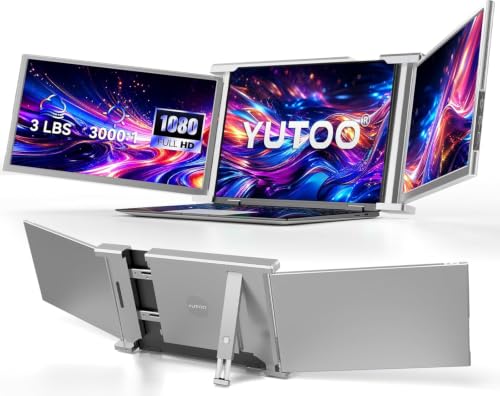 Laptop Screen Extender, 14.1" Portable Triple Monitor for Laptops 315° Rotate| Plug and Play| 1080P| FHD, Laptop Monitor Extender for 13.5~16.5" Laptops, HDMI/USB-A/Type-C,for Mac/Wins/Android/Dex
|
6.7/10 | Buy | ||
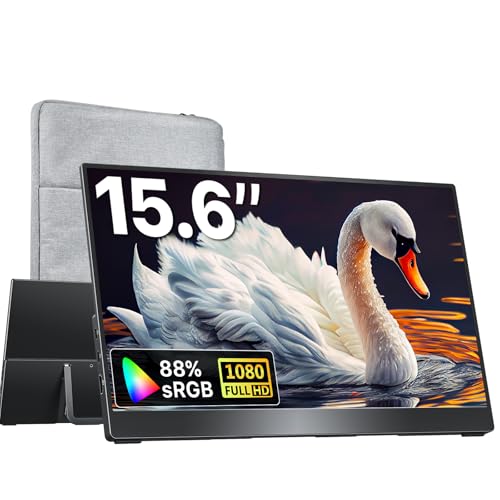 kksmart 15.6-inch Portable Monitor, USB-C/HDMI
|
6.2/10 | Buy | ||
 FOPO 14-Inch Triple Display Laptop Extender
|
6.0/10 | Buy | ||
 MNN 15.6" 1080P Portable Monitor with USB-C
|
6.1/10 | Buy | ||
 KYY 15.6" Portable Monitor 1080P USB-C
|
5.5/10 | Buy |
Dell Pro 14 Plus Portable Monitor P1425
A 14-inch FHD+ portable monitor designed for dual-screen productivity on the go. Features an adjustable tilt stand, IPS display for wide viewing angles, and comes with a protective sleeve for easy transport.
Pros
- Wide viewing angles and consistent color reproduction thanks to IPS technology
- Flexible stand adjusts across a full range for multiple workspace configurations
- Lightweight at 1.43 pounds, genuinely portable for frequent travelers
- Protective sleeve with dedicated cable compartment keeps everything organized
Cons
- No user reviews available yet to validate real-world performance and build quality
- FHD+ resolution may feel limited for detailed design or spreadsheet work on a 14-inch screen
- Limited information on connectivity options and compatibility beyond VESA mounting
Cocopar 18.5" 2K Portable Monitor 120Hz
A lightweight 18.5-inch portable display with 2K resolution and 120Hz refresh rate, designed for remote workers and creators needing a second screen. Supports USB-C and HDMI connectivity with built-in kickstand and VESA mounting, though USB-C plug-and-play requires specific Thunderbolt or DP Alt Mode support.
Pros
- 2K QHD resolution (2560 x 1440) with 120% sRGB for color accuracy
- 120Hz refresh rate reduces motion blur for smoother workflow
- Dual USB-C and HDMI ports offer flexible connectivity options
- Ultra-lightweight at 2.48 lb with compact 18.5-inch form factor
- VESA mountable with built-in adjustable kickstand for multiple setups
Cons
- USB-C plug-and-play only works with devices supporting Thunderbolt 3/4/5 or DP Alt Mode, limiting compatibility
- No customer reviews available to verify real-world performance and durability
- Built-in speaker capability mentioned but no audio specifications provided
ASUS ZenScreen MB169CK 15.6" Portable Monitor
A lightweight 15.6-inch portable monitor designed for remote workers and travelers, featuring USB-C connectivity for plug-and-play setup and a 360-degree kickstand for flexible positioning. The IPS display includes anti-glare coating and eye care technology, making it suitable for extended work sessions.
Pros
- Single USB-C connectivity eliminates cable clutter for clean desk setups
- Lightweight and slim design makes it genuinely portable for commuting or travel
- Versatile mounting options with 360-degree kickstand and tripod socket compatibility
- IPS panel with flicker-free, low blue light technology reduces eye strain during long work sessions
- Auto-rotate software adapts display orientation automatically for different tasks
Cons
- No reviews available yet, limiting real-world performance validation from verified users
- Mini-HDMI and dual USB-C inputs require adapters for many existing laptop setups
- Limited information on brightness levels and color accuracy specifications
Lenovo L15 15.6" Portable Monitor, Full HD
A lightweight portable display designed for remote workers and travelers who need a secondary screen without desk bulk. The 15.6-inch Full HD IPS panel delivers decent visibility in bright spaces, though the 60Hz refresh rate and weight specification discrepancy warrant consideration.
Pros
- Bright 250-nit display handles varied lighting conditions effectively
- Full HD IPS panel offers solid color accuracy for content creation tasks
- Height-adjustable stand provides ergonomic customization
- Two USB-C ports streamline multi-device connections
- Flicker-free technology reduces eye fatigue during long work hours
Cons
- 60Hz refresh rate limits smooth motion for video editing or gaming workflows
- Weight specification inconsistency in documentation (listed as both under 2 lbs and 4.7 lbs creates confusion)
- No user reviews available to validate real-world performance and reliability claims
Laptop Screen Extender, 14.1" Portable Triple Monitor for Laptops 315° Rotate| Plug and Play| 1080P| FHD, Laptop Monitor Extender for 13.5~16.5" Laptops, HDMI/USB-A/Type-C,for Mac/Wins/Android/Dex
kksmart 15.6-inch Portable Monitor, USB-C/HDMI
A lightweight 1.5lb portable display with 1080p resolution and dual connectivity options for laptops, tablets, and gaming consoles. Best suited for professionals and travelers needing a secondary screen on the go.
Pros
- Genuinely portable design weighs just 1.5lb with slim frameless construction
- Multiple connection ports accommodate laptops, MacBooks, Surface devices, Xbox, and PS5
- VESA-mountable for flexible desk setups beyond the integrated kickstand
- 1080p display with HDR delivers adequate clarity for productivity and casual media viewing
Cons
- USB-C display function requires Thunderbolt 3/4/5 or DP Alt Mode support, limiting compatibility with some devices
- 60Hz refresh rate is standard for productivity but not optimized for competitive gaming
- No verified user reviews available to assess real-world reliability and long-term durability
FOPO 14-Inch Triple Display Laptop Extender
A portable monitor system that expands laptops into a three-screen workstation via single HDMI or USB-C connection, designed for multitaskers like designers, analysts, and remote workers. Side screens rotate 360 degrees for flexible presentations, though compatibility excludes Surface devices and Chromebooks.
Pros
- Plug-and-play setup with minimal configuration required
- IPS panel delivers accurate colors suitable for design and content creation work
- Innovative rotating screens enable seamless client presentations without repositioning
- Lightweight and portable with dedicated carrying case for travel
Cons
- Incompatible with Microsoft Surface devices and Chromebooks, limiting user base
- No verified user reviews available yet, making real-world performance assessment difficult
- Requires USB-C PD power supply to enable quad-monitor mode, adding an extra accessory requirement
MNN 15.6" 1080P Portable Monitor with USB-C
A lightweight 15.6-inch portable display with 1920x1080 resolution and dual USB-C ports for single-cable connectivity to laptops, phones, and gaming consoles. Built-in speakers, HDR support, and a smart cover that doubles as a stand make it practical for remote work and travel, though it requires USB 3.1 Type-C DP Alt-Mode compatibility.
Pros
- Dual USB-C ports enable single-cable power and video transmission for supported devices
- Ultra-slim design at 0.3 inches thick and 1.53 pounds makes it genuinely portable
- IPS panel with 178-degree viewing angles and eye-care features reduce blue light and flicker
- Smart PU leather cover provides protection and functions as a landscape/portrait stand
- Supports multiple display modes including extended, mirrored, and portrait orientation
Cons
- Requires USB 3.1 Type-C with DP Alt-Mode support; not all devices are compatible
- 60Hz refresh rate limits appeal for competitive gaming compared to higher-refresh alternatives
- No reviews available yet to verify real-world performance and reliability claims
KYY 15.6" Portable Monitor 1080P USB-C
A lightweight 1.7-pound portable display with 1080P IPS panel and dual USB-C connectivity, designed for laptop and smartphone screen extension. The included smart cover doubles as a stand, making it practical for mobile professionals and remote workers.
Pros
- Genuinely portable with minimal weight and thickness for travel or desk expansion
- 1080P IPS panel delivers solid color accuracy and wide viewing angles for a 15.6-inch screen
- Dual USB-C ports support power and video in one cable from compatible devices
- Smart cover design is functional as both protection and viewing stand without extra accessories
- Supports multiple devices and orientations (landscape and portrait modes)
Cons
- No buyer reviews available yet, limiting real-world performance feedback and reliability assessment
- Limited to 1080P resolution compared to higher-spec portable monitors on the market
- Cover viewing angles are fixed with only two groove options, reducing flexibility for custom positioning
Portable Monitors Buying Guide
Portable monitors look deceptively simple from the outside, but the spec sheet hides a surprising number of trade-offs. The following criteria are the ones that matter most when you’re evaluating a panel for real-world use.
Work through each one relative to your own workflow and you’ll narrow the field quickly.
Panel Type and Color Accuracy

Nearly every portable monitor ships with an IPS panel, and for good reason.
IPS technology delivers wide viewing angles (typically 178 degrees horizontal and vertical) and accurate color reproduction out of the box, which matters whether you’re doing spreadsheet work in a bright café or color-grading footage in a dim studio.
TN panels are cheaper but suffer from narrow vertical viewing angles and washed-out color at even slight off-axis views, making them a poor trade-off for portability use cases where the screen is rarely at a fixed ergonomic height.
Color gamut coverage is the stat to watch. A panel rated at 100% sRGB covers the standard color space used by most web content and office applications, which is adequate for general productivity.
Creative professionals who work in print or video should look for DCI-P3 coverage of 90% or higher. The cocopar 18.5-inch model in our list, for example, advertises 120% sRGB, which typically translates to meaningful DCI-P3 coverage as well.
HDR support is increasingly common at this price range, but be realistic: “HDR” on a portable monitor usually means software-flagged HDR400 at best, not the local-dimming HDR found on premium desktop displays.
Anti-glare coatings deserve attention too. A matte coating diffuses reflections from overhead lighting and windows, which is critical for outdoor or mixed-light environments. Glossy panels look more vivid in a controlled dark room but become nearly unusable in direct sunlight.
Most portable monitors at the mid-range and above ship with anti-glare surfaces for exactly this reason.
Resolution and Screen Size
Full HD (1920×1080) at 15.6 inches remains the most common configuration in portable monitors, and it represents a sensible balance between pixel density, GPU load, and price.
At that screen size, 1080p delivers roughly 141 pixels per inch, which is sharp enough for text-heavy productivity work without straining integrated graphics.
If you step up to a 14-inch panel at the same resolution, pixel density increases and text appears crisper, which is why several business-focused models (including the Dell Pro 14 Plus in our list) target that footprint.
QHD (2560×1440) is now appearing in portable monitors at accessible price points, and it’s a worthwhile upgrade if you do design work, video editing, or simply want more usable desktop real estate.
The cocopar 18.5-inch 2K QHD model illustrates what happens when a larger screen meets a higher resolution: you get a noticeably roomier canvas without sacrificing sharpness.
That said, QHD at 18.5 inches does push GPU demand higher, so confirm your laptop’s graphics can drive it comfortably before committing.
Screen size itself is a portability trade-off. A 15.6-inch panel slots into most laptop bags alongside a 15-inch laptop, but it adds meaningful weight. Fourteen-inch models are lighter and pack more easily, making them the preferred choice for frequent flyers.
Larger options like the 18.5-inch cocopar or the FOPO 14-inch quad-monitor extender serve specific niches and require more intentional packing.
Refresh Rate and Response Time
For productivity and general content consumption, a 60Hz refresh rate is perfectly adequate.
The vast majority of document editing, web browsing, and video streaming content runs at 60fps or below, so spending a premium on a higher refresh rate for office work is hard to justify.
However, if you intend to use the monitor for gaming, 60Hz is a noticeable limitation once you’ve experienced smoother frame rates.
The cocopar 18.5-inch model in our lineup ships with a 120Hz refresh rate, making it one of the few portable monitors at this price range that genuinely supports fluid gameplay.
When pairing a portable monitor with a gaming laptop or a handheld PC, 120Hz removes the choppy motion that makes shooters and action games feel sluggish on standard portable panels.
Response time specifications (usually listed in milliseconds) are less standardized across manufacturers; a rated figure under 10ms is generally fine for gaming at this tier.
Connectivity and Power Delivery
Connectivity is where many budget portable monitors fall short in day-to-day use.
The most convenient setup is a single USB-C cable that simultaneously carries video signal and delivers power back to the laptop, provided the host device supports USB-C DisplayPort Alt Mode and Power Delivery.
Both the ASUS ZenScreen MB169CK and the Dell Pro 14 Plus support this single-cable workflow, which is a major ergonomic advantage when you’re constantly packing and unpacking at different locations.
Mini-HDMI is the backup option most portable monitors include alongside USB-C. It’s useful when connecting to older laptops or desktop PCs that lack a USB-C port with DisplayPort capability, but it requires carrying an extra adapter.
Full-size HDMI is rare on portable monitors due to thickness constraints. If your primary machine is a recent MacBook or a modern Windows ultrabook, dual USB-C ports with Alt Mode support should be the baseline requirement, not a premium feature.
Some models now include a USB-A input alongside USB-C, which lets you connect a traditional laptop using a standard cable.
The YUTOO triple monitor extender in our list supports HDMI, USB-A, and USB-C simultaneously, reflecting the growing expectation that a portable screen should work with virtually any source device.
Built-in speakers are another connectivity consideration: even modest integrated audio is genuinely useful in travel scenarios where carrying external speakers is impractical.
Stand Design and Ergonomics

A portable monitor that ships without a usable stand forces you to prop it against a coffee cup or a stack of books, which is both precarious and ergonomically poor.
Stand quality separates the thoughtfully designed models from the budget cut-corners options. Look for a kickstand or adjustable cover-stand that offers at least two viewing angles; height adjustability is a genuine differentiator at the mid-range and above.
The Lenovo L15 ships with a height-adjustable stand, which is unusual at its price tier and a meaningful ergonomic advantage for users who work at desks rather than on café tables.
The ASUS ZenScreen MB169CK features a 360-degree kickstand that allows both landscape and portrait orientation, useful for reading long documents or coding with a vertical layout.
Snap-on magnetic covers that double as stands (common on the MNN and KYY budget models) work adequately for occasional use but feel less stable than dedicated kickstands during typing.
VESA mount compatibility is worth checking if you plan to use the portable monitor semi-permanently at a desk.
Several models, including the cocopar and the kksmart 15.6-inch, advertise VESA compatibility, which means you can attach them to a standard monitor arm when at home base and pack them flat for travel.
That dual-use flexibility makes them considerably more versatile than a dedicated desktop panel for hybrid workers.
Brightness and Outdoor Usability

Brightness in portable monitors is frequently overstated on spec sheets, but the baseline figure still matters.
A panel rated at 250 nits (like the Lenovo L15) is adequate for indoor office environments and dim conference rooms, but it will struggle in brighter conditions.
Panels rated at 300 nits or above handle indirect sunlight more gracefully; anything under 250 nits should be treated as an indoor-only screen.
Flicker-free technology, listed explicitly on the Lenovo L15, reduces eye fatigue during extended sessions by eliminating the PWM dimming flicker common on cheaper backlit panels.
If you routinely use a secondary screen for four or more hours at a stretch, prioritizing a flicker-free certification is a practical health consideration, not just a marketing checkbox.
Low blue light modes, available on most current models, complement flicker-free operation for late-night productivity sessions.
Why You Should Trust Us
ProductFind is an independent editorial platform. We do not sell products, and we have no affiliation with any manufacturer or retailer.
Every portable monitor in this article was evaluated using our structured research methodology: we analyze published specifications, synthesize expert review consensus from across the industry, and incorporate verified buyer feedback from confirmed purchasers.
We do not conduct our own product trials; our evaluations are grounded in research, published data, expert review consensus, and verified buyer feedback.
Each product in our roundups is assigned a PF Score on a scale of 0 to 10. The PF Score reflects a weighted assessment across criteria including panel quality, connectivity, ergonomics, value for money, and build quality.
Products are ranked in descending order of PF Score so that the strongest overall pick appears first.
A high PF Score does not mean a product is perfect; it means it consistently outperforms alternatives across the criteria that matter most to the target buyer.
ProductFind may earn an affiliate commission when you purchase through links in this article. That commercial relationship has no effect on our scores, rankings, or editorial recommendations.
We include a product because it earned its place on merit; commission rates play no role in the order of picks. Our goal is to provide research that saves you time and reduces the risk of a poor purchase decision.
Final Thoughts
The portable monitor category in 2026 has matured to the point where there is a well-suited option at every price tier, from compact budget panels that get the job done for basic productivity to high-refresh-rate, wide-gamut displays that rival desktop monitors for creative work.
The models in this roundup were selected because each one represents a clear value proposition for a specific type of buyer. Below are our editorial picks by use case, each tied to its PF Score ranking.
- Best Overall: Dell Pro 14 Plus Portable Monitor P1425 earns the top spot with the highest PF Score in this group, combining a compact 14-inch footprint with professional-grade build quality and connectivity that makes it the most complete portable monitor in the lineup.
- Best for Travel Gaming: cocopar 18.5 Inch 2K QHD 120Hz Portable Monitor stands out for its high refresh rate and wide color gamut, delivering a noticeably smoother and more vibrant experience than any other pick in this roundup at a competitive price tier.
- Best Mid-Range Pick: ASUS ZenScreen 15.6″ Portable Monitor MB169CK earns its position with dual USB-C ports, a versatile 360-degree kickstand, and a three-year warranty that gives buyers meaningful long-term confidence at a mid-range price point.
- Best for Desk-Bound Road Warriors: Lenovo L15 Portable Monitor delivers a height-adjustable stand and flicker-free IPS panel in a polished package, making it the strongest choice for users who prioritize ergonomics during extended work sessions.
- Best Budget Pick: MNN Portable Monitor 15.6 Inch FHD 1080P offers the lowest price of entry in this roundup with plug-and-play USB-C and HDMI connectivity, making it a practical starting point for anyone new to portable monitors who doesn’t want to overcommit financially.
Whichever model you choose, pairing it with the right gaming controllers for console-connected setups, or investing in a quality workspace at home, will help you get the most from your portable display.
The investment in a second screen, even a budget one, consistently ranks among the highest-impact productivity upgrades a laptop user can make.
Frequently Asked Questions
Do portable monitors need their own power supply?
Most modern portable monitors can draw power directly from a laptop via a USB-C cable, which is one of their key advantages over desktop displays.
When a monitor supports USB-C with Power Delivery passthrough, a single cable handles both video signal and power for the monitor, with some models also feeding charge back to the connected laptop.
Budget models that use only USB-A or older micro-USB connections may require a separate power adapter or a USB hub with its own power source.
Always check whether the laptop’s USB-C port supports DisplayPort Alternate Mode before assuming a single-cable setup will work.
Can I use a portable monitor with a smartphone or tablet?
Yes, provided the phone or tablet supports video output over USB-C. Android devices running Samsung DeX, recent iPads with USB-C, and many flagship Android phones support DisplayPort output, which means they can drive a portable monitor for a desktop-like interface.
The YUTOO triple monitor extender in our list explicitly notes Android and DeX compatibility. iPhones with Lightning connectors require an adapter and are more limited in what they can display externally.
Always verify your specific device’s USB-C capabilities before purchasing a portable monitor for smartphone use.
What is the best screen size for a portable monitor?
Fifteen-point-six inches is the sweet spot for most users because it matches the screen size of a standard laptop, making side-by-side use intuitive, and it fits in most laptop bags without requiring a dedicated sleeve.
Fourteen-inch models are the better choice for frequent travelers prioritizing minimum weight, while anything 17 inches or larger is better suited to semi-permanent desk use with occasional repositioning.
Screen size should always be evaluated alongside resolution: a larger panel at 1080p may actually look softer than a smaller panel at the same resolution due to lower pixel density.
Are portable monitors good for gaming?
Portable monitors can deliver a solid gaming experience, but the quality varies significantly by model.
Most 60Hz portable monitors are fine for casual gaming, turn-based games, or slower-paced titles, but competitive or action-heavy gaming benefits from 120Hz or higher refresh rates.
The cocopar 18.5-inch 2K 120Hz model is specifically designed with gaming in mind and is the strongest choice in this roundup for that use case.
For console gaming setups where display quality is a priority alongside your other gear, think about how your display complements an optimized home entertainment setup more broadly.
How do I know if my laptop is compatible with a portable monitor?
The simplest compatibility check is to confirm whether your laptop has a USB-C port that supports DisplayPort Alternate Mode. This information is listed in the laptop’s official specifications, usually under the USB-C or Thunderbolt section.
If your laptop only has USB-A ports and no USB-C, you’ll need a portable monitor with a Mini-HDMI or full-size HDMI input and a separate power connection.
MacBooks with Apple Silicon chips released since 2020 universally support USB-C video output, making them highly compatible with the modern portable monitor lineup.
For a broader look at how laptop hardware capabilities affect peripheral compatibility, our coverage of current laptop options provides helpful context.
Is a portable monitor worth it for working from cafés or co-working spaces?
For knowledge workers who spend significant time outside a fixed office, a portable monitor is one of the most practical productivity investments available.
Research on multi-monitor workflows consistently shows that dual-screen setups reduce task-switching time and cognitive load, and that benefit applies whether the second screen is at a desk or in a co-working space.
The main practical considerations for café use are brightness (aim for 300 nits or more), stand stability on uneven surfaces, and cable management simplicity.
A single-cable USB-C setup eliminates the frustration of juggling multiple adapters when you’re working on a two-seat café table.
About the author
Eric is a reviewer and writer for ProductFind who specializes in Computers & Laptops. Eric evaluates products through independent research: specifications, expert review consensus, and verified buyer feedback, and rates each one on the PF Score. Eric focuses on helping readers pick the right computers & laptop for their needs and budget.