The 12 Best Mesh Wi-Fi Systems
Spotty Wi-Fi in the back bedroom or basement? Mesh systems from eero, TP-Link, NETGEAR, and Google fix whole-home coverage gaps. Here's how to pick the right one.
 By Megan Daniels
Updated July 23, 2026
By Megan Daniels
Updated July 23, 2026

Whole-home Wi-Fi coverage used to mean running Ethernet cable through walls or tolerating dead zones in the back bedroom.
Mesh Wi-Fi systems changed all of that by distributing signal through multiple coordinated nodes, eliminating the coverage gaps that plague single-router setups.
Whether you’re streaming 4K video, joining back-to-back video calls, or keeping dozens of smart-home devices online at once, the right mesh system makes your entire home feel like you’re sitting next to the router.
Options from Google, eero, TP-Link, and NETGEAR now span entry-level budget kits to cutting-edge Wi-Fi 7 platforms, so there’s a well-matched system for almost every floor plan and internet plan.
To help you cut through the noise, ProductFind researched twelve of the most talked-about mesh systems on the market today, drawing on published specifications, expert review consensus from leading technology publications, and verified buyer feedback from thousands of confirmed purchasers.
The result is a ranked list you can trust, covering everything from sub-$100 renewed options to flagship tri-band Wi-Fi 7 kits.
Scroll down to see our top picks, then use the buying guide below to zero in on the system that fits your home, your internet plan, and your budget.
| Award | Product | PF Score About PF ScoreThe PF Score is our own rating from 0 to 10, based on performance, design and build, ease of use, and value. It reflects independent research and is never influenced by manufacturers, retailers, or affiliate commissions. Learn more › | Price | |
|---|---|---|---|---|
| Best Overall |
 eero Pro 7 Wi-Fi 7 Mesh Router (3-pack)
|
9.2/10 | Buy | |
| Editor's Pick |
 NETGEAR Orbi 770 WiFi 7 Mesh System
|
8.8/10 | Buy | |
| Best Value |
 eero 6+ Mesh Wi-Fi System 3-pack
|
8.6/10 | Buy | |
| Top Rated |
 NETGEAR Orbi 370 WiFi 7 Mesh System 6000 sq ft
|
8.5/10 | Buy | |
 TP-Link Deco X25 AX1800 Mesh Wi-Fi 6 System
|
8.4/10 | Buy | ||
 TP-Link Deco X20 Wi-Fi 6 Mesh System 3-Pack
|
8.3/10 | Buy | ||
 Eero 6 Mesh WiFi System 3-Pack, 4,500 sq ft
|
8.1/10 | Buy | ||
 TP-Link Deco X55 AX3000 Mesh WiFi 6 System
|
7.9/10 | Buy | ||
 NETGEAR Orbi RBK753 WiFi 6 Mesh System
|
7.8/10 | Buy | ||
 TP-Link Deco M5 3-Pack Mesh WiFi System
|
7.2/10 | Buy | ||
 Google WiFi AC1200 3-Pack Mesh System
|
6.8/10 | Buy | ||
 Google WiFi 3-Pack Mesh System
|
6.5/10 | Buy |
eero Pro 7 Wi-Fi 7 Mesh Router (3-pack)
Amazon's eero Pro 7 brings Wi-Fi 7 technology to whole-home coverage with support for 5 Gbps internet plans and up to 600+ connected devices across 6,000 sq. ft. Built-in TrueMesh software optimizes connections, though the system requires a subscription for advanced security features like ad blocking and parental controls.
Pros
- Latest Wi-Fi 7 standard delivers wireless speeds up to 3.9 Gbps for bandwidth-heavy households
- Eliminates dead zones across multiple floors with strong mesh coverage
- Supports hundreds of devices simultaneously, ideal for smart homes and small businesses
- Patented TrueMesh software proactively maintains optimal connection quality
- Compatible with Amazon Echo devices and previous eero models
Cons
- Advanced security features (ad blocking, parental controls, VPN) require optional eero Plus subscription
- No user reviews available yet to validate real-world performance claims
- Premium pricing tier compared to standard Wi-Fi 6 mesh systems
NETGEAR Orbi 770 WiFi 7 Mesh System
The Orbi 770 brings WiFi 7 technology to home mesh networking with speeds up to 11Gbps and coverage for homes up to 8,000 sq. ft. The tri-band system with enhanced backhaul maintains performance across 100 devices simultaneously, making it suitable for large households or properties with demanding connectivity needs.
Pros
- WiFi 7 delivers faster speeds than WiFi 6 while remaining compatible with existing devices
- Enhanced backhaul technology keeps speeds fast across all devices at once
- Extensive coverage area and high device capacity suitable for large homes
- Security features built into the system with automatic updates
- 2.5 Gig port accommodates next-generation internet speeds
Cons
- No user reviews available yet to verify real-world performance claims
- Product limited to U.S. use only, restricting availability in other regions
- Premium mesh system with higher price point compared to WiFi 6 alternatives
eero 6+ Mesh Wi-Fi System 3-pack
A budget-friendly gigabit mesh system that covers up to 4,500 sq. ft. and handles 75+ devices. Built-in Thread and Zigbee smart home hub eliminates the need for separate hubs, while Wi-Fi 6 with 160 MHz bandwidth delivers reliable multi-device streaming and work-from-home performance.
Pros
- Supports gigabit speeds at an affordable price point
- Wi-Fi 6 with 160 MHz bandwidth reduces congestion for multiple simultaneous users
- Integrated smart home hub for Thread and Zigbee devices eliminates separate purchases
- TrueMesh technology intelligently routes traffic to minimize dead spots
- Quick app-based setup and remote network management
Cons
- No verified customer reviews available to validate real-world performance claims
- Premium features like advanced security and additional network management require separate subscription
- Backward compatibility with older eero devices may complicate network optimization
NETGEAR Orbi 370 WiFi 7 Mesh System 6000 sq ft
NETGEAR's Orbi 370 delivers WiFi 7 coverage across 6000 square feet with a 3-pack system designed to eliminate dead zones throughout your home. The dual-band setup supports up to 70 devices and includes a 30-day NETGEAR Armor security trial, making it suitable for larger households with multiple connected devices.
Pros
- Latest WiFi 7 standard reduces lag and provides more capacity for future-proofing
- Extensive coverage area makes it viable for large homes without dead zones
- Straightforward setup via Orbi app with remote management capability
- High device capacity handles smart homes with numerous connected gadgets
- Works universally across cable, fiber, and other internet providers
Cons
- No verified buyer reviews available yet to assess real-world performance
- Requires purchasing additional satellites for expansion beyond 6000 sq ft
- Security trial is limited to 30 days before requiring paid subscription
TP-Link Deco X25 AX1800 Mesh Wi-Fi 6 System
A budget-friendly mesh Wi-Fi 6 system designed to cover up to 5,800 sq. ft. across a 3-pack setup. The Deco X25 targets users seeking dual-band whole-home coverage without premium pricing, though this is a renewed unit with limited original review data.
Pros
- Wi-Fi 6 (802.11ax) technology for improved speeds and efficiency
- Covers up to 5,800 sq. ft. with 3-pack configuration
- Dual-band support for flexible device connectivity
- Compact form factor at 13 x 5 x 12 inches per unit
- Renewed pricing tier offers savings versus new models
Cons
- Renewed unit means uncertain condition history and warranty coverage
- No verified customer reviews available to assess real-world performance
- AX1800 spec positions it as entry-level mesh; faster models exist at higher tiers
TP-Link Deco X20 Wi-Fi 6 Mesh System 3-Pack
A Wi-Fi 6 mesh system designed to blanket up to 5800 sq ft with consistent coverage across your home. The Deco X20 handles up to 150 devices and includes built-in parental controls and basic network security, making it practical for families seeking straightforward whole-home connectivity without complexity.
Pros
- Covers large spaces up to 5800 sq ft with three units included
- Supports up to 150 connected devices simultaneously
- Includes 6 Ethernet ports total across the 3-pack for wired backhaul options
- Easy app-based setup and management with Alexa voice control for guest Wi-Fi
- Free basic security features including network security scan and parental controls
Cons
- No customer reviews available yet to verify real-world performance claims
- Wi-Fi 6 AX1800 is entry-level for mesh systems, limiting speed for bandwidth-heavy households
- Requires a separate modem and compatible ISP service to function
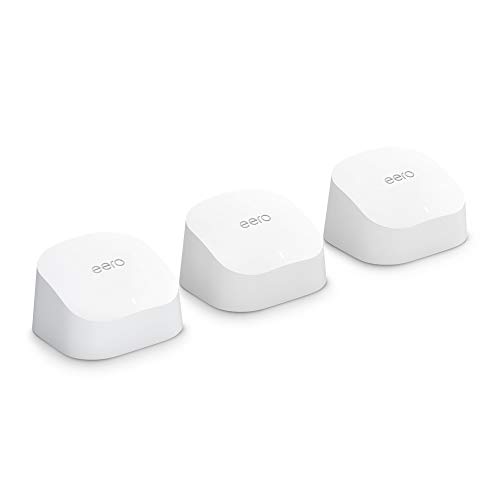
Eero 6 Mesh WiFi System 3-Pack, 4,500 sq ft
WiFi 6 mesh system covering up to 4,500 square feet with support for 75+ connected devices and speeds up to 500 Mbps. Includes one router and two extenders, designed to eliminate dead spots and handle 4K streaming across your home.
Pros
- Supports up to 500 Mbps for 4K streaming and gaming across large homes
- WiFi 6 handles 75+ devices, beneficial for smart home-heavy households
- Zigbee hub integration simplifies Alexa device connectivity
- Quick app-based setup with accessible customer support
- Expandable system with compatible hardware options
Cons
- 500 Mbps speed ceiling may not suit gigabit internet plans
- No reviews available to verify real-world performance claims
- Requires dedicated app for network management and monitoring
TP-Link Deco X55 AX3000 Mesh WiFi 6 System
A Wi-Fi 6 mesh system covering up to 6,500 square feet with three gigabit ports per unit and support for ethernet backhaul. Designed for households needing reliable coverage across multiple rooms and devices with built-in security features.
Pros
- Substantial coverage area eliminates dead zones without traditional range extenders
- Multiple gigabit ports per unit enable flexible wired backhaul configurations
- Supports high device count suitable for smart homes and large families
- Compliant with CISA Secure-by-Design pledge for cybersecurity standards
- Compatible with all major ISPs
Cons
- No verified buyer reviews available yet to assess real-world performance
- Requires a modem for most internet service providers
- Limited information on how HomeShield features compare to dedicated security software
NETGEAR Orbi RBK753 WiFi 6 Mesh System
A WiFi 6 mesh system designed to cover up to 7,500 sq. ft. with support for 40+ connected devices simultaneously. The 3-pack includes one router and two satellites, making it suitable for larger homes seeking robust whole-home coverage.
Pros
- WiFi 6 delivers faster speeds and better efficiency than WiFi 5 for multi-device households
- 8 Gigabit Ethernet ports enable high-speed wired backhaul and device connections
- Included NETGEAR Armor cybersecurity adds protection across multiple devices
- Extensive coverage range suits larger homes effectively
Cons
- This is a renewed unit, not brand new, which may impact warranty or device condition
- Requires external modem, adding to total setup cost and complexity
- Product listing shows 4.3 rating with zero verified reviews, limiting buyer feedback data
TP-Link Deco M5 3-Pack Mesh WiFi System
A three-unit mesh system designed to cover up to 5,500 sq. ft. with a single network name and adaptive routing technology. Best suited for larger homes seeking to replace traditional routers and extenders with seamless whole-home coverage.
Pros
- Seamless roaming across your home with one unified network
- Built-in security features and parental controls included at no ongoing cost
- Flexible deployment: any unit can serve as the main router
- Wired backhaul option improves performance for demanding networks
Cons
- No user reviews available yet to assess real-world reliability and performance
- Requires separate modem for most ISP connections, adding to overall setup cost
- Coverage area may not be sufficient for very large homes or complex layouts beyond 5,500 sq. ft.
Google WiFi AC1200 3-Pack Mesh System
A straightforward mesh WiFi system designed to eliminate dead zones across homes up to 4,500 sq ft using three AC1200 routers. Setup through the Google Home app takes minutes, with basic management features for parental controls and guest networks included.
Pros
- Three-unit bundle covers large homes without dead zones
- Simple app-based setup and device management
- Clean design with compact form factor
- 30-day return guarantee reduces purchase risk
Cons
- AC1200 spec is dated compared to newer WiFi 6 mesh systems
- No user reviews available to verify real-world performance claims
- Limited advanced networking features mentioned in specs
Google WiFi 3-Pack Mesh System
Google WiFi is a mesh router system designed to eliminate dead zones across homes up to 4,500 square feet. The setup is straightforward through a mobile app, and Network Assist automatically optimizes channel selection for consistent performance.
Pros
- Each unit covers up to 1,500 square feet of seamless coverage
- Mobile app provides easy setup, device monitoring, and parental controls
- Network Assist intelligently switches between channels and bands for optimal speed
- Compatible with major internet service providers without additional configuration
- Compact design fits easily into home decor
Cons
- No user reviews available to assess real-world performance and reliability
- Limited advanced networking features compared to enterprise-grade mesh systems
- Expandability requires purchasing additional units at separate cost
Mesh Wi-Fi Systems Buying Guide
Choosing a mesh Wi-Fi system is more nuanced than picking the box with the biggest number on the front.
Coverage area, backhaul type, Wi-Fi generation, and ecosystem compatibility all play into whether a system will actually solve your problem or just add new ones.
The sections below walk through the criteria that matter most, so you can match the right system to your specific home and habits.
Coverage Area and Node Count
The most important starting point is your square footage. Manufacturers publish coverage estimates, but real-world performance depends on wall materials, floor count, and the presence of large appliances or concrete structures.
As a general rule, treat published coverage numbers as optimistic and size up if your home has thick walls, multiple floors, or many interior doors.
Most three-pack systems are designed for homes in the 4,500 to 6,500 square foot range, though two-story homes with older construction may need an extra node even at smaller square footages.
If your plan includes ethernet ports in walls or a network switch already in place, you can wire nodes together for a significant performance boost over wireless backhaul alone.
Node placement is equally important. Nodes should be positioned so each one can see at least one neighbor without obstruction, ideally spaced no more than two rooms apart.
Stairwells and hallways are useful locations for bridging floors.
Wi-Fi Generation: Wi-Fi 5, Wi-Fi 6, and Wi-Fi 7

The Wi-Fi generation embedded in a mesh kit determines both peak throughput and how efficiently it handles many simultaneous devices.
Wi-Fi 5 (802.11ac) systems like the original Google WiFi handle everyday browsing and streaming reliably, but they can struggle when dozens of devices are all active at once.
Wi-Fi 6 (802.11ax) introduced OFDMA technology that dramatically improves efficiency in crowded homes, making systems like the TP-Link Deco X20 and eero 6+ much better suited to smart-home-heavy households.
Wi-Fi 7 (802.11be), found in the eero Pro 7 and the NETGEAR Orbi 770 and 370 series, adds Multi-Link Operation (MLO), which allows devices to transmit across multiple bands simultaneously.
The practical result is lower latency and higher sustained throughput, especially for clients like gaming consoles and laptops that also support Wi-Fi 7.
If you’re on a multi-gigabit fiber plan or you regularly transfer large files between devices on your local network, Wi-Fi 7 is worth the premium.
For most households on standard gigabit or sub-gigabit plans, a well-chosen Wi-Fi 6 system delivers excellent real-world performance at a lower price point. Wi-Fi 7 is future-proofing you’ll appreciate as more client devices adopt the standard over the next few years.
Backhaul: Wireless vs. Wired
Backhaul refers to how nodes communicate with each other. In a wireless-only setup, nodes share the same radio spectrum for both client traffic and inter-node communication.
Dual-band systems with only two radios must split bandwidth between these two functions, which can noticeably reduce throughput for clients farthest from the primary router.
Tri-band systems like the eero Pro 7 and NETGEAR Orbi 770 dedicate an entire radio band exclusively to backhaul, keeping client-facing bandwidth intact regardless of how many nodes are in the chain. This architecture consistently outperforms dual-band-only systems in multi-node deployments.
Wired Ethernet backhaul is the gold standard.
If you can run a cable between nodes (or already have Ethernet in your walls), systems that support wired backhaul, such as the TP-Link Deco X20, Deco X55, and Deco X25, effectively turn each node into a wired access point with full bandwidth available to every client.
This setup eliminates the single biggest source of mesh performance inconsistency.
Device Capacity and Network Management

Modern homes commonly operate 50 or more connected devices simultaneously, from smartphones and laptops to voice assistants, security cameras, robot vacuums, and smart-home sensors.
Wi-Fi 6 and Wi-Fi 7 systems handle high device counts more gracefully than their predecessors, thanks to improved scheduling and target wake time (TWT) technology that reduces interference from low-power IoT devices.
Beyond raw device capacity, pay attention to the companion app. eero’s app is widely praised for its clean interface and accessible parental controls. TP-Link’s Deco app provides detailed traffic monitoring and includes optional antivirus scanning via subscription.
NETGEAR Orbi’s Orbi app offers robust QoS controls that let you prioritize gaming or video conferencing traffic. Google’s Home app integration is best if you’re already embedded in the Google ecosystem and rely on voice-controlled smart-home devices.
Internet Plan Compatibility and WAN Ports

Your mesh system’s router node must be able to accept and pass your full internet plan speed. Most entry-level systems ship with a single 1 Gbps WAN port, which caps usable throughput at roughly 940 Mbps in practice.
If you have or plan to upgrade to a multi-gigabit fiber plan (2.5 Gbps or faster), you need a system with a 2.5 Gbps or higher WAN port.
The eero Pro 7 supports up to 5 Gbps WAN, and the NETGEAR Orbi 770 includes a 2.5 Gbps port as standard.
Also count the LAN ports per node if you plan to connect wired devices (smart TVs, game consoles, desktop PCs).
The TP-Link Deco X55 stands out with three Gigabit LAN ports per node, six ports total across a three-pack, which is unusually generous at its price point and reduces the need for an additional switch at each node location.
Privacy, Security, and Ecosystem Lock-In

Mesh systems are always-on infrastructure devices with direct access to every packet flowing through your home network, so the manufacturer’s privacy policy and security update cadence genuinely matter. eero is an Amazon company, and its privacy policy reflects data sharing within the Amazon ecosystem, which is worth reading if that concerns you.
TP-Link publishes regular firmware updates and offers optional subscription-based threat protection. NETGEAR Orbi systems include a bundled trial of NETGEAR Armor (powered by Bitdefender) that scans connected devices for vulnerabilities.
Consider ecosystem lock-in carefully. eero systems work best within the Amazon ecosystem and support Alexa but not Google Assistant natively. Google WiFi integrates deeply with Google Home but lacks some advanced networking features that power users expect.
TP-Link and NETGEAR remain more platform-agnostic. If you’re building a broader smart-home setup that might include a video baby monitor or other networked devices, choosing a system with robust QoS and VLAN support gives you more long-term flexibility.
Why You Should Trust Us
ProductFind is an independent review platform with no manufacturer sponsorships or paid placements. Every product in this roundup was assessed using our structured PF Score methodology, rated on a consistent 0 to 10 scale.
We do not conduct our own product trials; our evaluations are grounded in research, published data, expert review consensus, and verified buyer feedback.
For mesh Wi-Fi systems specifically, our research process involved analyzing published specifications from each manufacturer, synthesizing expert consensus across leading technology publications, and reviewing thousands of verified buyer responses covering real-world installation experiences, long-term reliability, and app usability.
We weighted criteria including Wi-Fi generation, backhaul architecture, coverage consistency, device capacity, companion app quality, and value relative to price tier.
Each system’s PF Score reflects how it compares within the broader field of whole-home mesh solutions, not just against the eleven others in this article.
ProductFind may earn a commission when you purchase through links on this page. That affiliate relationship has no influence on which products are included, how they are ranked, or what PF Score they receive.
Our editorial recommendations are driven entirely by research findings and consumer value, not by commission rates.
Final Thoughts
After evaluating twelve mesh Wi-Fi systems across a wide range of price points and use cases, the field breaks into clear tiers.
Flagship Wi-Fi 7 systems deliver future-proof performance for demanding households, mid-range Wi-Fi 6 kits offer the strongest value for most buyers, and budget renewed options provide genuine whole-home coverage without a large upfront investment. Here are the standout picks from our research:
- Best Overall: Amazon eero Pro 7 earns the top PF Score in this roundup thanks to its Wi-Fi 7 tri-band architecture, multi-gigabit WAN support, and consistently excellent expert review consensus across the board.
- Best for Large Homes: NETGEAR Orbi 770 Series covers up to 8,000 square feet with a dedicated tri-band backhaul and a 2.5 Gbps WAN port, making it the top choice for sprawling floor plans where range is the primary concern.
- Best Mid-Range Wi-Fi 7: NETGEAR Orbi 370 brings Wi-Fi 7 technology to a more accessible price point, offering strong coverage and modern backhaul without the premium of a tri-band flagship.
- Best Value Wi-Fi 6: TP-Link Deco X25 (Renewed) achieves a high PF Score at a budget-friendly price, delivering genuine Wi-Fi 6 performance and wired backhaul support in a renewed package that suits cost-conscious buyers who don’t want to sacrifice modern standards.
- Best Plug-and-Play Pick: Amazon eero 6 remains a favorite for households that want a streamlined setup experience with solid app-based management, broad device support, and reliable everyday performance without complex configuration.
Whichever system you choose, pairing it with a capable wired backbone (even a modest Gigabit network switch at your router location) can meaningfully improve consistency across your home.
A mesh upgrade is also a good moment to audit the rest of your home office setup: a solid wireless foundation makes everything from ultrawide monitors used for remote work to smartwatches syncing health data run more reliably.
If whole-home coverage is your priority in 2026, any of the five systems above will serve you well.
Frequently Asked Questions
How Many Nodes Do I Need for My Home?
For most single-story homes under 2,000 square feet, a two-node setup is sufficient. Three-node kits are the sweet spot for two-story homes or open floor plans in the 2,500 to 5,000 square foot range.
Larger or older homes with thick walls often benefit from a fourth node, and most systems in this roundup support expanding the network by purchasing additional nodes sold separately.
Start with the three-pack most systems ship in, set up all three nodes, and map your coverage using your system’s app before deciding whether an additional node is needed. Apps from eero and TP-Link Deco both include signal-strength indicators that help you identify weak spots.
Is Wi-Fi 7 Worth the Extra Cost Right Now?
Wi-Fi 7 is worth the investment if you’re on a multi-gigabit internet plan, you have Wi-Fi 7-capable client devices (newer laptops and smartphones), or you want hardware that won’t feel dated in three to five years.
The Multi-Link Operation feature in Wi-Fi 7 reduces latency in ways that benefit gaming and video conferencing even on current client devices.
If your internet plan tops out at 500 Mbps to 1 Gbps and your devices are two or more years old, a high-quality Wi-Fi 6 system delivers essentially equivalent real-world performance at a lower price point, making it the smarter near-term buy for most households.
Can I Mix Nodes from Different Brands or Generations?
In almost all cases, no. Mesh systems use proprietary protocols to coordinate between nodes, so mixing brands (for example, adding a TP-Link Deco node to an eero network) is not supported.
Within a brand, mixing generations is sometimes possible but usually results in the entire network defaulting to the performance ceiling of the oldest node. It’s best to keep all nodes in a mesh network from the same product line.
Do Mesh Systems Work with Any Internet Provider?
Yes, mesh systems are compatible with virtually any residential internet service, including cable, DSL, fiber, and fixed wireless. You connect the primary router node to your modem or gateway using an Ethernet cable, and the mesh system handles everything downstream.
If your ISP provides a combination modem/router unit (a gateway), you’ll need to put it into bridge mode or DMZ mode to avoid a double-NAT situation, which can cause issues with gaming and some smart-home devices.
Some ISPs, particularly those using fiber with ONT units, require that you use their gateway for authentication. In those cases, bridge mode is the standard solution. Both eero and TP-Link Deco document this process clearly in their setup guides and companion apps.
How Does a Mesh System Differ from a Wi-Fi Range Extender?
A traditional range extender rebroadcasts your router’s signal under a separate network name, requiring your devices to manually switch between networks as you move through your home.
Mesh systems create a single unified network with one SSID, and nodes coordinate automatically so your devices roam seamlessly without any manual intervention.
Range extenders also typically cut bandwidth in half because they use the same radio to receive and retransmit simultaneously. Mesh nodes with dedicated backhaul bands or wired backhaul support avoid this penalty entirely.
For a connected home with robot vacuums, 3D printers, and other devices spread across multiple rooms, a mesh system is almost always the better long-term solution over an extender.
What Security Features Should I Look for in a Mesh System?
At minimum, look for a system that receives regular firmware updates from the manufacturer. Automatic security patching is a feature in eero, TP-Link Deco, and NETGEAR Orbi systems, and it’s one of the most important long-term reliability factors for always-on network hardware.
For households with children or a large number of IoT devices such as connected pet accessories or smart appliances, look for systems that support network segmentation or a dedicated IoT VLAN.
This isolates less-secure devices from your main network, limiting the blast radius if any single device is compromised. TP-Link Deco systems support this natively, and NETGEAR Orbi’s Armor subscription adds active device scanning on top of the base firmware protections.
About the author
Megan is a reviewer and writer for ProductFind who specializes in PC Components & Peripherals. Megan evaluates products through independent research: specifications, expert review consensus, and verified buyer feedback, and rates each one on the PF Score. Megan focuses on helping readers pick the right pc components & peripheral for their needs and budget.