The 9 Best Mechanical Keyboards
Switch feel, layout, and build quality all shape how a mechanical keyboard performs daily. We researched nine boards from ASUS, Logitech G, AULA, and more to find the strongest picks across gaming, typing, and office use.
 By Megan Daniels
Updated July 23, 2026
By Megan Daniels
Updated July 23, 2026

A great mechanical keyboard can genuinely change how you experience your computer, whether you spend your days writing reports, grinding ranked matches, or coding late into the night.
Unlike membrane keyboards, mechanical switches give each keystroke a distinct tactile response, more consistent actuation, and a lifespan measured in tens of millions of keypresses.
The market has expanded dramatically, ranging from budget-friendly wireless boards to premium gasket-mount builds with hot-swappable switches, and sorting through the noise takes real research.
At ProductFind, we analyzed specifications, synthesized expert review consensus from across the industry, and weighed verified buyer feedback to surface the strongest picks across every price tier and use case.
The lineup below covers options from ASUS, Logitech G, AULA, EPOMAKER, RK Royal Kludge, and Cherry, spanning full-size and compact layouts, wired and wireless connectivity, and gaming-focused to office-friendly designs.
Scroll through our ranked top picks to find the right board for your setup.
| Award | Product | PF Score About PF ScoreThe PF Score is our own rating from 0 to 10, based on performance, design and build, ease of use, and value. It reflects independent research and is never influenced by manufacturers, retailers, or affiliate commissions. Learn more › | Price | |
|---|---|---|---|---|
| Best Overall |
 ASUS ROG Strix Scope II 96 Wireless Mechanical Keyboard
|
8.4/10 | Buy | |
| Editor's Pick |
 AULA F75 Pro 75% Wireless Mechanical Keyboard
|
8.4/10 | Buy | |
| Best Value |
 Logitech G PRO TKL Mechanical Gaming Keyboard
|
8.2/10 | Buy | |
| Top Rated |
 AULA F99 Wireless Mechanical Keyboard, 96% Compact
|
8.1/10 | Buy | |
 ASUS ROG Strix Scope II X Mechanical Gaming Keyboard
|
9.1/10 | Buy | ||
 EPOMAKER F75 75% Wireless Mechanical Keyboard
|
8.0/10 | Buy | ||
 RK Royal Kludge R98 Pro 96% Mechanical Keyboard
|
7.6/10 | Buy | ||
 Logitech G413 SE Full-Size Mechanical Gaming Keyboard
|
7.5/10 | Buy | ||
 Cherry KC 200 MX Mechanical Keyboard with MX2A Brown Switches
|
6.8/10 | Buy |
ASUS ROG Strix Scope II 96 Wireless Mechanical Keyboard
A compact 96% mechanical keyboard that packs full-size functionality with tri-mode connectivity, hot-swappable pre-lubed switches, and extended battery life up to 1,500 hours. Built for gamers and professionals seeking customization without sacrificing desk space.
Pros
- Exceptional battery longevity eliminates frequent recharging for wireless users
- Hot-swappable design allows switch customization without soldering
- Compact 96% form factor saves desk space while retaining full-size key set
- Factory-lubricated switches enhance smoothness and reduce rattle
- Comprehensive accessory bundle includes wrist rest, keycap puller, and wireless receiver
Cons
- No verified user reviews available, so real-world durability and reliability remain unconfirmed
- Limited to two switch options (Snow Linear and Storm Clicky) rather than broader compatibility with third-party switches
- Premium pricing reflects specialty gaming brand positioning, making it less accessible for budget-conscious users
AULA F75 Pro 75% Wireless Mechanical Keyboard
A compact 75% mechanical keyboard with tri-mode connectivity (Bluetooth 5.0, 2.4GHz, USB-C) and hot-swappable switches designed for both gaming and office work. Features pre-lubed switches, RGB lighting with knob control, and side-printed PBT keycaps, making it accessible for keyboard customization beginners.
Pros
- Multiple connectivity options allow seamless switching between PC, laptop, tablet, and mobile devices
- Hot-swappable design eliminates soldering, making it beginner-friendly for keyboard customization
- Multi-layered silicone dampening and PCB slotting reduce hollow sounds and improve overall typing feel
- Knob-based control for lighting and media functions offers intuitive gaming and productivity modes
- Side-printed PBT keycaps resist fading and wear better than traditional ABS alternatives
Cons
- No verified user reviews available yet to confirm real-world durability and build quality claims
- Compact 75% layout eliminates some keys found on full-size boards, which may require adjustment for certain workflows
- Driver software required for advanced macro programming and music-sync lighting effects, adding setup complexity
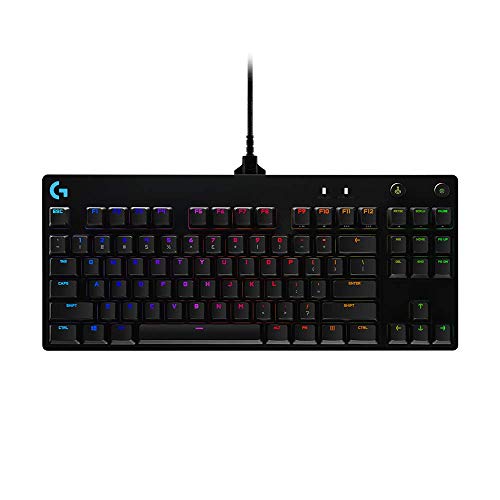
Logitech G PRO TKL Mechanical Gaming Keyboard
A competition-focused tenkeyless keyboard built for esports athletes, featuring durable GX Blue Click switches and a compact design that saves desk space. The detachable cable and onboard memory programming make it tournament-friendly, though the lack of a numeric keypad may not suit all users.
Pros
- Compact tenkeyless form factor maximizes mouse space and travel portability
- GX Blue Click switches offer satisfying tactile and audible feedback
- Onboard memory LIGHTSYNC lets you program lighting without G HUB on tournament PCs
- Detachable cable with three-pronged design ensures secure connection and easy packing
- 3-step angle adjustment and rubber feet provide stable, comfortable positioning during long sessions
Cons
- No numeric keypad limits functionality for productivity tasks or spreadsheet work
- Macro programming requires Logitech G HUB software, which may not be allowed in tournament settings
- No verified buyer reviews available to assess real-world durability and long-term reliability
AULA F99 Wireless Mechanical Keyboard, 96% Compact
A tri-mode mechanical keyboard with hot-swappable switches, pre-lubed linear stems, and multi-device connectivity via Bluetooth 5.0, 2.4GHz, or USB-C. The gasket structure and PBT keycaps target both work and gaming setups, though the 4.5-star rating reflects no verified buyer feedback yet.
Pros
- Three connection modes (BT5.0, 2.4GHz, USB-C) with ability to pair five devices simultaneously
- Hot-swappable design supports 3-pin and 5-pin switches without soldering, plus includes switch and keycap pullers
- Pre-lubed linear switches for smooth keystroke feel and fast response in gaming
- 96% compact layout preserves arrow keys and number pad while saving desk space
- 8000mAh battery and double-shot PBT keycaps built for durability
- Gasket structure with five-layer silencer pads reduces cavity noise and improves tactile feedback
Cons
- No verified customer reviews available to assess real-world reliability or build quality consistency
- Macro customization and 16 RGB lighting effects require driver software, adding setup complexity
- Gasket and silencer system adds weight (3.3 lbs) compared to standard mechanical keyboards
ASUS ROG Strix Scope II X Mechanical Gaming Keyboard
A full-size wired gaming keyboard with hot-swappable ROG NX V2 switches and PBT keycaps designed for gamers and streamers. Built with aluminum construction, sound dampening, and programmable hotkeys for gaming, content creation, and daily work.
Pros
- Hot-swappable design lets you swap switches without soldering, plus the option to choose between linear or clicky switch variants
- Enhanced RGB illumination thanks to LED lens in ROG NX V2 switches
- Integrated sound dampening and switch pads reduce noise and pinging for cleaner acoustics
- Pre-programmed Xbox Game Bar hotkeys and media wheel streamline gaming and streaming workflows
- Aluminum top plate and PBT keycaps provide durability for long-term use
Cons
- No user reviews available yet to confirm real-world performance and reliability
- Wired USB-C only connection with no wireless option for flexibility
- Premium price positioning limits appeal to budget-conscious buyers
EPOMAKER F75 75% Wireless Mechanical Keyboard
A compact 75% keyboard featuring gasket construction, five-layer sound dampening, and hot-swappable switches for customization. Offers triple connectivity (Bluetooth, 2.4GHz, USB-C) and a 4000mAh battery, suited for desk-conscious gamers and professionals seeking a quieter typing experience.
Pros
- Advanced gasket structure balances flexibility and firmness for comfortable extended typing
- Comprehensive sound dampening via five-layer padding creates noticeably quieter keystrokes
- Cherry profile PBT double-shot keycaps resist wear and fading over time
- Three connectivity options provide flexibility across different devices and scenarios
- Pre-lubricated mechanical switches deliver smooth actuation from the start
Cons
- No user reviews available yet, limiting real-world performance validation
- Compact 75% layout omits dedicated numpad and some function keys, requiring layer switching for certain inputs
- Battery capacity and actual runtime claims lack independent verification
RK Royal Kludge R98 Pro 96% Mechanical Keyboard
A compact 96-percent layout keyboard that balances space efficiency with full functionality, retaining numpad and arrow keys alongside hot-swappable switches and a volume knob. Pre-lubed cream linear switches and MDA profile PBT keycaps deliver a smooth, creamy typing feel suited for both gaming and office work.
Pros
- Gasket mount with five-layer sound-absorbing foam creates thocky, pleasant acoustics
- Hot-swappable hot-swap sockets let you swap switches without soldering
- MDA profile keycaps offer excellent finger contour and wrapping sensation
- Detachable aluminum knob adds premium feel and practical volume adjustment
- Compatible with Windows and MacOS for cross-platform flexibility
Cons
- No customer reviews available to validate real-world durability or quality control
- Wired connection limits desk flexibility compared to wireless alternatives
- Gasket mounting and foam layers add weight (1.76 lbs), making portability less convenient
Logitech G413 SE Full-Size Mechanical Gaming Keyboard
A full-size mechanical gaming keyboard built with PBT keycaps and a brushed aluminum frame for durability and reliable performance. Best suited for competitive gamers and typists who want a sturdy board without breaking the bank.
Pros
- Durable PBT keycaps and premium aluminum construction for long-term reliability
- Anti-ghosting performance and mechanical switches suit competitive gaming
- Robust build quality with minimal flex from the metal top case
- FN function keys provide quick access to volume, lighting, and system controls
Cons
- No user reviews available yet to assess real-world durability and switch feel consistency
- Wired connection limits desk flexibility compared to wireless alternatives
- Full-size footprint takes up significant desk space without programmable macro keys mentioned
Cherry KC 200 MX Mechanical Keyboard with MX2A Brown Switches
A wired mechanical office keyboard built with Cherry's MX2A Brown switches, delivering tactile feedback without the noise for professional environments. The aluminum chassis and laser-etched keycaps emphasize durability, while full N-key rollover and status LEDs cover practical daily needs.
Pros
- Tactile MX2A Brown switches provide responsive feedback without audible clicking, ideal for offices
- Laser-etched keycap lettering resists wear and remains readable after extended use
- Sturdy aluminum construction with fold-out feet ensures stability and premium feel
- Full N-key rollover eliminates ghosting for reliable simultaneous key input
- Practical shortcut keys for calculator and volume control minimize workflow interruption
Cons
- No customer reviews available to validate real-world durability or long-term reliability claims
- Wired USB-A connection offers no wireless flexibility for modern desk setups
- No backlighting mentioned, limiting usability in low-light work environments
Mechanical Keyboards Buying Guide
Choosing a mechanical keyboard is not as simple as picking the prettiest board on the shelf. Switch feel, layout, connectivity, build quality, and software support all interact in ways that affect daily comfort and long-term satisfaction.
The sections below break down each criterion so you can match a board to your actual workflow rather than to marketing copy.
If you are also building out your desk, a well-chosen ergonomic keyboard might be worth considering alongside a traditional mechanical board, especially for long typing sessions.
Switch Type and Feel

Switch type is the single biggest factor in how a mechanical keyboard feels and sounds. The three broad families are linear, tactile, and clicky.
Linear switches (such as the ROG NX Snow and LEOBOG Reaper found in several picks here) travel smoothly from top to bottom with no bump or audible click, making them popular for fast-paced gaming where consistent, low-resistance actuation matters.
Tactile switches like Cherry MX2A Brown give a gentle bump at the actuation point without an audible click, striking a balance that works well for mixed typing and gaming.
Clicky switches add both a tactile bump and a sharp click sound, giving typists satisfying feedback at the cost of office noise.
Pre-lubed switches, which appear on several boards in this roundup, reduce the scratchy friction common in stock switches and produce a smoother, quieter sound signature right out of the box.
Hot-swappable sockets let you pull switches and replace them without soldering, which is a transformative feature if you like to experiment with different switch feels over time.
If a board lacks hot-swap, you are locked into the factory switches unless you are comfortable with a soldering iron.
Actuation force is measured in grams and typically ranges from around 35 g for ultra-light linear switches to 60 g or more for heavier tactile options. Lighter switches fatigue hands less during long sessions but can cause accidental keypresses for some typists.
Heavier switches feel more deliberate but may slow down fast typists initially.
Layout and Form Factor

Keyboard layouts range from 60 percent (no function row, no navigation cluster) all the way to full-size 100 percent boards with a numpad.
The most popular compact options right now are 75 percent and tenkeyless (TKL, roughly 80 percent) layouts, both of which preserve the function row and most navigation keys while cutting desk footprint significantly.
Boards like the AULA F75 Pro and EPOMAKER x Aula F75 are 75 percent designs that add a physical volume knob, which is a practical touch for media control without sacrificing too many keys.
Full-size boards with a numpad suit accountants, data entry professionals, and anyone who regularly enters numeric data. The RK Royal Kludge R98 Pro takes a 96 percent approach, cramming the numpad into a tighter footprint by eliminating gaps between key clusters.
Think carefully about how much desk space you are working with; a smaller keyboard also leaves more room for a wide mouse pad, which matters for gamers who use low DPI settings.
A large keyboard placed next to a quality ultrawide monitor can feel cramped without enough lateral space.
Keycap row profile is a related consideration. MDA and OEM profiles have a sculpted, angled shape across rows, while XDA and DSA profiles are uniform height. Most users adapt quickly to any profile, but typing enthusiasts often have strong preferences.
PBT keycaps, featured on the AULA F75 Pro and the ASUS ROG Strix Scope II models, are harder, thicker, and more resistant to shine than ABS keycaps, which is an advantage for long-term durability.
Connectivity: Wired vs. Wireless
Wired keyboards offer zero-latency input and never need charging, which is why many competitive gamers still prefer them.
USB-C is now the dominant connector on modern mechanical keyboards and makes cable management much easier than the legacy Micro-USB connections found on older boards.
If latency is a priority and you are not moving your keyboard between devices, wired is the simple answer.
Wireless boards have closed the gap considerably.
Tri-mode connectivity, seen on the ASUS ROG Strix Scope II 96 Wireless, the AULA F99, and the AULA F75 Pro, combines 2.4 GHz RF (for near-wired latency), Bluetooth 5.0 (for pairing with phones, tablets, or multiple computers), and USB-C wired mode.
This versatility is ideal for users who switch between a desktop, a laptop, and a tablet throughout the day.
Battery life on tri-mode boards varies widely; check manufacturer-published estimates and user reports before buying if charging frequency matters to your workflow.
For competitive gaming at high refresh rates, a 2.4 GHz wireless connection is typically indistinguishable from wired in real-world play.
Pairing a low-latency wireless keyboard with a high-refresh-rate display (see our coverage of ultrawide monitors for display context) and a quality controller can meaningfully tighten your input chain without cable clutter.
A well-organized desk with a monitor arm also helps when you want to reduce cable sprawl around a wireless setup.
Build Quality and Typing Feel

Chassis construction determines acoustic character and stability. Most budget boards use a top-mount or tray-mount design, which delivers a firmer, higher-pitched typing sound.
Gasket mounting, found on the EPOMAKER x Aula F75 and the RK Royal Kludge R98 Pro, suspends the switch plate between silicone or foam gaskets, producing a softer, bouncier keystroke and a lower-pitched thud that many enthusiasts describe as more premium.
If sound and feel matter deeply, gasket-mount boards punch well above their price tier.
Internal dampening layers, foam padding between the PCB and case, and switch pad foam all reduce ping and hollow sounds.
The EPOMAKER x Aula F75 ships with five layers of dampening material, which is unusually thorough for a board in its price range.
Aluminum top plates and frames add rigidity and weight that contributes to a planted, premium feel on the desk.
Plastic cases are lighter and cheaper, and high-quality plastic like the polycarbonate used on some enthusiast boards can actually enhance sound by allowing more resonance through the case.
Stabilizers on the larger keys (spacebar, shift, enter, backspace) are often the weakest link on budget boards. Rattly stabilizers can undermine an otherwise good typing experience. Better boards ship with pre-lubed or screw-in stabilizers that are far quieter.
If a board’s stabilizers are the main complaint in verified buyer feedback, factor that into your decision.
RGB Lighting and Software
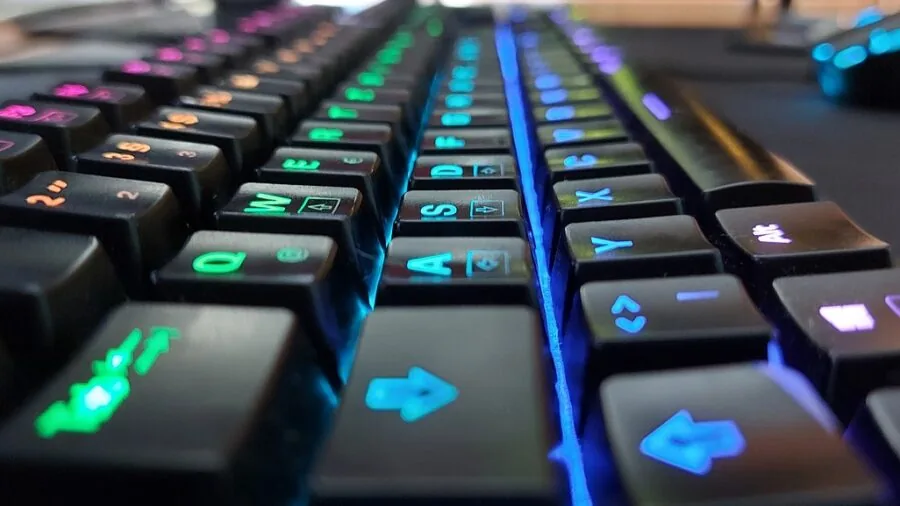
RGB backlighting is nearly universal on gaming-oriented mechanical keyboards and is increasingly common on office boards. Lighting quality varies more than the marketing suggests.
The brightness of per-key RGB LEDs, the smoothness of animation effects, and whether south-facing or north-facing LEDs affect how well lighting shines through keycaps all matter.
PBT keycaps generally have tighter legends that diffuse RGB less evenly than ABS keycaps, so if vibrant RGB is your priority, check community photos before buying.
Software support is a practical concern. ASUS Armory Crate, Logitech G Hub, and ROG’s ecosystem allow macro programming, RGB customization, and switch remapping.
Boards without dedicated software often rely on onboard memory and key combinations to switch profiles, which works fine once configured but is less intuitive.
If your workflow involves complex macros or per-game lighting profiles, invest in a board with mature software. For pure typing without frills, the Cherry KC 200 MX takes a no-software approach that office users often prefer.
Value and Long-Term Cost

Mechanical keyboards span an enormous price range, from budget-friendly entry points to premium enthusiast builds that cost as much as a mid-range gaming controller setup combined.
The boards in this roundup sit primarily in the affordable-to-mid-range tier, making them accessible without the compromises typical of the cheapest options.
Hot-swap support significantly extends the life of a keyboard by letting you replace worn or unwanted switches rather than the whole board.
Consider the total cost of ownership. A board with hot-swap, PBT keycaps, and gasket mounting may carry a higher upfront price but delivers a better baseline experience and more room to upgrade.
A budget board without those features may need accessory purchases (aftermarket keycaps, switch lube kits, stabilizer foam) to reach the same level, often closing the gap in total spend.
If you are assembling a complete desk setup, budgeting for ergonomic office seating alongside your keyboard choice will do more for long-term comfort than upgrading switches alone.
Why You Should Trust Us
ProductFind is an independent review publication with no brand relationships, retail partnerships, or manufacturer influence over its rankings.
Every product in this roundup was evaluated using a consistent, research-driven methodology: we analyze published specifications, synthesize expert review consensus drawn from across the keyboard and gaming peripherals community, assess verified buyer feedback at scale, and cross-reference manufacturer data with independent published sources.
We do not conduct our own product trials; our evaluations are grounded in research, published data, expert review consensus, and verified buyer feedback.
Each product receives a PF Score on a 0 to 10 scale based on that consistent set of criteria, applied equally across every board regardless of brand or price tier.
The scores reflect the totality of evidence rather than any single review or data point.
ProductFind may earn an affiliate commission when you purchase through links on this page, but affiliate relationships have zero bearing on rankings, PF Scores, or which products are included.
Our editorial decisions are made independently, and products are recommended solely on merit.
Final Thoughts
After evaluating specifications, expert consensus, and verified buyer feedback across all nine boards in this roundup, a few clear standouts emerged across different use cases and budgets.
Whether you are a competitive gamer, a hybrid worker who types across multiple devices, or someone building a clean office setup, there is a mechanical keyboard here worth your money.
- Best Overall: ASUS ROG Strix Scope II X earns the top spot with the highest PF Score in this roundup. Its full-size layout, hot-swappable pre-lubed ROG NX Snow V2 linear switches, and PBT keycaps make it a comprehensive package that satisfies both gamers and typists at a mid-range price.
- Best Wireless Value: ASUS ROG Strix Scope II 96 Wireless delivers tri-mode connectivity and a compact 96 percent layout with the same quality hot-swap and switch pedigree, making it the strongest wireless choice in the group.
- Best Budget Wireless Pick: AULA F75 Pro ties for the second-highest PF Score while coming in at a budget-friendly price. Its 75 percent layout, tri-mode wireless, physical knob, pre-lubed Reaper switches, and PBT keycaps make it exceptional for the spend.
- Best for Competitive Gaming: Logitech G PRO Mechanical TKL remains a proven platform for serious gamers. Its tenkeyless form factor, clicky switch option, and Logitech G Hub software integration suit players who want a no-compromise tournament-ready board from an established brand.
- Best for Office Use: Cherry KC 200 MX takes a refreshingly simple approach with its elegant aluminum surface and MX2A Brown switches. It is the quietest, most desk-appropriate board in the roundup and the right call for anyone who does not need gaming features cluttering their workspace.
A great keyboard is one piece of a well-considered desk setup.
If you are rounding out your workspace, pairing your new board with quality gaming headsets for audio immersion, and making sure your display and peripherals are dialed in will deliver the most complete experience.
For anyone upgrading the wider PC setup, our coverage of DDR5 RAM kits and PC cases can help you prioritize what to upgrade next.
Frequently Asked Questions
What is the difference between linear, tactile, and clicky switches?
Linear switches travel smoothly with no bump or sound, making them fast and quiet for gaming. Tactile switches have a physical bump at the actuation point that gives typing feedback without noise.
Clicky switches add an audible click to that tactile bump, which many typists love but coworkers may find disruptive. If you are unsure, tactile switches like Cherry MX Brown or their equivalents are the most broadly versatile starting point.
Is a hot-swappable keyboard worth the extra cost?
For most buyers, yes. Hot-swap sockets let you pull and replace switches in seconds without soldering, which means you can try different switch types as your preferences evolve without buying a new board.
Given that a quality keyboard can last a decade or more, the flexibility to change switches is a meaningful long-term advantage, especially as the aftermarket for switches continues to expand with interesting new options every year.
Do I need a full-size keyboard or is a compact layout better?
It depends entirely on your work. If you regularly input numeric data, a full-size board with a numpad saves time.
For most gamers and general typists, a 75 percent or TKL layout frees up significant desk space for mouse movement and keeps your hands in a more natural position relative to the screen.
Many users who switch to a compact layout report they never want to go back. A smaller keyboard also pairs well with an adjustable monitor arm that lets you optimize screen distance independently of desk surface use.
What is gasket mounting and does it matter for everyday users?
Gasket mounting suspends the switch plate between soft silicone or foam gaskets rather than screwing it rigidly to the case. The result is a slightly bouncy, softer typing feel and a lower-pitched sound profile that most people find more pleasant.
It matters more to enthusiasts who type for many hours daily than to casual users, but at the price points where gasket-mount boards now appear, it is a welcome bonus rather than a luxury reserved for expensive customs.
Can I use a mechanical gaming keyboard for office work?
Absolutely. The main consideration is switch noise. Clicky switches are often unwelcome in shared offices, while linear or tactile switches are far less intrusive.
Boards like the Cherry KC 200 MX are specifically designed with office aesthetics and subdued operation in mind, while something like the Logitech G413 SE can pass as an office board despite its gaming lineage.
If you work in a shared space, check switch sound level ratings before buying and consider pairing your setup with a solid ergonomic office chair and a portable monitor for a complete, comfort-focused workstation.
How does wireless latency compare to wired for gaming?
Modern 2.4 GHz wireless connections typically register input delays well under five milliseconds, which is imperceptible in all but the most elite competitive gaming scenarios.
Bluetooth has higher and more variable latency and is better suited for casual use, typing, or pairing with mobile devices.
If you play fast-paced competitive titles at high frames per second on a high-refresh display, a 2.4 GHz wireless board is a practical alternative to wired without meaningful performance sacrifice. Bluetooth mode is best reserved for multi-device switching and casual tasks.
About the author
Megan is a reviewer and writer for ProductFind who specializes in PC Components & Peripherals. Megan evaluates products through independent research: specifications, expert review consensus, and verified buyer feedback, and rates each one on the PF Score. Megan focuses on helping readers pick the right pc components & peripheral for their needs and budget.