The 8 Best Digital Note Taking Tablets
From distraction-free e-ink slates to AI-powered writing tablets, finding the right digital notebook depends on your workflow. Here are the top picks worth buying.
 By Deanna Torres
Updated July 23, 2026
By Deanna Torres
Updated July 23, 2026

Digital note-taking tablets have quietly become one of the most useful tools for students, professionals, and creatives who want to ditch paper without sacrificing the feel of writing by hand.
Whether you’re annotating dense PDFs, capturing ideas in a meeting, or sketching out a diagram, the right device can transform how you work.
The market has expanded rapidly, from distraction-free e-ink slates to full-featured Android tablets with pressure-sensitive styluses, and the differences between them matter far more than specs sheets suggest.
At ProductFind, we researched this category by analyzing manufacturer specifications, synthesizing consensus across expert reviews, and combing through verified buyer feedback to identify which digital note-taking tablets genuinely deliver on their promises.
Our picks span a range of budgets and use cases, from premium paper-tablet experiences to capable budget-friendly options for everyday note-takers.
Scroll down to see our top picks, then read the buying guide to find the right match for your workflow.
| Award | Product | PF Score About PF ScoreThe PF Score is our own rating from 0 to 10, based on performance, design and build, ease of use, and value. It reflects independent research and is never influenced by manufacturers, retailers, or affiliate commissions. Learn more › | Price | |
|---|---|---|---|---|
| Best Overall |
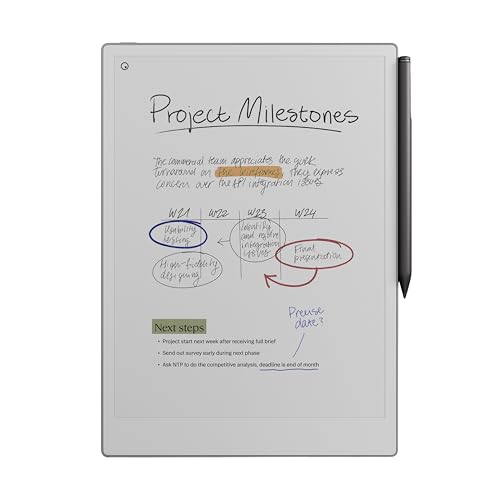 reMarkable Paper Pro 11.8" Color Tablet Bundle
|
9.4/10 | Buy | |
| Editor's Pick |
 reMarkable 2 10.3" Digital Paper Tablet Bundle
|
8.2/10 | Buy | |
| Best Value |
 Amazon Kindle Scribe 11" eReader with Pen
|
8.1/10 | Buy | |
| Top Rated |
 Amazon Kindle Scribe 64GB with Premium Pen
|
7.8/10 | Buy | |
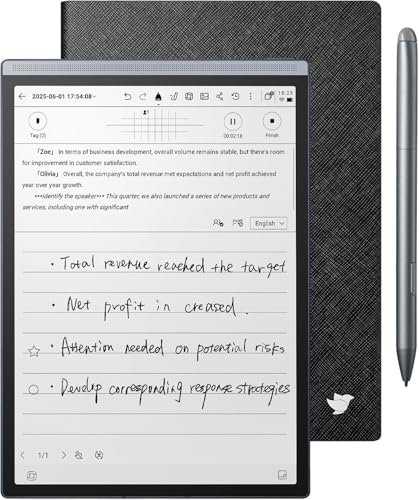 iFLYTEK AINOTE Air 2 8.2-inch E-Ink Tablet
|
7.2/10 | Buy | ||
 iFLYTEK AINOTE Air 2 8.2" E Ink Tablet
|
7.1/10 | Buy | ||
 XP-Pen Magic Note Pad 10.95" Android Tablet
|
6.8/10 | Buy | ||
 XP-Pen Note Plus A5 Digital Notebook
|
5.5/10 | Buy |
reMarkable Paper Pro 11.8" Color Tablet Bundle
A premium digital notebook with a groundbreaking color e-ink display and paper-like writing experience, designed for note-takers and readers who want reduced eye strain. Comes bundled with the Marker Plus pen and includes conversion tools for handwriting-to-text workflow.
Pros
- Color display is a significant first for the reMarkable line, expanding creative and organizational options
- Low-glare, reflection-based screen reduces eye strain compared to traditional tablets, even in bright outdoor conditions
- Marker Plus pen delivers natural writing feel with precise responsiveness and all-day comfort
- Complete bundle includes pen, spare tips, and cable with no additional purchases needed for basic use
- Thoughtful software features like PDF markup, handwriting conversion, and tag-based organization streamline workflow
Cons
- No verified buyer reviews available yet to assess real-world durability and long-term user satisfaction
- Premium pricing positions it as a high-end device rather than an accessible option for casual users
- Adjustable reading light may not provide sufficient illumination for all low-light environments compared to backlit displays
reMarkable 2 10.3" Digital Paper Tablet Bundle
A distraction-free tablet designed for note-taking and document review with a genuinely paper-like writing experience. Includes accessories and a year of cloud storage, making it a complete package for professionals and students who prioritize focus over connectivity.
Pros
- Paper-like writing experience that closely mimics pen on paper
- Exceptionally thin and portable design at 4.7mm
- Comprehensive bundle includes essential accessories and year-long cloud subscription
- Handwriting conversion enables notes to be reused as digital text
- Cloud integration with Dropbox and OneDrive for seamless workflow
Cons
- No reviews available to assess real-world performance and long-term durability
- Limited to note-taking and document review; not a general-purpose tablet
- Requires subscription beyond the initial 12-month trial for continued cloud access
Amazon Kindle Scribe 11" eReader with Pen
A premium e-ink tablet that combines reading with natural handwriting, featuring an 11-inch display, AI-powered note tools, and document markup capabilities. Best suited for readers and note-takers who want a single device for both.
Pros
- Paper-like writing experience with ultra-responsive pen that requires no charging
- Strong integration with cloud services for document import and note export
- Natural reading experience with AI features like book recaps and spoiler-free catch-ups
- Lightweight and thin form factor designed for extended comfort
- Adaptive display brightness and warmth control for different lighting
Cons
- No verified user reviews available yet, making real-world performance difficult to assess
- Premium pricing positions it in the high-end segment with limited budget alternatives
- Some AI features like 'Ask this Book' are not yet available and coming in 2026
Amazon Kindle Scribe 64GB with Premium Pen
A 10.2-inch e-ink tablet designed for reading and writing, featuring AI-powered note summarization and handwriting-to-text conversion. Best for readers who want to annotate documents and replace physical notebooks without distractions.
Pros
- Built-in AI tools make notes more legible and manageable through summarization and tone adjustment
- Premium Pen writes naturally without requiring separate charging or pairing
- Large 10.2-inch high-resolution display reduces eye strain for extended reading and writing sessions
- Seamless document import and annotation workflow through Amazon ecosystem
- Extended battery life supports regular use across weeks without frequent charging
Cons
- No customer reviews available yet to validate real-world performance and reliability
- Premium positioning means higher cost compared to standard e-readers or basic tablets
- Limited to Amazon's ecosystem for content and services, reducing flexibility for other platforms
iFLYTEK AINOTE Air 2 8.2-inch E-Ink Tablet
A multilingual AI-powered note-taking tablet with voice-to-text in 17 languages and handwriting recognition across 83 languages, ideal for professionals who need intelligent meeting summaries and cross-device sync. The paper-like E-Ink display and 7-day battery life suit extended work sessions without frequent charging.
Pros
- Extensive language support for voice and handwriting across 17 and 83 languages respectively, useful for global teams
- Long battery endurance of up to 7 days reduces daily charging needs
- AI-powered meeting transcription and schedule extraction streamline workflow documentation
- Paper-like writing experience with E-Ink technology reduces eye strain during extended note sessions
- Cloud sync via OneDrive and mobile app enables seamless cross-device access
Cons
- No verified buyer reviews available to assess real-world reliability and long-term durability
- Limited to 8.2-inch screen, which may feel cramped for users accustomed to larger tablets
- AI features' accuracy and meeting summary quality depend on audio clarity and background noise levels
iFLYTEK AINOTE Air 2 8.2" E Ink Tablet
An e-ink note-taking tablet designed for professionals and students who need AI-powered transcription and meeting summaries. The 8.2-inch display mimics paper writing with low-latency stylus input, while supporting voice-to-text across 17 languages and converting handwriting to text in 83 languages.
Pros
- Multi-language transcription capability spans 17 languages with 83-language handwriting conversion for global users
- Paper-like writing feel with stylus precision appeals to professionals replacing physical notebooks
- AI meeting summary and symbol-based task management (stars, triangles, circles) streamlines workflow documentation
- Eye-friendly adjustable reading light with 24 brightness levels supports extended use and audiobook reading
- Cloud synchronization via OneDrive ensures notes sync across devices securely
Cons
- No verified buyer reviews available, making real-world reliability and durability assessment difficult
- Limited information on battery life, storage capacity, and offline functionality
- 8.2-inch screen may feel small for users accustomed to larger tablets or paper notebooks
XP-Pen Magic Note Pad 10.95" Android Tablet
A full Android tablet with stylus support and three display modes (monochrome, light color, natural color) designed for note-taking, reading, and productivity. The 90Hz display with paper-like texture and low blue light certification suits students and professionals who want versatility beyond dedicated e-ink devices.
Pros
- Flexible display modes bridge e-ink simplicity and full Android functionality
- Pressure-sensitive stylus and native note app provide seamless writing experience
- Eye-friendly certification plus anti-glare etched glass reduce strain during extended use
- Full Android 14 ecosystem access expands beyond note-taking to productivity apps
- Quick 20W charging for 8000mAh battery supports mobile use
Cons
- Not an e-ink device, so requires more active power management than dedicated e-readers
- Narrow viewing angles by design sacrifice flexibility for reduced glare, limiting side viewing
- No reviews provided yet to validate real-world performance and reliability claims
XP-Pen Note Plus A5 Digital Notebook
A hybrid digital notebook that lets you write on real paper with an ink pen while syncing handwriting to your phone via Bluetooth 5.3. Best for students and professionals who want natural writing feel without electronic screens, though it requires using XP-Pen's specific pen and compatible A5 paper refills.
Pros
- Natural paper writing experience combined with digital convenience and instant phone syncing
- Long battery life and fast charging make it practical for all-day use
- Compatible with any thin A5 paper refill, avoiding locked-in proprietary costs
- Offline functionality with automatic sync prevents note loss
- Built-in editing, tagging, and search tools within the companion app
Cons
- Requires XP-Pen's exclusive matching ink pen, limiting pen choice flexibility
- No user reviews available yet, making real-world reliability unclear
- Limited to A5 size, smaller than standard notebooks, may feel cramped for some users
Digital Note Taking Tablets Buying Guide
Choosing the right digital note-taking tablet is rarely about finding the one with the most features. It’s about matching the device to how you actually work.
The sections below break down the criteria that matter most, so you can cut through the marketing noise and make a confident decision.
Display Technology: E-Ink vs. LCD vs. Color E-Ink
The display is the single most important factor in a note-taking tablet, and the choice between e-ink and traditional LCD affects everything from eye comfort to battery life.
E-ink displays, like those on reMarkable devices and the Kindle Scribe family, reflect ambient light the way paper does, which means far less eye strain during long reading or writing sessions.
They also consume power only when the screen refreshes, delivering battery life measured in days or weeks rather than hours.
Color e-ink, as seen on the reMarkable Paper Pro, represents the newest frontier. It adds the ability to highlight in multiple colors and sketch more expressively, while retaining the low-glare, paper-like surface.
The trade-off is that color e-ink palettes are more muted than a vivid LCD, which matters if you need photo-accurate rendering. For pure note-taking, annotation, and reading, the calmer display is typically a feature rather than a flaw.
LCD and hybrid tablets like those from XP-Pen offer richer color and more versatile app ecosystems, making them better suited to users who want a single device that also handles media, browsing, or digital art.
If focus and minimal distraction are priorities, e-ink wins. If you need a general-purpose tablet that also handles notes well, an LCD option may fit better alongside your other tablet essentials.
Writing Feel and Stylus Quality

The closest a digital device gets to real pen-on-paper feel, the less you’ll have to think about the technology and the more you’ll focus on your ideas.
This sensation, often called latency, is the delay between the moment your stylus tip touches the surface and the moment ink appears on screen.
Premium devices like the reMarkable lineup are engineered specifically to minimize this gap, and verified buyers consistently cite it as the defining quality that separates them from general-purpose tablets.
Pressure sensitivity is the other key variable. Higher pressure levels (the XP-Pen 3-in-1 color notebook claims 16,384 levels) allow more nuanced line weight variation, which matters for sketching and artistic annotation but is largely irrelevant for meeting notes or bullet journaling.
Battery-free stylus designs are worth seeking out: they eliminate the anxiety of a pen dying mid-session and tend to feel more balanced in hand.
Surface texture also contributes to the writing experience in ways that are hard to quantify from specs alone. Matte, slightly textured screen protectors or glass treatments add just enough friction to mimic paper grain.
Many users of reMarkable devices specifically call out this texture as the reason they chose it over iPad alternatives.
A stylus that magnetically attaches and charges on the device body is a convenience worth prioritizing, since loose styluses have a way of disappearing at the worst moments.
Software Ecosystem and Cloud Sync
Hardware gets you writing; software determines whether those notes are actually useful afterward.
Closed ecosystems, like reMarkable’s Connect platform or Kindle Scribe’s Amazon integration, offer tight, reliable sync but limit where your notes can go.
Open Android-based tablets give you access to apps like Notion, GoodNotes, or OneNote, but that openness also brings the distraction of notifications and a steeper learning curve.
AI-powered features are now appearing across the category. The Kindle Scribe includes built-in AI notebook summarization, while iFLYTEK’s AINOTE Air 2 offers voice-to-text transcription and multi-language meeting minutes.
These capabilities can be genuinely useful for professionals who want to convert handwritten notes into searchable, shareable documents without manual retyping. Evaluate whether those features require a paid subscription, since ongoing costs can add up quickly.
PDF annotation is a workflow most buyers underestimate until they need it. If you regularly mark up research papers, contracts, or textbooks, confirm that the device handles large PDFs without lag and supports highlight, underline, and freehand markup simultaneously.
Cloud sync reliability, particularly with services like Google Drive, Dropbox, or proprietary clouds, is equally important: a note-taking tablet whose notes stay siloed on the device is only half as useful as one that keeps everything accessible across your other devices and laptops.
Battery Life and Portability

One of the most underrated advantages of dedicated note-taking tablets, especially e-ink models, is that you genuinely stop worrying about battery life.
Devices like the reMarkable Paper Pro and Kindle Scribe can last weeks on a single charge under normal use, which means one less cable in your bag and one less thing to think about during a long day of lectures or back-to-back meetings.
Size and weight shape the portability equation. A larger display (the Paper Pro measures 11.8 inches) gives you more canvas for complex diagrams and multi-column notes, but adds weight and bulk to a bag.
Compact 8-inch models like the iFLYTEK AINOTE Air 2 slip easily into a jacket pocket and feel closer to a physical notebook.
Consider where you’ll actually use the device most: a desk-bound professional benefits from a larger screen, while a commuter or student on the move may prefer something lighter.
Organization Features and Search
The promise of digital notes is that you can find anything instantly, but that promise only holds if the device’s organization system matches how your brain works.
Look for robust folder and tagging systems, the ability to rename and reorder pages freely, and ideally some form of handwriting-to-text search so you can locate a specific note without scrolling through hundreds of pages.
Template libraries are a smaller but meaningful convenience. Pre-built page templates for daily planners, meeting agendas, Cornell notes, or dot grids save setup time and encourage consistent note structure.
Some platforms let you import custom templates, which is a significant advantage for users with established workflows.
The Kindle Scribe’s integration with Amazon’s document ecosystem means your annotated books and imported documents live alongside your notebooks in one unified library, which appeals to readers who also write.
Budget Considerations and Long-Term Value

Digital note-taking tablets range from genuinely affordable entry points to premium investments that rival a mid-range tablet in price. The right budget depends on how central note-taking is to your daily routine.
A student who needs reliable PDF annotation and basic note organization does not necessarily need the most premium e-ink experience available.
A lawyer annotating contracts all day or a designer sketching concepts in client meetings has a stronger case for investing in a top-tier device.
Factor in ongoing costs. Some devices require subscription plans to unlock cloud sync or advanced features (reMarkable’s Connect plan is the most widely discussed example). Replacement stylus tips, protective folios, and spare accessories add to the total cost of ownership.
On the flip side, a device that genuinely replaces paper notebooks, printed documents, and sticky notes can pay for itself in reduced consumable costs faster than you might expect.
Bundle offers (the reMarkable 2 bundle and the reMarkable Paper Pro bundle both include a Marker Plus and folio) often represent better value than buying accessories separately. Compare what each bundle includes before assuming the base device price is the full cost of getting started.
Why You Should Trust Us
ProductFind is an independent review platform. We do not sell the products we evaluate, and we have no commercial relationship with manufacturers that influences our rankings or conclusions.
Every product in this guide was assessed using a consistent, research-driven methodology: we analyzed manufacturer-published specifications, synthesized expert review consensus from across the industry, and weighted verified buyer feedback to understand real-world satisfaction over time.
Each product receives a PF Score on a scale of 0 to 10, assigned through this multi-source evaluation process. A higher PF Score reflects consistently strong performance across writing experience, software reliability, build quality, battery endurance, and value.
We do not conduct our own product trials; our evaluations are grounded in research, published data, expert review consensus, and verified buyer feedback.
ProductFind may earn a commission when you purchase through links on this page. That affiliate relationship has no bearing on which products are included, how they are ranked, or what scores they receive.
Our editorial independence is the foundation of everything we publish, and a product’s commission rate has never influenced a placement or recommendation on this site.
Final Thoughts
The digital note-taking tablet market has matured significantly, and there are now genuinely excellent options at every price point. After thorough research and analysis, here is how our top picks break down by use case and standout quality:
- Best Overall: reMarkable Paper Pro Bundle earns the top spot with the highest PF Score in this roundup, combining a groundbreaking color e-ink display, an exceptional paper-like writing surface, and weeks of battery life in a focused, distraction-free device.
- Best Pure Writing Experience (Classic): reMarkable 2 Bundle remains the benchmark for black-and-white e-ink note-taking, with a writing feel that expert reviewers and long-term buyers consistently rate among the most natural of any digital device.
- Best for Readers Who Also Write: Amazon Kindle Scribe (newest model) integrates note-taking directly into the Kindle reading ecosystem, with a large paper-like display and AI-assisted notebook features that make it uniquely useful for annotators and book lovers.
- Best for AI-Powered Meeting Notes: AINOTE Air 2 Bundle stands out for its voice-to-text transcription and multi-language meeting minutes capabilities, making it a compelling choice for professionals who need notes converted and organized automatically.
- Best Budget-Friendly Entry Point: XPPen Note Plus Digital Notebook offers a low-barrier way to experience digital note-taking with Bluetooth sync to phone, well suited to students or casual users who want a capable writing tablet without a significant upfront investment.
Whichever device you choose, the most important step is matching the tablet to how you actually work rather than to a spec sheet. A focused e-ink tablet that you reach for every day will always outperform a feature-rich device that stays in a drawer.
Frequently Asked Questions
What is the difference between an e-ink note-taking tablet and a regular Android tablet for writing?
E-ink note-taking tablets like the reMarkable and Kindle Scribe are purpose-built for writing and reading.
Their displays reflect light like paper, which is gentler on the eyes during long sessions, and their battery life is measured in weeks rather than hours. They deliberately limit notifications and apps to keep you focused.
Regular Android tablets offer a richer app ecosystem and color LCD displays, which makes them more versatile but also more distracting. If writing and reading are your primary use cases, a dedicated e-ink device typically wins on experience.
If you want one device for notes, media, and general productivity, a capable all-purpose tablet may serve you better.
Do digital note-taking tablets require a subscription to use?
It depends on the device. reMarkable tablets work without a subscription for basic local note-taking, but cloud sync, sharing, and advanced integrations require their Connect subscription plan.
The Kindle Scribe integrates with Amazon’s ecosystem and does not require a separate subscription beyond standard Amazon account access, though some AI features may be tied to Kindle Unlimited or Amazon account tiers. iFLYTEK and XP-Pen devices vary by model.
Always review the full feature availability before purchasing, since a device that gates core functionality behind a paywall changes its effective cost considerably.
Can I use a digital note-taking tablet to annotate PDFs?
Yes, PDF annotation is a core use case for most devices in this category. The reMarkable lineup, Kindle Scribe, and iFLYTEK AINOTE all support importing PDFs and marking them up with freehand pen input.
Performance varies: some devices handle large, image-heavy PDFs smoothly while others introduce noticeable lag. Verified buyer reviews are a particularly useful signal here, since PDF performance under real-world conditions is not always reflected in spec sheets.
If annotation is your primary use case, prioritize models with specific positive feedback on PDF handling.
Are digital note-taking tablets good for students?
They can be excellent for students, particularly those who take heavy notes in lectures, annotate textbooks, or want to reduce paper consumption.
The key trade-offs for students are cost, ecosystem lock-in, and whether the device’s app support covers academic tools like citation managers or course platforms.
An e-ink tablet pairs well with a reliable laptop for a clean split between focused writing and general computing.
Students on a tighter budget should look at the XP-Pen options in this roundup or consider whether a budget tablet with a stylus might serve their needs at lower cost.
How important is handwriting recognition for a note-taking tablet?
Handwriting recognition, the ability to convert your handwritten notes into searchable, editable text, can be genuinely transformative if you frequently need to share notes, search through them, or export them into documents.
Devices like the iFLYTEK AINOTE Air 2 emphasize this feature prominently, including multi-language support and meeting minute generation.
For users who primarily write for personal review and do not need to share or search notes digitally, recognition is a nice-to-have rather than a necessity.
Assess your actual downstream use of notes honestly before letting this feature be a deciding factor.
What accessories should I budget for when buying a digital note-taking tablet?
The most important accessories are a quality stylus (many devices include one, but check whether it’s a basic or premium version), a protective folio or case, and replacement stylus tips.
E-ink stylus tips wear down with use and regular replacement packs are worth buying at the outset. A folio that doubles as a stand is especially useful if you use your tablet at a desk alongside other equipment.
Bundle purchases, like the reMarkable Paper Pro Bundle or the reMarkable 2 Bundle, typically include a folio and premium stylus and often represent better value than building out an accessory kit separately after the fact.
About the author
Deanna is a reviewer and writer for ProductFind who specializes in Tablets & E-Readers. Deanna evaluates products through independent research: specifications, expert review consensus, and verified buyer feedback, and rates each one on the PF Score. Deanna focuses on helping readers pick the right tablets & e-reader for their needs and budget.