The 9 Best Gaming Desktops
GPU tier, RAM speed, cooling design, and upgrade headroom all separate a great gaming desktop from a disappointing one. Here are the top prebuilt picks across every budget.
 By Eric Harvey
Updated July 23, 2026
By Eric Harvey
Updated July 23, 2026
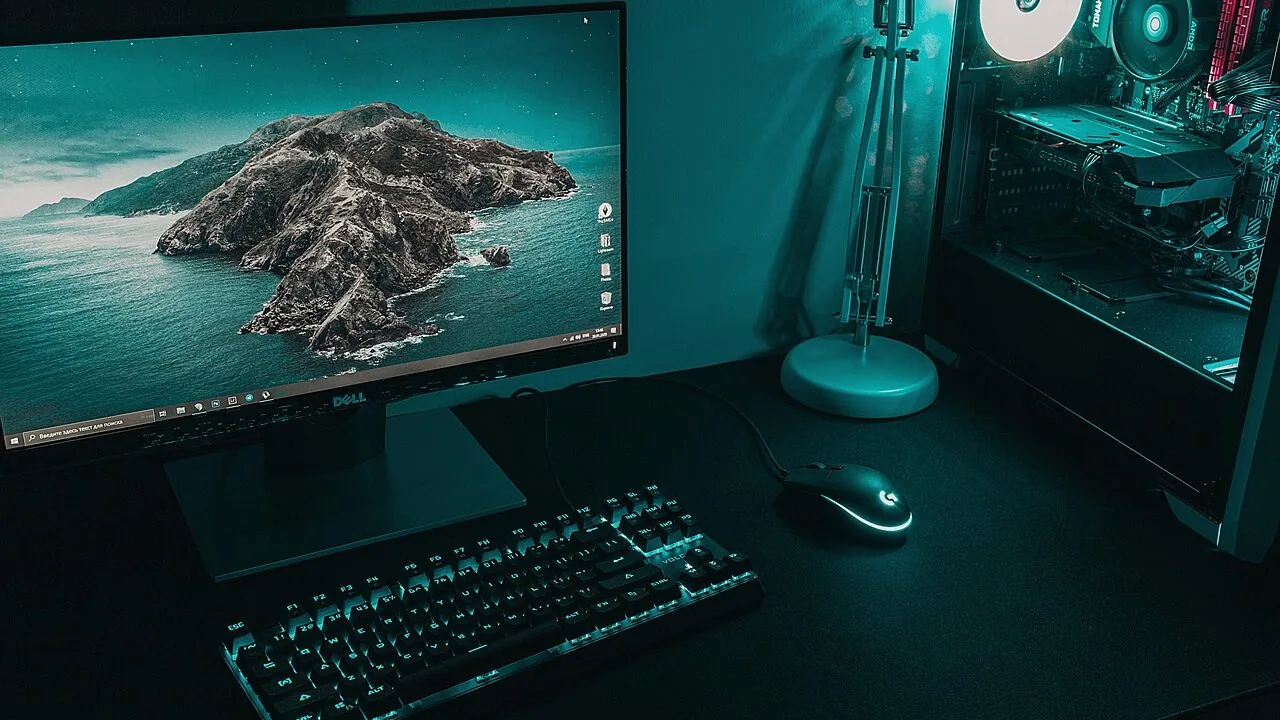
A gaming desktop offers something no gaming laptop or console can fully replicate: the freedom to run demanding titles at high resolution and frame rates, pair with the display and peripherals you choose, and upgrade individual components as the hardware landscape evolves.
Whether you are stepping into PC gaming for the first time or replacing an aging rig, the current generation of prebuilt towers delivers an impressive range of options, from entry-level performers to RTX 50-series powerhouses built for 4K and ray tracing.
The challenge is not finding a gaming PC; it is finding the right one for your budget, your play style, and the games you actually run.
At ProductFind, we researched the gaming desktop market by analyzing published specifications, synthesizing expert review consensus from across the enthusiast and mainstream press, and weighing verified buyer feedback to identify the strongest prebuilt options available today.
Every machine in this list was evaluated against consistent criteria covering CPU and GPU capability, memory and storage configuration, thermal management, build quality, connectivity, and long-term value.
Our top picks below cover the full price spectrum, from capable budget towers to flagship-class systems, so you can find the gaming desktop that best matches what you actually need.
| Award | Product | PF Score About PF ScoreThe PF Score is our own rating from 0 to 10, based on performance, design and build, ease of use, and value. It reflects independent research and is never influenced by manufacturers, retailers, or affiliate commissions. Learn more › | Price | |
|---|---|---|---|---|
| Best Overall |
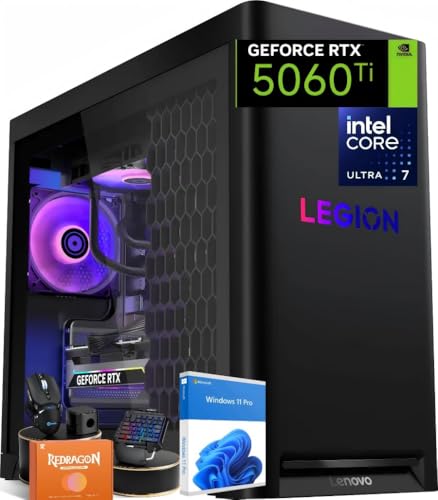 Lenovo Legion Tower 5i Intel Ultra 7 RTX 5060 Ti Gaming PC
|
8.4/10 | Buy | |
| Editor's Pick |
 iBUYPOWER Element EWA9N5702 Ryzen 9 RTX 5070
|
8.3/10 | Buy | |
| Best Value |
 Alienware Aurora ACT1250 RTX 5070 Gaming Desktop
|
8.2/10 | Buy | |
| Top Rated |
 ZOTAC MEK RTX 5060 Ti Gaming PC
|
8.1/10 | Buy | |
 Skytech Archangel 5 Ryzen 7 7700 RTX 5060 Gaming PC
|
7.9/10 | Buy | ||
 CyberPowerPC Ryzen 7 8700F RTX 5060 Ti Gaming Tower
|
7.8/10 | Buy | ||
 KOTIN Ryzen 7 9700X RTX 5060 Gaming PC
|
7.5/10 | Buy | ||
 YAWYORE Ryzen 7 5700X RTX 5060 Gaming PC
|
6.8/10 | Buy | ||
 ZYNEEX Ryzen 5 5500 Gaming Desktop with RTX 3050
|
6.1/10 | Buy |
Lenovo Legion Tower 5i Intel Ultra 7 RTX 5060 Ti Gaming PC
A mid-range gaming desktop built around Intel's latest Core Ultra 7 265F processor and RTX 5060 Ti graphics, with 32GB DDR5 RAM and liquid cooling for sustained performance. Designed for 1440p gaming and AI-assisted features, it appeals to players wanting modern specs without flagship pricing.
Pros
- Solid DDR5 and RTX 5060 Ti configuration for 1440p gaming
- Liquid cooling system reduces noise during heavy gaming sessions
- Upgradeable storage and RAM architecture supports future expansion
- Includes keyboard, mouse, and Legion Space software
- Windows 11 Pro with AI-driven tools via Copilot integration
Cons
- No verified buyer reviews yet to confirm real-world performance claims
- RTX 5060 Ti is entry-level for high-end 4K gaming at max settings
- MicroATX form factor limits upgrade options compared to full ATX boards
iBUYPOWER Element EWA9N5702 Ryzen 9 RTX 5070
High-end gaming desktop pairing AMD's Ryzen 9 7900X with NVIDIA RTX 5070 12GB, 32GB DDR5 RAM, and 1TB NVMe storage for demanding games and creative workloads. Includes tempered glass RGB case, Wi-Fi, and gaming peripherals out of the box, making it ready to use immediately.
Pros
- Powerful CPU-GPU combo suitable for 1440p and 4K gaming at high settings
- 32GB DDR5 RAM at 4800MHz handles multitasking and content creation efficiently
- Tempered glass RGB case with 16-color lighting and included gaming keyboard and mouse
- Wi-Fi 802.11AC connectivity built in, no bloatware on Windows 11 Home
- 1TB NVMe SSD provides fast load times for games and applications
Cons
- No user reviews available to verify real-world performance and reliability
- RGB lighting and gaming peripherals may not appeal to users preferring minimalist setups
- Upgradeability and thermal cooling solution details not specified in provided data
Alienware Aurora ACT1250 RTX 5070 Gaming Desktop
A premium gaming tower built around NVIDIA's latest Blackwell-based RTX 5070 GPU and Intel Core Ultra 7 265F processor, paired with 32GB DDR5 RAM and 1TB SSD storage. Designed for serious gamers and content creators who need sustained high-performance computing with customizable RGB lighting and robust onsite warranty support.
Pros
- Current-generation Blackwell GPU offers strong performance for gaming and creation workflows
- Platinum-rated 1000W PSU provides reliable sustained power delivery
- 32GB DDR5 RAM and 1TB SSD handle demanding applications and large game libraries
- Comprehensive Alienware Command Center software for lighting customization and performance tuning
- Onsite service guarantee removes logistics burden if hardware issues arise
Cons
- No user reviews available yet to validate real-world performance and reliability claims
- 1TB storage may require expansion for users with extensive game libraries or video projects
- Limited information on upgrade paths and component accessibility for future modifications
ZOTAC MEK RTX 5060 Ti Gaming PC
A pre-built gaming tower pairing an RTX 5060 Ti with Ryzen 7 9700X, 32GB DDR5 RAM, and 1TB SSD for 1080p and 1440p gaming. Includes 360mm liquid cooling, WiFi 6E, and arrives fully assembled with Windows 11 Home, making it a plug-and-play option for players who want to skip the build process.
Pros
- Complete system arrives ready to use with no assembly required
- Strong multi-core CPU and mid-tier GPU combo handles 1440p gaming and content creation
- Robust connectivity including WiFi 6E, DisplayPort 2.1b, and USB 3.2 Gen 2
- 360mm liquid cooler with quiet 3-phase motor keeps system cool and quiet
- Compact tempered glass chassis with magnetic filter for easy maintenance
Cons
- RTX 5060 Ti is entry-level for high-refresh or 4K gaming at high settings
- No zero-review rating history yet limits buyer confidence feedback
- Warranty return shipping only available to U.S. addresses
Skytech Archangel 5 Ryzen 7 7700 RTX 5060 Gaming PC
A mid-range pre-built gaming desktop pairing AMD Ryzen 7 7700 with RTX 5060, 32GB DDR5 RAM, and 1TB NVMe SSD in a tempered glass case. Designed to handle popular titles at 1080p Ultra settings with 60+ FPS, it arrives fully assembled with keyboard and mouse included.
Pros
- Strong CPU-GPU combo (Ryzen 7 7700 + RTX 5060) for 1080p gaming at high settings
- Fast 32GB DDR5 RAM and 1TB NVMe SSD reduce load times significantly
- Includes gaming keyboard, mouse, and free technical support
- Pre-assembled in USA with 1-year parts and labor warranty
- Tempered glass case with ARGB fans and clean white aesthetic
Cons
- 0 verified reviews on record, making real-world performance data unavailable
- GPU brand may vary, limiting control over specific manufacturer quality standards
- 750W Gold PSU leaves modest headroom for future component upgrades
CyberPowerPC Ryzen 7 8700F RTX 5060 Ti Gaming Tower
A mid-range gaming PC built around AMD's Ryzen 7 8700F and NVIDIA's RTX 5060 Ti, offering solid 1440p gaming performance with modern connectivity including WiFi 6 and dual USB-C ports. The 16GB DDR5 memory and 1TB NVMe SSD provide adequate storage and speed for gaming and productivity.
Pros
- Capable GPU and CPU pairing for 1440p gaming at high settings
- Modern DDR5 memory and fast NVMe storage for responsiveness
- Comprehensive connectivity with WiFi 6, multiple USB ports, and 7.1 audio
- Includes peripherals (keyboard and mouse) out of the box
- Lifetime technical support provides long-term peace of mind
Cons
- No reviews available yet, so real-world user experience is unverified
- 1TB SSD may fill quickly for users with large game libraries
- RTX 5060 Ti is entry-level for high refresh rate or 4K gaming
KOTIN Ryzen 7 9700X RTX 5060 Gaming PC
A ready-to-play gaming tower pairing a Ryzen 7 9700X with RTX 5060 for 1080p-1440p gaming, backed by 32GB DDR5 and a built-in smart display showing system metrics. USA-assembled with Windows 11 pre-installed, it skips the DIY hassle for streamers and creators who value convenience.
Pros
- 11.3-inch built-in smart display for real-time CPU, GPU, and system monitoring without external software
- 32GB DDR5 memory and 1TB PCIe 4.0 NVMe SSD for gaming, streaming, and video editing without slowdown
- 360mm ARGB liquid cooler with digital temperature display keeps thermals stable under load
- Assembled and tested in California with 1-year warranty plus lifetime US technical support, no assembly required
- WiFi 7 and Bluetooth 5.4 connectivity with 650W 80+ Gold power supply for stable performance and upgrade headroom
Cons
- RTX 5060 8GB limits 4K gaming capability and future AAA title scalability at higher settings
- No reviews yet make it difficult to assess real-world reliability and user satisfaction
- Premium pricing for pre-built configuration may not appeal to budget-conscious builders
YAWYORE Ryzen 7 5700X RTX 5060 Gaming PC
A mid-range gaming tower pairing an 8-core Ryzen 7 5700X processor with an RTX 5060 GPU, 32GB RAM, and 1TB SSD storage. Suitable for 1440p gaming and creative workloads, with modern features like DLSS 4 support and built-in WiFi, though no verified user feedback exists yet.
Pros
- Strong CPU-GPU balance for 1440p gaming and content creation workflows
- Generous 32GB RAM and 1TB storage eliminates immediate upgrade needs
- Integrated WiFi and Bluetooth reduce cable clutter and peripheral costs
- MSI B550M-A PRO motherboard supports future CPU upgrades via BIOS updates
Cons
- No verified customer reviews available to validate build quality and real-world performance
- 650W power supply is adequate but leaves minimal headroom for component upgrades
- RTX 5060 is entry-level for high-refresh 1440p or 4K gaming at max settings
ZYNEEX Ryzen 5 5500 Gaming Desktop with RTX 3050
A budget-friendly prebuilt desktop combining a Ryzen 5 5500 processor with RTX 3050 graphics, 16GB RAM, and 1TB SSD storage. Aimed at 1080p gaming, streaming, and content creation without breaking the bank.
Pros
- Solid mid-range specs suitable for 1080p gaming at reasonable frame rates
- Fast NVMe SSD and adequate RAM support multitasking and content work
- Pre-assembled and ready to use out of box, no build hassle
- ARGB cooling system offers both thermal management and aesthetic customization
- Built-in Wi-Fi eliminates need for separate networking adapter
Cons
- No user reviews available yet to verify real-world performance and reliability
- RTX 3050 is entry-level; may struggle at higher resolutions or demanding game settings
- 1-year warranty is standard but relatively short for long-term protection
Gaming Desktops Buying Guide
Shopping for a prebuilt gaming desktop involves more trade-offs than most buyers expect. The sections below break down the criteria that matter most, so you can prioritize your budget and avoid overpaying for specs you will never use.
If you are also considering a portable gaming solution, our coverage of laptops for every budget and use case is a useful companion read before you commit to a desktop.
GPU Tier and Target Resolution

The graphics card is the single most important component in any gaming desktop, and it should drive your purchase decision more than anything else.
For 1080p gaming at high or ultra settings, a mid-range GPU in the RTX 5060 Ti class delivers smooth frame rates in virtually every modern title without overspending.
Stepping up to an RTX 5070 opens up confident 1440p gameplay and capable 4K performance in less demanding games, while also enabling real-time ray tracing without a significant frame-rate penalty.
Pay attention to VRAM alongside the GPU tier. The RTX 5060 Ti variants in this list carry either 8 GB or 16 GB of GDDR7 depending on the model. For future-proofing and high-texture-pack titles, 16 GB is the safer choice.
NVIDIA’s DLSS 4 upscaling is supported across the entire RTX 50 series, which means even mid-range GPUs can push high resolutions with minimal visual compromise.
Avoid buying a system whose GPU is already a generation behind if you plan to keep the machine for three or more years.
Prebuilts using RTX 3050-class hardware can handle esports and older AAA titles comfortably, but they will feel constrained as new releases raise the performance floor.
Processor and Platform Compatibility
Modern gaming workloads are well served by both Intel and AMD CPUs, so platform choice often comes down to price-to-performance at the specific tier you are targeting.
Intel’s Core Ultra 7 265F, found in several picks on this list, combines a high core count with strong single-threaded performance for gaming, which matters because most game engines still lean on fast single-core execution.
AMD’s Ryzen 7 and Ryzen 9 processors, including the 7700 and 9700X represented here, offer competitive multi-threaded throughput and tend to pair well with DDR5 memory at high clock speeds.
For gaming specifically, eight CPU cores is the current sweet spot. Going beyond that provides diminishing returns in games, though it adds genuine value if you also use the machine for streaming, video editing, or running background applications while gaming.
Be cautious of prebuilts that pair a high-end GPU with a weaker CPU, as a mismatched processor can become a bottleneck and limit the GPU from reaching its potential frame rate ceiling.
RAM Capacity and Speed
Thirty-two gigabytes of DDR5 RAM is the standard configuration across the mid-range and premium prebuilts in 2026, and it is the right call.
Games themselves rarely exceed 16 GB, but the operating system, background processes, browser tabs, and streaming software all compete for memory headroom.
Thirty-two gigabytes gives you comfortable margin for multitasking without wasting money on 64 GB, which only pays off in workstation-class production workflows.
RAM speed matters more than most buyers realize on AMD Ryzen platforms, where the memory controller is tightly coupled to the CPU’s internal fabric (the Infinity Fabric).
Configurations running DDR5 at 6000 MHz or higher will show measurably better performance in memory-sensitive workloads compared to slower kits at the same capacity.
When evaluating prebuilts, confirm the actual rated speed of the included RAM, not just the capacity printed in the listing headline.
Storage Configuration

Every credible gaming desktop in 2026 ships with at least a 1 TB NVMe SSD as the primary drive, and the picks in this guide are no exception.
NVMe storage delivers fast game load times and virtually eliminates the stuttering associated with older SATA drives when streaming open-world assets.
PCIe Gen 4 NVMe drives, which are standard across most RTX 50-series prebuilts, offer sequential read speeds several times faster than SATA SSDs.
One terabyte fills up faster than gamers expect. Modern AAA titles routinely consume 100 GB or more per game, which means your primary drive can reach capacity after ten to twelve large installations.
When evaluating a prebuilt, look at whether the case and motherboard offer spare M.2 slots or SATA bays for adding storage later without replacing the existing drive.
Brands like Lenovo and Alienware tend to document internal expansion options clearly in their spec sheets.
Cooling System and Thermal Design

Sustained gaming performance depends entirely on how well a system manages heat under load.
Air cooling with multiple case fans is adequate for mid-range GPU and CPU pairings, but high-end configurations with powerful processors running alongside RTX 5070-class GPUs benefit significantly from liquid cooling, whether that is an all-in-one closed-loop cooler on the CPU or a more elaborate hybrid solution.
The Lenovo Legion Tower 5i’s Legion Liquid Cooling system is a practical example of a prebuilt that addresses this at the factory level rather than leaving the buyer to manage thermals after purchase.
Noise levels are a secondary but real concern, especially if the desktop sits on or near your desk.
ARGB air-cooled systems can perform well thermally, but cheaper fan implementations in budget prebuilts sometimes run louder than comparable liquid-cooled alternatives under sustained load.
Expert reviewer consensus consistently rewards prebuilts that maintain reasonable noise levels during extended gaming sessions, since a loud machine is a daily annoyance that specs sheets never mention.
Power Supply Rating and Upgradability

The power supply unit is one of the most overlooked components in a prebuilt gaming desktop, yet it directly affects both reliability and future upgrade headroom.
A 750W or 850W unit with an 80 Plus Gold rating is the minimum you should accept for any system carrying an RTX 5060 Ti or higher.
Platinum-rated PSUs, like the 1000W unit in the Alienware Aurora, offer better efficiency at load, which means less wasted heat and a lower electricity bill over the machine’s lifetime.
Upgradability varies significantly between prebuilts. Some brands use standard ATX motherboards and cases that accept off-the-shelf components, giving you a straightforward path to swapping GPUs or adding drives in two or three years.
Others use proprietary chassis or custom PSU form factors that restrict your options.
Before buying, check whether the case accepts standard ATX or mATX GPU lengths and whether the PSU uses standard connectors, particularly the PCIe 16-pin connector now required by RTX 50-series cards.
Connectivity is equally important: confirm you have USB-A and USB-C front-panel ports, at least one DisplayPort 2.1 or HDMI 2.1 output, and Wi-Fi 6 or 6E for wireless setups.
A well-specified smart home setup can also benefit from a desktop with a solid Wi-Fi radio, since many gamers run their machine as a home hub alongside gaming duties.
Why You Should Trust Us
ProductFind is an independent review publication. We do not accept payment from manufacturers to influence our rankings, and no brand has editorial input into our scoring or recommendations.
Every gaming desktop in this guide was evaluated through our structured research process: we analyzed detailed hardware specifications, synthesized expert review consensus drawn from the wider enthusiast and mainstream technology press, and reviewed verified buyer feedback across multiple retail platforms.
We do not conduct our own product trials; our evaluations are grounded in research, published data, expert review consensus, and verified buyer feedback.
Each product is assigned a PF Score on a 0 to 10 scale, reflecting how well it performs across our consistent set of criteria: GPU and CPU capability, memory and storage configuration, thermal management, build quality, connectivity, and overall value at its price tier.
A higher PF Score means a product stood out across more of those dimensions relative to competing options in the same category. ProductFind may earn a commission when you purchase through links in this article.
That affiliate relationship has no bearing on our rankings, scores, or editorial decisions. Our recommendations are based entirely on research merit.
Final Thoughts
The gaming desktop market in 2026 is genuinely competitive at every price point, and the prebuilts in this guide represent the strongest research-backed options across a wide range of budgets and performance targets.
Whether you are looking for a mainstream 1080p tower, a capable 1440p workhouse, or a full RTX 5070-powered flagship, there is a well-matched option here. Here is how we categorize the standout picks:
- Best Overall: Lenovo Legion Tower 5i AI Gaming Desktop earns the top PF Score in this group thanks to its combination of Intel Core Ultra 7 Series 2 processing power, RTX 5060 Ti graphics, Legion Liquid Cooling, and Windows 11 Pro, all in a well-designed chassis from a brand with a proven track record in gaming hardware.
- Best for Content Creators Who Game: iBUYPOWER Element Gaming PC Desktop pairs a Ryzen 9 7900X with an RTX 5070 12 GB GPU, making it the most capable machine in this list for workloads that demand both GPU rendering and multi-threaded CPU throughput, while still delivering premium gaming performance.
- Best Premium Flagship: Alienware Aurora Gaming Desktop ACT1250 distinguishes itself with a 1000W Platinum-rated PSU, RTX 5070 graphics, and Alienware’s polished build quality, making it a strong choice for buyers who want a premium brand experience and maximum upgrade headroom alongside strong out-of-the-box performance.
- Best Compact High-Performance Option: ZOTAC MEK Gaming PC Desktop brings the Ryzen 7 9700X and an RTX 5060 Ti 16 GB in a well-rounded package with Wi-Fi 6E and an 850W Gold PSU, standing out for buyers who want a higher VRAM allocation and a less common brand with a strong hardware pedigree.
- Best Mid-Range Value: Skytech Gaming Archangel 5 offers an AMD Ryzen 7 7700 paired with an RTX 5060 and DDR5 6000 MHz RAM at a mid-range price, representing an efficient performance-per-dollar balance for 1080p and entry-level 1440p gaming.
- Best Budget Pick: ZYNEEX Prebuilt Gaming Desktop PC is the most accessible entry point in this list, suitable for players running esports titles, streaming, and light editing who want to get into PC gaming without a large upfront investment.
No single machine is right for every buyer. If raw gaming frame rates at 1440p or beyond are the goal, prioritize GPU tier and VRAM.
If you also produce content, stream, or run demanding applications alongside games, a higher core-count CPU like the Ryzen 9 7900X in the iBUYPOWER pick becomes worth the premium.
And if longevity and easy upgrades matter to you, check the PSU wattage, available expansion slots, and whether the chassis accepts standard components before you buy.
Frequently Asked Questions
How Much Should I Spend on a Gaming Desktop in 2026?
The right budget depends on the games you play and the resolution you target. Budget-tier prebuilts in the range covered by this list handle esports and older AAA titles well.
Mid-range systems carrying RTX 5060 Ti graphics are the current sweet spot for 1080p and 1440p gaming at high settings.
Premium configurations with RTX 5070-class GPUs make sense if you want 4K capability, ray tracing, or plan to keep the machine for four or more years without a GPU upgrade.
Avoid buying down to the cheapest option if it means getting a mismatched CPU and GPU combination.
A weak processor paired with a powerful GPU will create a bottleneck that limits frame rates even in GPU-heavy scenarios, wasting the money spent on the higher-end graphics card.
Is a Prebuilt Gaming Desktop Worth It Compared to Building Your Own?
Prebuilt desktops have narrowed the price gap with self-builds significantly, especially in the current GPU market.
Beyond pricing, prebuilts offer a manufacturer warranty on the complete system, pre-configured drivers and software, and a single point of contact for support if something goes wrong.
For buyers who are not comfortable sourcing and assembling individual components, or who simply value their time, a prebuilt is a practical and increasingly competitive choice.
Self-builds still offer more granular control over every component choice and can occasionally deliver better value at specific price points. But for most buyers, the convenience, warranty coverage, and quality consistency of the prebuilts in this guide make them a sensible option without meaningful sacrifice.
What Is the Difference Between RTX 5060 Ti and RTX 5070 in a Gaming Desktop?
The RTX 5070 sits one full tier above the RTX 5060 Ti and offers meaningfully higher rasterization performance, more VRAM bandwidth, and stronger ray tracing throughput.
In practical terms, the 5070 handles 1440p and 4K gaming at higher settings and frame rates, while the 5060 Ti is optimized for 1080p at max settings and capable 1440p at medium to high settings depending on the title.
Both cards support DLSS 4 with Multi Frame Generation, which can dramatically boost displayed frame rates in supported games.
This makes the 5060 Ti more capable at higher resolutions than its raw rasterization numbers suggest, though the 5070 still holds a clear lead in demanding workloads.
If your monitor tops out at 1080p, the 5060 Ti is the smarter spend; if you have or plan to buy a 1440p or 4K display, the 5070 is worth the premium.
Can I Upgrade a Prebuilt Gaming Desktop Later?
Many prebuilts use standard ATX components and accept off-the-shelf upgrades, but not all of them.
Before purchasing, verify that the case has room for a larger GPU (check the clearance in millimeters), that the PSU is sufficiently rated for the next GPU tier up, and that spare M.2 or SATA slots are available for additional storage.
Brands like Lenovo Legion and Skytech Gaming generally document these details in their technical specifications, while some boutique builders use more proprietary designs that constrain future upgrades.
RAM upgrades are almost universally straightforward on prebuilts that use standard DDR5 DIMMs. Swapping a GPU is also relatively accessible on most ATX-based towers.
CPU upgrades are less common because they often require a new motherboard and sometimes a new cooler, making it easier to simply buy a better-specced machine from the start if CPU performance is a long-term priority.
Tracking your setup with a good fitness tracker and keeping your gaming station tidy with organized peripherals can also make the upgrade process easier when the time comes.
Do Gaming Desktops Come With a Keyboard and Mouse?
Some do, some do not. The iBUYPOWER Element pick in this guide includes a gamer keyboard and mouse in the box, which is useful for buyers who do not already own peripherals.
Most other prebuilts in this list ship as tower-only systems, requiring you to supply your own keyboard, mouse, monitor, and headset.
Factor peripheral costs into your total budget if you are starting from scratch, as quality gaming peripherals represent a meaningful additional investment on top of the desktop itself.
Pairing your new desktop with capable audio gear is worth considering early. A well-chosen set of headphones appropriate for your household or a quality speaker setup can transform the gaming experience.
Similarly, a reliable smart speaker can handle voice commands and smart home control without tying up your gaming PC’s resources.
How Long Will a Gaming Desktop Last Before Needing an Upgrade?
A mid-range to premium gaming desktop purchased today with RTX 5060 Ti or RTX 5070 graphics should remain capable for three to five years before a GPU upgrade feels necessary, assuming you are not chasing the absolute maximum settings on every new release.
The CPU lifespan is typically longer, with modern eight-core and above processors remaining competitive for five or more years in gaming workloads.
Storage is the component most likely to need expansion before anything else.
Adding a second NVMe drive midway through the machine’s life is a low-cost and easy upgrade that significantly extends the usable life of the system without touching the core components.
Buying a prebuilt with spare expansion slots from day one makes that future upgrade straightforward rather than requiring case modifications or drive replacements.
About the author
Eric is a reviewer and writer for ProductFind who specializes in Computers & Laptops. Eric evaluates products through independent research: specifications, expert review consensus, and verified buyer feedback, and rates each one on the PF Score. Eric focuses on helping readers pick the right computers & laptop for their needs and budget.