The 8 Best PC Case Fans
Noise, airflow, and bearing type separate great case fans from frustrating ones. This guide covers top picks from Noctua, ARCTIC, ASUS ROG, and Thermalright for every build type.
 By Megan Daniels
Updated July 23, 2026
By Megan Daniels
Updated July 23, 2026
A well-cooled PC runs faster, lasts longer, and stays quieter under load. Yet case fans are one of the most overlooked components in any build, whether you are putting together a compact mini-ITX workstation or a full-tower gaming rig.
The right fans keep your GPU, CPU, and storage from throttling under pressure; the wrong ones create a loud, turbulent mess that does more harm than good.
With dozens of options spanning budget 3-packs to premium acoustic engineering, knowing where to spend your money genuinely matters.
This guide covers eight carefully selected PC case fans ranging from wallet-friendly options to high-end performers from Noctua, ARCTIC, ASUS ROG, Thermalright, DARKROCK, and AsiaHorse.
ProductFind assembled this list through comprehensive research: manufacturer specifications, expert review consensus from the PC enthusiast community, verified buyer feedback, and published benchmark data.
Whether you need near-silent airflow for a home office machine or addressable RGB fans for a showcase build, the picks below represent the strongest options at each tier. Read on for the full ranked list.
| Award | Product | PF Score About PF ScoreThe PF Score is our own rating from 0 to 10, based on performance, design and build, ease of use, and value. It reflects independent research and is never influenced by manufacturers, retailers, or affiliate commissions. Learn more › | Price | |
|---|---|---|---|---|
| Best Overall |
 Noctua NF-A12x25 PWM 120mm Premium Quiet Fan
|
8.7/10 | Buy | |
| Editor's Pick |
 Noctua NF-P12 redux 120mm PWM Fan
|
8.4/10 | Buy | |
| Best Value |
 Arctic P8 Max 80mm Case Fan, 500-5000 RPM
|
8.2/10 | Buy | |
| Top Rated |
 DARKROCK 120mm Case Fan 3-Pack 1200 RPM
|
7.6/10 | Buy | |
 Thermalright TL-C12C-S 120mm ARGB PWM Fan 5-Pack
|
7.4/10 | Buy | ||
 Thermalright TL-M12QR 120mm Reverse Airflow Fans 3-Pack
|
7.1/10 | Buy | ||
 ASUS ROG Strix XF120 120mm PWM Fan
|
6.8/10 | Buy | ||
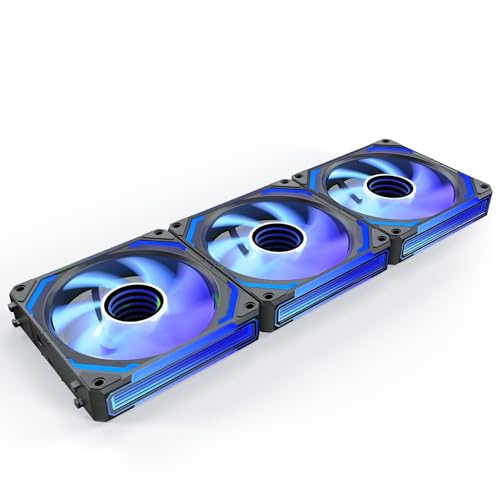 AsiaHorse COSMIQ 120mm RGB Case Fan 3-Pack
|
6.5/10 | Buy |
Noctua NF-A12x25 PWM 120mm Premium Quiet Fan
A high-performance 120mm case fan designed for low noise operation, combining strong airflow and static pressure suitable for CPU coolers, radiators, and general case cooling. The chromax.black.swap edition includes swappable colored anti-vibration pads for customization.
Pros
- Exceptionally quiet at idle with near-silent performance at low RPM
- Versatile design works as case fan, CPU cooler, and radiator fan
- Color-customizable swappable pads included in multiple colors
- Premium construction with metal-reinforced hub and Sterrox LCP material
- Auto PWM speed control via motherboard headers
Cons
- No customer reviews available to evaluate real-world performance feedback
- Premium positioning may not justify cost for basic cooling needs
- Single unit package means limited quantity for multi-fan setups
Noctua NF-P12 redux 120mm PWM Fan
A pressure-optimized 120mm cooling fan designed for CPU coolers, radiators, and chassis ventilation. The 1700 RPM PWM version balances strong airflow with quiet operation, supported by Noctua's track record of reliability and extensive hardware community recognition.
Pros
- Established high-performance 120x25mm design with hundreds of thousands of satisfied users
- Excellent static pressure and airflow suitable for multiple cooling applications
- PWM support enables dynamic speed control from silent idle to full performance
- Noctua quality at a more accessible price point than premium editions
- Extensive optional accessories available for various installation needs
Cons
- No verified user reviews available to assess real-world user satisfaction
- Limited information on noise levels at specific RPM thresholds beyond 25.1 dB(A) max specification
- Redux positioning may lack some premium features of higher-tier Noctua models
Arctic P8 Max 80mm Case Fan, 500-5000 RPM
Arctic's P8 Max is an 80mm case fan built for high-pressure cooling in compact spaces like server racks and tight heatsink configurations. It combines a wide PWM-controlled RPM range with fluid dynamic bearing technology for both silent operation at low speeds and powerful performance when needed.
Pros
- Powerful static pressure capability makes it effective in restricted airflow environments like 2U server racks
- PWM control with infinite variability between 500-5000 RPM allows fine-tuned cooling without stepping
- 0dB standby mode when PWM drops below 5 percent, useful for low-load scenarios
- Fluid dynamic bearing design supports long-term reliability in continuous-duty applications
Cons
- No customer reviews available yet to assess real-world reliability or noise characteristics
- 80mm size limits airflow volume compared to larger fan formats, suitable only for compact installations
- Requires PWM-capable motherboard or fan controller for speed adjustment
DARKROCK 120mm Case Fan 3-Pack 1200 RPM
Budget-friendly cooling solution with nine-blade design reaching 1200 RPM and hydraulic bearings rated for 30,000 hours of operation. Includes vibration-dampening silicone cushions to keep noise under 32.1 dBA, making it suitable for quiet PC builds.
Pros
- Quiet operation with four silicone vibration dampeners built in
- Long-lasting hydraulic bearing design rated for 30,000 hours average use
- Three-pin motherboard connection with wide case compatibility
- Durable PBT construction with good thermal and electrical insulation
- Includes 5-year after-sales service
Cons
- No verified buyer reviews available to assess real-world performance claims
- Three-pin connection lacks PWM speed control found on modern four-pin alternatives
- Limited specification transparency on airflow volume (CFM) and exact decibel output under various speeds
Thermalright TL-C12C-S 120mm ARGB PWM Fan 5-Pack
A budget-friendly cooling fan bundle with S-FDB bearings and ARGB support, reaching 1550 RPM with noise levels under 25.6 dBA. Best suited for budget builders needing multiple case or radiator fans without premium cooling performance demands.
Pros
- Affordable multi-pack option for full case cooling setups
- S-FDB bearing technology minimizes vibration and blade wobble
- Extensive ARGB lighting customization with 17 effect modes
- PWM temperature-based speed control reduces noise at low loads
- Suitable for both case fans and CPU cooler radiators
Cons
- No verified buyer reviews available to assess real-world durability or acoustic performance
- Mid-range airflow (66.17 CFM) limits high-performance cooling scenarios
- 1550 RPM max speed and noise ceiling of 25.6 dBA suggest conservative cooling capacity compared to high-end alternatives
Thermalright TL-M12QR 120mm Reverse Airflow Fans 3-Pack
A budget-friendly three-pack of 120mm reverse-blade case fans designed for intake or bottom-mounted positions, featuring daisy-chain PWM and ARGB connections for simplified cable management. The infinity mirror ARGB lighting and 1500RPM operation deliver steady airflow in mid-range builds without requiring separate wireless control.
Pros
- Daisy-chain PWM and ARGB connection minimizes motherboard header usage and wiring complexity
- Infinity mirror ARGB lighting on dual sides provides aesthetic appeal in visible chassis positions
- Straightforward motherboard header compatibility works with standard 4-pin PWM and 5V ARGB ports
- Included as three-pack, reducing per-unit cost for multi-fan setups
Cons
- No customer reviews available to validate real-world performance or reliability claims
- 47.6CFM airflow is modest, limiting suitability for high-performance or heavily overclocked systems
- Reverse blade configuration restricts placement flexibility compared to standard intake fans
ASUS ROG Strix XF120 120mm PWM Fan
A magnetic-levitation case fan designed to balance airflow and static pressure across multiple mounting applications. Rated for whisper-quiet operation at 22.5 dB(A) with a 400,000-hour lifespan and extensive speed control from 250 to 1800 RPM.
Pros
- MagLev bearing reduces friction and noise while extending durability to 400,000 hours
- Whisper-quiet 22.5 dB(A) acoustic profile with smooth, stable sound frequency
- Versatile 250-1800 RPM range enables flexible fan curves and passive cooling at 0% PWM
- Aerodynamic blade and frame design minimizes turbulence
- Anti-vibration pads and mounts reduce resonance and rattling
Cons
- No customer reviews available to validate real-world performance claims
- Limited information on actual airflow (CFM) and static pressure specifications
- 120mm size restricts compatibility to standard case fan mounts only
AsiaHorse COSMIQ 120mm RGB Case Fan 3-Pack
A 120mm case fan with infinity mirror RGB lighting, music sync capability, and daisy chain wiring designed for gamers and PC builders seeking both aesthetics and cooling performance. Operates quietly at up to 2000 RPM with adjustable speed control via PWM, making it suitable for both daily use and gaming scenarios.
Pros
- Aesthetic infinity mirror design with rich RGB effects differentiates it from standard fans
- Music sync and full-case lighting synchronization add dynamic visual appeal
- Hydrodynamic FDB bearing ensures smooth, long-lasting operation with minimal noise
- Daisy chain design simplifies installation and improves case airflow efficiency
- Balanced performance handles both quiet daily operation and gaming heat loads
Cons
- No verified user reviews available to confirm real-world reliability or RGB effectiveness
- Music sync feature quality and sound pickup sensitivity not independently validated
- Requires motherboard with 5V ARGB header or included controller for full functionality
PC Case Fans Buying Guide
Choosing the right case fan means balancing airflow, noise, bearing longevity, connector type, and aesthetics. Getting any one of these wrong can undermine an otherwise strong build.
The sections below break down each factor so you can match a fan to your specific needs, whether you are cooling a liquid CPU cooler radiator or just improving exhaust in a mid-tower.
Fan Size and Mounting Compatibility

Most PC cases accept 120 mm or 140 mm fans as standard, and the vast majority of products in this guide are 120 mm, the most universally compatible format.
The one exception is the ARCTIC P8 Max, which is an 80 mm fan engineered specifically for tight spots such as small-form-factor cases, rear exhaust mounts on compact boards, and server chassis.
Before purchasing any fan, cross-reference your PC case mounting points against the fan diameter in the product listing.
Smaller fans generally spin at higher RPM to move comparable air volumes, which often means more noise. Larger fans can spin slower and quieter while shifting the same or greater CFM.
If your case supports 140 mm, it is usually worth considering that size for top or front intake positions, even though the picks here focus on 120 mm solutions.
Always check fan-to-radiator matching too: a 120 mm fan on a 240 mm radiator means two fans, and mismatched sizes create inefficient coverage.
Airflow vs. Static Pressure
This is the most important technical distinction for case fan selection and one that is frequently misunderstood.
Airflow-optimized fans (measured in CFM, cubic feet per minute) move large volumes of air efficiently across open spaces and are ideal for unobstructed intake or exhaust positions.
Static-pressure-optimized fans maintain performance when pushing or pulling air through resistance, such as a dense radiator fin stack, a dust filter, or a heatsink array.
The Noctua NF-A12x25 and NF-P12 redux are both engineered with this distinction in mind: the A12x25 is a high-static-pressure performer praised across the enthusiast community for radiator duty, while the P12 redux leans toward balanced all-round use.
The ARCTIC P8 Max pushes its static pressure rating to an exceptional level for its 80 mm frame, making it a specialist tool rather than a general-use fan.
For most front-intake and top-exhaust positions in a standard mid-tower, an airflow fan is the right choice; for radiators and heatsinks, prioritize static pressure specs.
Noise Level and Bearing Type
Fan noise is measured in decibels (dB) or Sone, and the gap between a mediocre fan and a well-engineered one is audible within seconds. Bearing type is the single biggest factor in both noise floor and long-term reliability.
Sleeve bearings are the cheapest option and the least durable, with lifespans that often fall short of manufacturer claims; hydraulic bearings (used by DARKROCK) improve on sleeve designs with lubrication that extends operation; fluid dynamic bearings (FDB, used by AsiaHorse COSMIQ) and Noctua’s proprietary SSO2 bearings sit at the top of the longevity and low-noise hierarchy.
ASUS ROG Strix XF120 uses magnetic levitation, a bearing design where the shaft is suspended magnetically to eliminate contact friction entirely, rated for up to 400,000 hours in specifications. Thermalright’s S-FDB bearing in the TL-C12C-S similarly targets long service life.
If acoustic performance matters to your build, look for fans rated below 25 dB at maximum RPM.
PWM control (4-pin connector) allows the motherboard to dial fan speed to the minimum needed at any given thermal load, which keeps noise down during light workloads.
The 0 dB mode on the ARCTIC P8 Max goes further, stopping the fan entirely when temperatures permit.
PWM vs. DC Control and Connector Types

4-pin PWM fans give the motherboard or fan controller precise RPM control by modulating the power signal. This allows fine-tuned fan curves that balance acoustics and cooling dynamically.
3-pin DC fans vary speed by changing voltage, which is less precise and loses effectiveness at lower speeds. For most modern motherboards with full PWM header support, 4-pin fans are the preferred choice for intake and exhaust positions alike.
The Thermalright TL-M12QR and DARKROCK 3-pack use 3-pin connectors, which works perfectly well on any system but offers less granular control.
If you are pairing fans with a liquid cooler pump that requires one of your PWM headers, mixing 3-pin and 4-pin fans across your case is entirely reasonable.
Check how many fan headers your motherboard provides before committing to a 5-pack or 3-pack purchase; you may need a fan splitter or hub.
RGB and Aesthetics

Addressable RGB (ARGB) fans connect to a 5V 3-pin ARGB header on the motherboard and allow per-LED color control through software such as ASUS Aura Sync, MSI Mystic Light, or Gigabyte RGB Fusion.
Standard RGB fans use a 12V 4-pin header with less individual LED control. If aesthetics are a priority, verify that your motherboard has the right header type before purchasing.
The Thermalright TL-C12C-S 5-pack and the AsiaHorse COSMIQ both offer ARGB illumination. The COSMIQ’s infinity mirror design is a particularly strong visual choice for windowed cases, with its daisy-chain cable system reducing cable clutter when running multiple units.
Keep in mind that RGB fans often carry a price premium over acoustically equivalent non-RGB alternatives. If your case has no side panel window, there is no practical reason to pay extra for lighting.
A well-chosen PC case with a tempered glass panel is the natural pairing for any RGB fan setup.
Value: Single Units vs. Multi-Packs
Multi-packs offer significantly better per-fan value and are the sensible purchase for anyone equipping a case with three or more mounting positions.
The DARKROCK 3-pack, AsiaHorse COSMIQ 3-pack, Thermalright TL-M12QR 3-pack, and Thermalright TL-C12C-S 5-pack all bring the per-unit cost down compared to buying individual fans.
When comparing prices across packs, always calculate the per-fan cost rather than the total price of the box.
Single premium fans like the Noctua NF-A12x25 and NF-P12 redux are worth the higher individual price for critical positions such as a CPU heatsink or radiator mount, where acoustic and pressure performance has the most measurable impact.
Budget packs make more sense for general case airflow where the marginal difference between a premium and mid-tier fan is small.
Mixing and matching, high-end fans on the radiator and budget units for intake and exhaust, is a legitimate strategy for keeping total build cost reasonable.
This mirrors the approach many builders take when pairing fans with quality RAM kits and other components where not every slot demands top-dollar parts.
Why You Should Trust Us
ProductFind is an independent review publication. Every product in this guide was evaluated against a consistent set of criteria and rated on our PF Score scale of 0 to 10.
We do not conduct our own product trials; our evaluations are grounded in research, published data, expert review consensus, and verified buyer feedback.
For PC case fans, our research framework covers published specifications (RPM range, CFM, static pressure, noise rating, bearing type, connector type, and rated lifespan), cross-referenced against the consensus of enthusiast community reviews, verified purchaser feedback on Amazon, and manufacturer-published technical documentation.
Our PF Score reflects a weighted assessment across performance, reliability, value, and usability for the target buyer segment of each product.
A budget 3-pack is not penalized for lacking the acoustic engineering of a flagship single fan; it is judged against what a buyer in that price tier reasonably needs and expects.
Transparency matters to us: ProductFind may earn a commission when you purchase through links in this article. That affiliate relationship has no influence on rankings, scores, or which products appear in our recommendations. Our selection criteria are editorial, not commercial.
Final Thoughts
The right case fan depends entirely on your build goals, acoustic preferences, and how much airflow work each position needs to do. After researching and scoring all eight options, here is how we assign our editorial picks:
- Best Overall: Noctua NF-A12x25 PWM chromax.Black.swap earns the top PF Score in this roundup through its combination of best-in-class static pressure, near-silent operation, and the long-term reliability Noctua’s SSO2 bearing platform is widely recognized for. It is the one fan that performs at the front of the pack across every metric that matters.
- Best All-Round Value: Noctua NF-P12 redux-1700 PWM brings Noctua acoustic engineering to a more accessible price point, making it the strongest recommendation for builders who want premium-brand reliability without the flagship price of the A12x25.
- Best Budget Pick: ARCTIC P8 Max punches well above its price class with an impressive static pressure rating, 0 dB stop mode, and PWM control in a compact 80 mm format. It earns its strong PF Score through genuine engineering rather than marketing claims.
- Best Budget 3-Pack: DARKROCK 3-Pack 120mm is the most cost-effective way to fill out three case positions with decent hydraulic-bearing fans that offer solid longevity for the price tier.
- Best ARGB Multi-Pack: Thermalright TL-C12C-S 5-Pack delivers five ARGB fans with S-FDB bearings and PWM control at a per-fan cost that makes it hard to beat for builders who want a complete illuminated setup without overspending.
If you are building or upgrading a full system, case fans are only one piece of the thermal puzzle.
Pair your fan selection with a quality liquid CPU cooler for demanding processors, and make sure your chosen PC case has the mounting positions and airflow routing to take full advantage of the fans you install.
Frequently Asked Questions
How many case fans does a typical PC need?
Most mid-tower builds benefit from at least two to three fans: typically one or two front intakes and one rear exhaust. Higher-end systems with powerful GPUs or overclocked CPUs often run three to five fans total.
The goal is positive or neutral air pressure inside the case, with fresh cool air entering at the front and bottom and warm air exiting at the rear and top.
More fans are not automatically better; balanced placement matters more than raw fan count.
What is the difference between CFM and static pressure, and which should I prioritize?
CFM (cubic feet per minute) measures how much air a fan moves in open space. Static pressure measures how well a fan pushes air through resistance.
For unobstructed case positions (open front intake grilles, rear exhaust), a higher CFM fan works well. For radiators, heatsinks, and dust-filtered panels, choose a fan with high static pressure ratings.
Many enthusiast-grade fans like the Noctua NF-A12x25 are engineered to perform well in both scenarios, which is why they command a premium price.
Are PWM fans significantly better than 3-pin fans?
For most builds, yes. PWM fans allow the motherboard to adjust speed precisely by modulating the control signal, which means the fan runs at the minimum speed required to maintain safe temperatures.
This keeps noise lower during everyday tasks and ramps up automatically under load. Three-pin DC fans vary speed through voltage changes, which is less precise and can cause fans to stall at very low voltage settings.
If your motherboard has PWM headers available, 4-pin PWM fans are the better choice for long-term acoustics and thermal management.
Do I need ARGB fans if my case has no side window?
No. ARGB fans exist purely for visible aesthetics. If your case has a solid side panel, the RGB lighting contributes nothing to cooling performance and simply adds cost.
Save the budget for a higher-quality non-RGB fan with better bearing engineering or acoustic tuning. ARGB makes the most sense in windowed cases where the interior is visible, particularly builds using tempered glass panels.
How long should a good case fan last?
Bearing quality is the primary driver of fan lifespan. Budget sleeve-bearing fans may last as little as 15,000 to 20,000 hours under continuous load. Hydraulic and FDB bearing fans typically rate for 30,000 to 50,000 hours.
Premium designs like the ASUS ROG Strix XF120 with magnetic levitation are rated up to 400,000 hours in manufacturer specifications, though real-world results depend on operating environment and temperature.
As a practical benchmark, fans in a well-ventilated build running at moderate speeds should last five to ten years without issue in most cases.
Can I mix fans from different brands in the same build?
Yes, mixing fan brands is completely fine from a functional standpoint. The only limitation arises with RGB synchronization: ARGB fans from different brands may require separate software controllers or may not sync perfectly through a single platform.
For non-RGB builds, mixing a premium static-pressure fan on the radiator with budget airflow fans on intake and exhaust positions is a smart way to allocate spending.
Pair your component choices thoughtfully, just as you would when selecting RAM kits or storage drives, and prioritize quality where it has the most thermal impact.
About the author
Megan is a reviewer and writer for ProductFind who specializes in PC Components & Peripherals. Megan evaluates products through independent research: specifications, expert review consensus, and verified buyer feedback, and rates each one on the PF Score. Megan focuses on helping readers pick the right pc components & peripheral for their needs and budget.