The 12 Best Budget Tablets
Not all affordable tablets cut corners where it counts. We break down the best budget Android tablets from Samsung, Lenovo, and more, ranked by display quality, battery life, and software support.
 By Deanna Torres
Updated July 22, 2026
By Deanna Torres
Updated July 22, 2026

Shopping for a tablet doesn’t have to mean spending a fortune.
The market for affordable Android tablets has matured significantly, with brands like Samsung, Lenovo, and a growing field of value-focused manufacturers now delivering capable screens, multi-day battery life, and usable performance at prices that won’t break your budget.
Whether you need a portable screen for streaming, a compact device for students, or a light-duty productivity companion, there are solid options available across a wide range of price points from Samsung, Lenovo, Ulefone, and others in this roundup.
To build this list, the ProductFind editorial team researched dozens of budget-friendly tablets by analyzing manufacturer specifications, synthesizing expert review consensus from across the tech press, and weighing verified buyer feedback.
We do not conduct our own product trials; every recommendation is grounded in published data and independent research.
The picks below represent our top-ranked choices for buyers who want the most value per dollar in 2026, and the list is sorted by PF Score to put the strongest all-around performers at the top.
| Award | Product | PF Score About PF ScoreThe PF Score is our own rating from 0 to 10, based on performance, design and build, ease of use, and value. It reflects independent research and is never influenced by manufacturers, retailers, or affiliate commissions. Learn more › | Price | |
|---|---|---|---|---|
| Best Overall |
 Samsung Galaxy Tab A11 8.7-inch WiFi Tablet
|
8.2/10 | Buy | |
| Editor's Pick |
 Lenovo IdeaTab 11 2.5K Tablet with Stylus
|
8.1/10 | Buy | |
| Best Value |
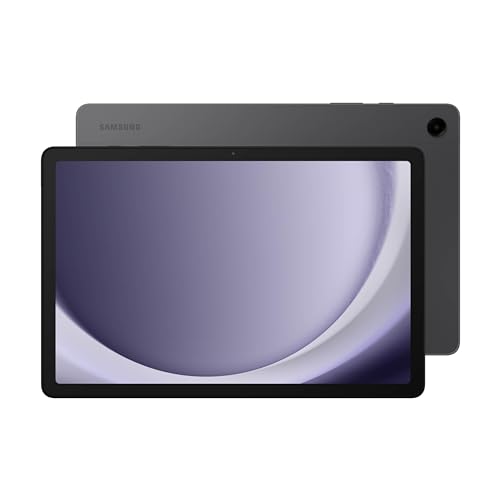 Samsung Galaxy Tab A9+ 11-inch 64GB Tablet
|
7.8/10 | Buy | |
| Top Rated |
 Lenovo IdeaTab 11 2.5K Tablet with Stylus
|
7.6/10 | Buy | |
 Lenovo Tab M11 11-inch Tablet with 128GB Storage
|
7.5/10 | Buy | ||
 Lenovo Tab One 8.7" Tablet
|
6.8/10 | Buy | ||
 EDUAITABLET 11-Inch Android 16 Tablet with Keyboard Bundle
|
6.4/10 | Buy | ||
 Ulefone Tab A9 Pro 8.68" Compact Tablet
|
6.3/10 | Buy | ||
 TUOHAITIME 11-inch Android 16 Tablet with Keyboard
|
5.4/10 | Buy | ||
 JUEDUR R900 10.1-Inch Tablet with 22GB RAM
|
5.3/10 | Buy | ||
 TUOHAITIME 10-Inch Android 16 Tablet with 24GB RAM
|
5.2/10 | Buy | ||
 SVITOO 10-Inch Android 16 Tablet with 20GB RAM
|
5.1/10 | Buy |
Samsung Galaxy Tab A11 8.7-inch WiFi Tablet
A budget-friendly WiFi tablet with a 90Hz display and solid mid-range processor, designed for casual browsing and media consumption. Best suited for users seeking an affordable option without cellular connectivity or warranty coverage.
Pros
- 90Hz refresh rate display enhances visual smoothness for scrolling and media
- MicroSD slot supports up to 2TB expansion for storage flexibility
- Android 15 with One UI 7 provides current software experience
- Dual GPS, GLONASS, Beidou, Galileo positioning for accurate location services
- Compact 8.7-inch form factor and light weight make it portable
Cons
- WiFi-only model lacks cellular connectivity and SIM slot
- No charger included in the box
- International model ships with no warranty coverage
- 5100mAh battery is modest for a tablet of this size
- Country selection issues during setup require manual adjustment via WiFi
Lenovo IdeaTab 11 2.5K Tablet with Stylus
An 11-inch tablet designed for students, featuring a 2.5K display with 90Hz refresh rate, MediaTek Dimensity 6300 processor, and included stylus and case. Includes productivity apps and Circle to Search functionality, with up to 12 hours of battery life.
Pros
- 11-inch 2.5K IPS display with 90Hz refresh rate and TUV Rheinland low blue light certification for comfortable studying
- Includes Tab Pen stylus and folio case, eliminating need for separate purchases
- Quad Dolby Atmos speakers with 72% NTSC color accuracy for media consumption
- Pre-loaded learning apps (Lenovo AI Note, Squid, Nebo, MyScript Calculator) tailored for academic use
- Up to 12 hours of battery life with 20W fast charging
Cons
- 4.8 rating with zero verified reviews, making real-world performance difficult to assess
- MediaTek Dimensity 6300 processor is mid-range and may show limitations in demanding multitasking or gaming
- Only 4GB RAM and 128GB storage may feel constraining for heavy users or content creators
Samsung Galaxy Tab A9+ 11-inch 64GB Tablet
An 11-inch family tablet with a bright display, quad speakers, and multi-window support for everyday entertainment and productivity. Best suited for household use, streaming, and kids' content rather than demanding workloads.
Pros
- Large 11-inch screen ideal for videos, games, and family use
- Quad Dolby Atmos speakers deliver robust audio quality
- Multi-window functionality allows seamless multitasking across apps
- Lightweight at 1.32 pounds with durable build for easy transport
- Samsung Kids app provides curated, safe content for children
Cons
- No verified buyer reviews available to confirm real-world performance
- Qualcomm Snapdragon 69 processor is entry-level, limiting demanding tasks
- 4GB RAM base model may struggle with heavy multitasking or gaming
Lenovo IdeaTab 11 2.5K Tablet with Stylus
A student-focused 11-inch tablet with MediaTek Dimensity 6300 processor, 90Hz 2.5K display, and bundled stylus and case. Includes dedicated learning apps and promises up to 12 hours of battery, though no verified user reviews confirm real-world performance.
Pros
- 11-inch 2.5K IPS display with 90Hz refresh rate and blue light filtering for extended study sessions
- MediaTek Dimensity 6300 processor handles multitasking and AI-enhanced features
- Tab Pen included with Circle to Search functionality via Google integration
- Four pre-installed learning apps (Lenovo AI Note, Squid, Nebo, MyScript Calculator) designed for note-taking and organization
- Quad Dolby Atmos speakers and 72% NTSC color for media consumption
Cons
- No verified buyer reviews available yet to validate advertised 12-hour battery claim or real-world performance
- 8GB RAM and 256GB storage may face limitations for heavy multitasking or large media libraries
- MediaTek Dimensity 6300 is mid-range; less powerful than flagship processors in premium tablets
Lenovo Tab M11 11-inch Tablet with 128GB Storage
An 11-inch Android tablet built for everyday multitasking, featuring a sharp 1920x1200 display and solid MediaTek processor paired with 128GB storage. The included folio case and 10-hour battery make it practical for work and media consumption at home or on the go.
Pros
- Vivid 1920x1200 display offers sharp clarity for reading, video, and photo viewing
- Lightweight at 1.03 pounds makes it genuinely portable for daily carry
- Generous 128GB storage eliminates frequent app or file management
- 10-hour battery covers extended work sessions without charging
- Folio case included adds value and immediate protection
Cons
- No user reviews available to validate real-world performance claims
- MediaTek Helio G88 is entry-level for gaming or demanding applications
- Lack of details on software updates or long-term support commitments
Lenovo Tab One 8.7" Tablet
A lightweight 8.7-inch tablet built for portable entertainment with up to 12.5 hours of battery life and included folio case. The MediaTek Helio G85 processor handles streaming and casual gaming smoothly, making it practical for users seeking a budget-friendly device without significant compromises.
Pros
- Exceptional battery life reaches 12.5 hours of YouTube streaming on a single charge
- Weighs under one pound with compact 8.7-inch display, easily fits in bags and purses
- Includes protective folio case with built-in stand at no extra cost
- Dual Dolby Atmos speakers and 480-nit HD display deliver solid media consumption experience
- Fast 15W charging and Android 14 with 2 years of security patches
Cons
- No customer reviews available yet to validate real-world performance and reliability
- MediaTek Helio G85 is entry-level, limiting performance for demanding apps or intensive gaming
- 8.7-inch HD display resolution is adequate but not premium compared to higher-end tablets
EDUAITABLET 11-Inch Android 16 Tablet with Keyboard Bundle
An 11-inch Android 16 tablet bundled with keyboard, mouse, and stylus for work and creative tasks. The package includes solid specs like an octa-core processor, 20GB RAM, and a 90Hz display, though performance expectations should align with its mid-range positioning.
Pros
- Complete accessories bundle reduces additional purchase needs for productivity work
- Expandable storage up to 1TB via microSD card supports large media libraries
- 90Hz display refresh rate provides smooth scrolling and responsive interaction
- Android 16 with Gemini AI integration offers modern software features
- Dual-band Wi-Fi 6 ensures fast and stable connectivity
Cons
- No verified buyer reviews available to assess real-world performance reliability
- 1280x800 resolution is standard HD rather than higher-definition alternatives at this size
- Unisoc T7250 processor is mid-range and may limit demanding gaming or professional applications
Ulefone Tab A9 Pro 8.68" Compact Tablet
A portable 8.68-inch tablet built for students and young professionals seeking a lightweight device for travel and daily tasks. Features Android 15, 8GB RAM, and a TÜV SÜD-certified eye-comfort display with dual speakers for balanced performance and media consumption.
Pros
- Eye-comfort display certified for reduced eye strain during long reading and browsing sessions
- Highly portable form factor designed specifically for on-the-go use in bags and backpacks
- Generous expandable storage up to 2TB eliminates space constraints
- Dual speakers provide fuller audio experience compared to single-speaker tablets
- Solid 2-year warranty with responsive customer support
Cons
- No reviews yet available to verify real-world performance and reliability claims
- Limited information on processor type and battery life specifications
- Compact 8.68-inch screen may feel small for extended productivity work compared to larger tablets
TUOHAITIME 11-inch Android 16 Tablet with Keyboard
An 11-inch Android 16 tablet targeting users who need a 2-in-1 device with bundled accessories including keyboard, stylus, and protective case. Features WiFi 6, dual cameras, and face unlock, though it carries no verified buyer reviews to validate real-world performance.
Pros
- Complete accessory bundle reduces additional purchase needs
- WiFi 6 and Bluetooth 5.0 for modern connectivity standards
- Large 11-inch display suitable for media and productivity
- Expandable storage up to 1TB via microSD slot
- Parental controls built-in for family use
Cons
- Zero verified customer reviews present, making real-world reliability unclear
- Widevine L1 certification limited - some services like Netflix may deliver lower quality due to L3 restrictions
- No independent benchmarks or performance data available to validate processor and RAM claims
JUEDUR R900 10.1-Inch Tablet with 22GB RAM
A budget Android 14 tablet designed for basic productivity and media consumption, featuring dual-band WiFi, expandable storage up to 1TB, and bundled keyboard/mouse accessories. Best suited for casual users seeking an affordable large-screen device rather than demanding performance.
Pros
- Comes bundled with keyboard and mouse, reducing accessory costs
- Widevine L1 support unlocks HD/UHD streaming on major platforms
- Massive expandable storage (1TB microSD support) for media libraries
- Dual-band WiFi provides flexibility for different network environments
- Metal body construction suggests durability over typical plastic tablets
Cons
- 1280x800 resolution is below modern standards; considered low HD for a 10.1-inch screen
- Virtual RAM boost (16GB) cannot match true physical RAM performance for intensive apps
- No verified user reviews available (4.3 rating with zero reviews) limits reliability assessment
TUOHAITIME 10-Inch Android 16 Tablet with 24GB RAM
A budget-friendly 10-inch tablet running Android 16 with octa-core processing, 24GB RAM, and WiFi 6 connectivity. Designed for media consumption and light productivity, it includes Google Kids Space for parental-controlled children's content and supports streaming apps via Widevine L1 certification.
Pros
- Large 10-inch display suitable for entertainment and office work
- Generous RAM and storage configuration at budget price point
- Latest Android 16 OS with Google Play access and minimal pre-installed apps
- Built-in parental controls and educational content for children aged 3+
- WiFi 6 connectivity for reliable internet speed
Cons
- No verified customer reviews available to assess real-world performance reliability
- 1280x800 resolution is modest for a 10-inch screen in 2024-2025 standards
- Requires 18W or 10W charger only, with slower first-time charging time (2+ hours)
- Widevine L3 limitation on some services like Netflix may reduce streaming quality
SVITOO 10-Inch Android 16 Tablet with 20GB RAM
A budget-friendly 10-inch tablet running Android 16 with expandable storage up to 1TB and parental controls, designed for families and casual users. Offers dual cameras, WiFi 6, and a 6000mAh battery, though it lacks GPS and split-screen functionality.
Pros
- Large 10.1-inch HD IPS display with 1280x800 resolution and wide viewing angles
- Substantial RAM and expandable storage suitable for apps, media, and educational content
- Robust parental controls and child safety features built-in
- Includes protective case and gift-ready packaging
- Up to 8 hours of video playback on 6000mAh battery
Cons
- No built-in GPS; not suitable for in-car navigation or location tracking
- No split-screen multitasking capability
- No verified user reviews available to assess real-world performance
Budget Tablets Buying Guide
Picking the right budget tablet requires balancing several competing priorities. A stunning display means little if the battery dies mid-afternoon, and raw processor speed matters less if the software experience is plagued by bloatware or receives no security updates.
The sections below walk through the key criteria our research consistently shows separate genuinely good affordable tablets from ones that disappoint within months of purchase.
Pair your new tablet with a quality set of wireless earbuds to get the most out of streaming and video calls.
Display Quality and Refresh Rate

At budget price points, display quality varies more than almost any other spec. Resolution is the baseline: look for at least a 1920×1200 panel on anything 10 inches or larger, since lower-resolution screens show obvious pixelation on text and video.
IPS panel technology is the reliable default for color accuracy and wide viewing angles; avoid screens that look washed out or shift color when viewed off-center.
Refresh rate has become a meaningful differentiator even in the budget tier.
A 90Hz panel makes scrolling through web pages and social feeds noticeably smoother than the standard 60Hz, and several picks in this roundup deliver it without a price premium.
If you plan to use your tablet primarily for reading or light browsing, 60Hz is fine. For video, social media, or any casual gaming, 90Hz is worth prioritizing.
Some newer models push 2.5K resolution at 90Hz, which represents genuine value for the money at this price tier.
Brightness is less frequently advertised but equally important for comfortable outdoor use. Where published nit ratings are available, aim for at least 350 nits for indoor use; anything below that can feel dim in brighter rooms.
Eye-comfort certifications, such as TÜV SÜD ratings for low blue light, are a useful bonus for readers or students who spend long sessions in front of the screen.
Processor and RAM

Budget tablets largely rely on mid-range chipsets from MediaTek, Qualcomm, or in-house silicon from larger brands.
For everyday tasks, the distinction between a MediaTek Helio G85 and a Dimensity 6300 is unlikely to be dramatic, but it matters when multitasking or running more demanding apps.
Newer-generation chips handle background processes more efficiently, which translates to fewer stutters and a smoother experience over time.
RAM is critical at this tier. A tablet with only 3GB or 4GB of RAM will struggle to keep multiple browser tabs open without reloading, which is frustrating for students or anyone who switches between apps frequently.
Aim for at least 4GB; 8GB is noticeably more comfortable if your workflow involves split-screen multitasking or keeping messaging apps running in the background. Be cautious of brands that advertise “virtual RAM” extensions as a substitute for actual onboard memory.
Storage matters too, particularly for tablets intended for media consumption. 64GB fills up quickly once you factor in the operating system, apps, and offline video downloads.
If expandable microSD storage is available, it adds flexibility, but check whether the manufacturer allows apps to be moved to the card, as some do not.
128GB base storage has become common enough at this price tier that it should be your minimum target if budget allows.
Battery Life and Charging
Battery capacity in mAh is a frequently cited spec, but real-world endurance depends heavily on screen size, display brightness, and software efficiency.
A 7000mAh cell in a tablet with a power-hungry bright display may last no longer than a 5000mAh cell paired with an efficient chip. Look for independently corroborated runtime claims rather than manufacturer-stated figures alone.
Expert review consensus in our research consistently points to tablets that sustain eight hours or more of screen-on time as genuinely capable daily drivers.
Charging speed is increasingly relevant as tablets take on more of the role once reserved for laptops. Budget tablets often ship with slower chargers, so verify what wattage the included adapter supports.
Fast charging at 18W or above will meaningfully cut the time spent tethered to a wall, while slower chargers can make a large battery feel like a liability overnight.
USB-C is now standard across reputable budget options, which is the right call for compatibility with existing cables.
Software, Updates, and Ecosystem

Software longevity is where many no-name budget tablets fall apart. A device running a two-year-old Android version at purchase with no promise of future updates is a security risk within months.
Samsung has committed to multi-year update windows on several of its Galaxy Tab A models, and Lenovo offers a reliable track record for delivering at least a few years of security patches.
Longer software support windows protect your investment and keep the experience usable well beyond the first year of ownership.
Android’s open ecosystem is the default for budget tablets, and it gives you access to the Google Play Store and the full breadth of Android apps.
Some lesser-known brands ship custom Android builds that can feel sluggish or include pre-installed apps that cannot be removed.
Samsung’s One UI and Lenovo’s relatively clean Android skin are both well-regarded by the buyer community for stability and feature completeness, including split-screen modes that make tablets more useful as productivity tools.
Just as you’d pair a capable laptop with thoughtful software choices, the same applies to tablets.
For students and productivity users, consider whether the tablet supports a stylus. Several models in this roundup include a pen accessory in the box, which adds real value for note-taking or annotating documents without any additional outlay.
Audio and Speaker Quality
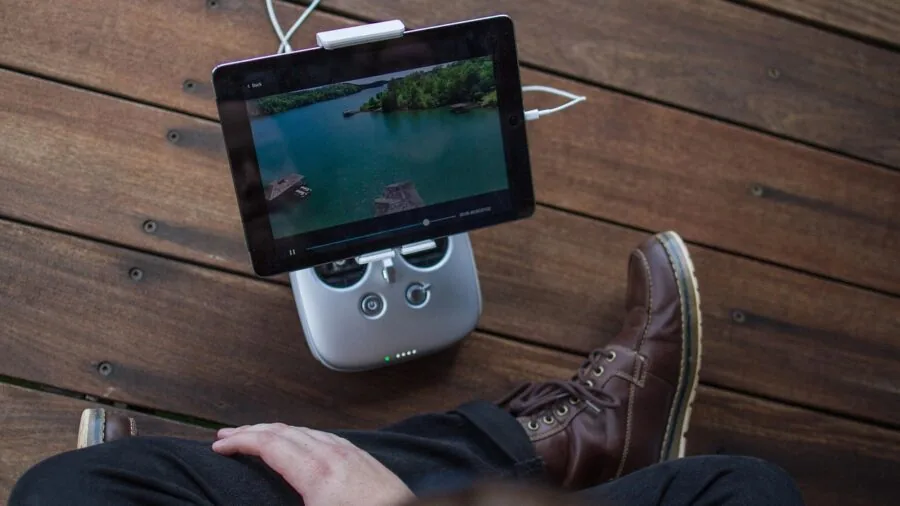
Tablets are used heavily for media consumption, and audio quality is often overlooked in spec sheets. Single-speaker tablets produce noticeably worse stereo sound, especially when held in landscape orientation for video.
Dual speakers are a solid baseline; quad-speaker configurations, which several Samsung and Lenovo models feature, produce a more immersive soundstage for movies and music without headphones.
Tuning matters as much as driver count. Some budget quad-speaker setups still sound tinny at higher volumes.
Buyer feedback in our research consistently notes that Samsung’s quad-speaker tuning at this tier is among the better implementations, particularly for dialogue clarity in streaming content.
For listening sessions where you want to block out the world, a solid pair of noise cancelling headphones remain a worthy companion to any tablet.
Build Quality and Portability

Budget tablets increasingly use polycarbonate bodies to keep costs down, but the best of them feel surprisingly solid in hand.
Look at thickness and weight if portability is important: tablets under 500g are comfortable for extended reading sessions, while heavier slabs with large batteries can feel tiring to hold one-handed.
A slim profile also matters for slipping into a bag alongside other gear.
Some brands include a folio case in the box, which is a meaningful value addition at the budget tier. A case protects against scratches during daily transport and often doubles as a stand for desk use.
When a folio case, stylus, and keyboard accessory are bundled together, the effective per-feature cost drops considerably compared to buying those accessories separately. Consider this when comparing the sticker prices across competing models.
Why You Should Trust Us
ProductFind is an independent review publication. We have no preferred brand relationships, and our recommendations are not influenced by advertising or retailer promotions.
Every tablet in this roundup was assessed using our structured PF Score methodology, a consistent 0 to 10 scale that weights display quality, performance, battery endurance, software support, audio, and build quality according to what our research shows matters most to real buyers in this category.
We do not conduct our own product trials; our evaluations are grounded in research, published data, expert review consensus, and verified buyer feedback. Where specifications differ between manufacturer claims and third-party published measurements, we weight the independent data more heavily.
We also track long-term buyer sentiment on verified purchase platforms to catch issues that only emerge after months of daily use, such as software degradation, battery wear, or build defects.
ProductFind may earn an affiliate commission when you purchase through links on this page. That relationship does not influence our rankings, scores, or selection of products.
Items are ranked by PF Score, not by margin, and we include products from lesser-known brands when the evidence supports their inclusion. Our goal is to give you the most honest, research-grounded shortlist available so you can buy with confidence.
Final Thoughts
The budget tablet market in 2026 is more competitive than it has ever been, and several models in this roundup punch noticeably above their price class. After synthesizing specifications, expert consensus, and verified buyer feedback, our top picks break down as follows:
- Best Overall: Samsung Galaxy Tab A11 WiFi (International Version) earns the top PF Score in this roundup with a strong combination of a higher-refresh display, capable front camera, and Samsung’s industry-leading software support commitment among budget Android tablets.
- Best for Students and Productivity: Lenovo Idea Tab (4GB / 128GB) stands out for bundling a 2.5K 90Hz IPS display, a stylus pen, and a folio case in a single package, making it exceptional value for college students or anyone who takes notes digitally.
- Best Mid-Range Value: Samsung Galaxy Tab A9+ 11″ offers a refined all-round experience with quad speakers, a slim and durable chassis, and Samsung’s updated chipset at a genuinely accessible price in the mid-range segment.
- Best Compact Pick: Lenovo Tab One 8.7″ is the right choice for buyers who want a lightweight, one-handed tablet for reading, streaming, and casual browsing without carrying a full-sized slate, and the included folio case adds practical daily protection.
- Best Ultra-Budget Option: Ulefone Tab A9 Pro is the strongest performer among the under-$268.00 no-name alternatives, offering a TÜV SÜD-certified eye-comfort display, Android 15, and expandable storage in a slim and lightweight form factor.
If none of these tablets match your specific requirements, it is worth considering whether a compact laptop or Chromebook might better suit your productivity needs. Our coverage of laptops for every budget covers that ground in detail.
For building out your home entertainment setup beyond a tablet, our guides to 4K TVs and soundbars are natural complements.
Frequently Asked Questions
What Is a Good Budget for an Android Tablet?
The sweet spot for a capable budget Android tablet sits in the lower-to-mid price tier, where established brands like Samsung and Lenovo offer well-supported devices with decent displays and enough RAM to feel smooth.
Below the very lowest price points, you tend to encounter older Android versions, minimal software support, and components that show their limitations quickly.
Spending a little more to reach a proven brand’s entry-level offering is almost always worth it for longevity.
At the higher end of the budget range covered in this roundup, you start finding 2.5K displays, 90Hz refresh rates, and bundled accessories that were premium features just a few years ago.
Think about what you’ll realistically use the tablet for every day, and let that use case guide your spending rather than defaulting to the cheapest available option.
Is a Budget Tablet Good Enough for Streaming Video?
Yes, most budget tablets handle streaming video on Netflix, YouTube, Disney+, and similar services perfectly well.
The key factors to check are display resolution, which should be at least 1920×1200 for sharp HD content, and Widevine L1 certification, which determines whether the device can stream HD or Full HD content from major platforms.
Some very low-cost tablets carry only Widevine L3, which caps streaming at lower resolutions and produces a noticeably softer picture.
Speaker quality is worth checking too. Quad-speaker setups are a meaningful upgrade for movie watching compared to a single down-firing driver.
If you stream frequently and want better audio than any tablet can provide on its own, a pair of over-ear headphones or compact Bluetooth speakers make a significant difference.
Should I Buy a No-Name Budget Tablet or Stick With a Known Brand?
Known brands like Samsung and Lenovo have a clear advantage in software support duration, which matters for long-term security and usability. They also tend to carry better after-sale support infrastructure and a more predictable track record for build quality.
Lesser-known brands can offer more hardware on paper for the money, but verified buyer feedback in our research frequently surfaces concerns about software bloat, short update windows, and inconsistent quality control.
That said, some no-name and emerging-brand tablets do represent genuine value at the very lowest price points for buyers with simple needs.
If your primary use case is video playback on a shared household device, a lesser-known brand at a lower price may be acceptable.
For a primary personal device you’ll rely on for several years, the software support commitment from an established brand is worth the modest price difference.
Do Budget Tablets Work Well for Kids?
Budget tablets can be a sensible choice for children, particularly models that offer parental control software, durable builds, and a manageable screen size.
Android’s built-in Family Link parental controls work across the ecosystem, so brand-name budget tablets with standard Android are easy to configure for safe kids’ use. A folio or protective case is strongly recommended to guard against drops.
For younger children specifically, look for lighter and smaller form factors so the device is comfortable to hold. Confirmed Widevine L1 support matters if the child will be watching content from major streaming apps.
Screen time limits and content filtering via Google Family Link are straightforward to set up on standard Android tablets from Samsung and Lenovo.
Can a Budget Tablet Replace a Laptop?
For light tasks like email, browsing, note-taking, and document editing, some budget tablets come close to replacing a basic laptop, especially when paired with a keyboard case.
Models that bundle a keyboard and stylus in the box make the case more convincingly. However, Android’s multitasking and file management remain more limited than a full desktop OS, and professional or creative software availability is more constrained.
If you find yourself needing more computing power or a full operating system for work or study, a dedicated laptop is likely the better long-term investment.
Our coverage of laptops for every use case and budget can help you find the right fit. For most casual users, though, a well-chosen budget tablet covers the majority of everyday computing needs at a fraction of the cost.
About the author
Deanna is a reviewer and writer for ProductFind who specializes in Tablets & E-Readers. Deanna evaluates products through independent research: specifications, expert review consensus, and verified buyer feedback, and rates each one on the PF Score. Deanna focuses on helping readers pick the right tablets & e-reader for their needs and budget.