The 12 Best Thin and Light Laptops
Portability without compromise: find slim, capable laptops for commuters, students, and remote workers, spanning budget to premium across Acer, ASUS, HP, and Lenovo.
 By Eric Harvey
Updated July 23, 2026
By Eric Harvey
Updated July 23, 2026

Thin and light laptops have quietly become the default choice for anyone who spends time moving between home, office, coffee shops, and classrooms.
As chipmakers push efficiency further with every generation, you no longer have to trade real performance for a slim chassis.
Whether you are a student hauling a backpack across campus, a professional hopping between meetings, or a remote worker who treats every café as a second office, the right ultraportable can keep up without weighing you down.
Pairing one with a quality USB-C hub extends connectivity without adding bulk to your bag.
At ProductFind, we evaluated every model on this list through comprehensive research: cross-referencing published specifications, synthesizing expert review consensus from multiple independent sources, and analyzing verified buyer feedback to surface consistent patterns.
The result is a ranked list spanning a wide range of price points and use cases, so you can find the right portable laptop for your specific workflow.
Scroll down for our top picks, then use the buying guide below to understand exactly what to look for.

Acer Swift Go 14 Intel Core i7 Touchscreen
A slim 14-inch ultrabook powered by Intel's 13th Gen Core i7, designed for professionals who need portability without sacrificing performance. The 1920x1200 touchscreen, 16GB RAM, and Wi-Fi 6E connectivity make it capable for productivity and creative work, though it lacks discrete graphics for intensive tasks.
Pros
- Extremely portable design fits easily in a laptop bag without compromising screen real estate
- Strong processor and 16GB RAM handle multitasking and creative applications smoothly
- Premium display with 1920x1200 resolution and touchscreen for versatile workflows
- Comprehensive port selection including dual USB4, HDMI 2.1, and microSD reader
- High-quality webcam and AI audio features ideal for video conferencing
Cons
- Intel Iris Xe graphics have limitations for gaming or heavy video rendering workloads
- 512GB SSD may feel tight for users with large media libraries or multiple applications
- No user reviews available, so real-world reliability feedback is unavailable

Acer Swift 3 SF314-511 14" Core i7 Laptop
The Acer Swift 3 pairs an Intel Core i7-1165G7 processor with a 14-inch Full HD IPS display and up to 16 hours of battery life, making it suitable for professionals needing portable productivity. Its slim 2.65-pound design and Intel Iris Xe graphics handle everyday tasks and light creative work, though the 8GB RAM and 512GB storage may require upgrades for heavier workloads.
Pros
- Lightweight and thin design ideal for travel and commuting
- Solid battery endurance rated up to 16 hours
- Thunderbolt 4 support enables high-speed data transfer and display connectivity
- Full HD IPS panel provides good color accuracy and viewing angles
- Fingerprint authentication adds convenient security
Cons
- 8GB RAM is modest for multitasking or demanding applications, and appears to be non-upgradeable onboard memory
- 512GB SSD may fill quickly for users with large media libraries or software collections
- No user reviews available yet to confirm real-world performance and reliability

Acer Swift 3 SF314-511 14" FHD Intel i7-1165G7
A lightweight 14-inch ultrabook built around Intel's efficient 11th-gen Core i7 processor, offering solid everyday performance with up to 16 hours of claimed battery life. Well-suited for professionals and students who prioritize portability and all-day endurance over raw gaming power.
Pros
- Compact and lightweight design ideal for mobile professionals and students
- Strong battery endurance claims for all-day unplugged work
- Modern I/O including Thunderbolt 4 and multiple USB ports
- Full HD IPS display with accurate color reproduction for creative work
- Intel 11th-gen efficiency balances performance with battery life
Cons
- No dedicated GPU limits gaming and heavy 3D rendering capability
- Single storage configuration with no user upgrade path mentioned
- 0 verified buyer reviews limits real-world reliability feedback at time of review

Lenovo Core i5-13420H 16GB DDR5 16" Laptop
A portable 16-inch business laptop combining an 8-core Intel processor with DDR5 RAM and military-grade durability in a 1.68kg frame. Best suited for professionals balancing multitasking demands with mobility across video conferencing, document work, and light content creation.
Pros
- 16-inch WUXGA display offers 11% more vertical space than standard FHD, reducing window juggling for multitaskers
- Intel Core i5-13420H with 8 cores and up to 4.6GHz turbo handles productivity and video conferencing smoothly
- Passed MIL-STD-810H military durability testing across 21 categories, plus physical camera privacy shutter
- Lightweight at 1.68kg with slim 16.9-17.9mm profile makes it genuinely portable for frequent travelers
- Comprehensive ports include USB-C with Power Delivery, HDMI, dual USB-A, SD card reader, and 3.5mm jack
Cons
- No user reviews available, so real-world reliability and quality control feedback cannot be assessed
- 1920x1200 resolution on 16-inch screen is adequate but not high-density compared to modern standards
- 50Wh battery capacity is modest for an ultraportable; actual runtime claims not specified in available data

ASUS VivoBook 14 Intel i3-13th Gen 16GB/256GB
A lightweight 14-inch laptop built around Intel's 13th-gen Core i3-1315U processor, offering 16GB RAM and 256GB SSD storage in a slim 3.09 lb design. Best suited for students and remote workers needing solid everyday performance without premium pricing.
Pros
- Portable design at under 3.1 lbs makes it genuinely travel-friendly
- Wi-Fi 6E and modern connectivity options keep you future-ready
- 16GB RAM handles everyday multitasking without lag
- Privacy shutter on webcam addresses real security concerns for remote work
- FHD display with anti-glare coating reduces eye strain during extended use
Cons
- No reviews yet posted, so real-world user feedback is unavailable for verification
- 256GB storage fills quickly with software and media, limiting expansion options
- Intel Core i3 processor is entry-level and may struggle with demanding creative or gaming tasks

ASUS ZenBook 13 UX331FA Ultra-Slim Laptop
A lightweight 13.3-inch ultrabook built around Intel's 8th-gen Core i5, 8GB RAM, and 512GB SSD storage. Designed for professionals and students who prioritize portability without sacrificing everyday computing performance, featuring a slim aluminum chassis at 2.5 lbs and a high-refresh NanoEdge display.
Pros
- Exceptionally thin and light design (0.55 inches, 2.5 lbs) ideal for commuters
- Fast 512GB PCIe SSD storage delivers quick system responsiveness
- Slim bezels maximize screen real estate on compact 13.3-inch frame
- Integrated fingerprint sensor adds security without extra bulk
- Wi-Fi 5 connectivity supports modern wireless networks
Cons
- 8GB LPDDR3 RAM may limit heavy multitasking or demanding applications compared to 16GB alternatives
- 8th-gen Intel processor is aging relative to current 11th-gen and newer options on the market
- No user reviews available to validate real-world performance and reliability claims

KAIGERR 15.6 Gaming Laptop with Ryzen 7 5700U
AMD Ryzen 7 5700U processor paired with 16GB RAM and 512GB SSD deliver solid multitasking and light gaming performance in a portable 3.65-pound frame. The 15.6-inch FHD display with thin bezels and integrated Radeon graphics make it suitable for office work, content consumption, and casual gaming.
Pros
- Capable processor for multitasking and light gaming without thermal throttling concerns
- Fast storage with 512GB SSD enables quick boot times and app launches
- Lightweight and portable at 3.65 pounds with 0.66-inch thickness
- WiFi 6 provides faster wireless speeds than standard WiFi 5
- Rich connectivity options including USB 3.2, Type-C, and HDMI
Cons
- No reviews available to verify real-world performance claims and user reliability
- Integrated Radeon graphics limit gaming to light titles and lower settings
- 512GB storage may require upgrades for content creators or large game libraries
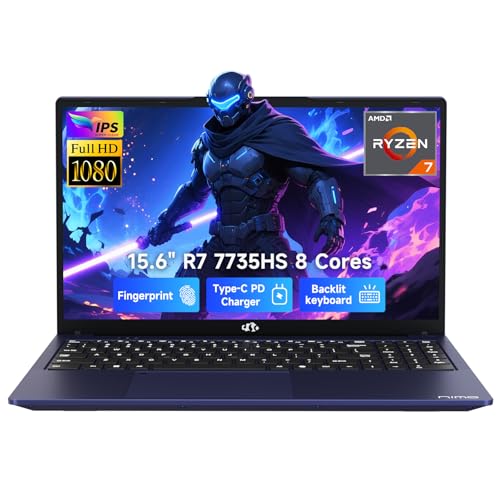
NIMO N159 15.6" Gaming Laptop, Ryzen 7 7735HS
Mid-range gaming and productivity laptop built around AMD's Ryzen 7 7735HS processor with 16GB DDR5 RAM and integrated Radeon 680M graphics. Designed for students, programmers, and casual gamers who prioritize portability, with a 180-degree hinge for collaboration and security features like fingerprint login.
Pros
- Excellent processor performance for its class with integrated Radeon 680M graphics suitable for light gaming and creative work
- Portability and build quality make it practical for students and professionals on the move
- 180-degree hinge and security features (fingerprint, webcam shutter) differentiate it from competitors
- 100W USB-C charger doubles as a phone charger, reducing cable clutter
- 15.6-inch FHD IPS display with anti-glare coating reduces eye strain
Cons
- Integrated graphics limit performance for demanding AAA gaming or professional rendering compared to discrete GPU alternatives
- No customer reviews available to verify real-world battery life and thermal performance claims
- 54Wh battery capacity is modest for all-day heavy workloads without charging access

ASUS Vivobook Go 15.6 FHD Ryzen 3 7320U Laptop
A budget-friendly 15.6-inch laptop built for everyday computing, featuring a Ryzen 3 7320U processor, 8GB RAM, and up to 11 hours of battery life. The chiclet keyboard with numeric pad and privacy shutter camera make it practical for work and casual use, though the 256GB storage and integrated graphics limit intensive tasks.
Pros
- Extended battery life up to 11 hours minimizes charging frequency
- Full-sized chiclet keyboard with numeric keypad for comfortable, quiet typing
- Privacy shutter on 720p HD IR camera for security-conscious users
- Military-grade durability passes five MIL-STD 810H tests
- Lightweight at 5.5 pounds with slim 0.7-inch profile for portability
Cons
- 256GB SSD storage is tight for users storing large files or multiple applications
- Integrated AMD Radeon graphics not suitable for gaming or professional design work
- No reviews available yet to verify real-world performance and reliability claims

Acer Aspire 3 A315-24P 15.6" Ryzen 3 Laptop
A slim, portable 15.6-inch laptop built for everyday productivity with AMD Ryzen 3 7320U processing and a Full HD IPS display. Solid choice for students and casual users seeking a lightweight machine without breaking the bank.
Pros
- Slim design and lightweight build make it travel-friendly
- Clear Full HD display suitable for work and media consumption
- Ryzen 3 7320U handles everyday multitasking and productivity tasks efficiently
- TNR technology and AI noise reduction improve video call quality in varying lighting
- Wi-Fi 6 support for faster connectivity
Cons
- 128GB SSD storage is limited for users with large file collections; may require external storage
- 8GB RAM is on the lower end for demanding multitasking or future-proofing
- No discrete GPU, so gaming and professional graphics work will be restricted

HP 14" Ultral Light Laptop, Intel Celeron, 8GB RAM, 192GB Storage
A lightweight 14-inch laptop designed for students and remote workers, built around Intel Celeron processing with 8GB RAM and expandable storage. It prioritizes portability and basic productivity over performance, making it practical for web browsing, document editing, and streaming.
Pros
- Genuinely portable design at under 3.5 pounds slips into backpacks easily
- Reasonable port selection for a budget ultralight including USB-C and HDMI
- RAM and storage are upgradable, extending device longevity
- Includes bundled software and cloud storage expansion out of the box
- 14-inch screen provides adequate working space for student and office tasks
Cons
- Intel Celeron processor is entry-level, limiting performance for demanding applications or multitasking beyond basics
- No verified user reviews available to assess real-world reliability and long-term durability
- Windows 11 S mode restricts app installation to Microsoft Store only, requiring activation for full Windows 11

HP 14" HD Laptop, Intel N4120, 8GB RAM, 192GB Storage
A budget-friendly 14-inch laptop designed for students and light business work, pairing a quad-core Intel Celeron processor with 8GB RAM and dual storage (64GB eMMC plus 128GB card). The bundle includes practical accessories like a USB-C docking hub and mouse pad, though the entry-level processor and Windows 11S may require some adjustment for power users.
Pros
- Solid value bundle with docking hub and extra storage card included
- Adequate performance for web browsing, document editing, and video conferencing
- Compact and lightweight design ideal for students carrying between classes
- Clear 14-inch display with decent brightness for indoor use
- Straightforward upgrade path from Windows 11S to standard Windows 11
Cons
- Intel Celeron N4120 is entry-level; struggles with heavy multitasking or creative software
- Reliance on microSD card reader for expandable storage creates dependency on external media
- Windows 11S comes with restrictions until manually switched to Home edition
Thin and Light Laptops Buying Guide
Choosing among today’s portable laptops is genuinely nuanced. Marketing claims like “ultra-slim” and “featherweight” are stamped on everything from premium Evo-certified machines to budget entry-level notebooks, and the specs that actually matter are often buried in the fine print.
The sections below break down the criteria our research consistently shows separate truly great ultraportables from ones that disappoint in daily use.
Processor Architecture and Real-World Performance

The CPU is the single biggest factor in how a slim laptop feels day to day.
Modern thin-and-light machines typically ship with processors designed for low-power envelopes: Intel’s U-series and P-series (with Evo certification indicating minimum thresholds for responsiveness and battery life), AMD’s Ryzen U-series, and increasingly, Arm-based chips from Qualcomm.
Each platform has trade-offs worth understanding before you buy.
Intel Evo-certified models such as the Acer Swift 3 and Swift Go lines must meet verified benchmarks for instant wake, battery duration, and charge speed, which gives you a floor of acceptable performance rather than a marketing promise.
AMD Ryzen 7000-series U-class chips deliver competitive multi-core throughput in a tight thermal budget and often edge out similarly specced Intel parts in sustained workloads.
Budget shoppers should be aware that ultra-low-voltage chips like the Intel N4120 are best suited to light web browsing and document editing, not creative or productivity multitasking.
RAM matters too.
Most buyers are well served by 8 GB of LPDDR5 for everyday tasks, but 16 GB is the more future-proof choice if you keep dozens of browser tabs open, use collaboration tools simultaneously, or work with any media editing software.
Our research shows that verified buyers consistently cite 8 GB as a pain point within one to two years of purchase on otherwise solid machines.
Weight, Build Quality, and Chassis Materials

In this category, weight is a primary spec, not a secondary detail. Machines under 3 pounds are genuinely comfortable to hold in one hand and carry all day without shoulder strain.
The 3 to 3.5 pound range still qualifies as portable for most people, while anything above 4 pounds starts to feel closer to a traditional notebook than an ultraportable.
Chassis material makes a measurable difference to both weight and durability. Aluminum alloy lids and palm rests reduce flex and feel premium under your palms, while magnesium alloy goes even lighter without sacrificing rigidity.
Plastic bodies are common on budget picks and are not inherently bad, but look for designs that cite MIL-SPEC durability ratings, which indicate the chassis survived drop, vibration, and humidity evaluation in independent standards evaluations.
The ASUS Vivobook Go 15, for example, carries military-grade durability credentials that matter if your laptop lives in a bag rather than on a desk.
Hinge quality is underrated. A stiff hinge that stays put at any angle is a quality-of-life upgrade you notice every single time you open the lid on an airplane tray table or a cramped café counter.
Read long-term buyer feedback carefully for hinge wear reports before committing to a budget model.
Display Quality and Size
Screen size in portable laptops runs from 13 to 16 inches, and the right choice depends on how you use your machine.
A 13 or 14 inch display packs down small enough for slim briefcases and minimalist backpacks, while 15 and 16 inch options give you more screen real estate for split-window work at the cost of a larger footprint.
The Acer Swift Go 14 strikes a compelling balance with a 1920×1200 touchscreen that gives just enough extra vertical space for document-heavy workflows.
Panel type shapes the visual experience significantly. IPS panels deliver accurate color, wide viewing angles, and solid brightness for most users.
OLED screens offer deeper blacks and richer contrast but historically cost more and can raise concerns about burn-in for static interface elements over years of use.
For a portable that will spend time outdoors or near windows, prioritize peak brightness: 300 nits is the minimum for comfortable indoor use, and 400 nits or above handles most ambient light scenarios.
Color coverage matters for creative work; 100% sRGB is the practical minimum for anyone editing photos or producing visual content.
Touch support adds versatility for note-taking and quick navigation but slightly increases weight and can reduce contrast due to the additional glass layer.
If you want a full pen-and-touch experience, consider whether a 2-in-1 convertible might serve your workflow better than a traditional clamshell form factor.
Battery Life and Charging

Battery life is where thin-and-light laptops either justify their premium or fall short of expectations. A credible all-day machine should reach eight hours or more of mixed productivity use under real-world conditions.
Expert consensus suggests treating manufacturer claims with healthy skepticism: rated battery life is typically measured under minimal-load scenarios, while real-world mixed use (browser, video calls, office apps) often returns 60 to 75 percent of the claimed figure.
Intel Evo certification mandates a minimum of nine hours of real-world battery life and requires that the machine reach a usable charge level within 30 minutes of being plugged in.
These thresholds have made Evo-certified machines like the Swift 3 and Swift Go a reliable baseline for commuters who cannot always find a power outlet.
AMD Ryzen 7000-series chips have closed the gap significantly thanks to TSMC’s 4nm process node, so do not automatically assume Intel has the efficiency edge at every price point.
USB-C charging is now the norm on quality ultraportables and is worth prioritizing. The ability to top up from a portable battery bank or a hotel room USB-C power adapter is a genuine convenience advantage when you are traveling.
Look for models that support charging over either USB-C port, not just a dedicated barrel connector.
Storage, Connectivity, and Ports

NVMe SSDs are now standard on all but the most entry-level ultraportables and are non-negotiable for comfortable everyday use.
The difference between a PCIe Gen 4 SSD and a Gen 3 drive is less noticeable for typical file access than raw benchmark numbers suggest, but the gap between an NVMe drive and eMMC flash storage is stark and genuinely impacts boot times, app launches, and large file transfers.
Several budget models in this roundup use eMMC storage with a bundled microSD card to hit a headline storage number, which is a compromise worth understanding before you buy.
Port selection on slim laptops is constrained by design, but the right combination matters. A Thunderbolt 4 or USB4 port gives you high-bandwidth display output, fast external storage, and power delivery in a single connector.
Two USB-A ports cover legacy peripherals without needing an adapter. An HDMI output is convenient for conference room projectors. If your preferred model is light on ports, a compact USB-C docking hub solves the problem without compromising desk tidiness.
Wi-Fi 6 is now the practical baseline for wireless; it offers meaningful speed and reliability improvements in crowded wireless environments like open offices and airports compared to Wi-Fi 5.
Security features are increasingly relevant for business and student use alike. A fingerprint reader paired with Windows Hello allows near-instant, passwordless login. An IR camera supports facial recognition login and is a genuine time-saver throughout the workday.
Both features appear across multiple models in this roundup and should be near the top of your checklist if you carry sensitive data.
Keyboard, Touchpad, and Webcam

Input quality is disproportionately important on a portable laptop because you will interact with the keyboard and touchpad for hours every day without an external peripheral nearby.
Key travel depth (the distance a key depresses before registering) directly affects typing comfort: 1.2 to 1.5 mm is the practical minimum for extended writing sessions, and anything below 1 mm often feels mushy or imprecise.
Backlit keyboards are now common even at mid-range price points and are worth confirming before purchase if you work in variable lighting.
Touchpad size and surface texture matter more than many buyers expect. A large glass-surface touchpad allows full palm-rest-to-bottom-of-chassis swipe gestures and supports Windows precision driver multi-finger shortcuts that genuinely accelerate navigation.
Smaller plastic-surface touchpads common on budget builds tend to feel less precise and develop surface wear over time.
Webcam quality has jumped up the priority list since remote and hybrid work became the norm.
A 1080p webcam with decent low-light performance is now available on mid-range models and makes a visible difference in how you appear on video calls.
If your portable will serve as your primary work machine, do not settle for a 720p sensor unless the budget leaves no alternative.
Pairing your laptop with a portable external monitor can further expand your workspace when you need a dual-screen setup on the go.
Why You Should Trust Us
ProductFind is an independent review platform with no manufacturer relationships that influence our rankings.
Every laptop on this list was assessed using a consistent, multi-signal research framework: we cross-reference official published specifications, synthesize expert review consensus from a broad range of credible independent sources, and analyze patterns in verified buyer feedback to surface recurring strengths and failure modes that single-source reviews may miss.
Each model receives a PF Score on a 0 to 10 scale, reflecting how well it performs across the criteria most relevant to buyers in this category, including processor efficiency, display quality, build durability, battery longevity, port selection, and value relative to comparable options.
We do not conduct our own product trials; our evaluations are grounded in research, published data, expert review consensus, and verified buyer feedback.
This approach lets us cover a broader range of models and price points than any single-reviewer operation, while maintaining consistent scoring criteria across every entry.
When the expert consensus shifts because a new firmware update, driver revision, or pricing change materially affects a product’s standing, we revisit and update our assessments accordingly.
ProductFind may earn an affiliate commission if you purchase through a link on this page. That commercial relationship has no bearing on which products are included, how they are ranked, or what PF Score they receive.
Our editorial independence is the foundation of the trust readers place in us, and we protect it consistently.
If you want to read more broadly about portable computing options, our overview of laptops across every budget and use case provides additional context for buyers still defining their needs.
Final Thoughts
After evaluating every model in this roundup against our consistent criteria, a few standout performers deserve recognition by category. Whether you are prioritizing versatility, processing power, or getting the most for your budget, the picks below represent the strongest choices at each position.
- Best Overall: Acer Swift Go 14 Intel Evo Touch earns the top spot with the highest PF Score in the roundup, combining a vibrant 100% sRGB touchscreen, Gen 4 SSD storage, and Intel Evo certification into the most well-rounded ultraportable on this list.
- Best Mid-Range Value: Acer Swift 3 Intel Evo 14 (8 GB) delivers Evo-certified performance and Wi-Fi 6 connectivity at a mid-range price point, making it the most compelling option for buyers who want verified responsiveness without stretching to a premium budget.
- Best for Power Multitaskers: Lenovo 16″ FHD+ Copilot AI PC stands out with its larger display, 16 GB DDR5 RAM, and a 13th Gen Intel Core processor that handles demanding parallel workloads better than the 14-inch competition at a comparable price.
- Best Budget Slim Laptop: Acer Aspire 3 A315 Slim (Ryzen 3) offers AMD Ryzen 3 7320U efficiency and Wi-Fi 6 at an accessible entry price, making it a sensible choice for students and light users who need reliable portability without a premium outlay.
- Best for Students on a Tight Budget: ASUS Vivobook Go 15.6″ FHD pairs military-grade durability, a webcam privacy shield, AMD Ryzen 3 processing, and fast-charge support into a well-protected portable that holds up to the rigors of daily campus carry better than most options at its price tier.
For buyers who primarily work at a desk but want the option to pack up and move, a dedicated protective laptop sleeve keeps your machine safe in transit, while a quality laptop cooling pad helps sustained performance on enclosed surfaces like beds or couches.
If your usage leans toward touch-first creative workflows, revisiting the 2-in-1 laptop category is worth the extra research time before committing to a traditional clamshell.
Frequently Asked Questions
What Weight Qualifies a Laptop as Truly Thin and Light?
Most reviewers and manufacturers use roughly 3 pounds (about 1.36 kg) as the informal threshold for a genuinely ultraportable machine.
Laptops under that mark are comfortable to carry one-handed and light enough that you will not notice them in a daypack over the course of a long commute.
Machines in the 3 to 4 pound range still qualify as portable and offer more room for larger batteries, bigger displays, and stronger cooling systems. Above 4 pounds, a laptop starts behaving more like a desktop replacement than a travel companion.
Thickness matters alongside weight. A chassis under 18 mm (roughly 0.7 inches) slides easily into slim sleeves and briefcases. Some Acer Swift models in this roundup achieve this profile while maintaining a full port array, which is a meaningful engineering achievement at their price points.
Is Intel Evo Certification Worth Paying For?
Intel Evo is a platform specification, not just a marketing label.
To carry the badge, a laptop must meet verified minimum thresholds: at least nine hours of real-world battery life, wake from sleep in under one second, reach a meaningful charge level within 30 minutes of plugging in, and pass connectivity and display quality checkpoints.
For buyers who prioritize reliability over raw clock speed, Evo certification is a useful shortcut that reduces the risk of buying a slim laptop that cannot deliver all-day battery life.
That said, Evo certification is not a guarantee of best-in-class performance. AMD Ryzen machines without Evo badges routinely match or exceed certified Intel counterparts in sustained productivity tasks, particularly in the mid-range.
Evaluate each machine on its own specifications and verified buyer feedback rather than relying solely on the badge.
How Much RAM Do I Actually Need in a Portable Laptop?
For basic web browsing, document editing, and video streaming, 8 GB of LPDDR5 RAM is technically sufficient today.
However, expert consensus and verified buyer feedback consistently show that users who keep multiple applications open, rely on web-based productivity suites, or use communication and collaboration tools simultaneously find 8 GB machines feeling sluggish within 12 to 18 months as software overhead increases.
If your budget allows, 16 GB is the more future-proof choice and increasingly available at mid-range price points.
On thin-and-light machines, RAM is almost always soldered to the motherboard to save space and reduce thickness, which means you cannot upgrade it later. This makes the initial configuration decision more consequential than it would be on a traditional desktop or upgradeable notebook.
Can a Thin and Light Laptop Handle Gaming or Creative Work?
Integrated graphics on modern AMD Ryzen 7000-series chips, particularly the Radeon 680M found in some models in this roundup, can handle light-to-medium gaming at reduced settings.
The NIMO gaming laptop in this list takes a different approach, pairing an AMD Ryzen 7 with a larger chassis to allow more thermal headroom for GPU-intensive tasks.
For serious gaming, however, a portable machine with a discrete GPU or a dedicated gaming desktop will deliver a substantially better experience.
Photo editing, light video work, and graphic design are well within reach for the upper-tier picks in this roundup, particularly models with 16 GB RAM, a fast NVMe SSD, and a display covering 100% sRGB.
Video encoding and 3D rendering tasks will push slim thermals, which can cause sustained-load throttling on thinner chassis designs. For any sustained creative workload, buyer reviews specifically mentioning long-session performance are a more reliable signal than peak benchmark scores.
What Accessories Should I Buy Alongside a Slim Laptop?
A well-fitted laptop sleeve is the first purchase to make, protecting the chassis from scratches and minor impacts in your bag without adding meaningful bulk.
A compact USB-C multiport adapter or hub addresses the port limitations common to slim designs and is especially useful if you regularly connect to external displays, wired ethernet, or USB-A peripherals.
Security-conscious users should also consider reliable antivirus software as a complement to Windows Defender, particularly on machines used across public Wi-Fi networks.
For hybrid workers who split time between a home office and a desk setup, a portable monitor transforms a slim laptop into a capable dual-screen workstation without requiring a permanent docking setup.
These monitors have matured significantly in both display quality and portability, and many draw power directly from the laptop’s USB-C port.
About the author
Eric is a reviewer and writer for ProductFind who specializes in Computers & Laptops. Eric evaluates products through independent research: specifications, expert review consensus, and verified buyer feedback, and rates each one on the PF Score. Eric focuses on helping readers pick the right computers & laptop for their needs and budget.