The 8 Best 4K Monitors
Sharp text, accurate color, and the right ports make all the difference. Here are the top 4K monitors across every budget, from hub-equipped professional displays to capable everyday upgrades.
 By Megan Daniels
Updated July 23, 2026
By Megan Daniels
Updated July 23, 2026

A great 4K monitor transforms how you work, create, and play.
Whether you’re editing photos, building spreadsheets across multiple windows, or watching high-resolution video, the jump from 1080p to 4K delivers noticeably sharper text, richer detail, and more usable screen real estate.
The market has matured rapidly, and options now span everything from budget-friendly entry points to professional-grade displays with factory-calibrated color and robust connectivity.
That makes choosing the right one genuinely challenging, especially when manufacturers use overlapping specs to market very different experiences.
To cut through the noise, the ProductFind team analyzed technical specifications, expert review consensus, and verified buyer feedback across the leading models available right now.
Each display was assessed against a consistent set of criteria covering panel quality, connectivity, ergonomics, and value, then awarded a PF Score on our 0-to-10 scale.
The result is a curated list of the top 4K monitors for a range of users, from general office workers to creative professionals and light gamers. Read on to see which displays earned our highest recommendations.
| Award | Product | PF Score About PF ScoreThe PF Score is our own rating from 0 to 10, based on performance, design and build, ease of use, and value. It reflects independent research and is never influenced by manufacturers, retailers, or affiliate commissions. Learn more › | Price | |
|---|---|---|---|---|
| Best Overall |
 Dell UltraSharp U2723QE 27-Inch 4K Monitor
|
9.2/10 | Buy | |
| Editor's Pick |
 Samsung ViewFinity S7 32-inch 4K Monitor
|
8.3/10 | Buy | |
| Best Value |
 Dell S2725QS 27-inch 4K 120Hz Monitor
|
8.1/10 | Buy | |
| Top Rated |
 LG 32-Inch 4K UHD IPS Monitor with 95% DCI-P3
|
7.9/10 | Buy | |
 ASUS ProArt PA279CRV 27-inch 4K Professional Monitor
|
7.8/10 | Buy | ||
 LG 32-Inch 4K UHD Monitor with HDR10
|
7.6/10 | Buy | ||
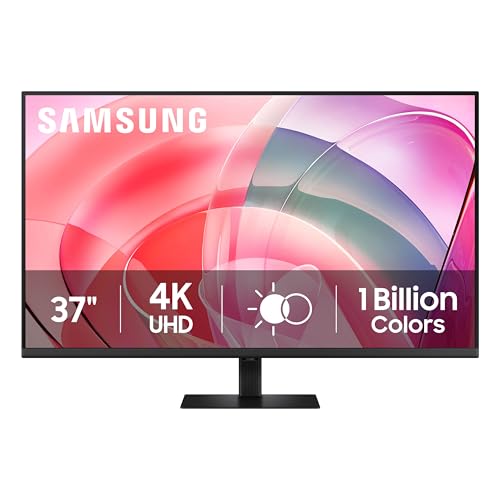 Samsung ViewFinity S7 37-Inch 4K Monitor
|
7.5/10 | Buy | ||
 LG 27US500-W 27-Inch 4K UHD Monitor
|
6.1/10 | Buy |
Dell UltraSharp U2723QE 27-Inch 4K Monitor
A premium 27-inch 4K display built for professionals and gamers seeking sharp visuals and extensive connectivity. The monitor combines 3840 x 2160 resolution with USB-C docking capabilities and fast 5ms response time, though it lacks built-in speakers and has limited refresh rate at 60Hz.
Pros
- Extensive connectivity with USB-C docking, DisplayPort 1.4, and quad USB 3.2 ports eliminates need for external hubs
- High pixel density at 163 PPI delivers sharp text and detailed visuals for design and office work
- Fast 5ms response time and 60Hz refresh rate handle gaming and video playback smoothly
- Anti-glare coating with hard finish reduces eye strain during extended use
Cons
- No built-in speakers, requiring external audio solution
- 60Hz refresh rate limits motion smoothness compared to higher-refresh gaming monitors
- No review feedback available to validate real-world performance claims
Samsung ViewFinity S7 32-inch 4K Monitor
Samsung's 32-inch ViewFinity S7 delivers 4K resolution with HDR10 support and wide 178-degree viewing angles, making it suitable for productivity-focused professionals and content creators. The monitor includes eye comfort features and flexible connectivity options, though it arrives with no verified buyer feedback to validate real-world performance.
Pros
- 4K UHD resolution with high pixel density for detailed visuals
- HDR10 support with optimized contrast and accurate color gamut
- Wide 178-degree viewing angle maintains consistent brightness and clarity from multiple positions
- Eye Saver Mode reduces blue light and flicker for prolonged use comfort
- Samsung Display Manager offers split-screen, KVM, and PIP/PBP functionality
Cons
- No verified customer reviews available to assess real-world reliability or user experience
- 32-inch size may require significant desk space and viewing distance for comfortable use
- HDMI and DisplayPort connectivity options not detailed regarding port count or standards
Dell S2725QS 27-inch 4K 120Hz Monitor
A 4K IPS display built for color-critical work and gaming, combining 99% sRGB accuracy with 120Hz refresh rates and AMD FreeSync Premium. The ultra-thin design and enhanced speakers add practical value, though the 0 verified reviews limit real-world confidence.
Pros
- Excellent color coverage at 99% sRGB, suitable for photo and video editing
- Smooth motion handling with 120Hz refresh rate and low latency response time
- Blue light reduction built in without compromising color accuracy
- Sleek minimalist aesthetic with ultra-thin bezels
- Integrated speakers eliminate need for separate audio setup
Cons
- No verified buyer reviews available to assess real-world reliability and user experience
- 1500:1 contrast ratio trails premium gaming monitors with higher ratios
- Limited spec details on port connectivity and full HDR implementation
LG 32-Inch 4K UHD IPS Monitor with 95% DCI-P3
A 32-inch 4K IPS display built for color-critical work, offering 95% DCI-P3 gamut accuracy and HDR10 support with an ergonomic adjustable stand. Best suited for designers, video editors, and professionals who need wide viewing angles and precise color reproduction across extended sessions.
Pros
- Exceptional color accuracy at 95% DCI-P3 coverage, ideal for design and post-production workflows
- Large 4K IPS panel delivers sharp visuals with consistent colors from multiple viewing angles
- Ergonomic stand with tilt and height adjustment minimizes neck strain during long work sessions
- Triple-sided borderless design enables seamless multi-monitor configurations
- HDR10 support provides richer contrast and smoother tonal transitions
Cons
- No customer reviews available yet to assess real-world performance and reliability
- Limited specification details on refresh rate and response time for fast-paced gaming or graphics work
- Premium positioning may not suit budget-conscious buyers seeking basic 4K display functionality
ASUS ProArt PA279CRV 27-inch 4K Professional Monitor
A factory-calibrated 4K professional display built for color-critical work, delivering 99% DCI-P3 coverage and Delta E < 2 accuracy verified by Calman. USB-C with 96W power delivery and a 5-year warranty make it practical for designers, video editors, and photographers who need dependable color accuracy.
Pros
- Factory pre-calibrated to Delta E < 2 with Calman verification, eliminating need for post-purchase calibration
- Dual color gamut support: 99% DCI-P3 and 99% Adobe RGB for film and print workflows
- USB-C with 96W Power Delivery simplifies desk setup and charges compatible laptops
- Includes 3 months of Adobe Creative Cloud access
- Extended 5-year warranty (3 years plus 2-year registration extension)
Cons
- No customer reviews available yet, limiting real-world feedback on long-term performance
- Premium pricing positioned toward professional markets rather than general users
- 4K resolution on 27 inches results in small UI scaling on Windows systems without proper settings adjustment
LG 32-Inch 4K UHD Monitor with HDR10
A 32-inch 4K display built for creative professionals and serious gamers, delivering 90% DCI-P3 color accuracy and HDR support. Features like Dynamic Action Sync and Black Stabilizer enhance gameplay, while the adjustable stand and split-screen functionality suit both production work and multimedia consumption.
Pros
- Wide color gamut (90% DCI-P3) makes it suitable for photo and video editing
- HDR10 support and large screen size enhance movie and gaming immersion
- Versatile stand allows easy adjustment for ergonomic positioning
- Black Stabilizer and Dynamic Action Sync provide competitive gaming advantages
- LG Switch feature enables split-screen productivity layouts
Cons
- 60Hz refresh rate is standard for a 4K monitor, limiting appeal for high-refresh gaming
- No customer reviews available to assess real-world performance and reliability
- Premium positioning likely commands a higher price point for budget-conscious buyers
Samsung ViewFinity S7 37-Inch 4K Monitor
Samsung's 37-inch ViewFinity S7 delivers 4K resolution (3840x2160) with HDR10 support, making it suited for productivity-focused professionals and creative workers who value screen real estate. The TUV-certified eye care features and eco-conscious design with recycled plastic add practical appeal beyond raw specifications.
Pros
- Large 37-inch screen provides significant productivity boost compared to standard 32-inch monitors
- HDR10 and high pixel density deliver vibrant, accurate color representation
- TUV-certified eye protection with flicker reduction and blue light filtering
- No-tool setup stand eliminates assembly hassle
- Responsible manufacturing with recycled materials and sustainable packaging
Cons
- No verified user reviews available to assess real-world reliability or performance consistency
- Premium-tier pricing typical for ultra-wide professional displays may limit accessibility
- Large physical footprint (32.44 inches wide) requires substantial desk space
LG 27US500-W 27-Inch 4K UHD Monitor
A 4K professional-grade display with 90% DCI-P3 color accuracy and HDR10 support, designed for creative work. The ergonomic stand and onscreen controls offer practical flexibility, though the monitor has zero verified buyer feedback.
Pros
- 4K UHD resolution (3840x2160) with 1000:1 contrast ratio for detailed imagery
- 90% DCI-P3 color gamut with HDR10 support ideal for color-critical creative work
- Ergonomic stand allows flexible tilt adjustment for comfortable viewing
- Onscreen Control tool for easy display partitioning and customization
- Complete accessories included: stand, HDMI cable, power adapter
Cons
- No verified buyer reviews available to assess real-world reliability or user experience
- Limited specifications published regarding brightness levels, response time, and refresh rate
- Borderless design benefit not clearly explained in feature descriptions
4K Monitors Buying Guide
Buying a 4K monitor involves more than picking the biggest screen or the lowest price. Panel technology, refresh rate, color coverage, and port selection all interact in ways that can make or break the experience for a specific use case.
This guide walks through the key decisions you’ll face, so you can match a display to how you actually work and what you actually do.
If you’re also rethinking your wider desk setup, pairing a new display with a quality monitor arm can significantly improve ergonomics and free up desk space.
Panel Technology: IPS, VA, and What It Means for You

Most 4K monitors you’ll encounter today use IPS (In-Plane Switching) panels, and for good reason. IPS delivers wide viewing angles, accurate color reproduction, and consistent brightness across the screen.
These qualities make IPS the dominant choice for photo editing, video work, and general productivity where you want what you see on screen to closely match reality.
Dell’s UltraSharp lineup and ASUS ProArt displays lean heavily on IPS for exactly this reason.
VA (Vertical Alignment) panels trade some color accuracy and viewing angle for higher native contrast ratios, which produces deeper blacks in dark scenes.
They can be a strong choice for mixed-use scenarios that include movie watching or gaming in dim environments.
OLED panels offer the best contrast and color of any technology but remain rare at 4K and carry a significant price premium at this resolution.
For most buyers, a well-calibrated IPS display like those from Dell, LG, or Samsung on this list will deliver excellent results across every task.
One nuance worth knowing: not all IPS panels are equal. Nano IPS and IPS Black variants improve on standard IPS in contrast and color volume respectively.
If deep blacks matter for your workflow, check whether a shortlisted monitor uses one of these enhanced IPS types before committing.
Refresh Rate and Response Time for Gaming and General Use

The standard refresh rate for productivity-focused 4K monitors has historically been 60 Hz, which is perfectly adequate for office tasks, creative work, and casual media consumption. However, the category has evolved quickly.
Several monitors on our list now offer 120 Hz at 4K resolution, which is a meaningful upgrade even for non-gamers because scrolling, window animations, and cursor movement all feel noticeably smoother.
If gaming is part of your use case, look for a monitor that supports AMD FreeSync Premium or NVIDIA G-Sync Compatible certification.
Variable refresh rate (VRR) technology synchronizes the display’s refresh rate with your GPU’s output, eliminating screen tearing without introducing input lag.
The Dell S2725QS on this list offers 120 Hz with FreeSync Premium at a mid-range price, making it one of the stronger all-round options for users who game occasionally but also do serious work.
Pairing a high-refresh 4K monitor with capable hardware is key; DDR5 RAM kits can help keep your system performing in line with what the display demands.
Response time (measured in milliseconds, usually grey-to-grey) affects how much motion blur appears in fast-moving content. For gaming or video, look for 5 ms or lower. For pure productivity, response time is rarely a meaningful concern.
Color Accuracy and Coverage for Creative Professionals
Color coverage is specified as a percentage of a defined color space, most commonly sRGB, DCI-P3, or Adobe RGB. sRGB covers the standard gamut used by web content and most consumer media.
DCI-P3 is the wider color space used in cinema and increasingly in high-end consumer displays. Adobe RGB extends coverage into greens and cyans, making it relevant for photographers and print designers who need to match output to printed proofs.
For general use, 99% sRGB coverage is entirely sufficient and is found across most of the mid-range monitors on this list.
Creative professionals should look for at least 90% DCI-P3, with the ASUS ProArt PA279CRV delivering 99% DCI-P3 and 99% Adobe RGB alongside factory calibration and a verified Delta-E under 2, meaning colors are accurate enough for professional print and video workflows straight out of the box.
Delta-E (dE) is the numerical measure of color accuracy. A dE below 2 is considered excellent and imperceptible to the human eye in most circumstances.
Some consumer monitors ship with a dE in the 3 to 5 range, which is acceptable for everyday use but noticeable to trained eyes in critical color applications.
If accuracy matters for your work, prioritize monitors that publish verified dE figures rather than vague claims.
Screen Size and Pixel Density

The most common sizes for 4K monitors are 27-inch and 32-inch. At 27 inches, a 4K panel delivers a pixel density of around 163 PPI, which results in sharp, crisp text at 100% scaling on Windows and macOS.
This size is well-suited to desks where viewing distance is roughly an arm’s length. The majority of our top picks fall in this range for this reason.
At 32 inches, pixel density drops to roughly 138 PPI, which is still comfortably sharp but may require slight UI scaling adjustments to feel comfortable for text-heavy work.
The payoff is more breathing room for large canvas work, video timelines, and multi-window setups.
The Samsung S70H and LG UltraFine 32-inch models on this list represent the 32-inch tier well, offering a good balance of size and sharpness for mixed use.
Users who need even more horizontal space should also consider whether an ultrawide monitor might better serve their workflow than a standard 16:9 4K display.
Ultrawide panels sacrifice pixel density slightly but offer a panoramic layout that suits video editing, coding, and multitasking in a way that a traditional aspect ratio cannot replicate.
Connectivity and USB-C / Hub Features

Connectivity is where budget and premium 4K monitors diverge most sharply. Entry-level models typically offer HDMI and DisplayPort inputs, which cover the majority of desktop setups.
If you’re connecting a laptop, check whether the monitor supports DisplayPort Alt Mode over USB-C. This allows a single cable to carry video, data, and power simultaneously, keeping your desk clean and reducing dongle clutter significantly.
The Dell UltraSharp U2723QE, our top-rated pick, goes further by functioning as a full USB-C hub with downstream USB-A and USB-C ports, an RJ-45 Ethernet port, and Power Delivery up to 90 W, enough to charge most laptops at full speed.
The ASUS ProArt PA279CRV offers USB-C PD at 96 W with daisy-chaining support for multi-monitor setups.
These hub-capable displays essentially replace a standalone dock for single-cable laptop users, which adds real practical value that doesn’t show up in a spec sheet comparison alone.
Also check for the number and version of HDMI ports. HDMI 2.0 supports 4K at 60 Hz, while HDMI 2.1 is needed for 4K at 120 Hz.
If you plan to connect a gaming console such as the PS5 or Xbox Series X alongside a PC, an HDMI 2.1 port ensures you’re not bottlenecked at 60 Hz from the console side.
Ergonomics, Build Quality, and Eye Comfort

Long hours in front of a monitor make ergonomics a legitimate performance consideration, not just a nice-to-have. Look for stands that offer height adjustment of at least 100 mm, tilt, swivel, and ideally pivot (portrait rotation).
These adjustments allow you to position the display at the correct eye level for your chair height, reducing neck and eye strain over the course of a workday.
Most of the LG UltraFine models on this list offer a full ergonomic range, as does the Dell UltraSharp.
Flicker-free backlighting (sometimes marketed as DC dimming) eliminates the high-frequency backlight cycling used in cheaper monitors, which can contribute to eye fatigue over long sessions.
Low Blue Light certification reduces the proportion of blue-spectrum light emitted, which is associated with disrupting sleep patterns when using screens late in the evening.
LG markets these as Flicker Safe and Reader Mode respectively, while Samsung calls their implementation Eye Saver Mode. These features are largely standardized across the category and should be considered table stakes for any monitor used for extended productivity work.
For users spending eight or more hours at a desk, investing in a well-chosen ergonomic office chair and a capable ergonomic keyboard alongside a good monitor creates a meaningful improvement in daily comfort and long-term wellbeing.
Why You Should Trust Us
ProductFind is an independent review publication. We have no manufacturer partnerships, no sponsored rankings, and no preferred brands.
Every display in this roundup was assessed using our structured research methodology: we analyze published technical specifications, synthesize consensus from the broader expert review community, incorporate verified buyer feedback from confirmed purchasers, and reference published display measurement data where available.
We do not conduct our own product trials; our evaluations are grounded in research, published data, expert review consensus, and verified buyer feedback.
Each monitor is awarded a PF Score on a 0-to-10 scale based on consistent criteria applied equally across all products in the category.
Those criteria weight panel quality and color accuracy, connectivity and practical features, build and ergonomics, and overall value relative to the competitive landscape. A PF Score of 9.0 or above signals a product we consider genuinely best-in-class within its category.
Scores in the 7.5 to 8.9 range indicate excellent options with clear, specific strengths. Scores below 7.0 indicate products that serve a niche or budget purpose but carry trade-offs worth understanding before purchase.
Transparency on affiliate relationships: ProductFind may earn a commission when you purchase a product through links on this page. That relationship has no bearing on how any product is scored, ranked, or described.
Our recommendations reflect research quality, not commission rates. We update our shortlists when new products launch or when verified buyer feedback shifts our confidence in an existing pick.
Final Thoughts
After a thorough review of specifications, expert consensus, and verified buyer feedback across eight leading 4K displays, a clear picture emerges.
The monitors on this list cover every meaningful use case, from daily productivity and creative work to light gaming and budget-conscious upgrades. Here are the standout picks and the specific reasons each one earned its designation.
- Best Overall: Dell UltraSharp U2723QE 27″ 4K UHD Monitor earns the top spot with the highest PF Score in this roundup, combining precise IPS color accuracy, a full USB-C hub, and exceptional build quality into a display that satisfies creative professionals and productivity users equally well.
- Best Budget Pick: Samsung 32″ ViewFinity S70H delivers strong everyday performance at an accessible price point, making 4K resolution and HDR10 genuinely attainable without meaningful compromise for standard office and media use.
- Best for Light Gaming: Dell 27 Plus 4K Monitor S2725QS stands out for combining a 120 Hz refresh rate, AMD FreeSync Premium, and 99% sRGB accuracy in a mid-range display, making it a rare multi-tasker that handles both spreadsheets and gaming sessions without forcing a trade-off.
- Best for Professional Color Work: ASUS ProArt Display PA279CRV 27″ 4K is purpose-built for photographers, videographers, and designers who need verifiable color accuracy, with 99% DCI-P3, 99% Adobe RGB, Calman Verified calibration, and a Delta-E under 2 fresh from the factory.
- Best Large-Screen Option: LG 32″ UltraFine IPS 4K Monitor offers an impressive combination of 95% DCI-P3 coverage, a borderless three-side design, AMD FreeSync, and full ergonomic adjustability in a 32-inch form factor, making it ideal for users who want more screen real estate without sacrificing color quality.
Whichever model you choose, upgrading to a quality 4K display is one of the highest-impact single changes you can make to a desktop setup.
If you’re building or refreshing your wider workspace at the same time, it’s worth considering how your broader hardware setup complements your new display, from the laptop or desktop driving it to the PC case housing your components.
Frequently Asked Questions
Do I Need a Powerful PC to Run a 4K Monitor?
For productivity tasks such as web browsing, document editing, and video conferencing, almost any modern PC with a dedicated or integrated GPU capable of outputting 4K over HDMI or DisplayPort will work fine.
The GPU load from rendering a desktop and productivity apps at 4K is modest.
For gaming at 4K, particularly at 60 Hz or above, a capable discrete GPU is essential. Running games at native 4K resolution is significantly more demanding than 1440p or 1080p.
Upscaling technologies such as DLSS (NVIDIA) and FSR (AMD) can help bridge the gap, but for consistently smooth frame rates at 4K in demanding titles, a mid-to-high-end GPU is the realistic baseline.
It’s also worth ensuring you have sufficient CPU cooling to keep your system stable under the extended loads that 4K gaming can produce.
Is 4K Worth It for a 27-Inch Monitor?
Yes, especially for work that involves fine detail. At 27 inches, a 4K panel produces roughly 163 pixels per inch, which results in text that appears crisp and smooth without any visible pixel structure, even when you’re sitting close to the screen.
This is noticeably sharper than a 1080p or 1440p display at the same size.
The practical benefit extends beyond visuals. More pixels at the same physical size means you can comfortably fit more content on screen without the text becoming too small to read comfortably, particularly in coding environments, spreadsheets, and photo editing applications.
For users who spend most of their time on a single 27-inch display, 4K provides a genuine productivity and visual quality upgrade.
What Is HDR on a Monitor, and Does It Matter?
HDR (High Dynamic Range) on a monitor refers to the display’s ability to render a wider range of brightness levels between the darkest shadows and brightest highlights.
In practice, how much HDR matters depends heavily on the peak brightness a monitor can actually achieve.
Entry-level HDR certifications such as HDR10 require only a modest 400 nits peak brightness, which produces a limited HDR effect compared to dedicated TV panels.
Most monitors in this price range are certified for HDR10, which is useful for playing HDR-graded content and adds some pop to compatible games and video.
However, true HDR performance that meaningfully transforms the viewing experience typically requires a higher-tier display with local dimming and significantly higher peak brightness.
For the monitors in this roundup, HDR10 support is a useful bonus feature rather than a primary reason to purchase.
Can I Use a 4K Monitor with a Mac?
Yes, and Macs pair particularly well with 4K monitors. macOS handles HiDPI (Retina-equivalent) scaling elegantly on external 4K displays, and Apple Silicon Macs drive 4K resolution efficiently without taxing the system.
Most MacBooks and Mac Minis output 4K over USB-C or Thunderbolt, so a monitor with a USB-C or Thunderbolt input is convenient for maintaining a single-cable connection.
The Dell UltraSharp U2723QE is a popular choice among Mac users because of its USB-C hub functionality and clean, precise IPS color, both of which complement macOS workflows well.
The ASUS ProArt PA279CRV is similarly compatible and appealing for Mac-based creative professionals.
When pairing a 4K display with a MacBook, portable DACs can also round out your audio setup if you’re working with music or audio production alongside video.
How Do 4K Monitors Compare to Ultrawide Displays?
Standard 4K monitors use a 16:9 aspect ratio at 3840 x 2160 resolution, while ultrawide monitors use 21:9 or 32:9 ratios at lower vertical resolution. The choice between them comes down primarily to use case.
A 4K display delivers superior pixel density and is better suited for color-critical work, general productivity, and use cases where vertical screen space matters, such as reading long documents or coding.
Ultrawide displays excel at tasks that benefit from horizontal span, including video editing, financial modeling across wide spreadsheets, and gaming that supports the wider field of view. They also eliminate the bezel gap of a dual-monitor setup.
If your work involves managing multiple side-by-side application windows or you game in titles that support ultra-wide natively, an ultrawide may be the better fit despite the lower pixel density.
What Should I Look for in a Monitor Stand or Mount?
Most monitors on this list include stands with height, tilt, and swivel adjustment, which covers the majority of ergonomic needs.
However, if your desk has limited footprint or you want to position the screen closer to the wall, a VESA-compatible monitor arm is a worthwhile addition.
All of the monitors in this roundup support the standard 100 x 100 mm VESA mounting pattern.
Monitor arms allow for more precise height and depth positioning than most OEM stands, can support dual-monitor configurations from a single clamp, and reclaim the base footprint of a stand entirely.
For users working with large 32-inch panels in particular, a sturdy arm with sufficient weight capacity makes repositioning much easier.
About the author
Megan is a reviewer and writer for ProductFind who specializes in PC Components & Peripherals. Megan evaluates products through independent research: specifications, expert review consensus, and verified buyer feedback, and rates each one on the PF Score. Megan focuses on helping readers pick the right pc components & peripheral for their needs and budget.